Wayback Machinekoobas.hobune.stream
May JUN Jul
Previous capture 12 Next capture
2021 2022 2023
1 capture
12 Jun 22 - 12 Jun 22
sparklines
Close Help
  • Products
  • Solutions
  • Made with Unity
  • Learning
  • Support & Services
  • Community
  • Asset Store
  • Get Unity

UNITY ACCOUNT

You need a Unity Account to shop in the Online and Asset Stores, participate in the Unity Community and manage your license portfolio. Login Create account
  • Blog
  • Forums
  • Answers
  • Evangelists
  • User Groups
  • Beta Program
  • Advisory Panel

Navigation

  • Home
  • Products
  • Solutions
  • Made with Unity
  • Learning
  • Support & Services
  • Community
    • Blog
    • Forums
    • Answers
    • Evangelists
    • User Groups
    • Beta Program
    • Advisory Panel

Unity account

You need a Unity Account to shop in the Online and Asset Stores, participate in the Unity Community and manage your license portfolio. Login Create account

Language

  • Chinese
  • Spanish
  • Japanese
  • Korean
  • Portuguese
  • Ask a question
  • Spaces
    • Default
    • Help Room
    • META
    • Moderators
    • Topics
    • Questions
    • Users
    • Badges
  • Home /
  • Help Room /
avatar image
7
Question by csoky123 · Aug 09, 2017 at 10:30 AM · android buildsigningnew-feature

Failed to sign APK package (Unity 2017)

CommandInvokationFailure: Failed to sign APK package. C:\android_sdk\build-tools\25.0.2\apksigner.bat sign --ks "D:\work\musiverse_git_2017\android_keys/keys.keystore" --ks-pass pass:"mykspass" --ks-key-alias "musiverse" --key-pass pass:"mykeypasspart1-=ChYmykeypasspart2" "D:\work\musiverse_git_2017\Temp/StagingArea/Package.apk"

stderr[ Exception in thread "main" java.io.FileNotFoundException: D:\work\musiverse_git_2017\Temp\StagingArea\Package.apk-=ChY (The system cannot find the file specified)

As you see part of my key pass is after the filename Package.apk. Actually wtf? How can I escape the characters in my key pass? This was not a problem in any Unity 4 or 5 versions, only in 2017!

(Also there is no Unity 2017 topic)

Comment
Add comment · Show 1
10 |3000 characters needed characters left characters exceeded
▼
  • Viewable by all users
  • Viewable by moderators
  • Viewable by moderators and the original poster
  • Advanced visibility
Viewable by all users
avatar image Hathakas · Aug 18, 2017 at 04:47 PM 0
Share

I'm also having this problem. $$anonymous$$y older unity version seem to work fine, it's just the 2017 for me.

12 Replies

· Add your reply
  • Sort: 
avatar image
7

Answer by Byoagames · Aug 18, 2017 at 11:44 PM

Under Publishing Settings, try changing the Build System to Gradle (New) instead of Internal (Default)

Comment
Add comment · Show 4 · Share
10 |3000 characters needed characters left characters exceeded
▼
  • Viewable by all users
  • Viewable by moderators
  • Viewable by moderators and the original poster
  • Advanced visibility
Viewable by all users
avatar image csoky123 · Aug 31, 2017 at 10:41 AM 0
Share

When i build with gradle, I get an error on the device: Failed to initialize the Unity engine

avatar image TinoPit · Sep 07, 2017 at 08:56 AM 0
Share

That worked for me, thx mate !

avatar image ercion · Oct 12, 2017 at 12:18 PM 0
Share

When I change it to Gradle, I get:

AAPT: No resource found that matches the given name (at 'value' with value '@integer/google_play_services_version').

avatar image Blue-Cut · Nov 22, 2017 at 12:57 PM 0
Share

Changing to Gradle sometimes work for some users, but it's not the solution for all Failed to sign AP$$anonymous$$ package errors.

$$anonymous$$y error is this one:

 Failed to load signer "signer #1"
 java.io.IOException: Failed to obtain key with alias "ega-prod" from C:/Users/$$anonymous$$arine/Desktop/EnergyCat/ega-client/ega-user.keystore. Wrong password?

But the problem here is that my password is correct, I am absolutly sure it's correct. And when passing to Gradle, I have this ins$$anonymous$$d : alt text
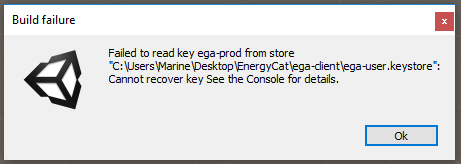
error-gradle.png (9.5 kB)
avatar image
3

Answer by Rajeesh_AR · Jan 11, 2018 at 12:35 PM

I also faced the same issue. But I was able to fix. The reason for the issue was that, I have not given the path for the 'keystore'.

click> Browse Keystore > choose the path

It worked.alt text
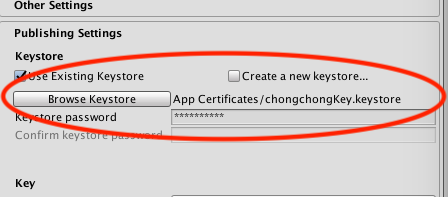

screen-shot-2018-01-11-at-60011-pm.png (28.8 kB)
Comment
Add comment · Show 1 · Share
10 |3000 characters needed characters left characters exceeded
▼
  • Viewable by all users
  • Viewable by moderators
  • Viewable by moderators and the original poster
  • Advanced visibility
Viewable by all users
avatar image JackKokah · Jul 07, 2018 at 12:19 AM 0
Share

this solved it for me, thanks.

avatar image
1

Answer by Joheil · Aug 13, 2017 at 01:41 PM

I got the same problem.

Comment
Add comment · Share
10 |3000 characters needed characters left characters exceeded
▼
  • Viewable by all users
  • Viewable by moderators
  • Viewable by moderators and the original poster
  • Advanced visibility
Viewable by all users
avatar image
-1

Answer by rajan4uto · Oct 18, 2017 at 08:55 AM

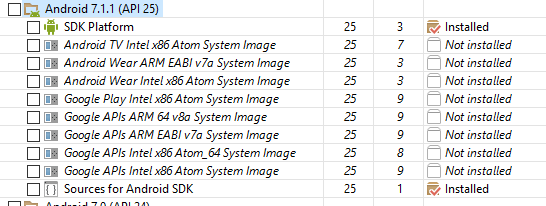
Just Update you android sdk.alt text


capture1.png (20.8 kB)
Comment
Add comment · Share
10 |3000 characters needed characters left characters exceeded
▼
  • Viewable by all users
  • Viewable by moderators
  • Viewable by moderators and the original poster
  • Advanced visibility
Viewable by all users
avatar image
0

Answer by coderalone · Aug 13, 2017 at 06:28 AM

Up, I got the same problem

Comment
Add comment · Share
10 |3000 characters needed characters left characters exceeded
▼
  • Viewable by all users
  • Viewable by moderators
  • Viewable by moderators and the original poster
  • Advanced visibility
Viewable by all users
  • 1
  • 2
  • 3
  • ›

Your answer

Hint: You can notify a user about this post by typing @username

Up to 2 attachments (including images) can be used with a maximum of 524.3 kB each and 1.0 MB total.

Follow this Question

Answers Answers and Comments

126 People are following this question.

avatar image avatar image avatar image avatar image avatar image avatar image avatar image avatar image avatar image avatar image avatar image avatar image avatar image avatar image avatar image avatar image avatar image avatar image avatar image avatar image avatar image avatar image avatar image avatar image avatar image avatar image avatar image avatar image avatar image avatar image avatar image avatar image avatar image avatar image avatar image avatar image avatar image avatar image avatar image avatar image avatar image avatar image avatar image avatar image avatar image avatar image avatar image avatar image avatar image avatar image avatar image avatar image avatar image avatar image avatar image avatar image avatar image avatar image avatar image avatar image avatar image avatar image avatar image avatar image avatar image avatar image avatar image avatar image avatar image avatar image avatar image avatar image avatar image avatar image avatar image avatar image avatar image avatar image avatar image avatar image avatar image avatar image avatar image avatar image avatar image avatar image avatar image avatar image avatar image avatar image avatar image avatar image avatar image avatar image avatar image avatar image avatar image avatar image avatar image avatar image avatar image avatar image avatar image avatar image avatar image avatar image avatar image avatar image avatar image avatar image avatar image avatar image avatar image avatar image avatar image avatar image avatar image avatar image avatar image avatar image avatar image avatar image avatar image avatar image avatar image avatar image

Related Questions

Signing android APK production? 1 Answer

Can't build on Android when signed 2 Answers

keystore to PEM file 3 Answers

Failed to sign APK, but gradle builds work? 1 Answer

How to use gradle's buildTypes, productFlavors, sourceSet and other features to batch build apks for different android channel in unity 0 Answers


Enterprise
Social Q&A

Social
Subscribe on YouTube social-youtube Follow on LinkedIn social-linkedin Follow on Twitter social-twitter Follow on Facebook social-facebook Follow on Instagram social-instagram

Footer

  • Purchase
    • Products
    • Subscription
    • Asset Store
    • Unity Gear
    • Resellers
  • Education
    • Students
    • Educators
    • Certification
    • Learn
    • Center of Excellence
  • Download
    • Unity
    • Beta Program
  • Unity Labs
    • Labs
    • Publications
  • Resources
    • Learn platform
    • Community
    • Documentation
    • Unity QA
    • FAQ
    • Services Status
    • Connect
  • About Unity
    • About Us
    • Blog
    • Events
    • Careers
    • Contact
    • Press
    • Partners
    • Affiliates
    • Security
Copyright © 2020 Unity Technologies
  • Legal
  • Privacy Policy
  • Cookies
  • Do Not Sell My Personal Information
  • Cookies Settings
"Unity", Unity logos, and other Unity trademarks are trademarks or registered trademarks of Unity Technologies or its affiliates in the U.S. and elsewhere (more info here). Other names or brands are trademarks of their respective owners.
  • Anonymous
  • Sign in
  • Create
  • Ask a question
  • Spaces
  • Default
  • Help Room
  • META
  • Moderators
  • Explore
  • Topics
  • Questions
  • Users
  • Badges