Wayback Machinekoobas.hobune.stream
May JUN Jul
Previous capture 12 Next capture
2021 2022 2023
1 capture
12 Jun 22 - 12 Jun 22
sparklines
Close Help
  • Products
  • Solutions
  • Made with Unity
  • Learning
  • Support & Services
  • Community
  • Asset Store
  • Get Unity

UNITY ACCOUNT

You need a Unity Account to shop in the Online and Asset Stores, participate in the Unity Community and manage your license portfolio. Login Create account
  • Blog
  • Forums
  • Answers
  • Evangelists
  • User Groups
  • Beta Program
  • Advisory Panel

Navigation

  • Home
  • Products
  • Solutions
  • Made with Unity
  • Learning
  • Support & Services
  • Community
    • Blog
    • Forums
    • Answers
    • Evangelists
    • User Groups
    • Beta Program
    • Advisory Panel

Unity account

You need a Unity Account to shop in the Online and Asset Stores, participate in the Unity Community and manage your license portfolio. Login Create account

Language

  • Chinese
  • Spanish
  • Japanese
  • Korean
  • Portuguese
  • Ask a question
  • Spaces
    • Default
    • Help Room
    • META
    • Moderators
    • Topics
    • Questions
    • Users
    • Badges
  • Home /
avatar image
0
Question by wesleywh · Aug 10, 2017 at 11:03 PM · bugcontrollerlaunching

Player Launched Into Air Problem

I'm getting some weird behavior that I hope someone might be able to pinpoint. When I use the community "HeadLookController" found here:

http://wiki.unity3d.com/index.php?title=HeadLookController

I have modified it to include a few new lines:

 public bool lockToPlayer = true;
     public Transform currentTarget = null;
 ...
 ...
 
 void Update() {
         if (lockToPlayer == true && GameObject.FindGameObjectWithTag ("PlayerCamera") != null) {
             currentTarget = GameObject.FindGameObjectWithTag ("PlayerCamera").transform;
         } 
         if (currentTarget != null)
             target = currentTarget.position;
     }
 void LateUpdate () {
         if (currentTarget == null)
             return;
 ...
 ...
 ...

I get the problem that when my npc looks at the player they're launched into the sky:
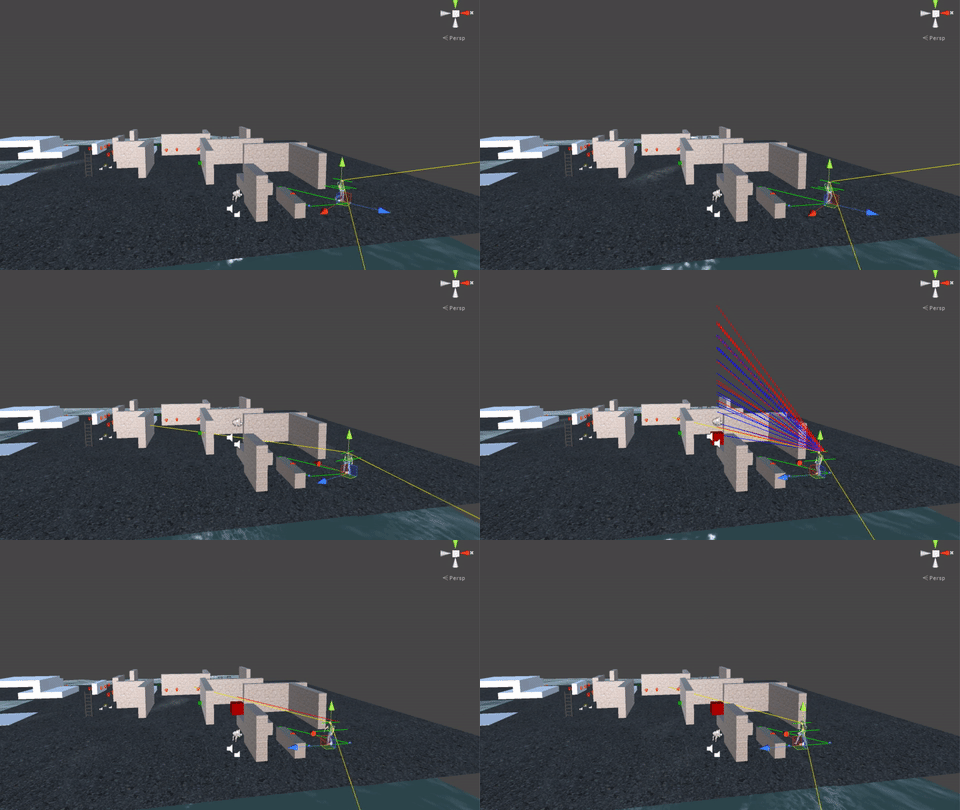
alt text

However, when I disable the "HeadLookController" I don't get this problem.

alt text

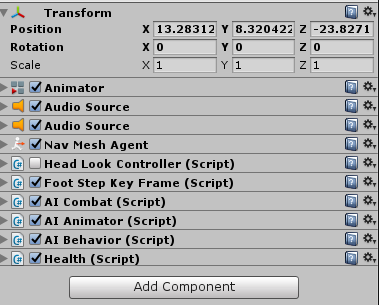
Here is what I have on my NPC:

alt text

Here is the root level that I have on my Player:
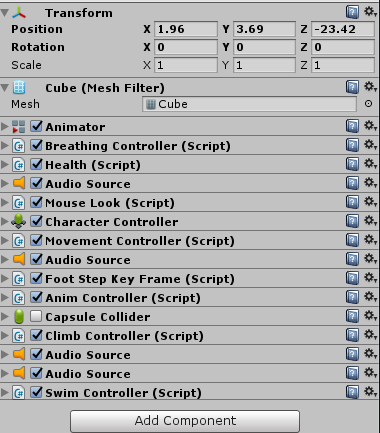
alt text

Both NPC and player have ragdoll applied but currently all the rigidbodies are marked as Kinematic in an effort to "disable" it until the player/npc has reached a death state.

Has anyone ever had this problem before?

npc.png (17.3 kB)
player.png (29.6 kB)
Comment
Add comment · Show 3
10 |3000 characters needed characters left characters exceeded
▼
  • Viewable by all users
  • Viewable by moderators
  • Viewable by moderators and the original poster
  • Advanced visibility
Viewable by all users
avatar image AlanMattano · Aug 11, 2017 at 02:38 PM 0
Share

Did you try to move the scripts into "FixedUpdate"? Are the colliders in a collision situation?

avatar image wesleywh · Aug 11, 2017 at 10:30 PM 0
Share

@Alan$$anonymous$$attano I actually haven't tried that. I will try that and see how it goes, thanks for the suggestion. As far as colliders go it's possible... I have tried to disable the multiple colliders on the same level but maybe the ragdoll colliders are causing issues.

avatar image wesleywh · Aug 12, 2017 at 05:58 PM 0
Share

@Alan$$anonymous$$attano Thanks so much for the suggestions. I moved that piece of code to the "FixedUpdate" while that didn't fix my launching problem I think you're right to tell me to move that their anyway. It will be more efficient anyway. As I was testing the colliders I noticed that the collider for his head was massive. This was the problem. A collider within a collider situation un-knowingly. So I changed it to a normal size and I don't randomly launch into the air anymore. However, I do get a slight jump when I get too close and the NPC plays the crouch animation. It's probably because his head enters the player collider causing him to jump.

Is there a way to prevent the player from getting too close to the NPC that you might be able to suggest?

Btw you should change your comment into an answer so I can accept your suggestion and close this question. Thanks for you help! :D

2 Replies

· Add your reply
  • Sort: 
avatar image
0
Best Answer

Answer by AlanMattano · Aug 13, 2017 at 12:29 AM

Like @wesleywh said, when you spawn a physics game object with RigidBody attach to it and is reacting in a strange behaviour, try to look if the colliders are touching some other collider. If it does, this can trigger big forces on the less heavy physic object. Especially if the mass difference is too big. Also, remember to use FixedUpdate when you deal with physics.

Comment
Add comment · Share
10 |3000 characters needed characters left characters exceeded
▼
  • Viewable by all users
  • Viewable by moderators
  • Viewable by moderators and the original poster
  • Advanced visibility
Viewable by all users
avatar image
0

Answer by baberwal-aman · Nov 29, 2018 at 03:40 PM

i tried a hack...calmped their height..

Comment
Add comment · Share
10 |3000 characters needed characters left characters exceeded
▼
  • Viewable by all users
  • Viewable by moderators
  • Viewable by moderators and the original poster
  • Advanced visibility
Viewable by all users

Your answer

Hint: You can notify a user about this post by typing @username

Up to 2 attachments (including images) can be used with a maximum of 524.3 kB each and 1.0 MB total.

Follow this Question

Answers Answers and Comments

76 People are following this question.

avatar image avatar image avatar image avatar image avatar image avatar image avatar image avatar image avatar image avatar image avatar image avatar image avatar image avatar image avatar image avatar image avatar image avatar image avatar image avatar image avatar image avatar image avatar image avatar image avatar image avatar image avatar image avatar image avatar image avatar image avatar image avatar image avatar image avatar image avatar image avatar image avatar image avatar image avatar image avatar image avatar image avatar image avatar image avatar image avatar image avatar image avatar image avatar image avatar image avatar image avatar image avatar image avatar image avatar image avatar image avatar image avatar image avatar image avatar image avatar image avatar image avatar image avatar image avatar image avatar image avatar image avatar image avatar image avatar image avatar image avatar image avatar image avatar image avatar image avatar image avatar image

Related Questions

Multiple Controller Issue (They only work if both controllers are inputting something) 1 Answer

First Person controller turned into a rocket ship 2 Answers

Why does the .controller file get modified when opening Unity? 3 Answers

Permanent unintentional Input on Axis 1 Answer

Child object consistency issue 1 Answer


Enterprise
Social Q&A

Social
Subscribe on YouTube social-youtube Follow on LinkedIn social-linkedin Follow on Twitter social-twitter Follow on Facebook social-facebook Follow on Instagram social-instagram

Footer

  • Purchase
    • Products
    • Subscription
    • Asset Store
    • Unity Gear
    • Resellers
  • Education
    • Students
    • Educators
    • Certification
    • Learn
    • Center of Excellence
  • Download
    • Unity
    • Beta Program
  • Unity Labs
    • Labs
    • Publications
  • Resources
    • Learn platform
    • Community
    • Documentation
    • Unity QA
    • FAQ
    • Services Status
    • Connect
  • About Unity
    • About Us
    • Blog
    • Events
    • Careers
    • Contact
    • Press
    • Partners
    • Affiliates
    • Security
Copyright © 2020 Unity Technologies
  • Legal
  • Privacy Policy
  • Cookies
  • Do Not Sell My Personal Information
  • Cookies Settings
"Unity", Unity logos, and other Unity trademarks are trademarks or registered trademarks of Unity Technologies or its affiliates in the U.S. and elsewhere (more info here). Other names or brands are trademarks of their respective owners.
  • Anonymous
  • Sign in
  • Create
  • Ask a question
  • Spaces
  • Default
  • Help Room
  • META
  • Moderators
  • Explore
  • Topics
  • Questions
  • Users
  • Badges