
Wayback Machinekoobas.hobune.stream
May JUN Jul
Previous capture 13 Next capture
2021 2022 2023
1 capture
13 Jun 22 - 13 Jun 22
sparklines
Close Help
  • Products
  • Solutions
  • Made with Unity
  • Learning
  • Support & Services
  • Community
  • Asset Store
  • Get Unity

UNITY ACCOUNT

You need a Unity Account to shop in the Online and Asset Stores, participate in the Unity Community and manage your license portfolio. Login Create account
  • Blog
  • Forums
  • Answers
  • Evangelists
  • User Groups
  • Beta Program
  • Advisory Panel

Navigation

  • Home
  • Products
  • Solutions
  • Made with Unity
  • Learning
  • Support & Services
  • Community
    • Blog
    • Forums
    • Answers
    • Evangelists
    • User Groups
    • Beta Program
    • Advisory Panel

Unity account

You need a Unity Account to shop in the Online and Asset Stores, participate in the Unity Community and manage your license portfolio. Login Create account

Language

  • Chinese
  • Spanish
  • Japanese
  • Korean
  • Portuguese
  • Ask a question
  • Spaces
    • Default
    • Help Room
    • META
    • Moderators
    • Topics
    • Questions
    • Users
    • Badges
  • Home /
avatar image
0
Question by Stash329 · Aug 10, 2021 at 09:21 PM · texturerenderingblackspot

Black spots appearing on asset / texture
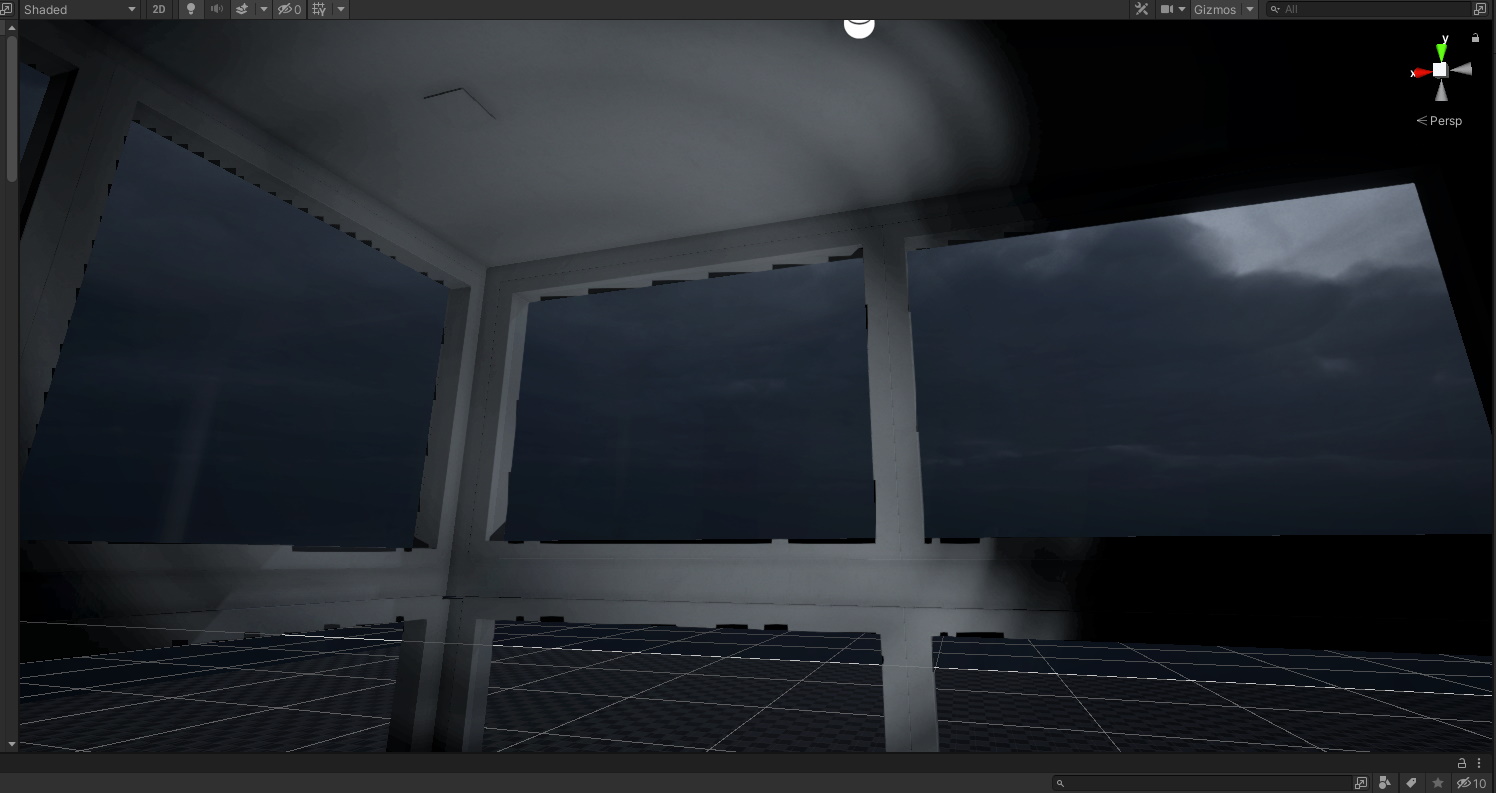
alt text

Hello all,

I am having an issue with black spots (as per photo). Currently, when you walk up to these windows at a certain angle and distance, all of these random black spots begin appearing around the windows.

I have disabled all lightmaps, toggled all sorts of potential light sources that may cause this issue, disabled shadows, but still no avail.

Does anybody happen to have any idea what may be causing this? These assets were imported via Blender (if that helps troubleshoot).

Currently using Unity 2021.1.16f1

Cheers,

Stan. T

blackspot-issues.jpg (184.9 kB)
Comment
Add comment · Show 3
10 |3000 characters needed characters left characters exceeded
▼
  • Viewable by all users
  • Viewable by moderators
  • Viewable by moderators and the original poster
  • Advanced visibility
Viewable by all users
avatar image Eno-Khaon · Aug 11, 2021 at 04:12 AM 0
Share

At a glance, those look primarily like self-shadowing artifacts.

Another thing to consider looking at, though, is what happens if you change texture import settings (at least for normal map) to turn off texture compression.

avatar image Stash329 Eno-Khaon · Aug 11, 2021 at 04:14 PM 0
Share

No luck. I disabled all texture compression, and even tried removing all textures to see if that may have been a potential cause. No dice.

This is very strange, I've never seen this before. I also tried downgrading to an earlier version of Unity, with no avail.

I am quite lost, haha

avatar image Stash329 Stash329 · Aug 11, 2021 at 04:23 PM 0
Share

Okay, I think I found a solution. I will write it as an answer.

1 Reply

· Add your reply
  • Sort: 
avatar image
0
Best Answer

Answer by Stash329 · Aug 11, 2021 at 04:25 PM

After spending a bit of time with the trial and error process, I narrowed the potential cause to the character's camera. My clipping planes (Near and Far) were 0.01 and 100, respectively. After slightly increasing the NEAR clipping plane to 0.1, the problem was fixed.

All worked out well! :)

cheers,

Stan. T

Comment
Add comment · Show 1 · Share
10 |3000 characters needed characters left characters exceeded
▼
  • Viewable by all users
  • Viewable by moderators
  • Viewable by moderators and the original poster
  • Advanced visibility
Viewable by all users
avatar image Eno-Khaon · Aug 11, 2021 at 06:16 PM 0
Share

For reference, changing from 0.01 to 0.1 $$anonymous$$imum clipping plane is actually a significant change, and not a slight one at all. Making that change removes a whole factor-of-10 from the frustum calculations, leaving a lot more room for processing objects being rendered.

To quote an excerpt from Unity's Camera class:

The clipping planes also deter$$anonymous$$e how depth buffer precision is distributed over the scene. In general, to get better precision you should move the Near plane as far as possible.


Although it's just a brief, generic overview, there's still some useful information there as a starting point.

Your answer

Hint: You can notify a user about this post by typing @username

Up to 2 attachments (including images) can be used with a maximum of 524.3 kB each and 1.0 MB total.

Follow this Question

Answers Answers and Comments

170 People are following this question.

avatar image avatar image avatar image avatar image avatar image avatar image avatar image avatar image avatar image avatar image avatar image avatar image avatar image avatar image avatar image avatar image avatar image avatar image avatar image avatar image avatar image avatar image avatar image avatar image avatar image avatar image avatar image avatar image avatar image avatar image avatar image avatar image avatar image avatar image avatar image avatar image avatar image avatar image avatar image avatar image avatar image avatar image avatar image avatar image avatar image avatar image avatar image avatar image avatar image avatar image avatar image avatar image avatar image avatar image avatar image avatar image avatar image avatar image avatar image avatar image avatar image avatar image avatar image avatar image avatar image avatar image avatar image avatar image avatar image avatar image avatar image avatar image avatar image avatar image avatar image avatar image avatar image avatar image avatar image avatar image avatar image avatar image avatar image avatar image avatar image avatar image avatar image avatar image avatar image avatar image avatar image avatar image avatar image avatar image avatar image avatar image avatar image avatar image avatar image avatar image avatar image avatar image avatar image avatar image avatar image avatar image avatar image avatar image avatar image avatar image avatar image avatar image avatar image avatar image avatar image avatar image avatar image avatar image avatar image avatar image avatar image avatar image avatar image avatar image avatar image avatar image avatar image avatar image avatar image avatar image avatar image avatar image avatar image avatar image avatar image avatar image avatar image avatar image avatar image avatar image avatar image avatar image avatar image avatar image avatar image avatar image avatar image avatar image avatar image avatar image avatar image avatar image avatar image avatar image avatar image avatar image avatar image avatar image avatar image avatar image avatar image avatar image avatar image avatar image avatar image avatar image avatar image avatar image avatar image avatar image

Related Questions

Black spots on textures 0 Answers

Can HDRP feature be activated only in specific scene? HDRP Raytracing Error 0 Answers

Black Polygons disrupting Geometry 0 Answers

Unity Movie Texture Audio Black Screen 1 Answer

textrendering.cleanup have so much draw calls 0 Answers


Enterprise
Social Q&A

Social
Subscribe on YouTube social-youtube Follow on LinkedIn social-linkedin Follow on Twitter social-twitter Follow on Facebook social-facebook Follow on Instagram social-instagram

Footer

  • Purchase
    • Products
    • Subscription
    • Asset Store
    • Unity Gear
    • Resellers
  • Education
    • Students
    • Educators
    • Certification
    • Learn
    • Center of Excellence
  • Download
    • Unity
    • Beta Program
  • Unity Labs
    • Labs
    • Publications
  • Resources
    • Learn platform
    • Community
    • Documentation
    • Unity QA
    • FAQ
    • Services Status
    • Connect
  • About Unity
    • About Us
    • Blog
    • Events
    • Careers
    • Contact
    • Press
    • Partners
    • Affiliates
    • Security
Copyright © 2020 Unity Technologies
  • Legal
  • Privacy Policy
  • Cookies
  • Do Not Sell My Personal Information
  • Cookies Settings
"Unity", Unity logos, and other Unity trademarks are trademarks or registered trademarks of Unity Technologies or its affiliates in the U.S. and elsewhere (more info here). Other names or brands are trademarks of their respective owners.
  • Anonymous
  • Sign in
  • Create
  • Ask a question
  • Spaces
  • Default
  • Help Room
  • META
  • Moderators
  • Explore
  • Topics
  • Questions
  • Users
  • Badges
