
Wayback Machinekoobas.hobune.stream
May JUN Jul
Previous capture 12 Next capture
2021 2022 2023
1 capture
12 Jun 22 - 12 Jun 22
sparklines
Close Help
  • Products
  • Solutions
  • Made with Unity
  • Learning
  • Support & Services
  • Community
  • Asset Store
  • Get Unity

UNITY ACCOUNT

You need a Unity Account to shop in the Online and Asset Stores, participate in the Unity Community and manage your license portfolio. Login Create account
  • Blog
  • Forums
  • Answers
  • Evangelists
  • User Groups
  • Beta Program
  • Advisory Panel

Navigation

  • Home
  • Products
  • Solutions
  • Made with Unity
  • Learning
  • Support & Services
  • Community
    • Blog
    • Forums
    • Answers
    • Evangelists
    • User Groups
    • Beta Program
    • Advisory Panel

Unity account

You need a Unity Account to shop in the Online and Asset Stores, participate in the Unity Community and manage your license portfolio. Login Create account

Language

  • Chinese
  • Spanish
  • Japanese
  • Korean
  • Portuguese
  • Ask a question
  • Spaces
    • Default
    • Help Room
    • META
    • Moderators
    • Topics
    • Questions
    • Users
    • Badges
  • Home /
avatar image
0
Question by Dick_Jones · Apr 02, 2016 at 04:51 AM · first person controllerfirst person shooterstretching

Gun stretches and moves around to much in FPS

Hello, Im having trouble with my FPS. I have attahced my gun the the camera which is attached to the Controller. However, when this is done, the gun doesn't move at the same speed as the camera, it goes off and stretches when I look up or down. Ive written my own player movement code. Any ideas? Please be detailed, i am new to this and there are no answers when this question has been asked before. Here are two examples
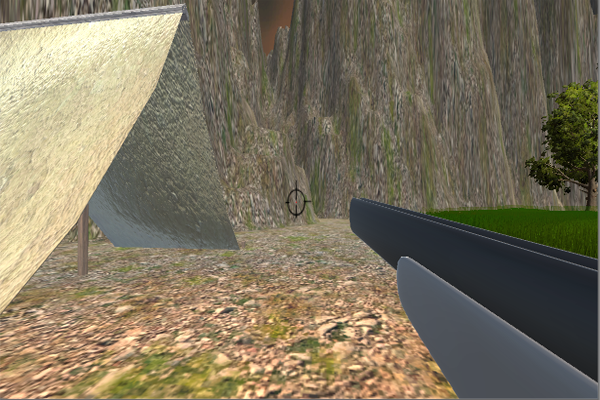
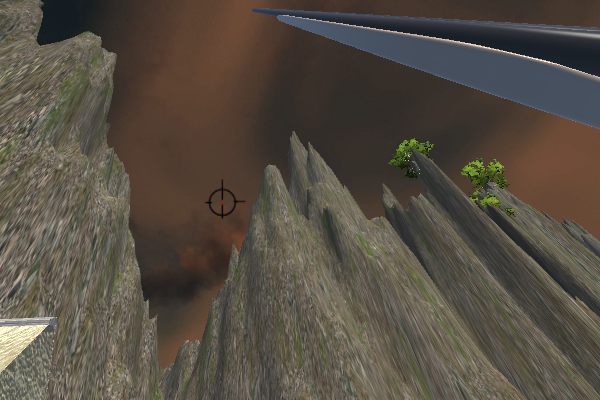
alt text alt text

Here is my own player movement code attached to the Player controller. I have not used any drag and drop movements or scripts for this.

 //VARIABLES FOR SOUND
 public AudioClip jump;
 public AudioClip collision;
 public AudioSource playerSpeaker;


 //VARIABLES AND JUNK!
 private float mouseSpeed = 5.0f;
 private float verticalRot = 0;
 private float upAndDown = 60.0f;
 private float haulAssSpeed = 10.0f;
 private float verticalSpeed = 0f;
 private float earthGravy = 5.0f;
 private float initialJumpVelocity = 20.0f;

 //BOOLS 
 private bool jumping = true;
 static bool gameOn = true;


 // Use this for initialization
 void Start () {
 
 }
 
 // Update is called once per frame
 void Update ()
 {
     if (gameOn == true)
     {
         CharacterController player1 = GetComponent<CharacterController>();

         //look left and right 
         float rotationLR = Input.GetAxis("Mouse X") * mouseSpeed;
         transform.Rotate(0, rotationLR, 0);


         //Look  up and down 
         verticalRot -= Input.GetAxis("Mouse Y") * mouseSpeed;
         float desiredUpDown = verticalRot;

         //stop from spining around by looking up and down
         desiredUpDown = Mathf.Clamp(desiredUpDown, -upAndDown, upAndDown);
         Camera.main.transform.localRotation = Quaternion.Euler(desiredUpDown, 0, 0);

         //Forward and side movements
         float fwdSpeed = Input.GetAxis("Vertical") * haulAssSpeed;
         float sideSpeed = Input.GetAxis("Horizontal") * haulAssSpeed;

         //Earths Gravy
         verticalSpeed += Physics.gravity.y * Time.deltaTime * earthGravy;

         //jumping

         if (Input.GetButtonDown("Jump") && player1.isGrounded)

         {
             verticalSpeed = initialJumpVelocity;
         }

         //Create a vector, each of the three speeds, move our character by that vector!
         Vector3 speed = new Vector3(sideSpeed, verticalSpeed, fwdSpeed);
         speed = transform.rotation * speed;

         //avoid glicthy play
         player1.Move(speed * Time.deltaTime);

     }
 
 }
 public static void playGameNow()
 {
     gameOn = true;
 }

 public static void stopGameNow()
 {
     gameOn = false;
 }

}

If you have done this correctly, what did you do? is it settings with controller or the camera? Any help greatly appreciated.

Thanks Again!

problempic1.png (461.9 kB)
problempic2.png (378.8 kB)
Comment
Add comment · Show 1
10 |3000 characters needed characters left characters exceeded
▼
  • Viewable by all users
  • Viewable by moderators
  • Viewable by moderators and the original poster
  • Advanced visibility
Viewable by all users
avatar image Mihaaa_123_123 · Apr 05, 2016 at 05:40 AM 0
Share

Hey, i have the same problem! I just cant find the solution. I followed qill18creates tutorials on youtube and everything is working fine, just the gun is acting wierd.

3 Replies

· Add your reply
  • Sort: 
avatar image
1

Answer by Mihaaa_123_123 · Apr 08, 2016 at 07:18 PM

I found the solution! It's very simple actually.

Use your object with player controller component and your script as the main parent. Create an empty object and attach your camera to it. (player2 is my empty object and the camera is attached to it)

And now put your player2 under your player. alt text


screenshot-2016-04-08-205403.png (14.7 kB)
Comment
Add comment · Share
10 |3000 characters needed characters left characters exceeded
▼
  • Viewable by all users
  • Viewable by moderators
  • Viewable by moderators and the original poster
  • Advanced visibility
Viewable by all users
avatar image
1

Answer by darkgamerxt · Sep 09, 2019 at 11:40 AM

had same issue,im new my self, what i did i created capsule and removed everything from it except for character controller, i put my playermove script in the capsule, i made the capsule parent for both the playercamera and the playerbody , i had my mouse look script in camera, so that way when the capsule moves the player body fellow, and when the camera rotate it rotate based on a capsule which removes the glitch of gun stretching, should work

Comment
Add comment · Show 1 · Share
10 |3000 characters needed characters left characters exceeded
▼
  • Viewable by all users
  • Viewable by moderators
  • Viewable by moderators and the original poster
  • Advanced visibility
Viewable by all users
avatar image
0

Answer by MikeDockery · Aug 08, 2018 at 10:31 AM

I had this problem and i dropped a new 1st person controller into the scene, copy over all the setting and scripts from the old one and it worked. Not sure why it was happening but like all these situations you either spend days figuring it out or get it solved and move on with game creation.

Comment
Add comment · Share
10 |3000 characters needed characters left characters exceeded
▼
  • Viewable by all users
  • Viewable by moderators
  • Viewable by moderators and the original poster
  • Advanced visibility
Viewable by all users

Your answer

Hint: You can notify a user about this post by typing @username

Up to 2 attachments (including images) can be used with a maximum of 524.3 kB each and 1.0 MB total.

Follow this Question

Answers Answers and Comments

7 People are following this question.

avatar image avatar image avatar image avatar image avatar image avatar image avatar image

Related Questions

Custom First Person Character Skin Problem 1 Answer

Im new at unity and im trying to make a first person game. I already have a mouse movement script for the camera but i dont know what to do for the walking script. 1 Answer

Choppy first person aiming when holding mouse input 0 Answers

Creating box that streches from point to mouse 1 Answer

Unnatural Texture Stretching 1 Answer


Enterprise
Social Q&A

Social
Subscribe on YouTube social-youtube Follow on LinkedIn social-linkedin Follow on Twitter social-twitter Follow on Facebook social-facebook Follow on Instagram social-instagram

Footer

  • Purchase
    • Products
    • Subscription
    • Asset Store
    • Unity Gear
    • Resellers
  • Education
    • Students
    • Educators
    • Certification
    • Learn
    • Center of Excellence
  • Download
    • Unity
    • Beta Program
  • Unity Labs
    • Labs
    • Publications
  • Resources
    • Learn platform
    • Community
    • Documentation
    • Unity QA
    • FAQ
    • Services Status
    • Connect
  • About Unity
    • About Us
    • Blog
    • Events
    • Careers
    • Contact
    • Press
    • Partners
    • Affiliates
    • Security
Copyright © 2020 Unity Technologies
  • Legal
  • Privacy Policy
  • Cookies
  • Do Not Sell My Personal Information
  • Cookies Settings
"Unity", Unity logos, and other Unity trademarks are trademarks or registered trademarks of Unity Technologies or its affiliates in the U.S. and elsewhere (more info here). Other names or brands are trademarks of their respective owners.
  • Anonymous
  • Sign in
  • Create
  • Ask a question
  • Spaces
  • Default
  • Help Room
  • META
  • Moderators
  • Explore
  • Topics
  • Questions
  • Users
  • Badges
