koobas.hobune.stream


Not able to get RaycastHit2D work properly
In my game, I am drawing a line and to limit the length of line, if it hits any collider, I am using raycasthit2d. But it doesn't work always.
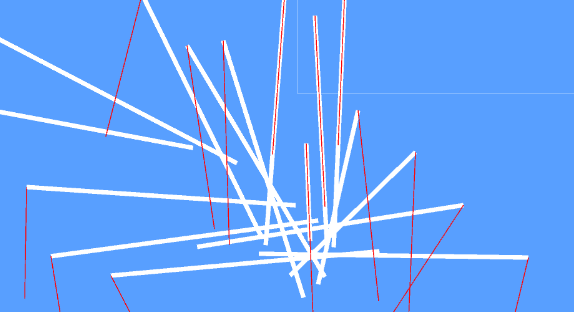
I used Debug.DrawRay to view how it works and it doesn't work as I expect it to. Below is my code
 RaycastHit2D hit = Physics2D.Raycast(startPoint, endPoint,distance, layerMask :1 << 8);
 Debug.DrawRay(startPoint,endPoint,Color.red,40f);
 Debug.Log("startPoint" + startPoint + " endPoint:" + endPoint+" distance:"+distance);
 if (hit.collider != null/* && hit.collider.CompareTag(GameConstants.TAG_OF_RESTRICT_LINES_OVER_PLAYER)*/)
 {
     Debug.Log(hit.collider.gameObject.name);
     endPoint = hit.point;
     Debug.Log(" :hit:" + hit.point);
 }
 Vector3[] array = new Vector3[] { startPoint, endPoint };
 lr.SetPositions(array);
Console output
startPoint(-4.9, -2.7, 1.0) endPoint:(1.1, -3.7, 1.0) distance:6
I have attached a screenshot for the same.
I am using startPoint and endPoint to draw line as well as giving raycast as respective startpoint and direction.
It would be a great help if someone can point out my mistake or an alternate way to achieve this.
My goal is to draw raycast line exactly as the line drawn by lineRenderer.

The problem is probably in the first line: RaycastHit2D hit = Physics2D.Raycast(startPoint, endPoint,distance, layerMask :1 << 8);
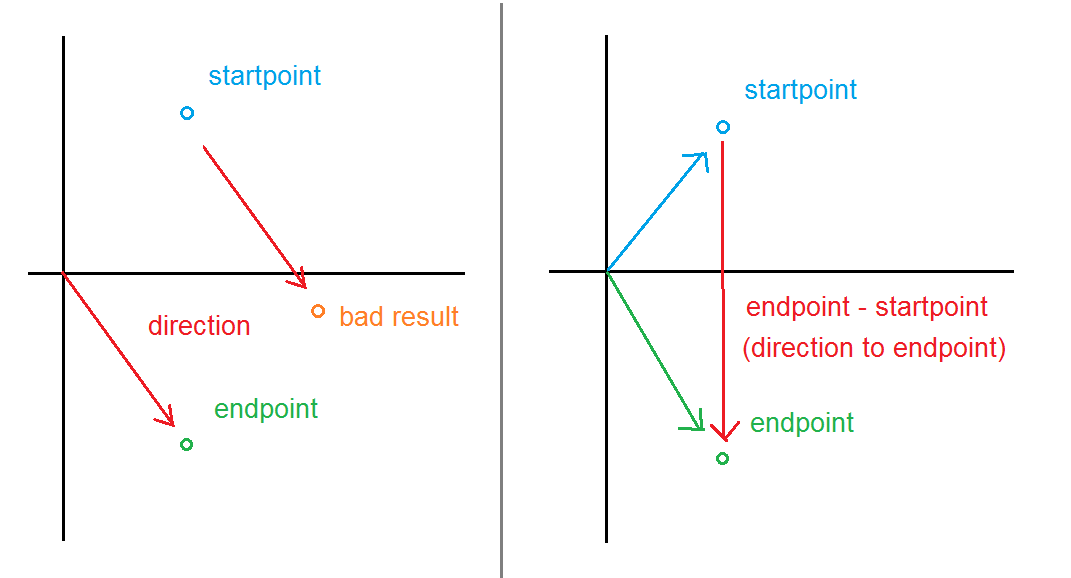
When raycasting, the second variable (in this case, you are using endPoint) must always be the direction you want the ray to go. Looks like this is not a direction, it is the final point. To get a direction, use [endpoint - startpoint].
Here's a picture of how I understand it.