 koobas.hobune.stream


How to calculate corners of near clip rect from Projection Matrix?
[Edit: The errors in my assumptions were: 1. confusion between NDC and clip space; And, 2. assuming that clip space goes from [-1,-1,0] ro [+1,+1,+1]. It goes from [-1,-1,-1] to [+1,+1,+1]. Therefore, the coordinates of the bottom-left of near clip rect in clip space are (-1,-1,-1), and so on...]
Given a projection matrix (with no assumptions about what kind of projection matrix it is, could be oblique/off-center, etc), I attempted to get the frustum corners as InverseProjectionMatrix * {corners in NDC space}, however the results seem to be incorrect. Here is the code I used:
 /// This is what I need to work
 void GetFrustumCornersFromCameraMatrix()
 {
     // The frustum rect at near clip plane is the inverse projection of a rectangle
     // with bounds [-1,-1,0] to [+1,+1,0] in normalized device coordinates.
     Camera cam = this.GetComponent<Camera>();

     var invMat = cam.nonJitteredProjectionMatrix.inverse;
     var bottomLeft = invMat * new Vector4(-1, -1, 0, 1);
     var topRight = invMat * new Vector4(1, 1, 0, 1);
     bottomLeft /= bottomLeft.w;
     topRight /= topRight.w;

     this.left = bottomLeft.x;
     this.right = topRight.x;
     this.bottom = bottomLeft.y;
     this.top = topRight.y;
 }

 /// For comparison purposes only - this works perfectly
 void GetFrustomCornersFromCameraSettings()
 {
     Camera cam = this.GetComponent<Camera>();

     float frustumHeight =
         2.0f * cam.nearClipPlane
              * Mathf.Tan(cam.fieldOfView * 0.5f * Mathf.Deg2Rad);

     var frustumWidth = frustumHeight * cam.aspect;

     this.left = -frustumWidth * 0.5f;
     this.right = frustumWidth * 0.5f;
     this.bottom = -frustumHeight * 0.5f;
     this.top = frustumHeight * 0.5f;
 }

 private void OnDrawGizmos()
 {
     var matbk = Gizmos.matrix;
     Camera cam = this.GetComponent<Camera>();

     float radius = 0.02f;
     Gizmos.matrix = this.transform.localToWorldMatrix;
     Gizmos.DrawSphere(new Vector3(left, top, cam.nearClipPlane), radius);
     Gizmos.DrawSphere(new Vector3(left, bottom, cam.nearClipPlane), radius);
     Gizmos.DrawSphere(new Vector3(right, top, cam.nearClipPlane), radius);
     Gizmos.DrawSphere(new Vector3(right, bottom, cam.nearClipPlane), radius);

     Gizmos.matrix = matbk;
 }
As you can see from the Gizmos, the returned coordinates are larger than what should be. (E.g., left should be -0.04430015, but I'm getting back -0.08857372, appears almost double but is not double) 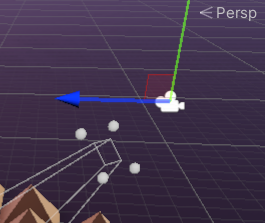 What am I doing wrong? Thanks in advance.

what is bottomLeft after the matrix multiply ? say just the X and W components.
an article out there suggested that going from NDC to regular might be (X + W) / (2 * W), which if W is small could account for a nearly-double factor.

This is bottomleft after matrix multiply: (-0.147667155, -0.147667155, -1, 1.66716659). That thread looks interesting, I think I may have misworded my question: I'm dealing with "clip space -> view space" rather than "NDC -> view space"
So looks like the clip space transformation in Unity maps to [-0.5, -0.5, 0] to [+0.5, +0.5, 1] instead of 1- to +1 in xy. It appears to be working after that change.

Uhm, the projection matrix brings you from camera space to clip space, not NDC. The clipspace should go from -1 to 1 on all axis. You picked 0 as z coordinate which would be in the "center" of the frustum. Since the scaling is 1/x that center isn't that far away from the near clipping plane, though, it's not the near clipping plane. When you draw you spheres you replace z with the near clipping plane distance. So you "project" the positions onto the near clipping plane. At least I guess that's what's happening here. So try:
 var bottomLeft = invMat * new Vector4(-1, -1, -1, 1);
 var topRight = invMat * new Vector4(1, 1, -1, 1);
instead.
Hmm, interesting. I read that clip space depth goes from 0 - 1 in Direct3D and -1 to +1 in OpenGL. Does Unity abstract that away and always ensure the projection matrix is built to transform to [-1, 1]? Thanks for the insight, will try this
Yes, Unity uses the OpenGL standard for the projection matrix. That's why there is GL.GetGPUProjectionMatrix. Though this is an internal detail you usually should not care about.
@Bunny83 yes, that was it! Would you $$anonymous$$d posting as an answer so I can mark it?

As I said in the comment above, the clipspace is a cube centered on the origin. So the z value also goes from -1 to 1. I just verified this with this script:
 public Camera cam;
 public Vector3[] points;
 private Vector4[] projectedPoints;

 private void OnDrawGizmos()
 {
     if (projectedPoints == null || projectedPoints.Length != points.Length)
         projectedPoints = new Vector4[points.Length];

     var invProj = cam.nonJitteredProjectionMatrix.inverse;
     for(int i = 0; i < points.Length; i++)
     {
         Vector4 p = points[i];
         p.w = 1;
         projectedPoints[i] = invProj * p;
         projectedPoints[i] /= projectedPoints[i].w;

         // z is usually inverted since OpenGL works with a righthanded system.
         // So just invert the z coordinate
         projectedPoints[i].z = -projectedPoints[i].z;
     }


     float radius = 0.02f;
     var mat = cam.transform.localToWorldMatrix;
     foreach (var p in projectedPoints)
     {
         Gizmos.DrawSphere(mat.MultiplyPoint(p), radius);
     }
 }
Here you can add as many clipspace points you like in the inspector. Here you can also modify the z value. So the input coordinates should all be between -1 and 1. A value of -1 for z would be the near clipping plane, a value of 1 the far clipping plane.
Values smaller than -1 get asymptotically closer to the camera position, while values larger than 1 would grow towards infinity.
As you might notice, I used the actual z value (which I had to invert since Unity uses a left handed system). Now the projected points are displayed at the correct "depth"



