
Wayback Machinekoobas.hobune.stream
May JUN Jul
Previous capture 13 Next capture
2021 2022 2023
1 capture
13 Jun 22 - 13 Jun 22
sparklines
Close Help
  • Products
  • Solutions
  • Made with Unity
  • Learning
  • Support & Services
  • Community
  • Asset Store
  • Get Unity

UNITY ACCOUNT

You need a Unity Account to shop in the Online and Asset Stores, participate in the Unity Community and manage your license portfolio. Login Create account
  • Blog
  • Forums
  • Answers
  • Evangelists
  • User Groups
  • Beta Program
  • Advisory Panel

Navigation

  • Home
  • Products
  • Solutions
  • Made with Unity
  • Learning
  • Support & Services
  • Community
    • Blog
    • Forums
    • Answers
    • Evangelists
    • User Groups
    • Beta Program
    • Advisory Panel

Unity account

You need a Unity Account to shop in the Online and Asset Stores, participate in the Unity Community and manage your license portfolio. Login Create account

Language

  • Chinese
  • Spanish
  • Japanese
  • Korean
  • Portuguese
  • Ask a question
  • Spaces
    • Default
    • Help Room
    • META
    • Moderators
    • Topics
    • Questions
    • Users
    • Badges
  • Home /
avatar image
3
Question by Mad_Fox · Oct 04, 2013 at 01:29 PM · meshfoot

Making Foot Dust with meshes like Mario 3D World

Hi, im making a 2.5D platformer (with poor coding knowledge), i really like those dust meshes from this game. alt text
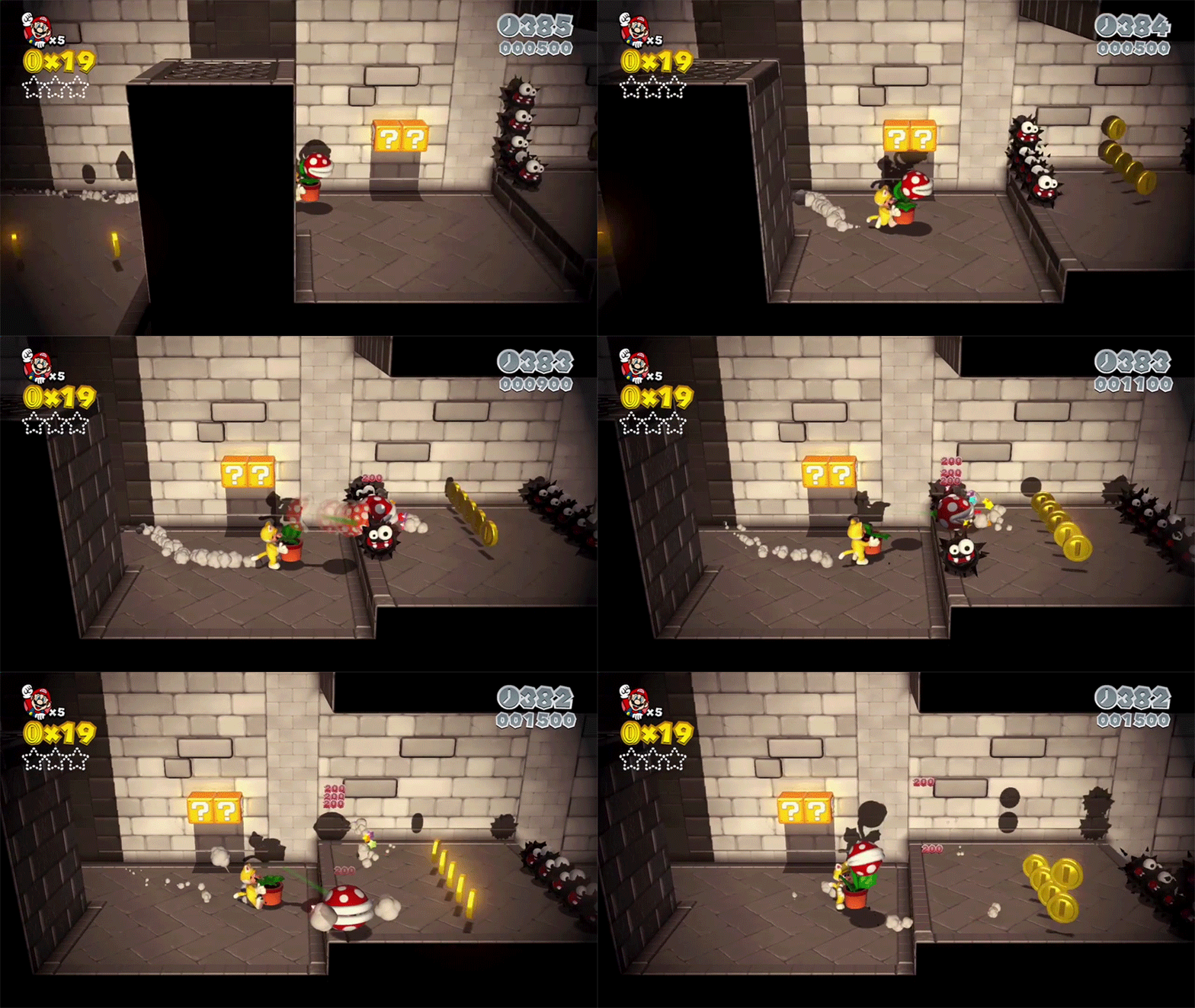
I've made an animated cloud mesh that goes from a tiny smoke and scale to a dust mesh, and then it slowly scale to almost 0. I would like to know how to instance/create those meshes when my character only run, meshes need to create and "die" in a place and not follow my character, I dont know if i need a particle system or just a script would made it. Thanks in advance!

Comment
Add comment · Show 3
10 |3000 characters needed characters left characters exceeded
▼
  • Viewable by all users
  • Viewable by moderators
  • Viewable by moderators and the original poster
  • Advanced visibility
Viewable by all users
avatar image Mad_Fox · Oct 04, 2013 at 06:37 PM 1
Share

Thanks guys, this was my first question in the forums, what a great community. Im a 3d modeler, and i know how to do some things in unity, but im starting. I read somewhere that those smoke effect were indeed meshes, im doubtful now, but thats a nice effect, my question was ai$$anonymous$$g to the instancing meshes answer, so thanks Owen and Fattie! I will try both techniques, instancing animated meshes and doing the proof method of the "sprite" particle effect, will try to post my results when i have it.

avatar image Fattie · Oct 05, 2013 at 07:59 AM 0
Share

this would have to be one of the best questions ever posted on here. It's so polite that you bothered to make an EXACT video (animated gif? whatever it is!) showing precisely what you meant. The model question. I sure learned something from Owen. Cheers

avatar image b16tran · Nov 27, 2013 at 08:15 AM 0
Share

I would love a Unity package of $$anonymous$$ario effects - I really like the look of theirs. Did you manage to create a similar looking effect? I would much love it if you could share it.

4 Replies

· Add your reply
  • Sort: 
avatar image
5
Best Answer

Answer by Owen-Reynolds · Oct 04, 2013 at 02:42 PM

That's just a regular particle effect. Nothing special about the one you're showing. Pretty much every game has the same thing. That's good, because Unity can make those with no trouble at all, with particleSystem.

That dust is a texture. Maybe it's UV-animated (which is a standard feature in both Unity particle systems,) but it might be just one texture, getting larger/smaller. The blast coming from his rear lower abdomen is "aimed," which is also standard in the Unity particleSystem.

Forget the "mesh" part. That's for spitting out solid objects. Technically everything is a mesh, but the particleSystem will handle it for you. You can think of it as simply showing copies of your picture.

Then the rest is what SS and perchak write about -- when do you turn it on/off.

Comment
Add comment · Show 2 · Share
10 |3000 characters needed characters left characters exceeded
▼
  • Viewable by all users
  • Viewable by moderators
  • Viewable by moderators and the original poster
  • Advanced visibility
Viewable by all users
avatar image Fattie · Oct 04, 2013 at 02:27 PM 0
Share

Here's an explanation of how to instantiate stuff in unity, which I think is what you were asking. BUT what you are seeing, you simply do as Owen explained. Enjoy


All you need is a script! That's it.

Do you know how to put your animation work in a Prefab?

Simply then use the command Instantiate to make a new one.

 var yourPrefab:GameObject; .. drag it in the editor, you know?
 
 var newSmoke:GameObject = Instantiate( yourPrefab );
 newSmoke.transform.parent = .. I suggest the floor or room;
 newSmoke.transform.position = .. where you want it
 newSmoke.name = "I made this in real time";
 // always give them a name so it makes sense in your editor


it's that easy. Note that you will hear a thousand times, especially from me, "Never instantiate in a video game, use a pool" Long discussion: http://answers.unity3d.com/questions/321762/how-to-assign-variable-to-a-prefabs-child.html

But here as a learning exercise you should just Instantiate. No problem.

In terms of how to get rid of it when it is finished, just do this in a small script, and attach the small script to your prefab

 Start()
 {
 Invoke( "getRidOf$$anonymous$$e", 3.5); // so, after 3.5 seconds for example
 }
 function getRidOf$$anonymous$$e()
 {
 DestroyImmediate(gameObject);
 }

it's that simple! ENJOY!!

avatar image Fattie · Oct 04, 2013 at 02:49 PM 0
Share

an outstanding point, to put it mildly, that this can and should be done just as particles -- the OP did not need to go build an animated object!

avatar image
0

Answer by perchik · Oct 04, 2013 at 01:30 PM

Seems like it's not too hard... create a flag to tell if you're running or not. If you are running, every second (or half second, or whatever) spawn your smoke cloud at the back of the character. I don't think the smoke cloud even "follows" the player, it looks like there's actually just a bunch of clouds.

Comment
Add comment · Share
10 |3000 characters needed characters left characters exceeded
▼
  • Viewable by all users
  • Viewable by moderators
  • Viewable by moderators and the original poster
  • Advanced visibility
Viewable by all users
avatar image
0

Answer by SilentSin · Oct 04, 2013 at 01:59 PM

The best way would be to look into animation events. Create an event every time a foot touches the ground in the run animation, maybe a different event for each foot. Then have that event call a function that instantiates your dust prefab.

A far more efficient way to do it would be to only have one particle system and instantiate a single particle or group of particles each time, but I doubt you care about the performance.

Comment
Add comment · Share
10 |3000 characters needed characters left characters exceeded
▼
  • Viewable by all users
  • Viewable by moderators
  • Viewable by moderators and the original poster
  • Advanced visibility
Viewable by all users
avatar image
0

Answer by UltraGearGames · Jul 22, 2019 at 12:55 PM

How do you make the dust meshes themselves though? I cant seem to find anything on the topic anywhere.

Comment
Add comment · Share
10 |3000 characters needed characters left characters exceeded
▼
  • Viewable by all users
  • Viewable by moderators
  • Viewable by moderators and the original poster
  • Advanced visibility
Viewable by all users

Your answer

Hint: You can notify a user about this post by typing @username

Up to 2 attachments (including images) can be used with a maximum of 524.3 kB each and 1.0 MB total.

Follow this Question

Answers Answers and Comments

22 People are following this question.

avatar image avatar image avatar image avatar image avatar image avatar image avatar image avatar image avatar image avatar image avatar image avatar image avatar image avatar image avatar image avatar image avatar image avatar image avatar image avatar image avatar image avatar image

Related Questions

FPS footsteps only work when jumping/hitting edges of a mesh 1 Answer

Cant see rock mesh in scene, but can see them in game. 1 Answer

Realtime Skin Mesh Decals 0 Answers

How/Where to learn about mesh operations? (help) 1 Answer

Non-Convex Mesh Collider triangle limit - is it more than 255? 0 Answers


Enterprise
Social Q&A

Social
Subscribe on YouTube social-youtube Follow on LinkedIn social-linkedin Follow on Twitter social-twitter Follow on Facebook social-facebook Follow on Instagram social-instagram

Footer

  • Purchase
    • Products
    • Subscription
    • Asset Store
    • Unity Gear
    • Resellers
  • Education
    • Students
    • Educators
    • Certification
    • Learn
    • Center of Excellence
  • Download
    • Unity
    • Beta Program
  • Unity Labs
    • Labs
    • Publications
  • Resources
    • Learn platform
    • Community
    • Documentation
    • Unity QA
    • FAQ
    • Services Status
    • Connect
  • About Unity
    • About Us
    • Blog
    • Events
    • Careers
    • Contact
    • Press
    • Partners
    • Affiliates
    • Security
Copyright © 2020 Unity Technologies
  • Legal
  • Privacy Policy
  • Cookies
  • Do Not Sell My Personal Information
  • Cookies Settings
"Unity", Unity logos, and other Unity trademarks are trademarks or registered trademarks of Unity Technologies or its affiliates in the U.S. and elsewhere (more info here). Other names or brands are trademarks of their respective owners.
  • Anonymous
  • Sign in
  • Create
  • Ask a question
  • Spaces
  • Default
  • Help Room
  • META
  • Moderators
  • Explore
  • Topics
  • Questions
  • Users
  • Badges
