Wayback Machinekoobas.hobune.stream
May JUN Jul
Previous capture 12 Next capture
2021 2022 2023
1 capture
12 Jun 22 - 12 Jun 22
sparklines
Close Help
  • Products
  • Solutions
  • Made with Unity
  • Learning
  • Support & Services
  • Community
  • Asset Store
  • Get Unity

UNITY ACCOUNT

You need a Unity Account to shop in the Online and Asset Stores, participate in the Unity Community and manage your license portfolio. Login Create account
  • Blog
  • Forums
  • Answers
  • Evangelists
  • User Groups
  • Beta Program
  • Advisory Panel

Navigation

  • Home
  • Products
  • Solutions
  • Made with Unity
  • Learning
  • Support & Services
  • Community
    • Blog
    • Forums
    • Answers
    • Evangelists
    • User Groups
    • Beta Program
    • Advisory Panel

Unity account

You need a Unity Account to shop in the Online and Asset Stores, participate in the Unity Community and manage your license portfolio. Login Create account

Language

  • Chinese
  • Spanish
  • Japanese
  • Korean
  • Portuguese
  • Ask a question
  • Spaces
    • Default
    • Help Room
    • META
    • Moderators
    • Topics
    • Questions
    • Users
    • Badges
  • Home /
avatar image
0
Question by Foulcloud · Jun 08, 2018 at 09:15 PM · lightinglightmapmesh rendererambient occlusion

How can I completley remove ambient occlusion between two static objects.

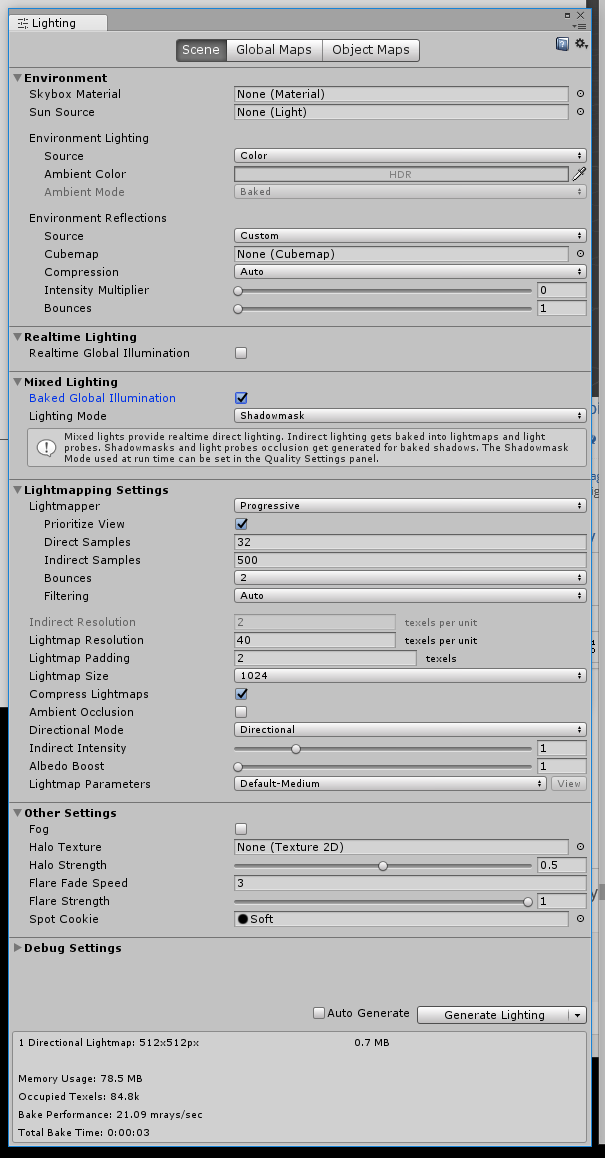
I have two simple cubes marked as static and static lightmap. I have disabled "Ambient Occlusion" in lighting settings for the scene. I do not have any post processing and no lights (only ambient environment lighting).

So scene is very simple - 2 cubes, 1 camera, only ambient lighting used.

When the cubes are near each other and I bake the lighting there is obvious ambient occlusion - darker spot near where the two meet.

I can turn on ambient occlusion and adjust the size/strength and it reacts as expected.

However, with ambient occlusion off there is still some left. Is this by nature, a bug, or something I am doing wrong?

Also, I have checked my NVidia settings to make sure it is not adding ambient occlusion behind the scenes.alt text
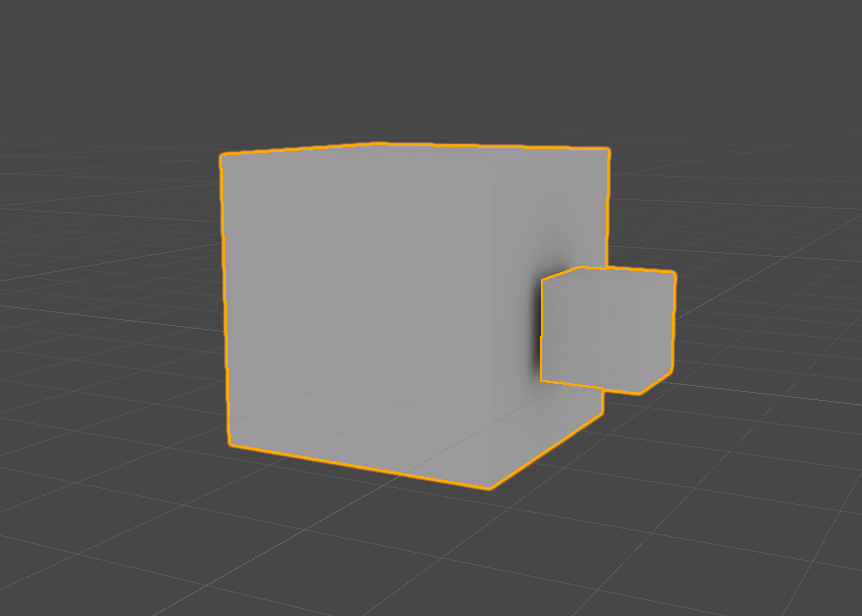
unexpected-ambient-occlusion.png (46.6 kB)
Comment
Add comment · Show 16
10 |3000 characters needed characters left characters exceeded
▼
  • Viewable by all users
  • Viewable by moderators
  • Viewable by moderators and the original poster
  • Advanced visibility
Viewable by all users
avatar image b1gry4n · Jun 08, 2018 at 09:54 PM 0
Share

can you show your lighting settings

avatar image Foulcloud b1gry4n · Jun 08, 2018 at 10:09 PM 0
Share

alt text

lighting-settings.png (79.6 kB)
avatar image b1gry4n Foulcloud · Jun 08, 2018 at 10:48 PM 0
Share

according to https://forum.unity.com/threads/ambient-occlusion.518323/

Ambient Occlusion is a cheap approximation of GI so baking it on top of GI doesn't make sense from a realistic point of view.

turn off baked global illu$$anonymous$$ation to see if that removes the ao

avatar image Foulcloud · Jun 08, 2018 at 11:01 PM 0
Share

Agreed. However I just want to turn it off completely. Shouldn't I be able to have some static objects with baked lighting and be able to leave ambient occlusion off on the whole scene? When I enable "Baked Global Illu$$anonymous$$ation" it then gives me the option to enable/disable "Ambient Occlusion". However with it off, it always seems to leave a little bit on. Same for you on your end? Turning GI off does remove the ambient occlusion but is not a solution for me. Thanks for taking the time to reply.

avatar image b1gry4n Foulcloud · Jun 08, 2018 at 11:07 PM 0
Share

i dont have a lot of experience lightmapping, but i have done it a few times.

https://docs.unity3d.com/$$anonymous$$anual/Light$$anonymous$$ode-$$anonymous$$ixed-DistanceShadowmask.html

maybe whats happening is since you dont have any lights in your scene and have it set to shadow mask it is receiving/sending shadows between the two static objects, which is why its displaying a shadow. maybe it isnt ambient occlusion at all.

your case would fall under "Static receiver" and "static caster" where it is receiving a shadow map

avatar image Foulcloud · Jun 08, 2018 at 11:20 PM 0
Share

Shadow cast and receive on both objects is off. I am thinking this might be a bug or is by design. I am running Unity 2018.1 for anyone's reference.

avatar image b1gry4n Foulcloud · Jun 08, 2018 at 11:37 PM 0
Share

pretty sure what youre seeing is baked shadows and has nothign to do with the object casting shadows or not. maybe reduce the number of bounces or bake these objects away from eachother and then move them together after the bake

avatar image b1gry4n b1gry4n · Jun 08, 2018 at 11:42 PM 0
Share

https://forum.unity.com/threads/progressive-lightmapper-direct-vs-indirect-samples.502719/

heres a resource that explains a bit further and could be the cause, the sample is carrying light info from the objects and applying it to the other. i wouldnt be surprised if you made one cube red and one cube blue, you see blue on the red and red on the blue or even a mixture of the two ins$$anonymous$$d of that dark ambient occlusion looking thing

avatar image Foulcloud · Jun 08, 2018 at 11:55 PM 0
Share

I don't think is the case here. All shadows disabled. Lighting $$anonymous$$ode changed from "Shadowmask" to "Baked Indirect". Environment reflections set to off. Also spot is still black with bright white cubes. It really looks like ambient occlusion - compared to Unity lighting or post process stack.

avatar image b1gry4n Foulcloud · Jun 09, 2018 at 12:08 AM 0
Share

im not sure of your use case, why would you want to bake lighting if you dont want the lighting data

avatar image Foulcloud b1gry4n · Jun 09, 2018 at 12:13 AM 0
Share

I want the baked lighting data for everything else - for better performance and visual quality. I just do not want this effect to appear.

Show more comments
avatar image Foulcloud Foulcloud · Jun 09, 2018 at 12:09 AM 0
Share

Here is an example in scene with lights and shadows. The smaller cube in the back is not static and appears as expected.alt text
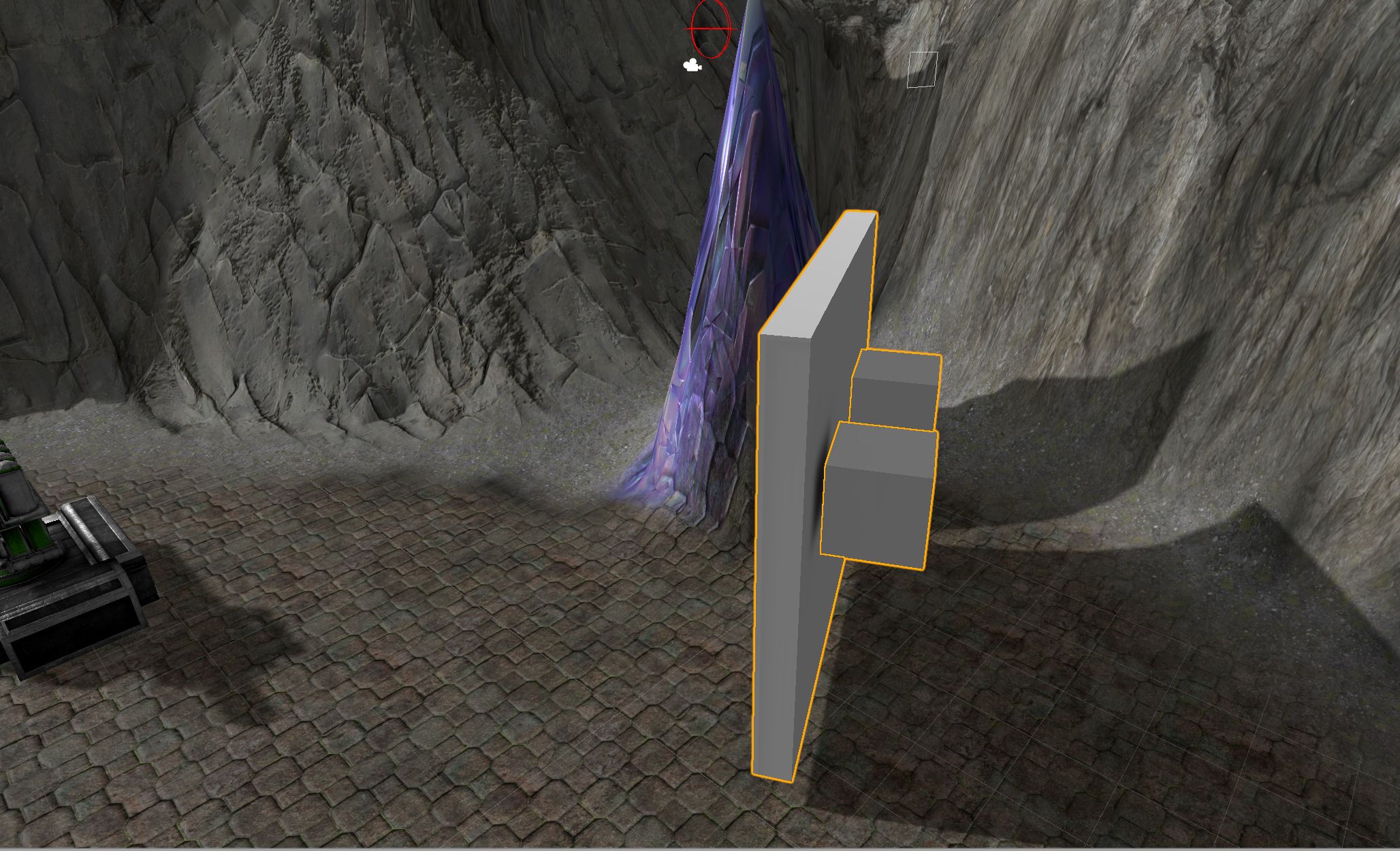
unexpected-ao-sample2.jpg (399.4 kB)
avatar image b1gry4n Foulcloud · Jun 09, 2018 at 12:16 AM 0
Share

also, what youre seeing could just be because youre using progressive. progressive is meant as a quick preview to lighting
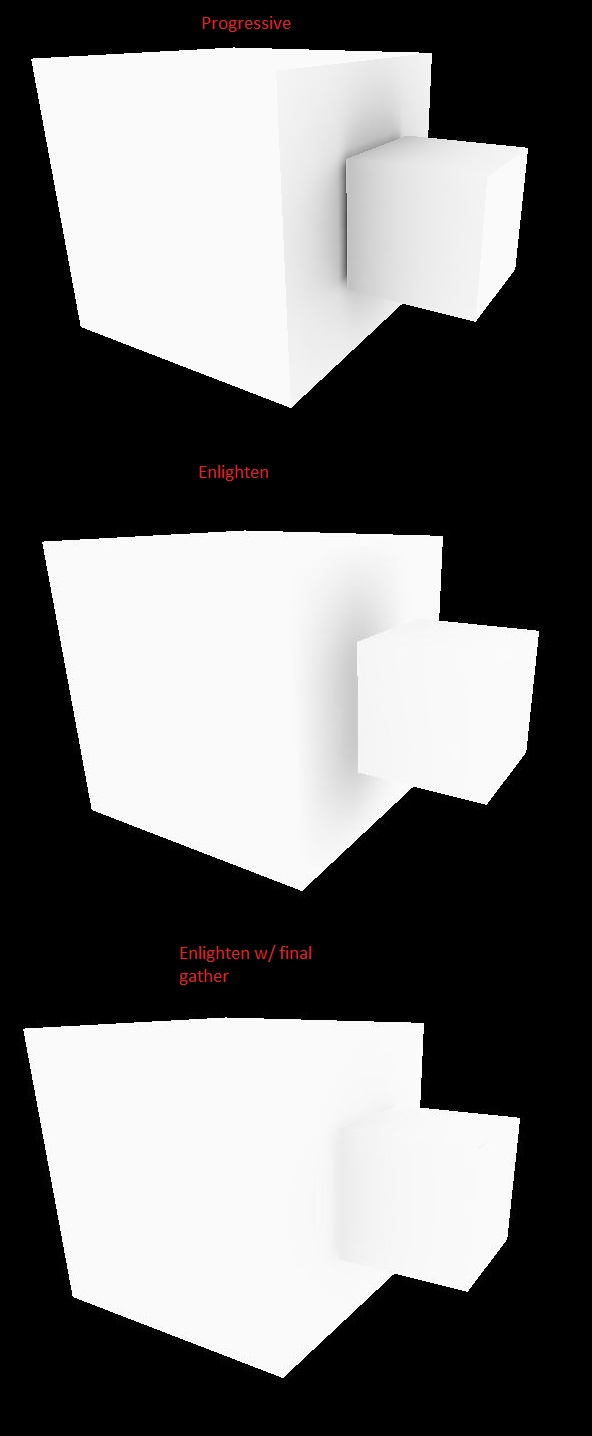
alt text

pef.jpg (64.5 kB)
Show more comments

0 Replies

· Add your reply
  • Sort: 

Your answer

Hint: You can notify a user about this post by typing @username

Up to 2 attachments (including images) can be used with a maximum of 524.3 kB each and 1.0 MB total.

Follow this Question

Answers Answers and Comments

110 People are following this question.

avatar image avatar image avatar image avatar image avatar image avatar image avatar image avatar image avatar image avatar image avatar image avatar image avatar image avatar image avatar image avatar image avatar image avatar image avatar image avatar image avatar image avatar image avatar image avatar image avatar image avatar image avatar image avatar image avatar image avatar image avatar image avatar image avatar image avatar image avatar image avatar image avatar image avatar image avatar image avatar image avatar image avatar image avatar image avatar image avatar image avatar image avatar image avatar image avatar image avatar image avatar image avatar image avatar image avatar image avatar image avatar image avatar image avatar image avatar image avatar image avatar image avatar image avatar image avatar image avatar image avatar image avatar image avatar image avatar image avatar image avatar image avatar image avatar image avatar image avatar image avatar image avatar image avatar image avatar image avatar image avatar image avatar image avatar image avatar image avatar image avatar image avatar image avatar image avatar image avatar image avatar image avatar image avatar image avatar image avatar image avatar image avatar image avatar image avatar image avatar image avatar image avatar image avatar image avatar image avatar image avatar image avatar image avatar image avatar image avatar image

Related Questions

Can/Should I bake lightmaps in a completely dark room? 1 Answer

How do I bake Ambient Occlusion map in Unity? 0 Answers

Blares appear at the junction of two meshes 0 Answers

Why Is my baked lightmap looking so weired?? 0 Answers

Possible to apply Ambient Occlusion in script? thanks in advance! 1 Answer


Enterprise
Social Q&A

Social
Subscribe on YouTube social-youtube Follow on LinkedIn social-linkedin Follow on Twitter social-twitter Follow on Facebook social-facebook Follow on Instagram social-instagram

Footer

  • Purchase
    • Products
    • Subscription
    • Asset Store
    • Unity Gear
    • Resellers
  • Education
    • Students
    • Educators
    • Certification
    • Learn
    • Center of Excellence
  • Download
    • Unity
    • Beta Program
  • Unity Labs
    • Labs
    • Publications
  • Resources
    • Learn platform
    • Community
    • Documentation
    • Unity QA
    • FAQ
    • Services Status
    • Connect
  • About Unity
    • About Us
    • Blog
    • Events
    • Careers
    • Contact
    • Press
    • Partners
    • Affiliates
    • Security
Copyright © 2020 Unity Technologies
  • Legal
  • Privacy Policy
  • Cookies
  • Do Not Sell My Personal Information
  • Cookies Settings
"Unity", Unity logos, and other Unity trademarks are trademarks or registered trademarks of Unity Technologies or its affiliates in the U.S. and elsewhere (more info here). Other names or brands are trademarks of their respective owners.
  • Anonymous
  • Sign in
  • Create
  • Ask a question
  • Spaces
  • Default
  • Help Room
  • META
  • Moderators
  • Explore
  • Topics
  • Questions
  • Users
  • Badges