Wayback Machinekoobas.hobune.stream
May JUN Jul
Previous capture 12 Next capture
2021 2022 2023
1 capture
12 Jun 22 - 12 Jun 22
sparklines
Close Help
  • Products
  • Solutions
  • Made with Unity
  • Learning
  • Support & Services
  • Community
  • Asset Store
  • Get Unity

UNITY ACCOUNT

You need a Unity Account to shop in the Online and Asset Stores, participate in the Unity Community and manage your license portfolio. Login Create account
  • Blog
  • Forums
  • Answers
  • Evangelists
  • User Groups
  • Beta Program
  • Advisory Panel

Navigation

  • Home
  • Products
  • Solutions
  • Made with Unity
  • Learning
  • Support & Services
  • Community
    • Blog
    • Forums
    • Answers
    • Evangelists
    • User Groups
    • Beta Program
    • Advisory Panel

Unity account

You need a Unity Account to shop in the Online and Asset Stores, participate in the Unity Community and manage your license portfolio. Login Create account

Language

  • Chinese
  • Spanish
  • Japanese
  • Korean
  • Portuguese
  • Ask a question
  • Spaces
    • Default
    • Help Room
    • META
    • Moderators
    • Topics
    • Questions
    • Users
    • Badges
  • Home /
avatar image
0
Question by iHanzo · Mar 08, 2017 at 09:18 AM · 2d gamepixel artdistortion

Pixels Warped/Distorted - Nothing Has Worked So Far

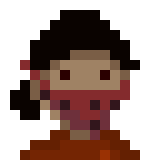
Basically, I'm currently messing around in Unity trying to get a hold of how the program works and I've come across this issue that's been really stumping me. The issue is that my pixel art is being distorted on different parts of the screen, where some parts of the screen work fine and others stretch or shrink my pixel art.

(Images resized so you can see them) alt text
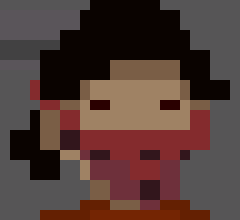
And here's what the original art is: alt text

The distortion on the character's face changes as they move around the screen (I'd show more but can't upload more images).

I've tried everything I could find online, from disabling anti-aliasing to fitting everything onto a pixel grid to changing the orthographic size (import setting is on point filter). If anyone could help me out here that would be great!

Edit: I should make note that the size I'm working with and the size the art is made for is 1920 x 1080, the screen sizes available are locked to 16 x 9 and this issue happens with every resolution I try.

screenshot-6.png (2.4 kB)
main.png (1.7 kB)
Comment
Add comment · Show 3
10 |3000 characters needed characters left characters exceeded
▼
  • Viewable by all users
  • Viewable by moderators
  • Viewable by moderators and the original poster
  • Advanced visibility
Viewable by all users
avatar image Commoble · Mar 08, 2017 at 05:18 PM 0
Share

Have you tried the techniques described here yet?

avatar image iHanzo Commoble · Mar 10, 2017 at 03:41 AM 0
Share

I have tried everything on that page, yes.

avatar image ZoeWheat · Jul 20, 2021 at 06:53 AM 0
Share

Same problem, hoping there's a solution to this

2 Replies

· Add your reply
  • Sort: 
avatar image
0

Answer by tanoshimi · Mar 10, 2017 at 06:57 AM

The scale factor of your "distorted" image is not an integer multiple of your source image, so it is necessarily going to be distorted.... pixels are atomic, so you can't scale an image up by 1.5x withot distortion.

Try importing your sprite at native size with 1 pixel = 1 unit.

Comment
Add comment · Share
10 |3000 characters needed characters left characters exceeded
▼
  • Viewable by all users
  • Viewable by moderators
  • Viewable by moderators and the original poster
  • Advanced visibility
Viewable by all users
avatar image
0

Answer by Bunny83 · Jul 20, 2021 at 10:51 AM

Since the question was bumped already. It's pretty clear that your original image is not a power of two. The "original" image has a size of 150x160 (where 10x10 pixels seems to represent "one pixel". So the original may be 15x16 pixels?).


By default Unity stores all textures in the next power of two size. That means images are rescaled to fit into the actual texture space. In this case here, assuming the source image is 15x16 pixels, it would be stretched to 16x16. So you get some weird aliasing since you need to fit 15 pixels into 16 pixels. If the source image is actually 150x160 a similar thing would happen. Though in this case the target image size would probably be 256x256.


The general solution is that your source images should have power of two resolution to begin with. If, for some reason that's not practical, you can switch the texture importer to advanced and select non-power-of-two (NPOT). This allows the texture to have any size. However this is not supported on all devices and may have performance implications. Also certain features like Mipmaps or anisotropic filtering will not work properly if the image is not a power of two.

Comment
Add comment · Share
10 |3000 characters needed characters left characters exceeded
▼
  • Viewable by all users
  • Viewable by moderators
  • Viewable by moderators and the original poster
  • Advanced visibility
Viewable by all users

Your answer

Hint: You can notify a user about this post by typing @username

Up to 2 attachments (including images) can be used with a maximum of 524.3 kB each and 1.0 MB total.

Follow this Question

Answers Answers and Comments

6 People are following this question.

avatar image avatar image avatar image avatar image avatar image avatar image

Related Questions

Why are my pixel art black in game window but not in scene windows? 2 Answers

Making a 2D 16-bit game. 0 Answers

Game Object visible in Scene mode but not visible in Game mode. 2 Answers

Help with 2D topdown combat 1 Answer

2D Top down physics with ground (slippery floor...) 1 Answer


Enterprise
Social Q&A

Social
Subscribe on YouTube social-youtube Follow on LinkedIn social-linkedin Follow on Twitter social-twitter Follow on Facebook social-facebook Follow on Instagram social-instagram

Footer

  • Purchase
    • Products
    • Subscription
    • Asset Store
    • Unity Gear
    • Resellers
  • Education
    • Students
    • Educators
    • Certification
    • Learn
    • Center of Excellence
  • Download
    • Unity
    • Beta Program
  • Unity Labs
    • Labs
    • Publications
  • Resources
    • Learn platform
    • Community
    • Documentation
    • Unity QA
    • FAQ
    • Services Status
    • Connect
  • About Unity
    • About Us
    • Blog
    • Events
    • Careers
    • Contact
    • Press
    • Partners
    • Affiliates
    • Security
Copyright © 2020 Unity Technologies
  • Legal
  • Privacy Policy
  • Cookies
  • Do Not Sell My Personal Information
  • Cookies Settings
"Unity", Unity logos, and other Unity trademarks are trademarks or registered trademarks of Unity Technologies or its affiliates in the U.S. and elsewhere (more info here). Other names or brands are trademarks of their respective owners.
  • Anonymous
  • Sign in
  • Create
  • Ask a question
  • Spaces
  • Default
  • Help Room
  • META
  • Moderators
  • Explore
  • Topics
  • Questions
  • Users
  • Badges