
Wayback Machinekoobas.hobune.stream
May JUN Jul
Previous capture 12 Next capture
2021 2022 2023
1 capture
12 Jun 22 - 12 Jun 22
sparklines
Close Help
  • Products
  • Solutions
  • Made with Unity
  • Learning
  • Support & Services
  • Community
  • Asset Store
  • Get Unity

UNITY ACCOUNT

You need a Unity Account to shop in the Online and Asset Stores, participate in the Unity Community and manage your license portfolio. Login Create account
  • Blog
  • Forums
  • Answers
  • Evangelists
  • User Groups
  • Beta Program
  • Advisory Panel

Navigation

  • Home
  • Products
  • Solutions
  • Made with Unity
  • Learning
  • Support & Services
  • Community
    • Blog
    • Forums
    • Answers
    • Evangelists
    • User Groups
    • Beta Program
    • Advisory Panel

Unity account

You need a Unity Account to shop in the Online and Asset Stores, participate in the Unity Community and manage your license portfolio. Login Create account

Language

  • Chinese
  • Spanish
  • Japanese
  • Korean
  • Portuguese
  • Ask a question
  • Spaces
    • Default
    • Help Room
    • META
    • Moderators
    • Topics
    • Questions
    • Users
    • Badges
  • Home /
avatar image
2
Question by ritoban · Jun 02, 2017 at 01:33 PM · uicanvasworld spaceantialiasing

World Space Canvas causes blurry text with anti-aliasing

I have a CardHolder, which is a 2D object, which has a canvas as a child. This canvas is being used to display text on the card (similar to Hearthstone). The canvas is in world space.

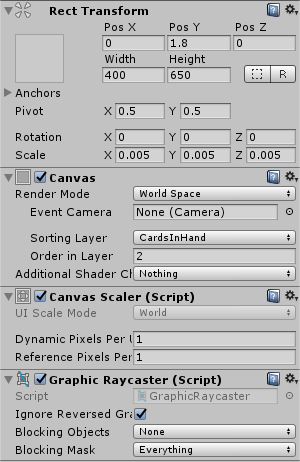
This is how my canvas is setup:
Without antialiasing, the text on the canvas is somewhat readable, but very choppy.alt text
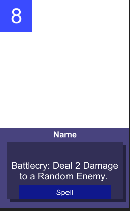
With the default unity MSAA, there is no change except for 1 more batch and 1 more SetPass call (I have checked the quality settings). Looks exactly like the previous image.

With the new post processing effects fast anti aliasing with defauly preset, the text starts to get blurry. Unfortunately, I am unable to post any more screenshots.

The higher quality settings make the text blurrier. Higher performance settings make the text choppier (as seen in the default MSAA).

I have tried changing the values in the canvas scalar. Increasing the Dynamic Pixels Per Unit makes the text choppier, and after a value of ~15, the text starts to shrink in size. Although some people have suggested I increase the value to 100+, this just makes the text tiny. Font size in the text components don't help either, as even font size 300 is tiny. Reference pixels per unit doesn't change anything.

However, I do not believe the problem is in the antialiasing. I suspect it lies in how I have setup my canvas. If you require more information, you can look at the project's github at: https://github.com/ritoban123/prototype-card-game

screenshot-8.png (4.2 kB)
screenshot-7.png (32.9 kB)
Comment
Add comment
10 |3000 characters needed characters left characters exceeded
▼
  • Viewable by all users
  • Viewable by moderators
  • Viewable by moderators and the original poster
  • Advanced visibility
Viewable by all users

0 Replies

· Add your reply
  • Sort: 

Your answer

Hint: You can notify a user about this post by typing @username

Up to 2 attachments (including images) can be used with a maximum of 524.3 kB each and 1.0 MB total.

Follow this Question

Answers Answers and Comments

3 People are following this question.

avatar image avatar image avatar image

Related Questions

Alternatives to Canvas Draw Order when using elements that rotate around each other 0 Answers

How to get UI elements on card not to shine through? 1 Answer

Antialiasing As Post Effect Blurring UI Text 0 Answers

4.6 UI Canvas is smaller than normal 1 Answer

Animation not playing on game object activated by script 3 Answers


Enterprise
Social Q&A

Social
Subscribe on YouTube social-youtube Follow on LinkedIn social-linkedin Follow on Twitter social-twitter Follow on Facebook social-facebook Follow on Instagram social-instagram

Footer

  • Purchase
    • Products
    • Subscription
    • Asset Store
    • Unity Gear
    • Resellers
  • Education
    • Students
    • Educators
    • Certification
    • Learn
    • Center of Excellence
  • Download
    • Unity
    • Beta Program
  • Unity Labs
    • Labs
    • Publications
  • Resources
    • Learn platform
    • Community
    • Documentation
    • Unity QA
    • FAQ
    • Services Status
    • Connect
  • About Unity
    • About Us
    • Blog
    • Events
    • Careers
    • Contact
    • Press
    • Partners
    • Affiliates
    • Security
Copyright © 2020 Unity Technologies
  • Legal
  • Privacy Policy
  • Cookies
  • Do Not Sell My Personal Information
  • Cookies Settings
"Unity", Unity logos, and other Unity trademarks are trademarks or registered trademarks of Unity Technologies or its affiliates in the U.S. and elsewhere (more info here). Other names or brands are trademarks of their respective owners.
  • Anonymous
  • Sign in
  • Create
  • Ask a question
  • Spaces
  • Default
  • Help Room
  • META
  • Moderators
  • Explore
  • Topics
  • Questions
  • Users
  • Badges
