
Wayback Machinekoobas.hobune.stream
May JUN Jul
Previous capture 12 Next capture
2021 2022 2023
1 capture
12 Jun 22 - 12 Jun 22
sparklines
Close Help
  • Products
  • Solutions
  • Made with Unity
  • Learning
  • Support & Services
  • Community
  • Asset Store
  • Get Unity

UNITY ACCOUNT

You need a Unity Account to shop in the Online and Asset Stores, participate in the Unity Community and manage your license portfolio. Login Create account
  • Blog
  • Forums
  • Answers
  • Evangelists
  • User Groups
  • Beta Program
  • Advisory Panel

Navigation

  • Home
  • Products
  • Solutions
  • Made with Unity
  • Learning
  • Support & Services
  • Community
    • Blog
    • Forums
    • Answers
    • Evangelists
    • User Groups
    • Beta Program
    • Advisory Panel

Unity account

You need a Unity Account to shop in the Online and Asset Stores, participate in the Unity Community and manage your license portfolio. Login Create account

Language

  • Chinese
  • Spanish
  • Japanese
  • Korean
  • Portuguese
  • Ask a question
  • Spaces
    • Default
    • Help Room
    • META
    • Moderators
    • Topics
    • Questions
    • Users
    • Badges
  • Home /
avatar image
1
Question by funkyboy · Apr 06, 2018 at 02:09 PM · cameratransparencypost-processingantialiasing

Focal Cange + Switch FXAA to TAA -> glitch with transparent materials

Hello,


About Antialiasing, I have this script that can switch from FXAA to TAA.
(to compare results at runtime from differents angles mostly...)

And I also have a script to switch the camera focal.


Now, I noticed a funny glitch with those 2 scripts and transparent materials :

  • when I enter play mode already in FXAA :
    I can switch the focal and everything's fine.

  • I switch to TAA :
    The focal switch still works fine.

  • now I switch back to FXAA and I switch the focal again :
    the Glitch appears here : Transparent materials are out of place


I guess you're not supposed to switch the AA method like that :) to begin with.
now why does it glitch ? why does it happen ?


top : at start
below : the glitchlink text alt text
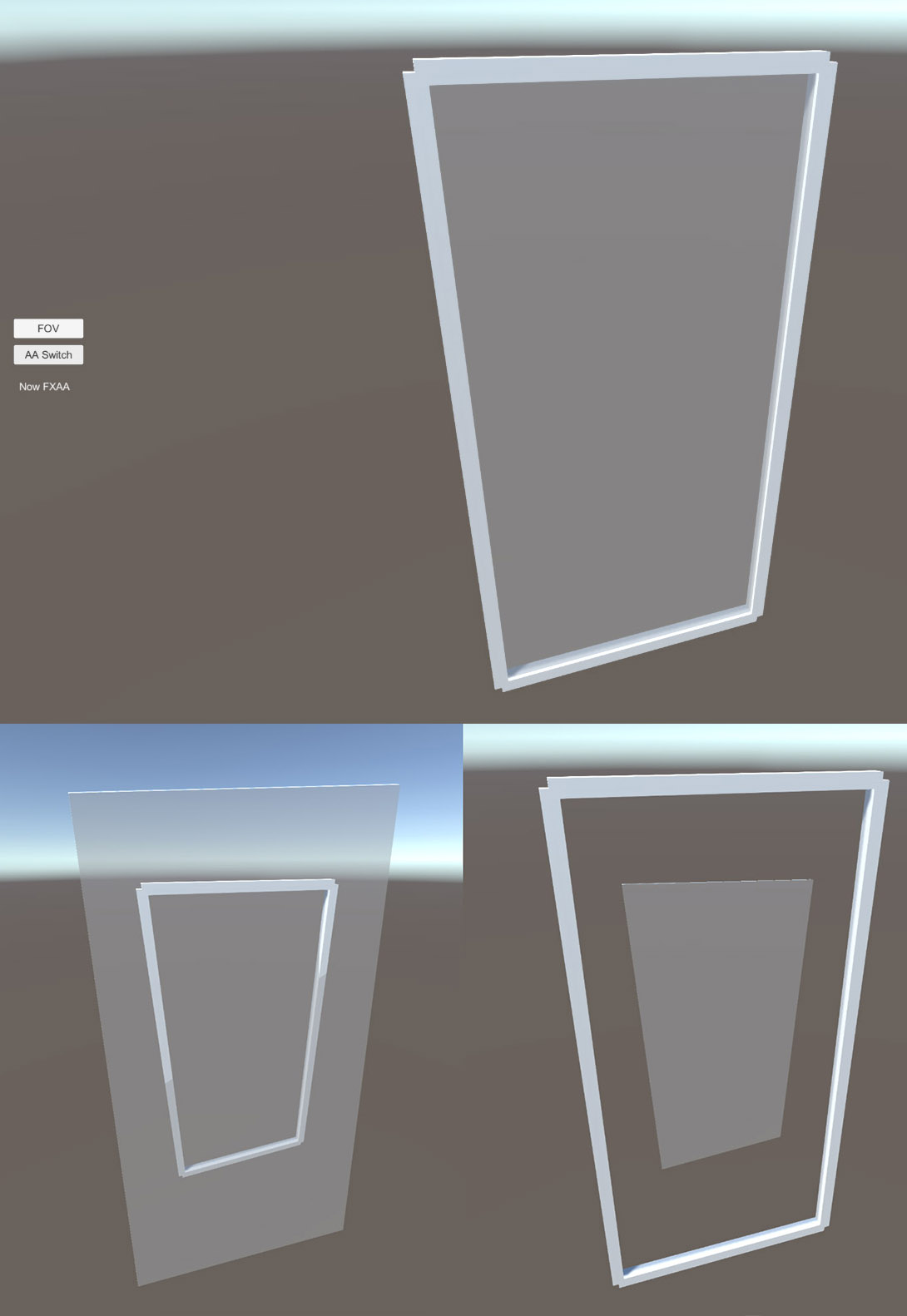

and small package to reproduce the "glitch"
thx !

fxaa-taa-glitch.zip (111.1 kB)
glitch.jpg (84.4 kB)
Comment
Add comment
10 |3000 characters needed characters left characters exceeded
▼
  • Viewable by all users
  • Viewable by moderators
  • Viewable by moderators and the original poster
  • Advanced visibility
Viewable by all users

2 Replies

· Add your reply
  • Sort: 
avatar image
0
Best Answer

Answer by glitchers · Jun 01, 2020 at 04:57 PM

I found the cause and fix for this. It's to do with the camera and it's projection matrix(s). Here is the git commit that fixes the issues for PostProcessing v2 - https://github.com/Unity-Technologies/PostProcessing/commit/08b1319cd47862e2837fbf1273ff32b974cfed76


I am still using V1 however for a few reasons so I needed the fix v1. It was pretty simple to get it working for changing to FAA but still using the post-processing behaviour.

I added this function to PostProcessingBehaviour

     [ContextMenu("Reset Camera Projection Matrices")]
     public void ResetCameraProjectionMatrices()
     {
         if (m_Camera)
         {
             m_Camera.ResetProjectionMatrix();
             m_Camera.nonJitteredProjectionMatrix = m_Camera.projectionMatrix;
         }
         else
         {
             Debug.LogWarning("Cannot ResetCameraProjectionMatrices - no camera", this);
         }
     }

I then call this method just before the end of OnPreCull , before it does the TAA jittered matrix setup. I also removed OnPostRender as it's now obsolete.


However! These changes work until you turn off post processing altogether and then they re-appear. I tried adding the ResetCameraProjectionMatrices function call inside OnDisable but it doesn't work.

Changing the projection matrix stops it from updating when fieldOfView changes until you call camera.ResetProjectionMatrix(). However calling ResetProjectionMatrix() the issue remains. I tried calling it without also touching the nonJitteredProjectionMatrix but that also does not work.

What I have found which does work is to set camera.useJitteredProjectionMatrixForTransparentRendering to true inside OnDisable. I'm not sure if it is needed but you can set it to false inside OnEnable.

Comment
Add comment · Show 2 · Share
10 |3000 characters needed characters left characters exceeded
▼
  • Viewable by all users
  • Viewable by moderators
  • Viewable by moderators and the original poster
  • Advanced visibility
Viewable by all users
avatar image funkyboy · Jun 02, 2020 at 10:44 AM 0
Share

Hey @glitchers , amazing !
Thank you for your time and research.
Although, those days we're using PostProcess V3 and HDRP at work.
And this glitch doesn't happen at all with V3, I checked, switch TAA/FXAA + focal change, no glitch.
It will prove useful to some people I'm sure.
Cheers !

avatar image funkyboy · Jun 02, 2020 at 01:59 PM 0
Share

realized it was the same issue as this older post
https://forum.unity.com/threads/cutting-between-vcams-with-different-fovs-leaves-wrong-fov-on-the-alpha-renderstage.485865/

avatar image
0

Answer by Symmetron · Oct 08, 2018 at 08:47 AM

I have the same problem. I want to use TAA in the high setting and FXAA for the medium setting. I start at TAA, go down to FXAA (and optionally back up to TAA) and it continues to work. But the next time I go back down to FXAA it breaks. So specifically the suspects in the code are changes to

AntialiasingModel.Method

and

PostProcessingProfile.antialiasing.settings

coupled with a change to

Camera.fieldOfView

.

As for the FOV change, I have experimented with different values and even just dropping from 90 (my default setting) to 80 causes the glitch, albeit more subtly. It gets worse the bigger the difference is.

(My current workaround is to just not mess with the AA "settings" or "method" and to instead scale from TAA on the higher settings directly down to no AA on the lowest.)

EDIT: Quick update, this does not resolve the issue. The glitch now still happens on the "no AA" setting, not on the two settings using TAA though. Since using TAA on all is not a solution this means I have no working solution right now. Will investigate more.

EDIT2: Switching between no AA and various presets of FXAA works just fine. TAA is definitely the culprit. Specifically switching to TAA and then away from TAA seems to "dirty" some system which then produces the FOV glitch whenever you're NOT using TAA.

Comment
Add comment · Share
10 |3000 characters needed characters left characters exceeded
▼
  • Viewable by all users
  • Viewable by moderators
  • Viewable by moderators and the original poster
  • Advanced visibility
Viewable by all users

Your answer

Hint: You can notify a user about this post by typing @username

Up to 2 attachments (including images) can be used with a maximum of 524.3 kB each and 1.0 MB total.

Follow this Question

Answers Answers and Comments

127 People are following this question.

avatar image avatar image avatar image avatar image avatar image avatar image avatar image avatar image avatar image avatar image avatar image avatar image avatar image avatar image avatar image avatar image avatar image avatar image avatar image avatar image avatar image avatar image avatar image avatar image avatar image avatar image avatar image avatar image avatar image avatar image avatar image avatar image avatar image avatar image avatar image avatar image avatar image avatar image avatar image avatar image avatar image avatar image avatar image avatar image avatar image avatar image avatar image avatar image avatar image avatar image avatar image avatar image avatar image avatar image avatar image avatar image avatar image avatar image avatar image avatar image avatar image avatar image avatar image avatar image avatar image avatar image avatar image avatar image avatar image avatar image avatar image avatar image avatar image avatar image avatar image avatar image avatar image avatar image avatar image avatar image avatar image avatar image avatar image avatar image avatar image avatar image avatar image avatar image avatar image avatar image avatar image avatar image avatar image avatar image avatar image avatar image avatar image avatar image avatar image avatar image avatar image avatar image avatar image avatar image avatar image avatar image avatar image avatar image avatar image avatar image avatar image avatar image avatar image avatar image avatar image avatar image avatar image avatar image avatar image avatar image avatar image avatar image avatar image avatar image avatar image avatar image avatar image

Related Questions

How to make an object transparent in script? 3 Answers

Determine transparency render order using something other than the camera? 1 Answer

Unity 3D UI and Standard Transparent material 0 Answers

Apply transparency depending on camera 0 Answers

Camera Transparency 1 Answer


Enterprise
Social Q&A

Social
Subscribe on YouTube social-youtube Follow on LinkedIn social-linkedin Follow on Twitter social-twitter Follow on Facebook social-facebook Follow on Instagram social-instagram

Footer

  • Purchase
    • Products
    • Subscription
    • Asset Store
    • Unity Gear
    • Resellers
  • Education
    • Students
    • Educators
    • Certification
    • Learn
    • Center of Excellence
  • Download
    • Unity
    • Beta Program
  • Unity Labs
    • Labs
    • Publications
  • Resources
    • Learn platform
    • Community
    • Documentation
    • Unity QA
    • FAQ
    • Services Status
    • Connect
  • About Unity
    • About Us
    • Blog
    • Events
    • Careers
    • Contact
    • Press
    • Partners
    • Affiliates
    • Security
Copyright © 2020 Unity Technologies
  • Legal
  • Privacy Policy
  • Cookies
  • Do Not Sell My Personal Information
  • Cookies Settings
"Unity", Unity logos, and other Unity trademarks are trademarks or registered trademarks of Unity Technologies or its affiliates in the U.S. and elsewhere (more info here). Other names or brands are trademarks of their respective owners.
  • Anonymous
  • Sign in
  • Create
  • Ask a question
  • Spaces
  • Default
  • Help Room
  • META
  • Moderators
  • Explore
  • Topics
  • Questions
  • Users
  • Badges
