Wayback Machinekoobas.hobune.stream
May JUN Jul
Previous capture 12 Next capture
2021 2022 2023
1 capture
12 Jun 22 - 12 Jun 22
sparklines
Close Help
  • Products
  • Solutions
  • Made with Unity
  • Learning
  • Support & Services
  • Community
  • Asset Store
  • Get Unity

UNITY ACCOUNT

You need a Unity Account to shop in the Online and Asset Stores, participate in the Unity Community and manage your license portfolio. Login Create account
  • Blog
  • Forums
  • Answers
  • Evangelists
  • User Groups
  • Beta Program
  • Advisory Panel

Navigation

  • Home
  • Products
  • Solutions
  • Made with Unity
  • Learning
  • Support & Services
  • Community
    • Blog
    • Forums
    • Answers
    • Evangelists
    • User Groups
    • Beta Program
    • Advisory Panel

Unity account

You need a Unity Account to shop in the Online and Asset Stores, participate in the Unity Community and manage your license portfolio. Login Create account

Language

  • Chinese
  • Spanish
  • Japanese
  • Korean
  • Portuguese
  • Ask a question
  • Spaces
    • Default
    • Help Room
    • META
    • Moderators
    • Topics
    • Questions
    • Users
    • Badges
  • Home /
avatar image
0
Question by pottyscotty · Oct 11, 2016 at 02:11 PM · daynight

Earth Day/Night cycle texture

alt text

Semi-solution found, please see second answer

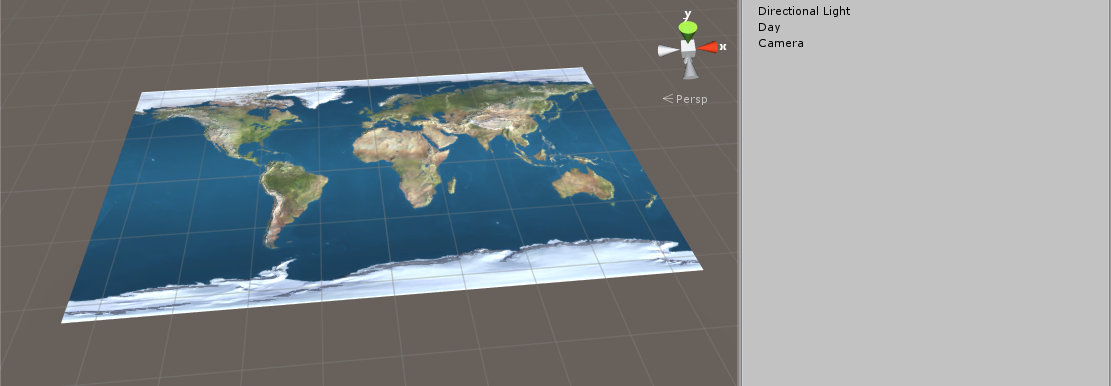
I have a plane with an Earth texture and bumpmap and would like to add a day/night cycle to the scene. The problem is that only half the world would be in darkness at once, but I have no idea how I could do this. I do have the 'night Earth' texture but need a way to mask it so only some of it shows (like below).

alt text

Any ideas?

bibi.png (2.7 kB)
screenshot-1.png (258.9 kB)
Comment
Add comment
10 |3000 characters needed characters left characters exceeded
▼
  • Viewable by all users
  • Viewable by moderators
  • Viewable by moderators and the original poster
  • Advanced visibility
Viewable by all users

2 Replies

· Add your reply
  • Sort: 
avatar image
0

Answer by doublemax · Oct 11, 2016 at 02:44 PM

Create a material with the earth texture. Set the second texture as "Detail Albedo" in the same material. You can animate it by changing the texture offset over time.

 using UnityEngine;
 
 public class RotateTextureOffset : MonoBehaviour
 {
   private Renderer rend;
   public float scrollSpeed = 0.1f;
 
     void Start () {
       rend = GetComponent<Renderer>();    
     }
     
   void Update() {
     float offset = Time.time * scrollSpeed;
     rend.material.SetTextureOffset("_DetailAlbedoMap", new Vector2(0, offset));
   }
 }

BTW: For a more realistic effect, you'd need something like this:
http://www.uni.edu/morgans/astro/course/Notes/section1/geochrone2.gif

Comment
Add comment · Show 1 · Share
10 |3000 characters needed characters left characters exceeded
▼
  • Viewable by all users
  • Viewable by moderators
  • Viewable by moderators and the original poster
  • Advanced visibility
Viewable by all users
avatar image pottyscotty · Oct 11, 2016 at 03:08 PM 0
Share

Problem is this is the result (imagine it was going across the x axis too, I just haven't changed it) -

http://im.ezgif.com/tmp/ezgif-1829365490.gif

It's still a block image with sharp ends and affecting large areas at once. It's also partially showing through to the daytime texture. Is there such a thing as a 'transparency mask' as I think that would work pretty much like you have done?

avatar image
0

Answer by pottyscotty · Oct 11, 2016 at 11:04 PM

I have semi-found a solution, however still require help to get it to look alright.

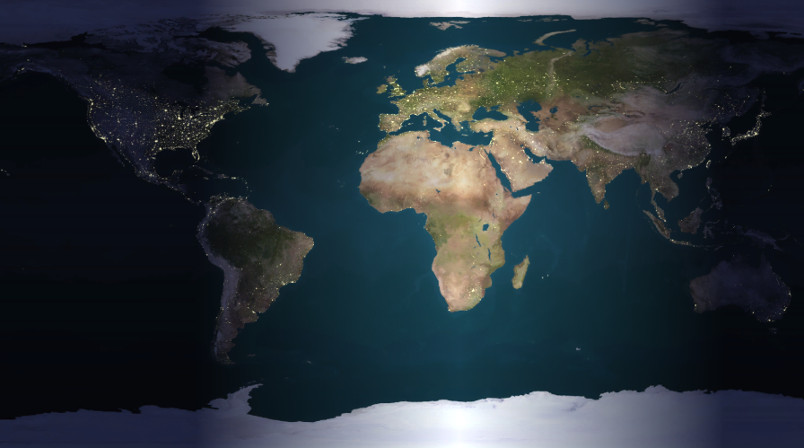
I have made sure there is no Ambient Occlusion or Skybox and then added the 'Night Earth' texture as an emission map. I have also made a new directional light with a cookie that fades out either end (I'll improve on the size and sharpness once I get this working).

Now, when the light is not hitting areas, they clearly show the 'Night Earth' texture. When light is on areas, it shows the 'Day Earth' texture. This works perfectly for me if it wasn't for one problem - the emission map bleeds through even when light is hitting it. As you can see from the pictures, the lights from things like street lamps can still be seen during the day.
alt text

Yes, turning down the emission value kind of works (though you can still see lights pretty clearly), but it makes the places that are in night time barely visible. Seems no matter how much you juggle lighting, emission, colour values etc there's a problem. Any ideas as to what I can do to get it looking good? Last resort is I'll just have to ditch the day/night cycle or have the whole world turn dark at once.


screenshot-1.jpg (63.8 kB)
Comment
Add comment · Show 2 · Share
10 |3000 characters needed characters left characters exceeded
▼
  • Viewable by all users
  • Viewable by moderators
  • Viewable by moderators and the original poster
  • Advanced visibility
Viewable by all users
avatar image Bonfire-Boy · Oct 11, 2016 at 11:21 PM 0
Share

I reckon I'd be looking at doing it all in a custom shader, making the emission value some function of the night-darkening value, with a threshold on the latter below which there's no emission. Sorry I'm not a shader expert though, I tend to hack them till they look right and I'd have to research the emission stuff myself.

avatar image pottyscotty · Oct 11, 2016 at 11:24 PM 0
Share

Years after getting Unity I've still not done much with it, just played around a bit so I've got no idea on the shader front either. I would think with a custom one it'd be possible though as all the required features seems to be there, just needs putting in order.

Your answer

Hint: You can notify a user about this post by typing @username

Up to 2 attachments (including images) can be used with a maximum of 524.3 kB each and 1.0 MB total.

Follow this Question

Answers Answers and Comments

59 People are following this question.

avatar image avatar image avatar image avatar image avatar image avatar image avatar image avatar image avatar image avatar image avatar image avatar image avatar image avatar image avatar image avatar image avatar image avatar image avatar image avatar image avatar image avatar image avatar image avatar image avatar image avatar image avatar image avatar image avatar image avatar image avatar image avatar image avatar image avatar image avatar image avatar image avatar image avatar image avatar image avatar image avatar image avatar image avatar image avatar image avatar image avatar image avatar image avatar image avatar image avatar image avatar image avatar image avatar image avatar image avatar image avatar image avatar image avatar image avatar image

Related Questions

Blended skybox shader is messing with my lens flare 0 Answers

Billboarded Trees not lit? 1 Answer

Realtime daylight cycle? 1 Answer

Sun(light) rotation is not working 1 Answer

Using adaptive tonemapping along with day-night cycle 0 Answers


Enterprise
Social Q&A

Social
Subscribe on YouTube social-youtube Follow on LinkedIn social-linkedin Follow on Twitter social-twitter Follow on Facebook social-facebook Follow on Instagram social-instagram

Footer

  • Purchase
    • Products
    • Subscription
    • Asset Store
    • Unity Gear
    • Resellers
  • Education
    • Students
    • Educators
    • Certification
    • Learn
    • Center of Excellence
  • Download
    • Unity
    • Beta Program
  • Unity Labs
    • Labs
    • Publications
  • Resources
    • Learn platform
    • Community
    • Documentation
    • Unity QA
    • FAQ
    • Services Status
    • Connect
  • About Unity
    • About Us
    • Blog
    • Events
    • Careers
    • Contact
    • Press
    • Partners
    • Affiliates
    • Security
Copyright © 2020 Unity Technologies
  • Legal
  • Privacy Policy
  • Cookies
  • Do Not Sell My Personal Information
  • Cookies Settings
"Unity", Unity logos, and other Unity trademarks are trademarks or registered trademarks of Unity Technologies or its affiliates in the U.S. and elsewhere (more info here). Other names or brands are trademarks of their respective owners.
  • Anonymous
  • Sign in
  • Create
  • Ask a question
  • Spaces
  • Default
  • Help Room
  • META
  • Moderators
  • Explore
  • Topics
  • Questions
  • Users
  • Badges