
Wayback Machinekoobas.hobune.stream
May JUN Jul
Previous capture 13 Next capture
2021 2022 2023
1 capture
13 Jun 22 - 13 Jun 22
sparklines
Close Help
  • Products
  • Solutions
  • Made with Unity
  • Learning
  • Support & Services
  • Community
  • Asset Store
  • Get Unity

UNITY ACCOUNT

You need a Unity Account to shop in the Online and Asset Stores, participate in the Unity Community and manage your license portfolio. Login Create account
  • Blog
  • Forums
  • Answers
  • Evangelists
  • User Groups
  • Beta Program
  • Advisory Panel

Navigation

  • Home
  • Products
  • Solutions
  • Made with Unity
  • Learning
  • Support & Services
  • Community
    • Blog
    • Forums
    • Answers
    • Evangelists
    • User Groups
    • Beta Program
    • Advisory Panel

Unity account

You need a Unity Account to shop in the Online and Asset Stores, participate in the Unity Community and manage your license portfolio. Login Create account

Language

  • Chinese
  • Spanish
  • Japanese
  • Korean
  • Portuguese
  • Ask a question
  • Spaces
    • Default
    • Help Room
    • META
    • Moderators
    • Topics
    • Questions
    • Users
    • Badges
  • Home /
avatar image
0
Question by GBT · Aug 19, 2013 at 05:38 PM · triggermethod

OnTriggerStay method always choosing the "Other" I don't need

it's not going to be easy to explain my problem so I will do my best:

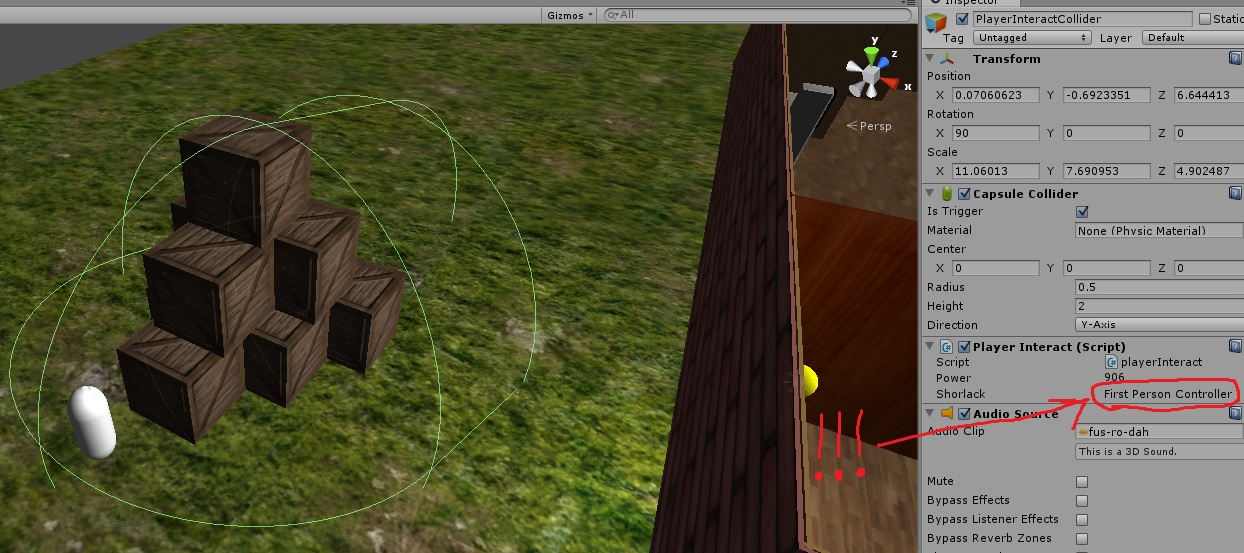
I've used a Capsule collider attached to my FPS player, it's a trigger that helping my Character to react to it's front environment.

I've tried to use the method "OnTriggerStay" (in a script attached to the capsule collider) for everything that stands infront of him (you can see the picture I've added, this is in_game pause).

this is the script for my method:

 void OnTriggerStay(Collider Other){
         shorlack = Other.gameObject;
         
         if(Input.GetButtonDown("fus") && Other.tag == "fusrodah"){
             fusRoDah (Other.gameObject);
         }
     }

I've added "shorlack" as a public variable so I know what exactly "Other" is in game time. the problem is, Other is almost always my FPS, only when I appsolutley touches one of the crates, Other referes to it. all the crates are tagged as "fusrodah".

Is there any way to limit my OnTrigger method to "fusrodah" tagged game objects only? and how can I make the method to refer all the crates at once?
alt text

fus.jpg (236.4 kB)
Comment
Add comment
10 |3000 characters needed characters left characters exceeded
▼
  • Viewable by all users
  • Viewable by moderators
  • Viewable by moderators and the original poster
  • Advanced visibility
Viewable by all users

2 Replies

· Add your reply
  • Sort: 
avatar image
0
Best Answer

Answer by chelnok · Aug 20, 2013 at 07:17 PM

Variable shorlack gets the gameobject always because you have it in OnTriggerStay without any condition. Cant really be sure, but i think you are trying to get this:

 void OnTriggerStay(Collider Other){
        if(Other.gameObject.tag == "fusrodah"){

          shorlack = Other.gameObject;
 
           if(Input.GetButtonDown("fus")){
             fusRoDah (Other.gameObject);
          }
        }
     }

To ignore your player you could use tag for player (and all childs)

if (other.tag == "player") return;

Better way is assign your player to its own layer, and ignore that layer:

if (other.gameObject.layer == 7) return; //or what ever your layer for player is

Or you can ignore it with collision matrix: http://docs.unity3d.com/Documentation/Components/LayerBasedCollision.html

Comment
Add comment · Show 2 · Share
10 |3000 characters needed characters left characters exceeded
▼
  • Viewable by all users
  • Viewable by moderators
  • Viewable by moderators and the original poster
  • Advanced visibility
Viewable by all users
avatar image GBT · Aug 20, 2013 at 08:07 PM 0
Share

Thank you, appearently every I needed was this line: if (other.tag == "player") return;

avatar image OP_toss · Aug 21, 2013 at 12:46 AM 0
Share

Well that's just about a million times easier than what I was explaining...

Also +1 for collision matrix ignoring. $$anonymous$$uch better than tags (I never use them) or ignoring manually with code.

avatar image
0

Answer by OP_toss · Aug 19, 2013 at 06:08 PM

I recommend using OnTriggerEnter and OnTriggerExit and flipping a bool instead. I trust Update and those methods much more than OnTriggerStay (for whatever reason).

Below is copy-pasted code from another thread talking about this issue (I'm lazy). Try this, it should work better.

 var isInTrigger: boolean = false;   
 
 function Update(){            
      if(isInTrigger){            
          //Do whatever it is you want to do here 
      } 
  }    

 function OnTriggerEnter(){            
      isInTrigger = true; 
 }  
 
 function OnTriggerExit(){            
      isInTrigger= false; 
 }

I don't use OnTriggerStay because it seems to depend too much on Unity to do work that I could easily do myself. It is also another method that potentially could run every update. I like to keep all repeating actions in one place. I probably want to know if it is in the trigger or not anyways, so keeping track of the bool isn't asking too much. And lastly, I think querying input inside a specialized method like that could potentially not work. I believe it's recommended to use Update for input checks.

Hope this helps!

Comment
Add comment · Show 10 · Share
10 |3000 characters needed characters left characters exceeded
▼
  • Viewable by all users
  • Viewable by moderators
  • Viewable by moderators and the original poster
  • Advanced visibility
Viewable by all users
avatar image GBT · Aug 19, 2013 at 07:03 PM 0
Share

this way I should put the script on the objects, I want the script to be only on my FPS. before OnTriggerStay I tried OnTriggerEnter, it doesn't work for me either

avatar image OP_toss · Aug 19, 2013 at 07:20 PM 0
Share

Do you have a RigidBody attached to your FPS? Are your colliders on your crates marked as Triggers? Are you definitely getting an enter/stay event to fire?

avatar image GBT · Aug 19, 2013 at 07:55 PM 0
Share

my FPS is doesn't have rigidbody attached, the colliders on my crates aren't triggers. I even tried with both enter and stay, they both give me the same reaction, I have to touch the crate with my FPS

avatar image OP_toss · Aug 19, 2013 at 11:21 PM 0
Share

If your FPS moves, and it has a collider, it needs a rigid body in order to calculate properly. All moving colliders need rigid bodies.

If you want your crates to react and send the OnTrigger_ messages, you need them to be Triggers. Thus OnTRIGGER.

I'm surprised you're getting anything without the above setup...

avatar image GBT · Aug 20, 2013 at 10:43 AM 0
Share

when my crates are triggers, they just falling off the ground. there is no difference when my FPS is rigidbody for me

Show more comments

Your answer

Hint: You can notify a user about this post by typing @username

Up to 2 attachments (including images) can be used with a maximum of 524.3 kB each and 1.0 MB total.

Follow this Question

Answers Answers and Comments

19 People are following this question.

avatar image avatar image avatar image avatar image avatar image avatar image avatar image avatar image avatar image avatar image avatar image avatar image avatar image avatar image avatar image avatar image avatar image avatar image avatar image

Related Questions

Trigger that reacts to different tags? C# 1 Answer

MissingMethodException: 'UnityEngine.AudioClip.Play' 2 Answers

Can't click gameobject when over another trigger? 1 Answer

Execute method at specific frame with Spine 0 Answers

Trigger only one collider? 1 Answer


Enterprise
Social Q&A

Social
Subscribe on YouTube social-youtube Follow on LinkedIn social-linkedin Follow on Twitter social-twitter Follow on Facebook social-facebook Follow on Instagram social-instagram

Footer

  • Purchase
    • Products
    • Subscription
    • Asset Store
    • Unity Gear
    • Resellers
  • Education
    • Students
    • Educators
    • Certification
    • Learn
    • Center of Excellence
  • Download
    • Unity
    • Beta Program
  • Unity Labs
    • Labs
    • Publications
  • Resources
    • Learn platform
    • Community
    • Documentation
    • Unity QA
    • FAQ
    • Services Status
    • Connect
  • About Unity
    • About Us
    • Blog
    • Events
    • Careers
    • Contact
    • Press
    • Partners
    • Affiliates
    • Security
Copyright © 2020 Unity Technologies
  • Legal
  • Privacy Policy
  • Cookies
  • Do Not Sell My Personal Information
  • Cookies Settings
"Unity", Unity logos, and other Unity trademarks are trademarks or registered trademarks of Unity Technologies or its affiliates in the U.S. and elsewhere (more info here). Other names or brands are trademarks of their respective owners.
  • Anonymous
  • Sign in
  • Create
  • Ask a question
  • Spaces
  • Default
  • Help Room
  • META
  • Moderators
  • Explore
  • Topics
  • Questions
  • Users
  • Badges
