
Wayback Machinekoobas.hobune.stream
May JUN Jul
Previous capture 13 Next capture
2021 2022 2023
1 capture
13 Jun 22 - 13 Jun 22
sparklines
Close Help
  • Products
  • Solutions
  • Made with Unity
  • Learning
  • Support & Services
  • Community
  • Asset Store
  • Get Unity

UNITY ACCOUNT

You need a Unity Account to shop in the Online and Asset Stores, participate in the Unity Community and manage your license portfolio. Login Create account
  • Blog
  • Forums
  • Answers
  • Evangelists
  • User Groups
  • Beta Program
  • Advisory Panel

Navigation

  • Home
  • Products
  • Solutions
  • Made with Unity
  • Learning
  • Support & Services
  • Community
    • Blog
    • Forums
    • Answers
    • Evangelists
    • User Groups
    • Beta Program
    • Advisory Panel

Unity account

You need a Unity Account to shop in the Online and Asset Stores, participate in the Unity Community and manage your license portfolio. Login Create account

Language

  • Chinese
  • Spanish
  • Japanese
  • Korean
  • Portuguese
  • Ask a question
  • Spaces
    • Default
    • Help Room
    • META
    • Moderators
    • Topics
    • Questions
    • Users
    • Badges
  • Home /
avatar image
7
Question by ashapi3 · Dec 10, 2012 at 10:09 AM · audioaudiosourcerolloff

Hearing audio outside max distance

Okay, I'm trying to set up ambient city noise outside the building in my scene. However, when I make the audio source, it plays the sound (quite loudly, too) even outside the maximum distance I specified. I've tried everything I can think of- messing with the size of the min and max distances, trying both linear and logarithmic rolloff, nothing works.

I'm having the same problem with other sounds in my scene, and it's getting really frustrating. Does anyone have a solution for this?

Comment
Add comment · Show 3
10 |3000 characters needed characters left characters exceeded
▼
  • Viewable by all users
  • Viewable by moderators
  • Viewable by moderators and the original poster
  • Advanced visibility
Viewable by all users
avatar image Psymon · Dec 10, 2012 at 10:17 AM 0
Share

Have you set correctly your audioclips to 3D sound ?

avatar image ashapi3 · Dec 10, 2012 at 10:45 AM 0
Share

Yes, they have 3D Sound checked in the inspector.

avatar image BL00DCELL · Mar 13, 2013 at 10:41 PM 0
Share

Ever find a solution for this? I have all my sounds set to 3d and the sounds still play beyond the max distance.

12 Replies

· Add your reply
  • Sort: 
avatar image
33

Answer by kingcoyote · Apr 02, 2015 at 04:38 AM

I've been having this same problem and it seems the Unity 5 solution is to set the Audio Source's Spatial Blend setting to 1. The slider is in the same section as Priority and Volume. When set to 0, the distance settings are ignored.

Comment
Add comment · Show 4 · Share
10 |3000 characters needed characters left characters exceeded
▼
  • Viewable by all users
  • Viewable by moderators
  • Viewable by moderators and the original poster
  • Advanced visibility
Viewable by all users
avatar image KortaMusik · Apr 17, 2015 at 11:39 PM 0
Share

@kingcoyote It´s a solution for the volume rolloff. But the Spatial Blend set to 1 distorts the audio...It´s there another solution to this problem?

avatar image Riley Smit · Jul 09, 2015 at 01:42 PM 2
Share

That's the Doppler level, if you set it to 0 you'll have no distortion.

avatar image asdfa dasdfadsf adf af asd · Jul 09, 2015 at 10:46 PM 0
Share

It is so obvius and indeed didn t find it on the docs...

avatar image Light_ · Jan 13, 2018 at 06:31 PM 0
Share

Oh thank you thank you!

avatar image
9

Answer by whitneymisch · Sep 17, 2014 at 02:36 AM

I was having the same problem! I switched the volume rolloff from Logarithmic to custom, and then it worked! Not sure why logarithmic didn't work though.

Comment
Add comment · Show 5 · Share
10 |3000 characters needed characters left characters exceeded
▼
  • Viewable by all users
  • Viewable by moderators
  • Viewable by moderators and the original poster
  • Advanced visibility
Viewable by all users
avatar image no9rg · Sep 17, 2014 at 07:07 AM 1
Share

whitneymisch

maxDistance behaviour is different for Linear and Logarithmic roloff. For logarithmic rolloff the sound doesn't stop playing, it only stops attenuating. Odd but that's the way Unity works here.

http://docs.unity3d.com/ScriptReference/AudioSource-maxDistance.html

avatar image ThinkBotLabs · Sep 19, 2015 at 03:54 AM 2
Share

Just switching it it custom worked for me as well.

avatar image CelticKnight · Aug 27, 2017 at 11:56 PM 1
Share

Thankyou for posting that fixed up the problem I was having

avatar image rad1c · Mar 15, 2018 at 03:58 PM 2
Share

4 years passed, version 2017.3.1, your solution still works and the answer is still valid :)

avatar image Harinezumi · Aug 12, 2018 at 12:25 PM 0
Share

Thank you! This was the solution for me to not hear sounds outside the max range.

no9rg's comment is the answer why it doesn't work with logarithmic falloff. In my opinion, they should give an option to have logarithmic falloff, but no sound outside the range.

avatar image
7

Answer by wderstine · Jul 12, 2017 at 03:42 AM

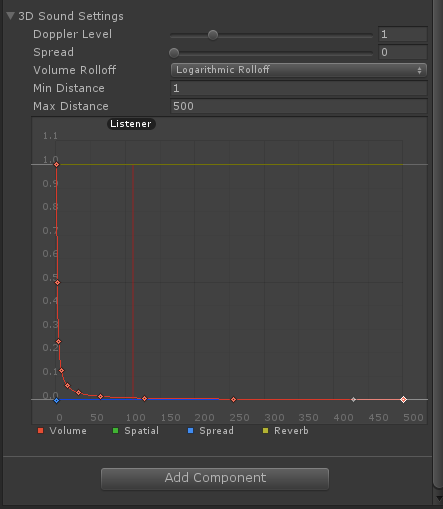
@ashapi3 When you first create an audio source the default max distance is 500 and the curve is set to meet zero on the Y axis at 500.
alt text

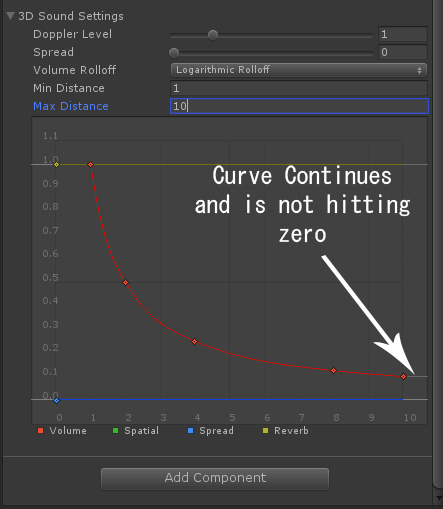
If you edit the max distance in the input field the curve is still the same and doesn't conform to your newly edited max distance.
alt text

So you have to edit it so that the last node on your curve is hitting zero otherwise the actual max distance is still 500. You might have to set it back to 500 so that you can delete unnecessary nodes so you don't get weird bumps in your curve out at far distances before setting it to the desired max distance.


soundoutside.png (33.5 kB)
soundoutside1.png (43.1 kB)
Comment
Add comment · Show 2 · Share
10 |3000 characters needed characters left characters exceeded
▼
  • Viewable by all users
  • Viewable by moderators
  • Viewable by moderators and the original poster
  • Advanced visibility
Viewable by all users
avatar image CelticKnight · Aug 28, 2017 at 12:01 AM 0
Share

+wderstine But if you edit the last node it automatically changes the Rolloff from logarithmic to custom.

avatar image TheGameLearner · Sep 27, 2018 at 05:08 AM 0
Share

Thanks, was struggling for a long time.

avatar image
1

Answer by marji_sound · Dec 28, 2013 at 05:43 PM

And if you need to eliminate panning but also have the effect of roll of at max distance, you can leave the pan at 1 but set the spread to 180 which will remove left-right panning.

Comment
Add comment · Share
10 |3000 characters needed characters left characters exceeded
▼
  • Viewable by all users
  • Viewable by moderators
  • Viewable by moderators and the original poster
  • Advanced visibility
Viewable by all users
avatar image
1

Answer by jpatinop80 · May 15, 2016 at 01:33 PM

Like the other said You Have to activate 3d sound with slider on Spatial Blend, But the important thing is the "audio listener".. must be on the object is getting near or far from 3d sound.

Comment
Add comment · Share
10 |3000 characters needed characters left characters exceeded
▼
  • Viewable by all users
  • Viewable by moderators
  • Viewable by moderators and the original poster
  • Advanced visibility
Viewable by all users
  • 1
  • 2
  • 3
  • ›

Your answer

Hint: You can notify a user about this post by typing @username

Up to 2 attachments (including images) can be used with a maximum of 524.3 kB each and 1.0 MB total.

Follow this Question

Answers Answers and Comments

32 People are following this question.

avatar image avatar image avatar image avatar image avatar image avatar image avatar image avatar image avatar image avatar image avatar image avatar image avatar image avatar image avatar image avatar image avatar image avatar image avatar image avatar image avatar image avatar image avatar image avatar image avatar image avatar image avatar image avatar image avatar image avatar image avatar image avatar image

Related Questions

WebGL audiosource max distance not working 1 Answer

webgl volume just doesnt work 0 Answers

Audio Source Volume not Fading Over Distance 6 Answers

How to get current volume of an AudioSource. 3 Answers

Is there a way to create a random Audiosource loop? 2 Answers


Enterprise
Social Q&A

Social
Subscribe on YouTube social-youtube Follow on LinkedIn social-linkedin Follow on Twitter social-twitter Follow on Facebook social-facebook Follow on Instagram social-instagram

Footer

  • Purchase
    • Products
    • Subscription
    • Asset Store
    • Unity Gear
    • Resellers
  • Education
    • Students
    • Educators
    • Certification
    • Learn
    • Center of Excellence
  • Download
    • Unity
    • Beta Program
  • Unity Labs
    • Labs
    • Publications
  • Resources
    • Learn platform
    • Community
    • Documentation
    • Unity QA
    • FAQ
    • Services Status
    • Connect
  • About Unity
    • About Us
    • Blog
    • Events
    • Careers
    • Contact
    • Press
    • Partners
    • Affiliates
    • Security
Copyright © 2020 Unity Technologies
  • Legal
  • Privacy Policy
  • Cookies
  • Do Not Sell My Personal Information
  • Cookies Settings
"Unity", Unity logos, and other Unity trademarks are trademarks or registered trademarks of Unity Technologies or its affiliates in the U.S. and elsewhere (more info here). Other names or brands are trademarks of their respective owners.
  • Anonymous
  • Sign in
  • Create
  • Ask a question
  • Spaces
  • Default
  • Help Room
  • META
  • Moderators
  • Explore
  • Topics
  • Questions
  • Users
  • Badges