
Wayback Machinekoobas.hobune.stream
May JUN Jul
Previous capture 13 Next capture
2021 2022 2023
1 capture
13 Jun 22 - 13 Jun 22
sparklines
Close Help
  • Products
  • Solutions
  • Made with Unity
  • Learning
  • Support & Services
  • Community
  • Asset Store
  • Get Unity

UNITY ACCOUNT

You need a Unity Account to shop in the Online and Asset Stores, participate in the Unity Community and manage your license portfolio. Login Create account
  • Blog
  • Forums
  • Answers
  • Evangelists
  • User Groups
  • Beta Program
  • Advisory Panel

Navigation

  • Home
  • Products
  • Solutions
  • Made with Unity
  • Learning
  • Support & Services
  • Community
    • Blog
    • Forums
    • Answers
    • Evangelists
    • User Groups
    • Beta Program
    • Advisory Panel

Unity account

You need a Unity Account to shop in the Online and Asset Stores, participate in the Unity Community and manage your license portfolio. Login Create account

Language

  • Chinese
  • Spanish
  • Japanese
  • Korean
  • Portuguese
  • Ask a question
  • Spaces
    • Default
    • Help Room
    • META
    • Moderators
    • Topics
    • Questions
    • Users
    • Badges
  • Home /
avatar image
0
Question by reinfeldx · Feb 20, 2015 at 09:07 PM · audiosourceaudioclipplayclipatpoint

Why am I able to play an AudioClip without an AudioSource?

I'm not sure why this is working. It seems that I am able to play AudioClips referenced in the script without having an AudioSource on the GameObject. In fact, I don't have an AudioSource anywhere in the scene.

I'm happy that it's working, but confused as to why. Any help?

 using UnityEngine;
 using System.Collections;
 using System.Collections.Generic;
 
 public class GramGram : MonoBehaviour {
 
     public List <AudioClip> audioClips = new List <AudioClip> ();
     
     // Update is called once per frame
     void Update () {
 
         if (Input.GetButtonDown ("Fire1")) {
             StartCoroutine ("Speak");
         }
     }
 
     IEnumerator Speak () {
 
         foreach (AudioClip clip in audioClips) {
             AudioSource.PlayClipAtPoint (clip, transform.position);
             yield return new WaitForSeconds (clip.length + 1f);
         }
     }
 }
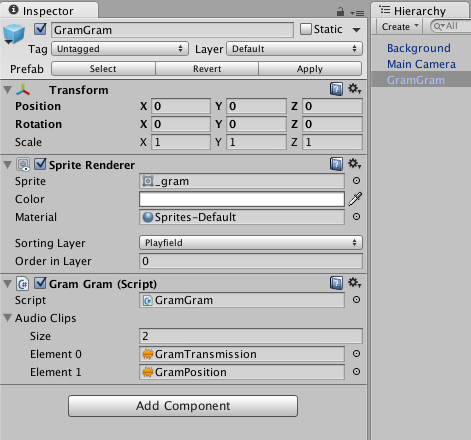
alt text

screen-shot-20120220.png (46.4 kB)
Comment
Add comment
10 |3000 characters needed characters left characters exceeded
▼
  • Viewable by all users
  • Viewable by moderators
  • Viewable by moderators and the original poster
  • Advanced visibility
Viewable by all users

1 Reply

· Add your reply
  • Sort: 
avatar image
1
Best Answer

Answer by tanoshimi · Feb 20, 2015 at 09:13 PM

Read the documentation for the PlayClipAtPoint function:

"This function creates an audio source but automatically disposes of it once the clip has finished playing."

http://docs.unity3d.com/ScriptReference/AudioSource.PlayClipAtPoint.html

Comment
Add comment · Show 5 · Share
10 |3000 characters needed characters left characters exceeded
▼
  • Viewable by all users
  • Viewable by moderators
  • Viewable by moderators and the original poster
  • Advanced visibility
Viewable by all users
avatar image reinfeldx · Feb 20, 2015 at 09:19 PM 0
Share

Ah, thanks.

I suppose then that PlayClipAtPoint is a resource-efficient way to play sound effects, relative to other options like Play and PlayOneShot?

avatar image Oooweeooo · Feb 20, 2015 at 10:21 PM 1
Share

I'm not sure if this is still the case, but PlayClipAtPoint used to create and destroy an object to play the sound. This would make it more expensive than the alternatives.

From our own tests PlayOneShot is marginally better than Play, but you can't test for things like isPlaying.

avatar image tanoshimi · Feb 20, 2015 at 10:34 PM 1
Share

Depends how you define "resource efficient".... As the documentation and Ooweeoo state - PlayClipAtPoint (and PlayOneShot) creates and then destroys an AudioSource component just to play the clip. That's "efficient" if you mean that you don't have to have an audiosource persisting in the scene when it isn't required. But it's certainly not "efficient" because it allocates and then destroys an object, requiring the garbage collector to clean up memory.

Generally speaking, they're to be avoided, especially on mobile devices.

avatar image reinfeldx · Feb 20, 2015 at 11:17 PM 0
Share

Thanks for the feedback. I'll keep those things in $$anonymous$$d and do some reading up my own as well.

avatar image BobbyDoogle · May 16, 2020 at 05:44 PM 0
Share

Old thread, I use pathelogical games pool manager, and I was curiouse, I just reworked my audio system to used a pooled prefab with an audio source (I set the clip and play then despawn it) pathelogical enables / disables but DOES NOT create / destroy. Any idea if this is more or less efficient then just PlayClipAtPoint?

Your answer

Hint: You can notify a user about this post by typing @username

Up to 2 attachments (including images) can be used with a maximum of 524.3 kB each and 1.0 MB total.

Follow this Question

Answers Answers and Comments

21 People are following this question.

avatar image avatar image avatar image avatar image avatar image avatar image avatar image avatar image avatar image avatar image avatar image avatar image avatar image avatar image avatar image avatar image avatar image avatar image avatar image avatar image avatar image

Related Questions

Making AudioSource follow camera? 1 Answer

A better script for a machine gun? 1 Answer

GetSpectrumData - what does it fill the samples argument with exactly? 0 Answers

AudioClip stuttering while loop is OFF and not using function Update? 1 Answer

Browsers prevent WebGL Audio to start at Awake. How to get notification of actual Audio start? 0 Answers


Enterprise
Social Q&A

Social
Subscribe on YouTube social-youtube Follow on LinkedIn social-linkedin Follow on Twitter social-twitter Follow on Facebook social-facebook Follow on Instagram social-instagram

Footer

  • Purchase
    • Products
    • Subscription
    • Asset Store
    • Unity Gear
    • Resellers
  • Education
    • Students
    • Educators
    • Certification
    • Learn
    • Center of Excellence
  • Download
    • Unity
    • Beta Program
  • Unity Labs
    • Labs
    • Publications
  • Resources
    • Learn platform
    • Community
    • Documentation
    • Unity QA
    • FAQ
    • Services Status
    • Connect
  • About Unity
    • About Us
    • Blog
    • Events
    • Careers
    • Contact
    • Press
    • Partners
    • Affiliates
    • Security
Copyright © 2020 Unity Technologies
  • Legal
  • Privacy Policy
  • Cookies
  • Do Not Sell My Personal Information
  • Cookies Settings
"Unity", Unity logos, and other Unity trademarks are trademarks or registered trademarks of Unity Technologies or its affiliates in the U.S. and elsewhere (more info here). Other names or brands are trademarks of their respective owners.
  • Anonymous
  • Sign in
  • Create
  • Ask a question
  • Spaces
  • Default
  • Help Room
  • META
  • Moderators
  • Explore
  • Topics
  • Questions
  • Users
  • Badges
