
Wayback Machinekoobas.hobune.stream
May JUN Jul
Previous capture 13 Next capture
2021 2022 2023
1 capture
13 Jun 22 - 13 Jun 22
sparklines
Close Help
  • Products
  • Solutions
  • Made with Unity
  • Learning
  • Support & Services
  • Community
  • Asset Store
  • Get Unity

UNITY ACCOUNT

You need a Unity Account to shop in the Online and Asset Stores, participate in the Unity Community and manage your license portfolio. Login Create account
  • Blog
  • Forums
  • Answers
  • Evangelists
  • User Groups
  • Beta Program
  • Advisory Panel

Navigation

  • Home
  • Products
  • Solutions
  • Made with Unity
  • Learning
  • Support & Services
  • Community
    • Blog
    • Forums
    • Answers
    • Evangelists
    • User Groups
    • Beta Program
    • Advisory Panel

Unity account

You need a Unity Account to shop in the Online and Asset Stores, participate in the Unity Community and manage your license portfolio. Login Create account

Language

  • Chinese
  • Spanish
  • Japanese
  • Korean
  • Portuguese
  • Ask a question
  • Spaces
    • Default
    • Help Room
    • META
    • Moderators
    • Topics
    • Questions
    • Users
    • Badges
  • Home /
avatar image
0
Question by indieman · Jul 14, 2014 at 07:17 PM · curvesplayclipatpoint

Having trouble with PlayClipAtPoint and Mecanim Curves

Hello everyone.

My player is setup with 2 scripts relevant to this issue: one is just a list of public audio clips (PlayerSounds.cs), the other is my character controller script (PlayerController.cs).

My controller script has an audio management function, like so:

 void AudioManagement()
     {
         footSteps = anim.GetFloat("FootStep");
         if(footSteps > 0.5)
             AudioSource.PlayClipAtPoint(playerSounds.footStepSound, transform.position);
     }

The footSteps variable is a public float, and is linked to the animation clip's curve, which for all walks/runs has 2 peaks at the value of 1. The peaks are synced to the foot/ground contact frame.
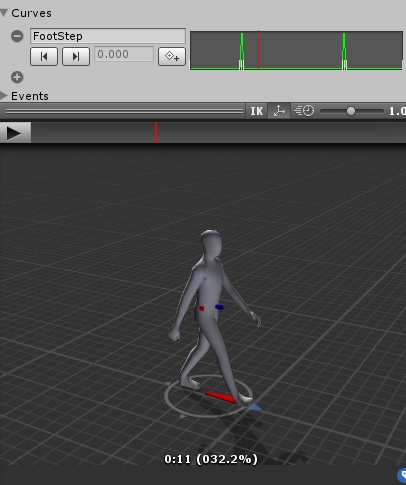
alt text

Now here's the funny bit: the sound only plays whenever it wants to. Sometimes I get 3 footstep sounds in a row before it goes silent for a few frames, then I get 1 or 2, then again a break in play, and on and on. Usually the silent treatment is longer (in seconds) than the cumulative duration of the played sounds, if that makes sense.

The audio clip's duration exceeds the time in between the peaks, meaning the sounds should overlap. And sometimes they do, only without any apparent logic.

Oh and the Audio Management function runs during FixedUpdate. Switching Fixed for regular Update didn't improve things.

If all else fails I will try the OnTriggerEnter solution, but that involves adding triggers to both feet and burdening the scene. I'd like to stick to a (working!) Curve/PlayClipAtPoint setup.

Any help/ideas appreciated, thanks in advance.

curve.jpg (48.9 kB)
Comment
Add comment
10 |3000 characters needed characters left characters exceeded
▼
  • Viewable by all users
  • Viewable by moderators
  • Viewable by moderators and the original poster
  • Advanced visibility
Viewable by all users

1 Reply

· Add your reply
  • Sort: 
avatar image
0

Answer by indieman · Jul 15, 2014 at 07:54 AM

The OnTriggerEnter solution works perfectly. But it's not as elegant. Oh well.

Comment
Add comment · Share
10 |3000 characters needed characters left characters exceeded
▼
  • Viewable by all users
  • Viewable by moderators
  • Viewable by moderators and the original poster
  • Advanced visibility
Viewable by all users

Your answer

Hint: You can notify a user about this post by typing @username

Up to 2 attachments (including images) can be used with a maximum of 524.3 kB each and 1.0 MB total.

Follow this Question

Answers Answers and Comments

2 People are following this question.

avatar image avatar image

Related Questions

create and display curve based on physics? 2 Answers

Adding an animation curve for SpriteRenderer.color via code. 1 Answer

How to generate random borders with collider? 1 Answer

Decrease volume of individual sounds over time 0 Answers

How to exdent or shink bezier tangent/arm 1 Answer


Enterprise
Social Q&A

Social
Subscribe on YouTube social-youtube Follow on LinkedIn social-linkedin Follow on Twitter social-twitter Follow on Facebook social-facebook Follow on Instagram social-instagram

Footer

  • Purchase
    • Products
    • Subscription
    • Asset Store
    • Unity Gear
    • Resellers
  • Education
    • Students
    • Educators
    • Certification
    • Learn
    • Center of Excellence
  • Download
    • Unity
    • Beta Program
  • Unity Labs
    • Labs
    • Publications
  • Resources
    • Learn platform
    • Community
    • Documentation
    • Unity QA
    • FAQ
    • Services Status
    • Connect
  • About Unity
    • About Us
    • Blog
    • Events
    • Careers
    • Contact
    • Press
    • Partners
    • Affiliates
    • Security
Copyright © 2020 Unity Technologies
  • Legal
  • Privacy Policy
  • Cookies
  • Do Not Sell My Personal Information
  • Cookies Settings
"Unity", Unity logos, and other Unity trademarks are trademarks or registered trademarks of Unity Technologies or its affiliates in the U.S. and elsewhere (more info here). Other names or brands are trademarks of their respective owners.
  • Anonymous
  • Sign in
  • Create
  • Ask a question
  • Spaces
  • Default
  • Help Room
  • META
  • Moderators
  • Explore
  • Topics
  • Questions
  • Users
  • Badges
