 koobas.hobune.stream


Orient vehicle to ground normal (terrain hugging)
So the problem I'm having is trying to orient a vehicle to the ground based on a raycast. The raycast works, the movement works, and aligning the normal of the ground to the transform.up works. However, together these don't work. It won't rotate.
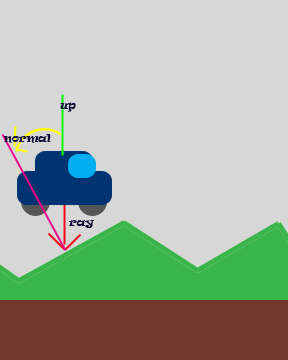
I think the problem is that aligning the transform.up = hit.normal overrides any rotation. My question would be, how exactly do I form an algorithm that will translate rotation into the normal. I figure if I can rotate the normal before I set it to the up vector that rotation should be possible. And I don't want it to rotate and snap back, which I found out how to do.
Here is my code (C#):
 if (Physics.Raycast(transform.position, -transform.up, out hit))
     {
         Quaternion grndTilt = Quaternion.FromToRotation(transform.up, hit.normal);
         transform.rotation = Quaternion.Euler(0, Input.GetAxis("Horizontal") * turnSpeed * 100 * Time.deltaTime, 0) * grndTilt;
         //transform.up = hit.normal;
     }
     Vector3 movDir;
     //transform.Rotate(0, Input.GetAxis("Horizontal") * turnSpeed * Time.deltaTime,0);
     movDir = transform.forward*Input.GetAxis("Vertical")*speed;
     // moves the character in horizontal direction
     controller.Move(movDir*Time.deltaTime-Vector3.up*0.1f);
I've been all over the internet, and nothing seems to be working!
EDIT:
Removed the code because it was incorrect. The solution:
Two parts - a composite vector from each of the corners to give you the direction to orient (my original issue) - and separating the mesh to a sub gameobject. Keep your controller as the root (or even another sub object). Very clean movement. Forgive me for no code example. :)


the back and front are offset variables to move the raycasts towards the front of the tank and the back. These are float data types.
An easy solution is in two parts: - a composite vector from each of the corners to give you the direction to orient (my original issue) - and separating the mesh to a sub gameobject. $$anonymous$$eep your controller as the root (or even another sub object)
Was a very clean movement
Since I felt the urge to answer this for someone else who was having a problem, I dredged up how I did it. I didn't like messing with the rotation to orient the object as it caused a ton of issues.
So this one is a little bit difficult if you're not well versed on you vector math (like I'm not :P). So essentially, you want to beam down 4 vectors and then combine them and set the composite normal to transform's up. So here's the code:
 public Transform backLeft;
 public Transform backRight;
 public Transform frontLeft;
 public Transform frontRight;
 public RaycastHit lr;
 public RaycastHit rr;
 public RaycastHit lf;
 public RaycastHit rf;

 public Vector3 upDir;

 void Update () {

     Physics.Raycast(backLeft.position + Vector3.up, Vector3.down, out lr);
     Physics.Raycast(backRight.position + Vector3.up, Vector3.down, out rr);
     Physics.Raycast(frontLeft.position + Vector3.up, Vector3.down, out lf);
     Physics.Raycast(frontRight.position + Vector3.up, Vector3.down, out rf);

     upDir = (Vector3.Cross(rr.point - Vector3.up, lr.point - Vector3.up) +
              Vector3.Cross(lr.point - Vector3.up, lf.point - Vector3.up) +
              Vector3.Cross(lf.point - Vector3.up, rf.point - Vector3.up) +
              Vector3.Cross(rf.point - Vector3.up, rr.point - Vector3.up)
             ).normalized;
     Debug.DrawRay(rr.point, Vector3.up);
     Debug.DrawRay(lr.point, Vector3.up);
     Debug.DrawRay(lf.point, Vector3.up);
     Debug.DrawRay(rf.point, Vector3.up);


     transform.up = upDir;

 }
Left some debug code in there for visualization. Its surprisingly smooth, but I'll let you figure out how to apply it: 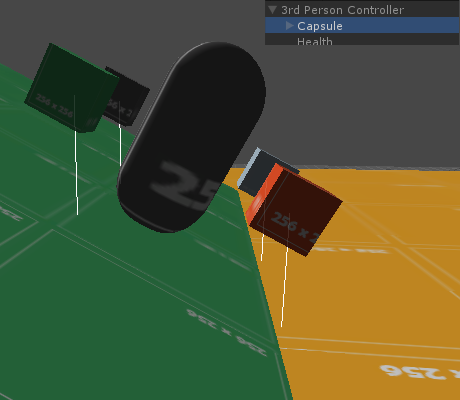
Also, if you use cubes - like I did - make sure they are NOT getting hit by the raycast. The hierarchy works like specified in the picture (Ensure the mesh is a sub object and does not have a character controller).
Only problem is if one of your rays hangs over the edge, you'll get a bit glitchy. So just figure out how to tell if that case happens (like a drastic different in the rays or something, or possibly specify distance): 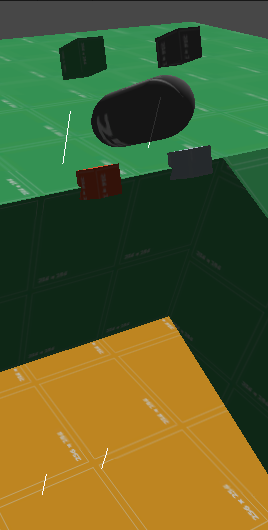
If the ray falls to infinity, there is no hit. So then it just removes it from the equation. Which is good, and means it isn't part of the adjustment. But so here's the solution from who-knows-when I posted my original question!

Awesome. Thanks, SirGive. I'm going to try to implement this over the next few days. Will let you know. I've spent literally months on this problem, from physics based solutions to creating shell objects with the model as a child (as you've done above), with little success. Can't wait to put this to use!
Glad I could help! Its also worth noting that the way you apply your fwd may affect applying the terrain adjustment. For instance, this code works in conjunction with unity's thirdpersoncontroller script. However, there are issues with my friend's custom movement script. I believe its an order of operations issue. Unfortunately, I'm not working on anything that utilizes this so I don't really have a good environment to fully test it.


Hey @SirGive, great post. It seems to work better than just combining the returned normals of the RayCastHits. Your math works great but I think it would be more correct if it looked something like this
 // Get the vectors that connect the raycast hit points

 Vector3 a = rr.point - lr.point;
 Vector3 b = rf.point - rr.point;
 Vector3 c = lf.point - rf.point;
 Vector3 d = rr.point - lf.point;

 // Get the normal at each corner

 Vector3 crossBA = Vector3.Cross (b, a);
 Vector3 crossCB = Vector3.Cross (c, b);
 Vector3 crossDC = Vector3.Cross (d, c);
 Vector3 crossAD = Vector3.Cross (a, d);

 // Calculate composite normal

 transform.up = (crossBA + crossCB + crossDC + crossAD ).normalized;
Using Debug.DrayRay to visualize these cross product vectors gives you the expected normals at each ray cast hit point.
$$anonymous$$y question is about the hanging edge case. When very close to an edge you can really get some undesired results. 

The pitures above have the raycasts shooting down from each corner and the debug lines shown are the calculated normals. In the first frame you can see that the raycasts hit the lower ledge and the object was oriented appropriately. However, in the second frame, due to the re-orientation of the object, the raycasts hit the top ledge, so the object is orientated back to level. Rinse, repeat. This causes the object to jitter back and forth indefinitely. I am curious if you had a solution for this behavior?
Thanks!

This definitely will help smooth things out.

Another fix is to Lerp towards the value of up ins$$anonymous$$d of directly setting it. It makes the difference between a really jerky motion if you are using it on a terrain for example, and a really smooth motion.
     // Calculate composite normal
     Vector3 newUp = (crossBA + crossCB + crossDC + crossAD).normalized;

     transform.up = Vector3.Lerp(transform.up, newUp, Time.deltaTime);

I had the same problem: assigning transform.up seems to be equivalent to transform.rotation = Quaternion.FromToRotation(Vector3.up, newNormal). The solution for me was to keep a "compass" variable which showed the current rotation angle from forward: thus I "rotated" this angle and applied to the object using Euler:
float curDir = 0f; // compass indicating direction
float vertSpeed = 0f; // vertical speed (see note)
...
void Update(){
    float turn = Input.GetAxis("Horizontal") * turnSpeed * 100 * Time.deltaTime,
    curDir = (curDir + turn) % 360; // rotate angle modulo 360 according to input
    if (Physics.Raycast(transform.position, -transform.up, out hit))
    {
        Quaternion grndTilt = Quaternion.FromToRotation(transform.up, hit.normal);
        transform.rotation = grndTilt * Quaternion.Euler(0, curDir, 0);
    }
    Vector3 movDir;
    movDir = transform.forward*Input.GetAxis("Vertical")*speed;
    // moves the character in horizontal direction (gravity changed!)
    if (controller.isGrounded) vertSpeed = 0; // zero v speed when grounded
    vertSpeed -= 9.8f * Time.deltaTime; // apply gravity
    movDir.y = vertSpeed; // keep the current vert speed
    controller.Move(movDir*Time.deltaTime);
    ...
An alternative way to do that is using the OnControllerColliderHit event to get the normal - but only if its Y coordinate is > 0.3 (or some other suitable value) or else the car can stick to walls or to other vehicles during lateral collisions!
NOTE: I changed the way gravity is applied - it gives a better behaviour when "flying" after a hill. Discard these changes if you don't want them - the rotation thing is at the beginning, and has nothing to do with gravity.
EDITED: There was an error in the script above: the rotation was being calculated from transform.up to the normal (it should be Vector3.up to normal) what was causing the crazy instability.
In my tests, I also noticed that the vehicle was following the terrain normal immediately, what was producing a strange behaviour. I added a new variable - curNormal - which smoothly followed the terrain normal using Lerp, and also was used in the Raycast to avoid other instabilities. The result is very convincent - hope you like it too:
 float curDir = 0f; // compass indicating direction
 float vertSpeed = 0f; // vertical speed (see note)
 Vector3 curNormal = Vector3.up; // smoothed terrain normal

 void Update(){
     float turn = Input.GetAxis("Horizontal") * turnSpeed * 100 * Time.deltaTime;
     curDir = (curDir + turn) % 360; // rotate angle modulo 360 according to input
     RaycastHit hit;
     if (Physics.Raycast(transform.position, -curNormal, out hit)){
         curNormal = Vector3.Lerp(curNormal, hit.normal, 4*Time.deltaTime);
         Quaternion grndTilt = Quaternion.FromToRotation(Vector3.up, curNormal);
         transform.rotation = grndTilt * Quaternion.Euler(0, curDir, 0);
     }
     Vector3 movDir;
     movDir = transform.forward*Input.GetAxis("Vertical")*speed;
     // moves the character in horizontal direction (gravity changed!)
     if (controller.isGrounded) vertSpeed = 0; // zero v speed when grounded
     vertSpeed -= 9.8f * Time.deltaTime; // apply gravity
     movDir.y = vertSpeed; // keep the current vert speed
     controller.Move(movDir*Time.deltaTime);
 }
JAVASCRIPT VERSION:
 private var curDir: float = 0f; // compass indicating direction
 private var vertSpeed: float = 0f; // vertical speed (see note)
 private var curNormal = Vector3.up; // smoothed terrain normal

 function Update(){
     var turn = Input.GetAxis("Horizontal") * turnSpeed * 100 * Time.deltaTime;
     curDir = (curDir + turn) % 360; // rotate angle modulo 360 according to input
     var hit: RaycastHit;
     if (Physics.Raycast(transform.position, -curNormal, hit)){
         curNormal = Vector3.Lerp(curNormal, hit.normal, 4*Time.deltaTime);
         var grndTilt = Quaternion.FromToRotation(Vector3.up, curNormal);
         transform.rotation = grndTilt * Quaternion.Euler(0, curDir, 0);
     }
     var movDir = transform.forward*Input.GetAxis("Vertical")*speed;
     // moves the character in horizontal direction (gravity changed!)
     if (controller.isGrounded) vertSpeed = 0; // zero v speed when grounded
     vertSpeed -= 9.8f * Time.deltaTime; // apply gravity
     movDir.y = vertSpeed; // keep the current vert speed
     controller.Move(movDir*Time.deltaTime);
 }
Hmm... not working for me. $$anonymous$$y vehicle just rotates and then snaps back. Also rotation is really if-y. When rotating it tends to freak out.
I think i'm more so looking for an algorithm to set transfom.up ins$$anonymous$$d of the whole rotation. Could be wrong though.

I found the error and changed the script - now it's tested and following the terrain without any instability. Give a try to the new version above.
That works extremely well. I was actually able to achieve the exact same thing with two raycasts. Funny thing is, it required me to use transform.position and transform.forward. But yours does the charm. I'm not sure which has less overhead, so I'll make sure to check. Here is what I did:
RaycastHit hitA;
 if (Physics.Raycast(transform.position + transform.forward * front, -transform.up, out hitA))
 {
     RaycastHit hitB;
     if (Physics.Raycast(transform.position - transform.forward * back, -transform.up, out hitB))
         transform.forward = hitA.point - hitB.point; // check A to B vector and align forward

This topic seems like it comes up at least once a day :P
Here's my take on it, a few links and some quick code.
1. make-player-character-stick-to-the-level-mesh 2. walking-on-a-cube 3. How-in-the-world-were-the-physics-in-F-zero-X-done 4. script-for-hovercraft-mechanics
I like to keep things simple. So if you can get away with the least amount of code, do it.. Use a SphereCast with a radius appropriate for your vehicle/player. One SphereCast with a Lerp will give you the feel of using 4 or more raycast without the complexity. If you don't want to climb 90° angles make the radius less than half the vehicle/player width. If you want free rotation physics while in the air use a small distance for the SphereCast. Example code below uses 0.5 meter radius and 5 meter distance.
 RaycastHit hit;
 if (Physics.SphereCast(transform.position, 0.5f, -transform.up, out hit, 5)) {
     transform.rotation = Quaternion.Lerp(transform.rotation, Quaternion.LookRotation(Vector3.Cross(transform.right, hit.normal), hit.normal), Time.deltaTime * 5.0f);
 }
If you want more precision SphereCast or Raycast either at points spread out then cast down or from the center cast at 45° angles down and out then average the angles to get the best orientation.


For the rotation, it snaps back because your code says the rotation is the current value of the arrow keys. Of course when you let go it snaps to 0. Use the arrows to add to rotation (the answer above.)
For raycast wiggling, use -Vector3.up as the aim dir instead of -transform.up. The latter is down from our tilt. So, tilting changes the raycast dir, which hits the ground somewhere else, which gets a diff normal, which makes you tilt a different dir... . You'll wiggle any time you stand still on a curved surface. The effect is worse as your (0,0,0) gets further off the ground. -Vector3.up is always straight down, which won't change as we tilt.
Setting transform.up wants to override any previous tilt you have. It's actually doing a bit of math to figure out how to get up to point that way. Using *grndTilt (if it stands for the tilt from "no change" to "ground normal" changes your up while keeping everything the same.
To apply the grndTilt, the order multiplying quaternions matters, and it's usually backwards to how you think. Try flipping *grndtilt to in front instead of in back (that's in the answer above, but is easy to miss, since we are so used to thinking a*b and b*a are the same.) Or, you can think of doing the tilt as: transform.rotation = tilt*transform.rotation;
I didn't even think about using Vector3.up! I noticed that it was co$$anonymous$$g down from the tilt, but it never cross my $$anonymous$$d that it could be a problem. Thanks. And I have forgotten about the order of rotations. facepalm I need to brush up on my math. I did get it working, but I used 2 raycasts to be much more simple. Thanks for that.

Aldonaletto's answer worked for me like this:
     public GameObject target;
     float curDir = 0f; // compass indicating direction
     Vector3 curNormal = Vector3.up; // smoothed terrain normal
     public float turn;

     // Update is called once per frame
     void Update ()
     {

         curDir = (curDir + turn) % 360; // rotate angle modulo 360 according to input
         RaycastHit hit;
         if (Physics.Raycast(target.transform.position, -curNormal, out hit))
         {
             curNormal = Vector3.Lerp(curNormal, hit.normal, 4*Time.deltaTime);
             Quaternion grndTilt = Quaternion.FromToRotation(Vector3.up, curNormal);
             target.transform.rotation = grndTilt * Quaternion.Euler(0, curDir, 0);
         }
     }
If you want the object to turn just set turn to .01f or whatever amount until it has turned as much as you need then set it back to 0.





