
Wayback Machinekoobas.hobune.stream
May JUN Jul
Previous capture 13 Next capture
2021 2022 2023
1 capture
13 Jun 22 - 13 Jun 22
sparklines
Close Help
  • Products
  • Solutions
  • Made with Unity
  • Learning
  • Support & Services
  • Community
  • Asset Store
  • Get Unity

UNITY ACCOUNT

You need a Unity Account to shop in the Online and Asset Stores, participate in the Unity Community and manage your license portfolio. Login Create account
  • Blog
  • Forums
  • Answers
  • Evangelists
  • User Groups
  • Beta Program
  • Advisory Panel

Navigation

  • Home
  • Products
  • Solutions
  • Made with Unity
  • Learning
  • Support & Services
  • Community
    • Blog
    • Forums
    • Answers
    • Evangelists
    • User Groups
    • Beta Program
    • Advisory Panel

Unity account

You need a Unity Account to shop in the Online and Asset Stores, participate in the Unity Community and manage your license portfolio. Login Create account

Language

  • Chinese
  • Spanish
  • Japanese
  • Korean
  • Portuguese
  • Ask a question
  • Spaces
    • Default
    • Help Room
    • META
    • Moderators
    • Topics
    • Questions
    • Users
    • Badges
  • Home /
avatar image
1
Question by medkhai · Feb 25, 2015 at 11:54 AM · prefablightingartifacts

Indoor lighting not blending. shows artifact on component snap lines

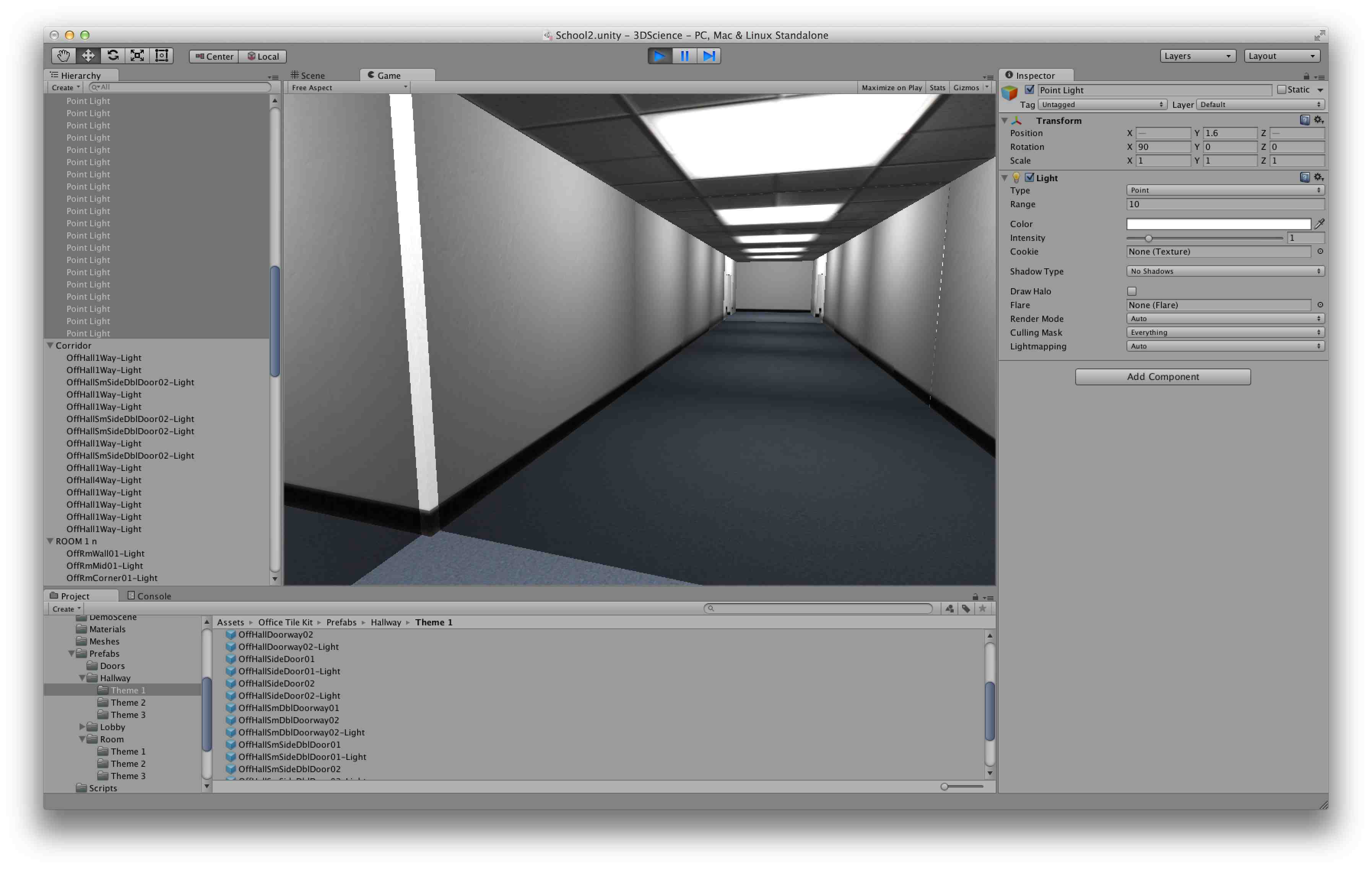
I have bought Nitrous Butterfly Office Level Kit, and was trying to learn how to use it. I build a simple corridor and some rooms, then I tried putting Point Lights to illuminate the interiors.

However as I kept adding lights, some strange artifact became apparent, where the room and corridor prefab snap together.

You can clearly see that there are lines between each prefab, the light does not blend smoothly.

I tried lowering intensity or range, but even at the lowest setting intensity 0.1 the lines are still visible, and the light do not blend smoothly.
alt text

ligh-error-plan.jpg (137.8 kB)
light-error1.jpg (271.3 kB)
Comment
Add comment · Show 1
10 |3000 characters needed characters left characters exceeded
▼
  • Viewable by all users
  • Viewable by moderators
  • Viewable by moderators and the original poster
  • Advanced visibility
Viewable by all users
avatar image Josh Naylor ♦♦ · Feb 25, 2015 at 11:55 AM 0
Share

have you tried asking the publisher about the issue

3 Replies

· Add your reply
  • Sort: 
avatar image
1

Answer by tpelham42 · Feb 26, 2015 at 02:57 AM

I am the kit publisher.

This appears to be an issue with the lightmaps in your scene. You should either

a. Ensure all level pieces are marked as lightmap static and re-bake the scene. OR b. If you don't want light maps then ensure there are no existing lightmaps are built for the scene by clearing them in the light map window.

Unity Lightmapping Quickstart: http://docs.unity3d.com/Manual/Lightmapping.html

Comment
Add comment · Show 1 · Share
10 |3000 characters needed characters left characters exceeded
▼
  • Viewable by all users
  • Viewable by moderators
  • Viewable by moderators and the original poster
  • Advanced visibility
Viewable by all users
avatar image Josh Naylor ♦♦ · Feb 26, 2015 at 03:40 PM 0
Share

It's great to see publishers replying to these kind of threads, keep up the good work!

avatar image
0

Answer by medkhai · Feb 26, 2015 at 03:40 PM

Dear tpelham42

thank you for your answer. I was not using and lightmap, as I was just testing out the kit. However your advice will be precious once I start using it in a real project.

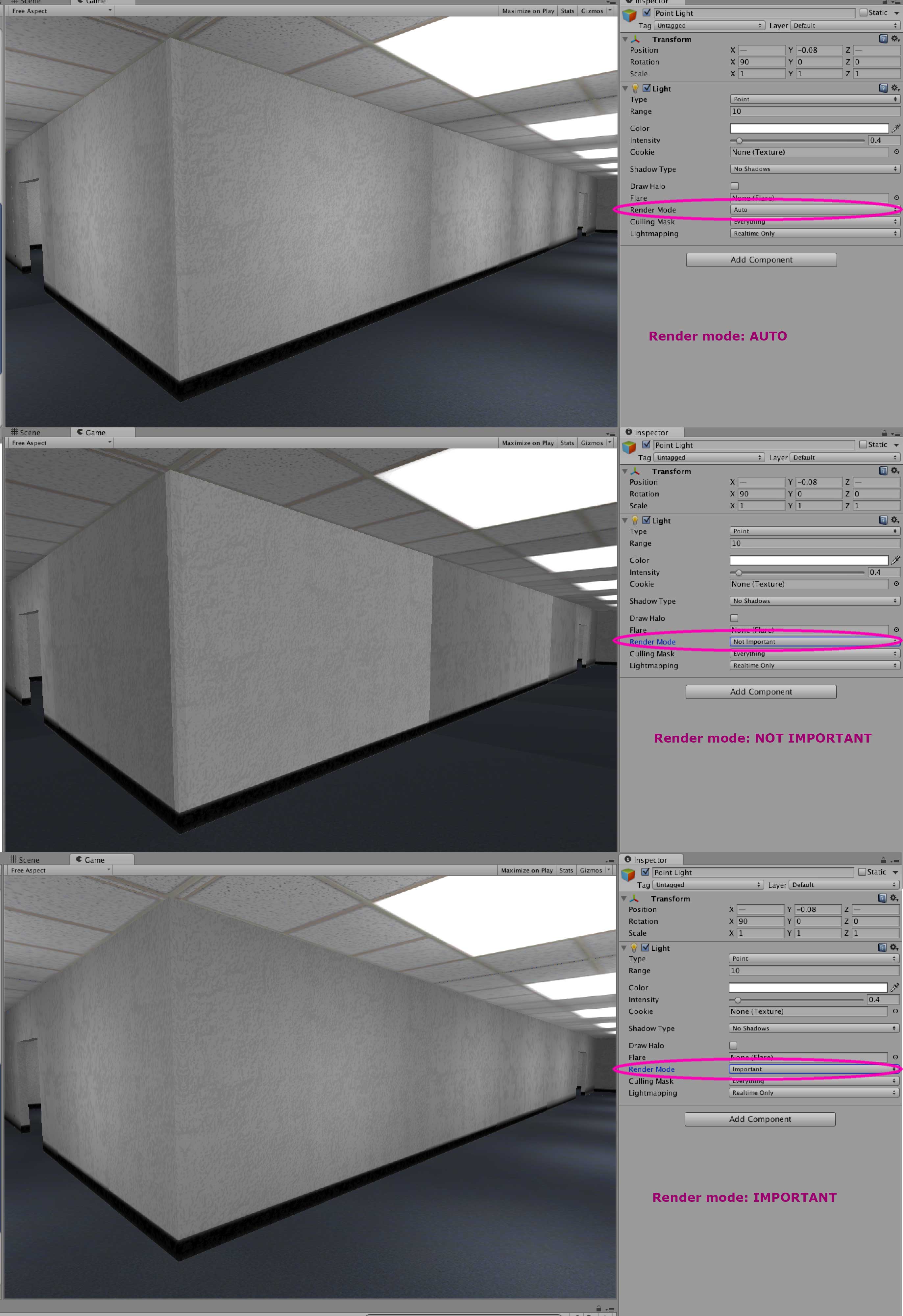
I found that the Render mode of the lights affects the problem I was having. By default my lights were set as Auto, so I has seeing this effect. Changing the Render Mode to Important fixed it.
alt text


solved.jpg (493.8 kB)
Comment
Add comment · Share
10 |3000 characters needed characters left characters exceeded
▼
  • Viewable by all users
  • Viewable by moderators
  • Viewable by moderators and the original poster
  • Advanced visibility
Viewable by all users
avatar image
0

Answer by marcospgp · Feb 01, 2021 at 01:17 PM

Just wanted to chime in and mention that this also happens in the Universal Render Pipeline, and can't be fixed by setting Render Mode to Important as mentioned above.

More information about lighting in URP here https://learn.unity.com/tutorial/editing-lighting-in-the-lightweight-render-pipeline

Comment
Add comment · Share
10 |3000 characters needed characters left characters exceeded
▼
  • Viewable by all users
  • Viewable by moderators
  • Viewable by moderators and the original poster
  • Advanced visibility
Viewable by all users

Your answer

Hint: You can notify a user about this post by typing @username

Up to 2 attachments (including images) can be used with a maximum of 524.3 kB each and 1.0 MB total.

Follow this Question

Answers Answers and Comments

5 People are following this question.

avatar image avatar image avatar image avatar image avatar image

Related Questions

Vertex-Lit mesh artifacts 0 Answers

Why does my Unity 2019 baked lighting have errors? 1 Answer

Baked area light not showing in android after downloading asset bundle 0 Answers

Lighting in Augmented Reality. 3 Answers

Light Baking for Single Scene Game 0 Answers


Enterprise
Social Q&A

Social
Subscribe on YouTube social-youtube Follow on LinkedIn social-linkedin Follow on Twitter social-twitter Follow on Facebook social-facebook Follow on Instagram social-instagram

Footer

  • Purchase
    • Products
    • Subscription
    • Asset Store
    • Unity Gear
    • Resellers
  • Education
    • Students
    • Educators
    • Certification
    • Learn
    • Center of Excellence
  • Download
    • Unity
    • Beta Program
  • Unity Labs
    • Labs
    • Publications
  • Resources
    • Learn platform
    • Community
    • Documentation
    • Unity QA
    • FAQ
    • Services Status
    • Connect
  • About Unity
    • About Us
    • Blog
    • Events
    • Careers
    • Contact
    • Press
    • Partners
    • Affiliates
    • Security
Copyright © 2020 Unity Technologies
  • Legal
  • Privacy Policy
  • Cookies
  • Do Not Sell My Personal Information
  • Cookies Settings
"Unity", Unity logos, and other Unity trademarks are trademarks or registered trademarks of Unity Technologies or its affiliates in the U.S. and elsewhere (more info here). Other names or brands are trademarks of their respective owners.
  • Anonymous
  • Sign in
  • Create
  • Ask a question
  • Spaces
  • Default
  • Help Room
  • META
  • Moderators
  • Explore
  • Topics
  • Questions
  • Users
  • Badges