
Wayback Machinekoobas.hobune.stream
May JUN Jul
Previous capture 13 Next capture
2021 2022 2023
1 capture
13 Jun 22 - 13 Jun 22
sparklines
Close Help
  • Products
  • Solutions
  • Made with Unity
  • Learning
  • Support & Services
  • Community
  • Asset Store
  • Get Unity

UNITY ACCOUNT

You need a Unity Account to shop in the Online and Asset Stores, participate in the Unity Community and manage your license portfolio. Login Create account
  • Blog
  • Forums
  • Answers
  • Evangelists
  • User Groups
  • Beta Program
  • Advisory Panel

Navigation

  • Home
  • Products
  • Solutions
  • Made with Unity
  • Learning
  • Support & Services
  • Community
    • Blog
    • Forums
    • Answers
    • Evangelists
    • User Groups
    • Beta Program
    • Advisory Panel

Unity account

You need a Unity Account to shop in the Online and Asset Stores, participate in the Unity Community and manage your license portfolio. Login Create account

Language

  • Chinese
  • Spanish
  • Japanese
  • Korean
  • Portuguese
  • Ask a question
  • Spaces
    • Default
    • Help Room
    • META
    • Moderators
    • Topics
    • Questions
    • Users
    • Badges
  • Home /
avatar image
0
Question by Fattie · Nov 17, 2014 at 08:01 AM · uislider4.6

4.6 UI "Slider" jumps on handle press?

Note - in fact this has been fixed Nov19 per Runevision @ Unity

http://forum.unity3d.com/threads/slider-is-broken-cant-grab.280585/

they say the fix should appear in a patch


The slider handles do not work - if you "grab" them, they jump to that spot.
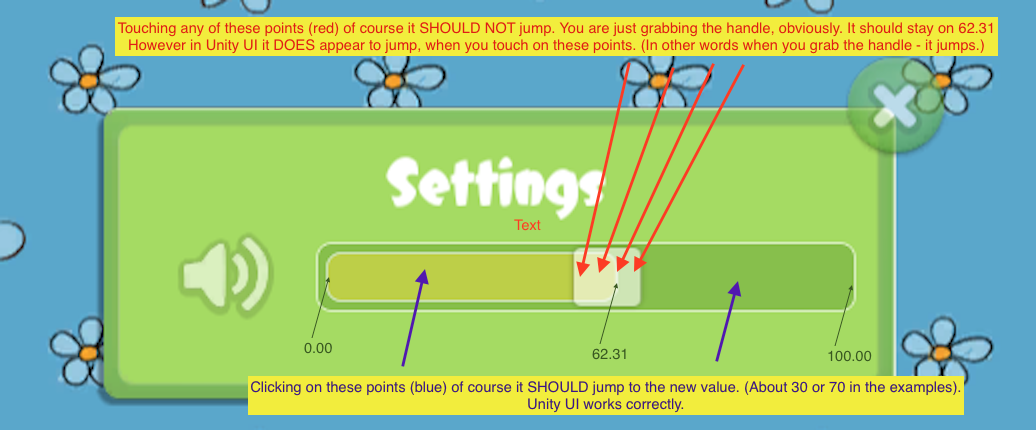
alt text

screen shot 2014-11-17 at 15.51.24.png (90.2 kB)
ui+slider.png (202.7 kB)
Comment
Add comment
10 |3000 characters needed characters left characters exceeded
▼
  • Viewable by all users
  • Viewable by moderators
  • Viewable by moderators and the original poster
  • Advanced visibility
Viewable by all users

2 Replies

· Add your reply
  • Sort: 
avatar image
0

Answer by fafase · Nov 17, 2014 at 09:03 AM

It seems to be the default behaviour as long as your slider is interactable. I guess this is because the interactable is on the slider so the whole box is acting.

If you untick this on the slider component, then it won't jump. But it won't do anything anymore either...

Then it seems to be up to you to create a script where you will perform the movement yourself, using IBeginDragHandler, IDragHandler. But then you also need to update all of the information of slider bar and values and so on...

Comment
Add comment · Show 6 · Share
10 |3000 characters needed characters left characters exceeded
▼
  • Viewable by all users
  • Viewable by moderators
  • Viewable by moderators and the original poster
  • Advanced visibility
Viewable by all users
avatar image fafase · Nov 17, 2014 at 09:05 AM 0
Share

You may be better off creating your won slider. Also, using the new UI and you cannot publish anymore. I got that issue lately when using the uGUI and then anyone playing the game on a computer with no Unity would see blank GUI items.

avatar image Kiwasi · Nov 17, 2014 at 10:12 AM 0
Share

Web player support has been intermittent on the beta. The other platforms publish fine.

avatar image Kiwasi · Nov 17, 2014 at 10:16 AM 0
Share

You may be able to block or invalidate the click if it falls inside the handle rect. Should be easy enough to do.

avatar image fafase · Nov 17, 2014 at 10:18 AM 0
Share

Isn't all platforms including a watermark saying "Built with Beta"? I think Standalone does, not sure about mobile.

avatar image Kiwasi · Nov 17, 2014 at 10:29 AM 0
Share

Web player has the watermark. I wouldn't $$anonymous$$d it so much if it was a proper logo and didn't look so tacky. Still, they are calling updates 'release candidates' now, and 5 is in beta. So it can't be too far off actual release.

Show more comments
avatar image
0

Answer by Scribe · Nov 17, 2014 at 10:41 AM

Mine works exactly as you have suggested it should by default :o I've uploaded a little test build for windows (.exe) here if you would like to test it, I'm not sure what is causing the difference though, I have the older 4.6 I believe as opposed to the 5 beta if that is it?

Comment
Add comment · Show 12 · Share
10 |3000 characters needed characters left characters exceeded
▼
  • Viewable by all users
  • Viewable by moderators
  • Viewable by moderators and the original poster
  • Advanced visibility
Viewable by all users
avatar image Fattie · Nov 17, 2014 at 10:44 AM 0
Share

Hi Scribe, thanks! I'm using 4.6.0f2. You? Perhaps you could just post the unity project??

avatar image Scribe · Nov 17, 2014 at 10:48 AM 0
Share

https://www.dropbox.com/s/pnifzbjvy46c73v/sliderTest.unitypackage?dl=0 Hopefully that works for you!

avatar image fafase · Nov 17, 2014 at 11:14 AM 0
Share

I have 4.6.0b17 and it works the "wrong" way.

avatar image Scribe · Nov 17, 2014 at 11:18 AM 0
Share

I am using 4.6.0.31489 apparently!

avatar image Scribe · Nov 17, 2014 at 12:42 PM 0
Share

I think my version must be earlier as when I went to download the beta again just now the version downloaded is 4.6.0f2, which is strange if they have 'fixed' it to be wrong haha! I got it from the main 4.6 beta unity site, I could zip my program file up but I'm not sure if that would be legal or helpful if the final release is going to have different functionality! :S

Show more comments

Your answer

Hint: You can notify a user about this post by typing @username

Up to 2 attachments (including images) can be used with a maximum of 524.3 kB each and 1.0 MB total.

Follow this Question

Answers Answers and Comments

27 People are following this question.

avatar image avatar image avatar image avatar image avatar image avatar image avatar image avatar image avatar image avatar image avatar image avatar image avatar image avatar image avatar image avatar image avatar image avatar image avatar image avatar image avatar image avatar image avatar image avatar image avatar image avatar image avatar image

Related Questions

Left end of ui slider background flattens when moving handle to left 0 Answers

Slider handle disappears when enlarged up (4.6ui) 1 Answer

(4.6 UI) Use a slider's "Value" as parameter to attached funct? 1 Answer

PlayerPrefs not saving slider value & audio 2 Answers

4.6 UI Change what 'Spacebar' is doing by default 1 Answer


Enterprise
Social Q&A

Social
Subscribe on YouTube social-youtube Follow on LinkedIn social-linkedin Follow on Twitter social-twitter Follow on Facebook social-facebook Follow on Instagram social-instagram

Footer

  • Purchase
    • Products
    • Subscription
    • Asset Store
    • Unity Gear
    • Resellers
  • Education
    • Students
    • Educators
    • Certification
    • Learn
    • Center of Excellence
  • Download
    • Unity
    • Beta Program
  • Unity Labs
    • Labs
    • Publications
  • Resources
    • Learn platform
    • Community
    • Documentation
    • Unity QA
    • FAQ
    • Services Status
    • Connect
  • About Unity
    • About Us
    • Blog
    • Events
    • Careers
    • Contact
    • Press
    • Partners
    • Affiliates
    • Security
Copyright © 2020 Unity Technologies
  • Legal
  • Privacy Policy
  • Cookies
  • Do Not Sell My Personal Information
  • Cookies Settings
"Unity", Unity logos, and other Unity trademarks are trademarks or registered trademarks of Unity Technologies or its affiliates in the U.S. and elsewhere (more info here). Other names or brands are trademarks of their respective owners.
  • Anonymous
  • Sign in
  • Create
  • Ask a question
  • Spaces
  • Default
  • Help Room
  • META
  • Moderators
  • Explore
  • Topics
  • Questions
  • Users
  • Badges
