
Wayback Machinekoobas.hobune.stream
May JUN Jul
Previous capture 12 Next capture
2021 2022 2023
1 capture
12 Jun 22 - 12 Jun 22
sparklines
Close Help
  • Products
  • Solutions
  • Made with Unity
  • Learning
  • Support & Services
  • Community
  • Asset Store
  • Get Unity

UNITY ACCOUNT

You need a Unity Account to shop in the Online and Asset Stores, participate in the Unity Community and manage your license portfolio. Login Create account
  • Blog
  • Forums
  • Answers
  • Evangelists
  • User Groups
  • Beta Program
  • Advisory Panel

Navigation

  • Home
  • Products
  • Solutions
  • Made with Unity
  • Learning
  • Support & Services
  • Community
    • Blog
    • Forums
    • Answers
    • Evangelists
    • User Groups
    • Beta Program
    • Advisory Panel

Unity account

You need a Unity Account to shop in the Online and Asset Stores, participate in the Unity Community and manage your license portfolio. Login Create account

Language

  • Chinese
  • Spanish
  • Japanese
  • Korean
  • Portuguese
  • Ask a question
  • Spaces
    • Default
    • Help Room
    • META
    • Moderators
    • Topics
    • Questions
    • Users
    • Badges
  • Home /
avatar image
0
Question by jade1209 · Apr 11, 2017 at 05:34 PM · unity 5cameraperspective camera

Issue with Perspective Camera with a specific view.

Hello Unity community. I have a little problem about perspective camera. What I want to achieve is similar to the following screenshot but I want the 2 side images on top of the screen. alt text
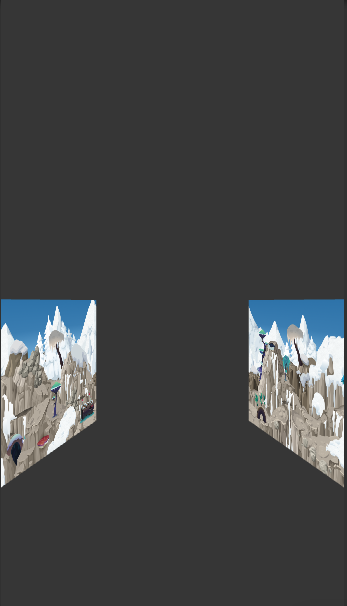
However, when I adjust the y position of the image, what I get is the following screenshot.
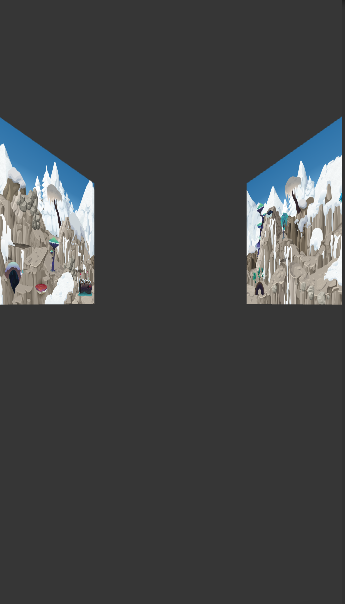
alt text

So, to conclude my problem. I want the view like the first image but position like the second image and I don't know how to do it. So, any suggestion? Thank you!

2.png (64.5 kB)
3.png (64.5 kB)
Comment
Add comment · Show 2
10 |3000 characters needed characters left characters exceeded
▼
  • Viewable by all users
  • Viewable by moderators
  • Viewable by moderators and the original poster
  • Advanced visibility
Viewable by all users
avatar image Bodrp · Apr 13, 2017 at 02:25 AM 0
Share

I am guessing a good answer would include the use of a custom projection matrix.

avatar image ritoban · Apr 13, 2017 at 02:55 AM 0
Share

Basically, you want projection on the X and Z axis, but the Y axis should be orthographic. I don't even now if that's possible with a custom projection matrix. You might want to look at Thin$$anonymous$$atrix's openGL tutorials where he covers projection matrices. But I have no idea how to combine 2 types of projection matrices in different axes.

1 Reply

· Add your reply
  • Sort: 
avatar image
0

Answer by Bodrp · Apr 16, 2017 at 08:45 AM

Right here I think is what you need. I tweaked gfoot's code a little to get this:

 using UnityEngine;
 
 public class ProjectionMatrixCustomizer : MonoBehaviour
 {
     [SerializeField] float left = -5;
     [SerializeField] float right = 5;
     [SerializeField] float bottom = -10;
     [SerializeField] float top = 1;
     [SerializeField] float dist = 15;
 
     public void Update()
     {
         Camera.main.projectionMatrix = PerspectiveOffCenter(left, right, bottom, top, dist, Camera.main.nearClipPlane, Camera.main.farClipPlane);
     }
 
     Matrix4x4 PerspectiveOffCenter(float left, float right, float bottom, float top, float dist, float near, float far)
     {
         float x = 2.0f * dist / (right - left);
         float y = 2.0f * dist / (top - bottom);
         float a = (right + left) / (right - left);
         float b = (top + bottom) / (top - bottom);
         float c = -(far + near) / (far - near);
         float d = -(2.0f * far * near) / (far - near);
         float e = -1.0f;
         var m = new Matrix4x4();
         m[0, 0] = x;
         m[0, 1] = 0;
         m[0, 2] = a;
         m[0, 3] = 0;
         m[1, 0] = 0;
         m[1, 1] = y;
         m[1, 2] = b;
         m[1, 3] = 0;
         m[2, 0] = 0;
         m[2, 1] = 0;
         m[2, 2] = c;
         m[2, 3] = d;
         m[3, 0] = 0;
         m[3, 1] = 0;
         m[3, 2] = e;
         m[3, 3] = 0;
         return m;
     }
 }

From there, I fiddled with the serialized fields to get what I wanted. Which I didn't. But I managed to get what YOU wanted (maybe). Whatever you do, if you leave Top value near 0, you should be able to get the desired effect.

When you're done, I suggest you change the Update() method for a Start() method to avoid recalculating the matrix every frame.

Comment
Add comment · Share
10 |3000 characters needed characters left characters exceeded
▼
  • Viewable by all users
  • Viewable by moderators
  • Viewable by moderators and the original poster
  • Advanced visibility
Viewable by all users

Your answer

Hint: You can notify a user about this post by typing @username

Up to 2 attachments (including images) can be used with a maximum of 524.3 kB each and 1.0 MB total.

Follow this Question

Answers Answers and Comments

5 People are following this question.

avatar image avatar image avatar image avatar image avatar image

Related Questions

Google cardboard - Wrong cameras? 0 Answers

How to end a cinematic camera cycle 1 Answer

My Camera Do Not Limit Its Angles And It Glitches, How I Can Solution It? 0 Answers

Camera projection matrix parameters unit 1 Answer

When I run my builds I get a blank screen, in the editor they run fine 0 Answers


Enterprise
Social Q&A

Social
Subscribe on YouTube social-youtube Follow on LinkedIn social-linkedin Follow on Twitter social-twitter Follow on Facebook social-facebook Follow on Instagram social-instagram

Footer

  • Purchase
    • Products
    • Subscription
    • Asset Store
    • Unity Gear
    • Resellers
  • Education
    • Students
    • Educators
    • Certification
    • Learn
    • Center of Excellence
  • Download
    • Unity
    • Beta Program
  • Unity Labs
    • Labs
    • Publications
  • Resources
    • Learn platform
    • Community
    • Documentation
    • Unity QA
    • FAQ
    • Services Status
    • Connect
  • About Unity
    • About Us
    • Blog
    • Events
    • Careers
    • Contact
    • Press
    • Partners
    • Affiliates
    • Security
Copyright © 2020 Unity Technologies
  • Legal
  • Privacy Policy
  • Cookies
  • Do Not Sell My Personal Information
  • Cookies Settings
"Unity", Unity logos, and other Unity trademarks are trademarks or registered trademarks of Unity Technologies or its affiliates in the U.S. and elsewhere (more info here). Other names or brands are trademarks of their respective owners.
  • Anonymous
  • Sign in
  • Create
  • Ask a question
  • Spaces
  • Default
  • Help Room
  • META
  • Moderators
  • Explore
  • Topics
  • Questions
  • Users
  • Badges
