
Wayback Machinekoobas.hobune.stream
May JUN Jul
Previous capture 13 Next capture
2021 2022 2023
1 capture
13 Jun 22 - 13 Jun 22
sparklines
Close Help
  • Products
  • Solutions
  • Made with Unity
  • Learning
  • Support & Services
  • Community
  • Asset Store
  • Get Unity

UNITY ACCOUNT

You need a Unity Account to shop in the Online and Asset Stores, participate in the Unity Community and manage your license portfolio. Login Create account
  • Blog
  • Forums
  • Answers
  • Evangelists
  • User Groups
  • Beta Program
  • Advisory Panel

Navigation

  • Home
  • Products
  • Solutions
  • Made with Unity
  • Learning
  • Support & Services
  • Community
    • Blog
    • Forums
    • Answers
    • Evangelists
    • User Groups
    • Beta Program
    • Advisory Panel

Unity account

You need a Unity Account to shop in the Online and Asset Stores, participate in the Unity Community and manage your license portfolio. Login Create account

Language

  • Chinese
  • Spanish
  • Japanese
  • Korean
  • Portuguese
  • Ask a question
  • Spaces
    • Default
    • Help Room
    • META
    • Moderators
    • Topics
    • Questions
    • Users
    • Badges
  • Home /
avatar image
0
Question by PaulzCreative · Jun 16, 2015 at 02:56 PM · simulatormechanicspool

All Physics Pool Stroke Mechanics - How to Build


I need to learn how to Slide an object along its z axis while tied to a stationary pivot point... thats really it essentially


The end goal is a Pool / Billiard simulator driven by a true to life mechanical model of a Pool Player.

Input into the sim will need to accurately reflect the pendulum motion of the forearm to include side deviations as well as the forward and backward swing.
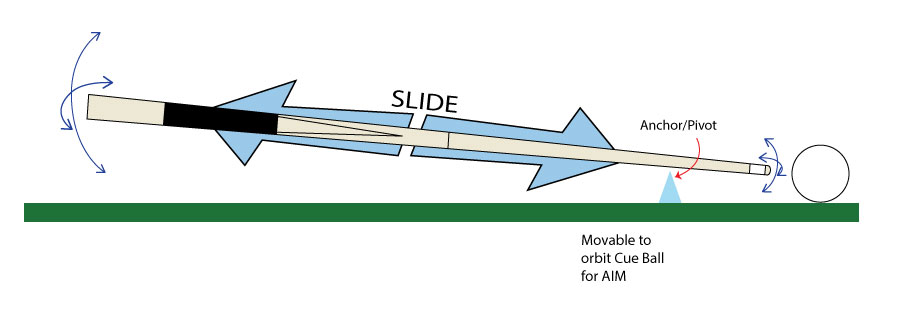
alt text

Im having trouble wrapping my head around getting the cue to slide along the z axis while maintaining a stationary attach/pivot point emulating the bridge hand that holds the cue.

Im sure theres an easy way, so Im asking for advice with the ways to set this up.

If possible I would like to set this up in a way that is dynamic enough to be easily configured to match a layers physical stroke / setup characteristics, such as grip position on the back of the cue, bridge hand placement as well as how high they hold the cue in their bridge (for adding spin to the ball etc).

I have tried a number of things but I dont think i have the knowledge yet to build this the right way or the Best way, etc

Thanks for your help!

Paul

cuestroke.jpg (28.2 kB)
Comment
Add comment · Show 4
10 |3000 characters needed characters left characters exceeded
▼
  • Viewable by all users
  • Viewable by moderators
  • Viewable by moderators and the original poster
  • Advanced visibility
Viewable by all users
avatar image Owen-Reynolds · Jun 16, 2015 at 03:12 PM 0
Share

$$anonymous$$y feeling is that the physics system, using joints, springs ... won't work for something this complex. I mean, sure you could on the fly put a characterJoint at the hand/stick connection. But then the stick/bridge would be another charJoint w/unconstrained motion (not sure how to make that) on 1 local axis? Ugg. Or make the bridge just have low friction forward and high friction sideways?

I don't think the physics system is quite up to that realism. The alternative is to just use math. That always works, as long as you know how to write it.

avatar image PaulzCreative · Jun 17, 2015 at 03:01 AM 0
Share

Thanks Owen for your reply! I do truly respect your experience and your opinion and usually i would run with it. But whats telling me it might work is an earlier version (data lost) I made of this some time ago. I built the model as a stick man in the proper stance and poroportions etc, anchored the elbow and let the forearm swing like a perpetual motion pendullum. for the bridge I used 4 spheres atached to eachother (creating a diamond shaped hole in the middle, disabled the mesh renderer an placed that where the cue would go through the fingers of the bridge hand.

SO for this one I was looking for a more pure mechanic such as nesting a sliding oject as a child to an object thats anchoered to the table... etc sort of like the individual movements of the rings in a gyro..

But one of the driving factors for going hollistic with this is that I will be using it to evaluate an correct a real pool playerz stroke, etc. So the elements involed as well as the physics need to be a close to the player model etc.

With that in $$anonymous$$d Ill be making this somewhat configurable to adjust to the individual's physical traits like how high he holds the cue stick with the bridge hand when adding draw or where her hand holds the back of the cue. Those kinds of things. This will allow me to eval the cues true angle at the point of impact.

I did make a psuedo bridge made from a number of cylinders for the finger segments etc.

avatar image Owen-Reynolds · Jun 17, 2015 at 06:56 AM 0
Share

UA is good for single questions about using specific Unity components. Seems you like want a more wide-ranging discussion, and maybe more about the physics of using a pool cue than about Unity. $$anonymous$$ight be better for the forums.

avatar image PaulzCreative · Jun 17, 2015 at 10:10 AM 0
Share

Actually I just want to learn how to Slide and object along its z axis while tied to a stationary pivot point... thats really it essentially

1 Reply

· Add your reply
  • Sort: 
avatar image
0

Answer by PaulzCreative · Jun 29, 2015 at 06:07 PM

Solution: A

A Configurable Joint with all contraints locked down except for the Z Movement.

The trick to get the single pivot was to attach the secondary anchor to a 'kinetic only' object AND make sure the anchor gizmos were positioned in the desired locations:

Primary and secondary gizmos placed at the point I wanted the bridge hand to be.

Comment
Add comment · Share
10 |3000 characters needed characters left characters exceeded
▼
  • Viewable by all users
  • Viewable by moderators
  • Viewable by moderators and the original poster
  • Advanced visibility
Viewable by all users

Your answer

Hint: You can notify a user about this post by typing @username

Up to 2 attachments (including images) can be used with a maximum of 524.3 kB each and 1.0 MB total.

Follow this Question

Answers Answers and Comments

3 People are following this question.

avatar image avatar image avatar image

Related Questions

Multiple Cars not working 1 Answer

Flight Simulator - Return To Original Height 0 Answers

IAP: MS billing simulator for local testing? 0 Answers

Tiny Banner Ad problem? 1 Answer

Moving a character depending on the direction he is facing (C#/Unity3D) 1 Answer


Enterprise
Social Q&A

Social
Subscribe on YouTube social-youtube Follow on LinkedIn social-linkedin Follow on Twitter social-twitter Follow on Facebook social-facebook Follow on Instagram social-instagram

Footer

  • Purchase
    • Products
    • Subscription
    • Asset Store
    • Unity Gear
    • Resellers
  • Education
    • Students
    • Educators
    • Certification
    • Learn
    • Center of Excellence
  • Download
    • Unity
    • Beta Program
  • Unity Labs
    • Labs
    • Publications
  • Resources
    • Learn platform
    • Community
    • Documentation
    • Unity QA
    • FAQ
    • Services Status
    • Connect
  • About Unity
    • About Us
    • Blog
    • Events
    • Careers
    • Contact
    • Press
    • Partners
    • Affiliates
    • Security
Copyright © 2020 Unity Technologies
  • Legal
  • Privacy Policy
  • Cookies
  • Do Not Sell My Personal Information
  • Cookies Settings
"Unity", Unity logos, and other Unity trademarks are trademarks or registered trademarks of Unity Technologies or its affiliates in the U.S. and elsewhere (more info here). Other names or brands are trademarks of their respective owners.
  • Anonymous
  • Sign in
  • Create
  • Ask a question
  • Spaces
  • Default
  • Help Room
  • META
  • Moderators
  • Explore
  • Topics
  • Questions
  • Users
  • Badges
