
Wayback Machinekoobas.hobune.stream
May JUN Jul
Previous capture 13 Next capture
2021 2022 2023
1 capture
13 Jun 22 - 13 Jun 22
sparklines
Close Help
  • Products
  • Solutions
  • Made with Unity
  • Learning
  • Support & Services
  • Community
  • Asset Store
  • Get Unity

UNITY ACCOUNT

You need a Unity Account to shop in the Online and Asset Stores, participate in the Unity Community and manage your license portfolio. Login Create account
  • Blog
  • Forums
  • Answers
  • Evangelists
  • User Groups
  • Beta Program
  • Advisory Panel

Navigation

  • Home
  • Products
  • Solutions
  • Made with Unity
  • Learning
  • Support & Services
  • Community
    • Blog
    • Forums
    • Answers
    • Evangelists
    • User Groups
    • Beta Program
    • Advisory Panel

Unity account

You need a Unity Account to shop in the Online and Asset Stores, participate in the Unity Community and manage your license portfolio. Login Create account

Language

  • Chinese
  • Spanish
  • Japanese
  • Korean
  • Portuguese
  • Ask a question
  • Spaces
    • Default
    • Help Room
    • META
    • Moderators
    • Topics
    • Questions
    • Users
    • Badges
  • Home /
avatar image
0
Question by Chimera3D · Mar 08, 2014 at 09:57 AM · terrainproceduraledgefans

Fixing Quadrilateral Edge Cracks

I have a procedural terrain generation system going with a quad tree LOD system. Basically I have a sphere of quadrilaterals (which are separate game objects) at different levels of "subdivision" (every quad has the same number of vertices) and a 3D perlin noise function displaces the vertices to make a landscape. The problem is that between different levels of subdivision the edge vertices differ because at a higher subdivision level there is higher resolution for the noise function. I know that this a common problem as the built-in terrain system has a LOD system that accounts for the, along with almost every other similar, functional system. I think have a good idea of what I need to do but I don't know how the code for it would work. First I'd need to find the neighbor quads of a quad, which I know has something to do with the great circle distances between that quad and all of the rest (perhaps a distance equal to the length of the current quad multiplied by 2 would indicate a neighbor). Then I get the edge vertices, which I can already do effortlessly since the edge triangle indices are always the same. Then compare the edge vertices and determine the subdivision levels of the neighbors. I don't know where to go from here though. Help?

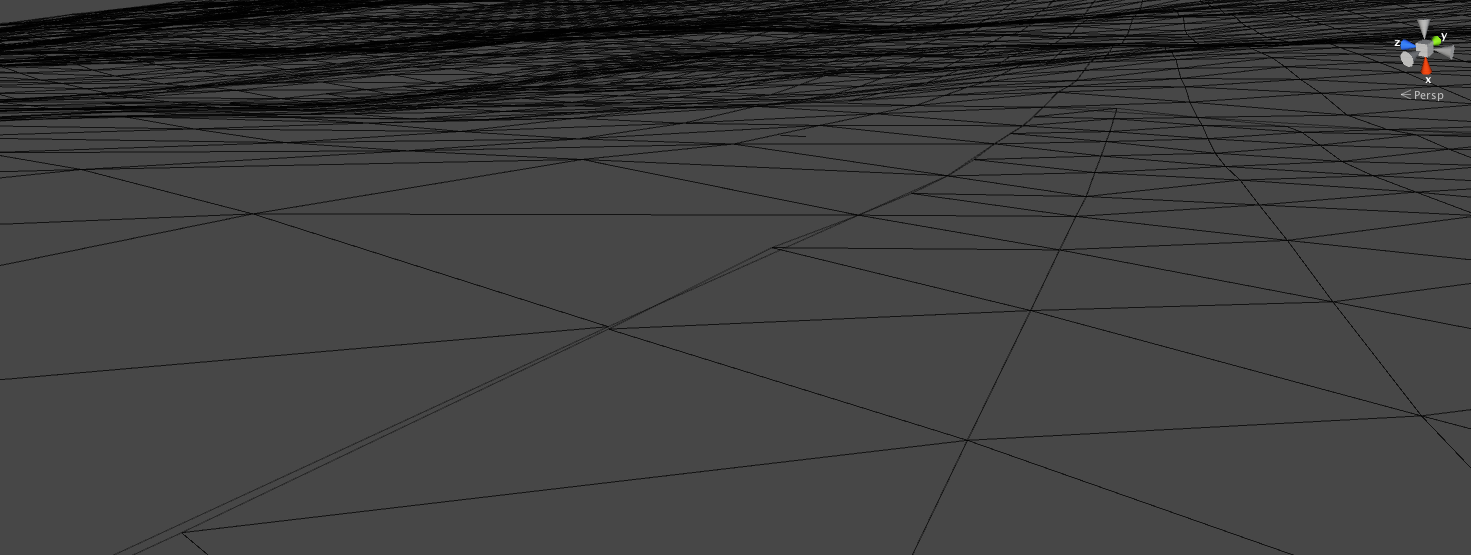
Screenshot of a few cracks (they aren't too severe here) : alt text
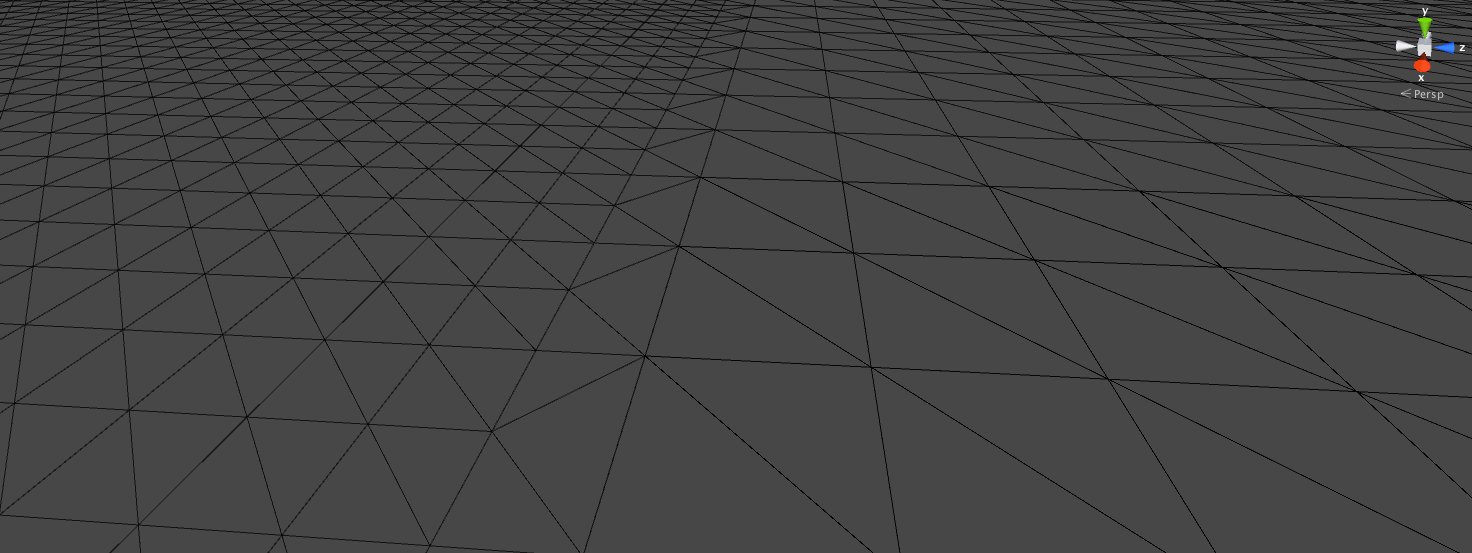
My end goal (the built-in terrain edge fans): alt text
EDIT: I think I got the first part but I don't know how to collapse the vertices based on the neighbors.

terrain.png (117.1 kB)
edgecracks.png (131.1 kB)
Comment
Add comment · Show 1
10 |3000 characters needed characters left characters exceeded
▼
  • Viewable by all users
  • Viewable by moderators
  • Viewable by moderators and the original poster
  • Advanced visibility
Viewable by all users
avatar image Chimera3D · Mar 09, 2014 at 04:20 AM 0
Share

I figured out how to collapse the edge vertices. Because there is a set number of possible edge conditions for every quadrilateral, entering the indices in manually, into an array, is not a big deal. I'm entering the indices into bit masks that only store the edge triangles, basically whenever a specific bit mask for a specific index is needed, the edge triangles are set to the bit mask values. As long as the edge triangles are stored in the bit mask array in a linear matter, the triangles adjacent to each other are set to each other.

For example:

Initial Triangle Array (a,b,c,d,e,f)

Bitmask Triangle Array (a, a, c, c, e, e)

Basically the intermediate triangles are skipped in the output triangle array. I'm not sure if I'm explaining this well but for me it works. Still, I have to write the other systems and bring them all together, so if I run into any more problems I'll ask for help here.

0 Replies

· Add your reply
  • Sort: 

Your answer

Hint: You can notify a user about this post by typing @username

Up to 2 attachments (including images) can be used with a maximum of 524.3 kB each and 1.0 MB total.

Follow this Question

Answers Answers and Comments

20 People are following this question.

avatar image avatar image avatar image avatar image avatar image avatar image avatar image avatar image avatar image avatar image avatar image avatar image avatar image avatar image avatar image avatar image avatar image avatar image avatar image avatar image

Related Questions

Pixelated Texture Edges on Terrain 0 Answers

How can I get a Low Poly terrain to work in Unity? 2 Answers

Procedural terrain- of the 2D circular variety. 0 Answers

Why aren't the mesh collider and mesh filter meshes saved in prefab children? 2 Answers

Assigning Textures to Terrain at Runtime 2 Answers


Enterprise
Social Q&A

Social
Subscribe on YouTube social-youtube Follow on LinkedIn social-linkedin Follow on Twitter social-twitter Follow on Facebook social-facebook Follow on Instagram social-instagram

Footer

  • Purchase
    • Products
    • Subscription
    • Asset Store
    • Unity Gear
    • Resellers
  • Education
    • Students
    • Educators
    • Certification
    • Learn
    • Center of Excellence
  • Download
    • Unity
    • Beta Program
  • Unity Labs
    • Labs
    • Publications
  • Resources
    • Learn platform
    • Community
    • Documentation
    • Unity QA
    • FAQ
    • Services Status
    • Connect
  • About Unity
    • About Us
    • Blog
    • Events
    • Careers
    • Contact
    • Press
    • Partners
    • Affiliates
    • Security
Copyright © 2020 Unity Technologies
  • Legal
  • Privacy Policy
  • Cookies
  • Do Not Sell My Personal Information
  • Cookies Settings
"Unity", Unity logos, and other Unity trademarks are trademarks or registered trademarks of Unity Technologies or its affiliates in the U.S. and elsewhere (more info here). Other names or brands are trademarks of their respective owners.
  • Anonymous
  • Sign in
  • Create
  • Ask a question
  • Spaces
  • Default
  • Help Room
  • META
  • Moderators
  • Explore
  • Topics
  • Questions
  • Users
  • Badges
