
Wayback Machinekoobas.hobune.stream
May JUN Jul
Previous capture 13 Next capture
2021 2022 2023
1 capture
13 Jun 22 - 13 Jun 22
sparklines
Close Help
  • Products
  • Solutions
  • Made with Unity
  • Learning
  • Support & Services
  • Community
  • Asset Store
  • Get Unity

UNITY ACCOUNT

You need a Unity Account to shop in the Online and Asset Stores, participate in the Unity Community and manage your license portfolio. Login Create account
  • Blog
  • Forums
  • Answers
  • Evangelists
  • User Groups
  • Beta Program
  • Advisory Panel

Navigation

  • Home
  • Products
  • Solutions
  • Made with Unity
  • Learning
  • Support & Services
  • Community
    • Blog
    • Forums
    • Answers
    • Evangelists
    • User Groups
    • Beta Program
    • Advisory Panel

Unity account

You need a Unity Account to shop in the Online and Asset Stores, participate in the Unity Community and manage your license portfolio. Login Create account

Language

  • Chinese
  • Spanish
  • Japanese
  • Korean
  • Portuguese
  • Ask a question
  • Spaces
    • Default
    • Help Room
    • META
    • Moderators
    • Topics
    • Questions
    • Users
    • Badges
  • Home /
This post has been wikified, any user with enough reputation can edit it.
avatar image
0
Question by Lohrion · Jan 09, 2015 at 12:49 PM · animationunity 4.6state machine

Mecanim state machine reverts changes done by animation?

Hello,

I am trying to animate my UI. My animation state machine looks like this:
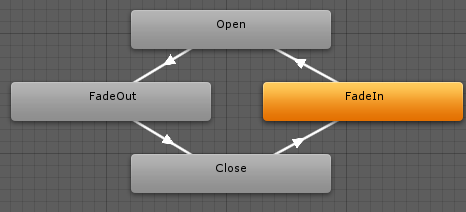
alt text

The states "Fade in" and "Fade out" have their respective animations attached, while the states "Open" and "Closed" have no animations. The transition away from "Close" is triggered when the boolean "ShowMenu" is set to true, and the transition away from "Open" when the "ShowMenu" is set to false. The transitions away from FadeOut and FadeIn are triggered via exit time.

My expectation would be that the main menu would fade in at start, stay there until the press of a button and then fade out - and stay offscreen.

What happens is exactly that, except for the last part. The fade out-animation plays, but on entering of the state "Closed" the scale, position and transform.IsActive property is reverted, as if the fade out-animation didn't happen. (This happens also for the fade in-animation if for example I change the scale, but that behaviour is okay in this special case).

I was reading through some tutorials, yet nowhere is mentioned that upon entering a state without animation would revert the properties to default (as set in the inspector prior to starting the game).

Where does this behaviour come from? What am I missing?

I am aware of the fact that an animation with a single key frame defining the state the object should stay in would solve the matter, yet it is somewhat counter-intuitive for me and I'd have to do this for every menu with an animation. Therefore, I am looking for a way that complies with my lazy nature ;-)

menufadeinfadeout.png (12.2 kB)
Comment
Add comment · Show 4
10 |3000 characters needed characters left characters exceeded
▼
  • Viewable by all users
  • Viewable by moderators
  • Viewable by moderators and the original poster
  • Advanced visibility
Viewable by all users
avatar image meat5000 ♦ · Jan 09, 2015 at 12:53 PM 0
Share

I believe an animation must have 2 keyframes or strange things will happen. I solved a similar problem by placing an extra keyframe beyond the last and not playing it. This seemed to help hold the animation as I wanted it rather than going back to the first frame. This was with a 3D model, however. Ins$$anonymous$$d of an empty state perhaps have one that hold the fade-out state in place.

avatar image Lohrion · Jan 09, 2015 at 01:14 PM 0
Share

A keyframe holding only one frame should not be a problem. There is a tutorial in the manual where they do this: http://docs.unity3d.com/460/Documentation/$$anonymous$$anual/HOWTO-UIScreenTransition.html

What I don't like about that particular approach is that the animator is disabled when the animation is over, and enabled when another animation is played. Without the disabling, the animation would repeat, I think.

In your comment you are hinting that the animation is returning the state of the object to the first keyframe. I don't think this is happening, because when I remove the transition from "FadeOut" to "Closed" and play through that scenario, everything seems ok except for the fact that I can't fade the menu back in (as expected).

avatar image meat5000 ♦ · Jan 09, 2015 at 01:21 PM 0
Share

The best approach would be to handle it via slider, for example with a blend tree, or Lerp the variables in code. For me, Animator is a bit overkill for the whole thing, as you are discovering with the state machine.

avatar image Ericool · Jan 09, 2015 at 01:25 PM 0
Share

Exactly lerping with the animation curve in code calling the method evaluate(time)

3 Replies

· Add your reply
  • Sort: 
avatar image
1
Best Answer Wiki

Answer by Lohrion · Jan 10, 2015 at 06:16 PM

Thanks for your suggestions. Next time I'll most likely do it via lerping, as it seems much simpler for such an easy task. In case anyone else stumbles upon this, I'll answer my own question:

I simply removed the states "Closed" and "Open", following the example from here: http://docs.unity3d.com/460/Documentation/Manual/HOWTO-UIScreenTransition.html

The states did really nothing except for causing trouble and making the state machine look more complete to myself - now it works as expected.

I think the unexpected behaviour came from the inner working of mecanim, assuming that everything not changed within an animation should stay the way it was initially. So with no animation, everything goes back to the initial state. If anyone knows the exact reason (as I'm only guessing), feel free to comment.

Comment
Add comment · Share
10 |3000 characters needed characters left characters exceeded
▼
  • Viewable by all users
  • Viewable by moderators
  • Viewable by moderators and the original poster
  • Advanced visibility
Viewable by all users
avatar image
14

Answer by TeoL · Apr 14, 2016 at 03:36 PM

For anyone else who has this problem (this is a top SERPS result) - with current versions of Unity, you can simply select a state, and uncheck the box that says "Write Defaults" in the Inspector - this will prevent that state from resetting the animation state on the related mesh.

Comment
Add comment · Show 1 · Share
10 |3000 characters needed characters left characters exceeded
▼
  • Viewable by all users
  • Viewable by moderators
  • Viewable by moderators and the original poster
  • Advanced visibility
Viewable by all users
avatar image Immanuel-Scholz · Apr 14, 2016 at 03:53 PM 1
Share

+1. This is the correct answer. Do not abandon $$anonymous$$ecanim or resort to fake 1-keyframe animations (or even 2-keyframe animations).

avatar image
0

Answer by Ericool · Jan 09, 2015 at 12:53 PM

I had the same issue but I used instead a keyframe array and an animation curve variable instead them you do your own state machine with if and else

Comment
Add comment · Share
10 |3000 characters needed characters left characters exceeded
▼
  • Viewable by all users
  • Viewable by moderators
  • Viewable by moderators and the original poster
  • Advanced visibility
Viewable by all users

Your answer

Hint: You can notify a user about this post by typing @username

Up to 2 attachments (including images) can be used with a maximum of 524.3 kB each and 1.0 MB total.

Follow this Question

Answers Answers and Comments

6 People are following this question.

avatar image avatar image avatar image avatar image avatar image avatar image

Related Questions

Humanoid Animation type character position problem, Generic work fine 1 Answer

Animation State OnStateEnter getting previous state 0 Answers

how to make multiple transition from one state? 1 Answer

Can the animation editor create local rotational data? 3 Answers

Animator dont transition to self or any sub state 2 Answers


Enterprise
Social Q&A

Social
Subscribe on YouTube social-youtube Follow on LinkedIn social-linkedin Follow on Twitter social-twitter Follow on Facebook social-facebook Follow on Instagram social-instagram

Footer

  • Purchase
    • Products
    • Subscription
    • Asset Store
    • Unity Gear
    • Resellers
  • Education
    • Students
    • Educators
    • Certification
    • Learn
    • Center of Excellence
  • Download
    • Unity
    • Beta Program
  • Unity Labs
    • Labs
    • Publications
  • Resources
    • Learn platform
    • Community
    • Documentation
    • Unity QA
    • FAQ
    • Services Status
    • Connect
  • About Unity
    • About Us
    • Blog
    • Events
    • Careers
    • Contact
    • Press
    • Partners
    • Affiliates
    • Security
Copyright © 2020 Unity Technologies
  • Legal
  • Privacy Policy
  • Cookies
  • Do Not Sell My Personal Information
  • Cookies Settings
"Unity", Unity logos, and other Unity trademarks are trademarks or registered trademarks of Unity Technologies or its affiliates in the U.S. and elsewhere (more info here). Other names or brands are trademarks of their respective owners.
  • Anonymous
  • Sign in
  • Create
  • Ask a question
  • Spaces
  • Default
  • Help Room
  • META
  • Moderators
  • Explore
  • Topics
  • Questions
  • Users
  • Badges
