
Wayback Machinekoobas.hobune.stream
May JUN Jul
Previous capture 13 Next capture
2021 2022 2023
1 capture
13 Jun 22 - 13 Jun 22
sparklines
Close Help
  • Products
  • Solutions
  • Made with Unity
  • Learning
  • Support & Services
  • Community
  • Asset Store
  • Get Unity

UNITY ACCOUNT

You need a Unity Account to shop in the Online and Asset Stores, participate in the Unity Community and manage your license portfolio. Login Create account
  • Blog
  • Forums
  • Answers
  • Evangelists
  • User Groups
  • Beta Program
  • Advisory Panel

Navigation

  • Home
  • Products
  • Solutions
  • Made with Unity
  • Learning
  • Support & Services
  • Community
    • Blog
    • Forums
    • Answers
    • Evangelists
    • User Groups
    • Beta Program
    • Advisory Panel

Unity account

You need a Unity Account to shop in the Online and Asset Stores, participate in the Unity Community and manage your license portfolio. Login Create account

Language

  • Chinese
  • Spanish
  • Japanese
  • Korean
  • Portuguese
  • Ask a question
  • Spaces
    • Default
    • Help Room
    • META
    • Moderators
    • Topics
    • Questions
    • Users
    • Badges
  • Home /
avatar image
0
Question by namekaw · Jan 29, 2013 at 09:52 PM · collidercarfallconvex

Vehicle either falls apart or falls through ground.

I have a car resting still on a flat terrain with a collider on both. When I check the convex settings the car does not fall, but splits up into the chassis, wheels and body (repelling each other). When I do not check convex, the car stays in one piece but falls through the ground. Help?

Comment
Add comment · Show 1
10 |3000 characters needed characters left characters exceeded
▼
  • Viewable by all users
  • Viewable by moderators
  • Viewable by moderators and the original poster
  • Advanced visibility
Viewable by all users
avatar image AndyMartin458 · Jan 30, 2013 at 12:17 AM 0
Share

Are the wheels resting well above the ground? Do you have a rigid body on the object? Colliders? Do the fallen apart pieces fall through the ground? This is a pretty vague question.

2 Replies

· Add your reply
  • Sort: 
avatar image
1
Best Answer

Answer by schaddemm · Jan 30, 2013 at 12:53 AM

Testing concave meshcolliders vs meshcollider is not supported. (and would probably not be a good idea performance wise). "Mesh Colliders that are marked as Convex can collide with other Mesh Colliders" I don't know if you can test mesh collider vs terrain, but either way I'd think you're probably better off simplifying the collisionmesh of your car into a few boxes.

If youve got something like a bowl its a concave mesh. a ball would be a convex one. concave meshes are way more difficult to compute than convex ones. When you force a mesh to be convex unity fills the gaps, so the bowl will spill its contents. alt text
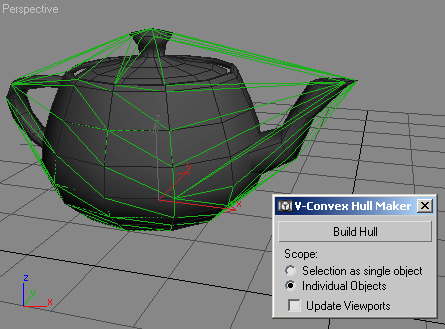
So in summary: You probably can't test a concave collider against a terrain collider (and shouldn't). What I think you should be doing is to use a compound collider.

read about this and the other stuff here: http://docs.unity3d.com/Documentation/Manual/Physics.html

Comment
Add comment · Show 7 · Share
10 |3000 characters needed characters left characters exceeded
▼
  • Viewable by all users
  • Viewable by moderators
  • Viewable by moderators and the original poster
  • Advanced visibility
Viewable by all users
avatar image Adam-Buckner ♦♦ · Jan 30, 2013 at 10:50 AM 0
Share

Schaddemm: "You shouldn't test convex mesh colliders against terrain". Terrain uses a form of mesh colliders, so a convex mesh will collide with the terrain, but it's not as performant as using primitive child colliders.

You certainly "can" test convex mesh colliders against terrain. I've even done it, but it's not ideal, and rarely have I found that child colliders are not only more performant, but a better design for many shapes.

avatar image namekaw · Jan 30, 2013 at 07:27 PM 0
Share

Figured it out, Thanks for the help!

avatar image schaddemm · Jan 31, 2013 at 08:44 AM 0
Share

@Little Angel: Concave you can't test against a terrain collider, convex you (probably) shouldn't.

avatar image spoiltcheese · Jan 31, 2013 at 09:12 AM 0
Share

From the physics manual:

$$anonymous$$esh Colliders cannot collide with each other unless they are marked as Convex. Therefore, they are most useful for background objects like environment geometry. Convex $$anonymous$$esh Colliders must be fewer than 255 triangles.

Egro, the best way to do object (non-environmental) physics is by using a primitive collider- either by wrapping it in a single large collider (easier but less accurate) or using compound colliders (somewhat more accurate depending on the level of detail.

Interestingly, I was also doing some research on Unity colliders and the "wrapper" collider for actors seems to be the popular choice even among the higher-grade games. Consequently, one gets actors able to go into walls (where the model leaves the wrapper collider) but not quite through it, but this is considered acceptable.

TL;DR leave the convex mesh for backgrounds.

avatar image schaddemm · Jan 31, 2013 at 09:37 AM 0
Share

@spoiltcheese:

you're talking about the character collider, right? Using a character collider for collision with the world makes tons of sense, since we don't want to get stuck anywhere, also we want always to be able to rotate. that the model goes through the wall can be prevented, you could make the character collider bigger than the model, you could even grow the character collider or grow another collider if he stretches out an arm or something.

for stuff like bullets though we can use mesh colliders again (I think people use simplified collision meshs for models with high detail), now we can use raycast or a sphere collider vs mesh collider.

So I think one character should have different colliders for different tasks, like a sphere trigger for pickups, a mesh collider to test against bullets, a character collider to test vs the levelgeometry.

Show more comments
avatar image
1

Answer by Sun-Dog · Jan 30, 2013 at 12:47 AM

I would suggest that your car is made of a series of separate meshes, each mesh has a convex mesh collider on it and each mesh object has its own rigidbody.

I would suggest that you look at the Rigidbody Component docs and look at the section on child colliders. I would suggest that you only want one rigidbody on the root GameObject, keep the meshes to themselves and have a series of child colliders.

Regardless of what you choose to do with your colliders, you should only have one rigidbody for the car and it should go on the root.

Comment
Add comment · Share
10 |3000 characters needed characters left characters exceeded
▼
  • Viewable by all users
  • Viewable by moderators
  • Viewable by moderators and the original poster
  • Advanced visibility
Viewable by all users

Your answer

Hint: You can notify a user about this post by typing @username

Up to 2 attachments (including images) can be used with a maximum of 524.3 kB each and 1.0 MB total.

Follow this Question

Answers Answers and Comments

14 People are following this question.

avatar image avatar image avatar image avatar image avatar image avatar image avatar image avatar image avatar image avatar image avatar image avatar image avatar image avatar image

Related Questions

Internal collisions 1 Answer

MeshCollider vs. anyOtherCollider 1 Answer

Convex collider sometimes works, sometimes doesn't. 2 Answers

tire falling through terrain? 1 Answer

Bucket with apples on a terrain (Sphere Colliders + Mesh Collider + Terrain) 0 Answers


Enterprise
Social Q&A

Social
Subscribe on YouTube social-youtube Follow on LinkedIn social-linkedin Follow on Twitter social-twitter Follow on Facebook social-facebook Follow on Instagram social-instagram

Footer

  • Purchase
    • Products
    • Subscription
    • Asset Store
    • Unity Gear
    • Resellers
  • Education
    • Students
    • Educators
    • Certification
    • Learn
    • Center of Excellence
  • Download
    • Unity
    • Beta Program
  • Unity Labs
    • Labs
    • Publications
  • Resources
    • Learn platform
    • Community
    • Documentation
    • Unity QA
    • FAQ
    • Services Status
    • Connect
  • About Unity
    • About Us
    • Blog
    • Events
    • Careers
    • Contact
    • Press
    • Partners
    • Affiliates
    • Security
Copyright © 2020 Unity Technologies
  • Legal
  • Privacy Policy
  • Cookies
  • Do Not Sell My Personal Information
  • Cookies Settings
"Unity", Unity logos, and other Unity trademarks are trademarks or registered trademarks of Unity Technologies or its affiliates in the U.S. and elsewhere (more info here). Other names or brands are trademarks of their respective owners.
  • Anonymous
  • Sign in
  • Create
  • Ask a question
  • Spaces
  • Default
  • Help Room
  • META
  • Moderators
  • Explore
  • Topics
  • Questions
  • Users
  • Badges
