 koobas.hobune.stream


Facebook SDK v4.2.4 - Android - Login not working
Hi Guys,
I've been stuck on this one for most of the day.
I'm trying to run the example scene that comes with the Facebook SDK v4.2.4 unity package. I have it working fine on iOS except Android is giving me trouble.
When I launch the application I press FB.Init and it loads successfully. When I press the Login button the screen goes black for less than a second and returns back to the scene and the other buttons (except Publish Install) are still greyed out.
I believe my problem is related to my Key Hash. At first my key has wasn't appearing in the FacebookSettings panel in Unity. So I downloaded an OpenSSL zip and moved it into my jdk bin folder (C:\Program Files\Java\jdk1.7.0_40\bin\openssl.exe) I then manually got a key from the cmd. Then I noticed at a later point the FacebookSettings panel was showing me the same key hash I got from the cmd.
Maybe I stuffed up retrieving the correct key hash?
What was the correct way to retrieve my key hash?
Currently my Facebook app settings match the details in Unity. (package name, class name, key hash). I am doing all of my Android testing on a device and not an emulator.
Apologies for writing another "Login not working" question. I read through the other questions and felt they all had different issues to mine as they were able to see the login screen.
Note, if you're on a Mac...
the "Rafael solution" is the only solution:
http://answers.unity3d.com/questions/609810/using-facebook-api-with-android-says-login-is-canc.html
(it is also (by far) the easiest and simplest solution if you are not on a Mac)

I stopped following this question after my problem was resolved some how last year. But after reading the discussion today I figured @brian_jew provided an answer within the update of his answer.
We found out that sometimes the older version of openssl may not generate the correct keyhash. You can either update your openssl or check out this stackoverflow answer here for an alternate solution to getting a proper keyhash
I guess you still need to mess around with the keyhash but it still answers/resolves the problem for the original question.

Hi @imawizard ... thanks for that. One question, did you notice that when you update the key hashes on developers.facebook -- does that propafate instantly? Or do you have to wait? IT adds more confusion!
Answer - we did some experimentation on that; in fact changes to the "$$anonymous$$ey Hashes" on developers.facebook do propagate instantly. It's 100% certain. So that's one issue off the table at least. Cheers all
Again, the solution is this:
ttp://answers.unity3d.com/questions/609810/using-facebook-api-with-android-says-login-is-canc.html
that even works if you are on $$anonymous$$ac


Hey no worries. Android development is tough. As one of the engineers that built the SDK, we're trying to make it easier for people. It sounds like you already did this:
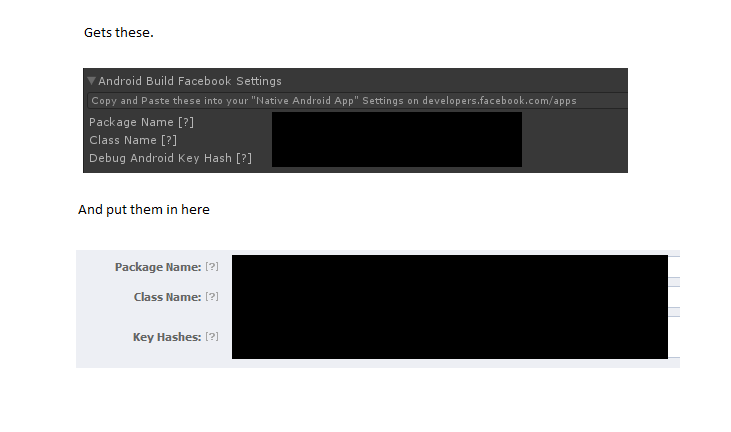
Are you using the default package name: com.Company.ProductName ? There's a known issue that somethings don't work correctly with that. You can edit the Android build settings to change the Bundle Identifier (we called it "Package Name" here to match the facebook developer settings). We'll also look into it on our end.
Some other answers that might help us if the above doesn't help: -Which version of Android do you have? -Is the Facebook App installed? -Do you have adb setup to monitor the logs from Android? A log dump of adb log right before and after the login happened would help. (Set your unity build to do a "Development Build" for more debug stuff to log.)
You can send all that info to: unity-sdk@fb.com and we'll follow up.
UPDATE: We found out that sometimes the older version of openssl may not generate the correct keyhash. You can either update your openssl or check out this stackoverflow answer here for an alternate solution to getting a proper keyhash: http://stackoverflow.com/questions/19051361/facebook-unity-sdk-on-android-login-fails-when-fb-app-installed
A couple of days later I was about to send my project to the Facebook guys. Though before I send it I did a last test and it started working. I didn't make any changes at all. So it could of been their back-end or something. They didn't have any suggestions as to why it started working again.
One thing they did mention in an email was:
"Will login work on your android if you uninstall the Facebook app? If that works it is an issue we're digging into this week."
I never had the Facebook app on my device, though that suggestion may work for you.

i've got the same error, and when i uninstalled the Facebook app, i was able to get the login working.

I have uninstalled the Facebook app on my device, and while the logs appear to be showing that the login is successfully (i.e. the access token is being returned), it doesn't seem to be firing the callback.
This would make me think that there is an error in the code logic, but we have built this application for iPhone and the logic has worked just fine.

Sorry to ask in this, but has that problem been solved, I have the same problem, I Uninstall the Facebook App and it works like a charm

Yeah same for me, but that's a problem. How can I make this work if someone already has the Facebook app on their phone?

I was having same problem, I tried a lot of things like changing openssl or generating release keystore properly, and many other stuffs but what really solved my problem is, my game is in 'landscape' mode and com.facebook.LoginActivity was in 'portrait' mode. I manually changed it to 'landscape' in AndroidManifest.xml located inside Assets\\Plugins\\Android folder which solved the problem for me. Hope that helps. 

I've been stuck on this one for hours, and this is the thing that finally worked for me. Thanks so much!

No problem. Later I found out that you can just remove 'android:screenOrientation' portion altogether, so com.facebook.LoginActivity does not require any orientation. This the cleaner way I think. Anyway, glad that it helped you :)
That does sound better. Again, thanks so much for sharing your findings.

The Best and the easiest solution ever!!!
I have done a tricky way to achieve that which is more simpler than any solution.
Let your game app stay with the generated key hash in facebook edit setting. Don't worry about the correct key hash.
Make sure you have wrong android hash key pasted on facebook app setting in your developer account.
Build your game and try log in with your Fb developer account.
Now As soon as your game app doesn't find the same hash key then facebook app will pop up and taaaddaaaaaa. Here you go with correct key hash, just note down the hash key and now paste into your facebook app setting in your developer account
Worked like a charm!!!


I've experienced the same problem. Just upgrade your facebook sdk to 4.3.6 and everything will be okay :)

I had the same problem. It worked once I uninstalled the Facebook App from my device. I checked it by displaying the FB.UserId,FB.AccessToken - which were no more empty strings!

Yes I confirm that by uninstalling facebook app did indeed allow my app to grab facebook information. This is a good temporally fix but unfortunately it is best for debug purpose.



