
Wayback Machinekoobas.hobune.stream
May JUN Jul
Previous capture 13 Next capture
2021 2022 2023
1 capture
13 Jun 22 - 13 Jun 22
sparklines
Close Help
  • Products
  • Solutions
  • Made with Unity
  • Learning
  • Support & Services
  • Community
  • Asset Store
  • Get Unity

UNITY ACCOUNT

You need a Unity Account to shop in the Online and Asset Stores, participate in the Unity Community and manage your license portfolio. Login Create account
  • Blog
  • Forums
  • Answers
  • Evangelists
  • User Groups
  • Beta Program
  • Advisory Panel

Navigation

  • Home
  • Products
  • Solutions
  • Made with Unity
  • Learning
  • Support & Services
  • Community
    • Blog
    • Forums
    • Answers
    • Evangelists
    • User Groups
    • Beta Program
    • Advisory Panel

Unity account

You need a Unity Account to shop in the Online and Asset Stores, participate in the Unity Community and manage your license portfolio. Login Create account

Language

  • Chinese
  • Spanish
  • Japanese
  • Korean
  • Portuguese
  • Ask a question
  • Spaces
    • Default
    • Help Room
    • META
    • Moderators
    • Topics
    • Questions
    • Users
    • Badges
  • Home /
avatar image
2
Question by elbon96 · Oct 29, 2010 at 01:49 AM · wheelcollidervehicle

When I use WheelColliders, my car drifts to the left. Why?

I'm working with WheelColliders on a basic car model. As I decrease the side friction, my car begins to drift to the left (and only the left) badly. Why? Is there a way to fix this?

Here's the (extremely basic) script that controls my car at the moment:

var fr : WheelCollider; var fl : WheelCollider; var br : WheelCollider; var bl : WheelCollider;

var speed = 10.0; var steerSpeed = 10.0;

var COM : GameObject;

var gear = 4;

function Start() { rigidbody.centerOfMass = COM.transform.localPosition; rigidbody.angularDrag = 10; }

function Update() { if (Input.GetKeyDown ("1")) { gear = 1; }

 if (Input.GetKeyDown ("2")) {
     gear = 2;
 }

 if (Input.GetKeyDown ("3")) {
     gear = 3;
 }

 if (Input.GetKeyDown ("4")) {
     gear = 4;
 }

}

function FixedUpdate () { fr.steerAngle = Input.GetAxis ("Horizontal") steerSpeed; fl.steerAngle = Input.GetAxis ("Horizontal") steerSpeed;

 br.motorTorque = Input.GetAxis ("Vertical") * speed * gear;
 bl.motorTorque = Input.GetAxis ("Vertical") * speed * gear;

}

Comment
Add comment
10 |3000 characters needed characters left characters exceeded
▼
  • Viewable by all users
  • Viewable by moderators
  • Viewable by moderators and the original poster
  • Advanced visibility
Viewable by all users

3 Replies

· Add your reply
  • Sort: 
avatar image
0
Best Answer

Answer by Edy · Nov 30, 2010 at 12:42 AM

Ensure that the center of mass (CoM) is properly set to the exact center of the WheelCollider's positions. If the CoM is slightly biased to a side, the WheelColliders of that side will support more weight, which means higher friction forces at that side.

As far as I've experienced with WheelColliders there's no such bug (See my Live Demo on vehicle physics with WheelColliders). There was a similar misbehavior in Unity 2.x, but it was fixed in Unity 3.

Comment
Add comment · Show 1 · Share
10 |3000 characters needed characters left characters exceeded
▼
  • Viewable by all users
  • Viewable by moderators
  • Viewable by moderators and the original poster
  • Advanced visibility
Viewable by all users
avatar image elbon96 · Dec 03, 2010 at 09:42 PM 0
Share

Okay, thanks. I haven't tested but it seems reasonable so I'll accept.

avatar image
2

Answer by bitbutter · Jan 29, 2014 at 03:58 PM

The reason for the drifting seems to be some kind of bug related to fixed timestep. The drifting can be removed by reducing the timestep, see animated gif below for a before and after.
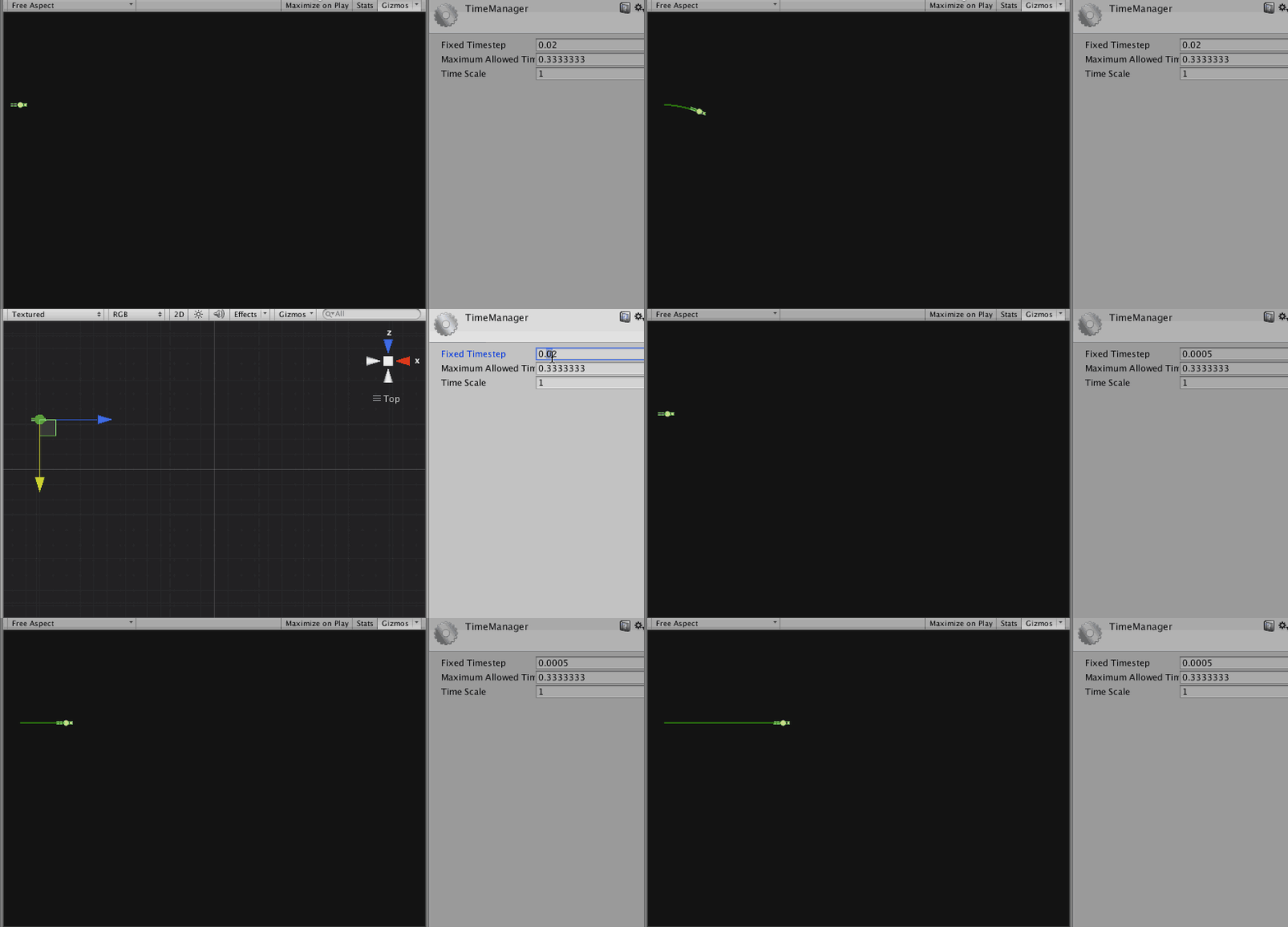
alt text

Comment
Add comment · Share
10 |3000 characters needed characters left characters exceeded
▼
  • Viewable by all users
  • Viewable by moderators
  • Viewable by moderators and the original poster
  • Advanced visibility
Viewable by all users
avatar image
1

Answer by elbon96 · Oct 29, 2010 at 12:47 PM

In the end, I decided to use a rather hacky fix that solved the problem, which, after further research, I learned was a bug with the standard WheelCollider. I added a value to the steerAngle on top of my turning values, like this:

fr.steerAngle = Input.GetAxis ("Horizontal") * steerSpeed + counterDrift;
fl.steerAngle = Input.GetAxis ("Horizontal") * steerSpeed + counterDrift;

It works, but if anyone has a better solution, I'd be glad to hear it.

Comment
Add comment · Show 1 · Share
10 |3000 characters needed characters left characters exceeded
▼
  • Viewable by all users
  • Viewable by moderators
  • Viewable by moderators and the original poster
  • Advanced visibility
Viewable by all users
avatar image Mikael-H · Dec 05, 2013 at 03:20 PM 0
Share

I'm having the same issue. I've checked and double checked that everything is symmetric. Did you ever solve this?

Your answer

Hint: You can notify a user about this post by typing @username

Up to 2 attachments (including images) can be used with a maximum of 524.3 kB each and 1.0 MB total.

Follow this Question

Answers Answers and Comments

2 People are following this question.

avatar image avatar image

Related Questions

Why does my car re-align after drift into the original direction? 0 Answers

Unity Car Controller Collision Reverse 1 Answer

How can I allow WheelColliders to free-roll? 0 Answers

How do I get my wheel mesh to rotate on the proper axis? 3 Answers

How can I get current lateral and longitudial friction forces from standart WheelColliders? 0 Answers


Enterprise
Social Q&A

Social
Subscribe on YouTube social-youtube Follow on LinkedIn social-linkedin Follow on Twitter social-twitter Follow on Facebook social-facebook Follow on Instagram social-instagram

Footer

  • Purchase
    • Products
    • Subscription
    • Asset Store
    • Unity Gear
    • Resellers
  • Education
    • Students
    • Educators
    • Certification
    • Learn
    • Center of Excellence
  • Download
    • Unity
    • Beta Program
  • Unity Labs
    • Labs
    • Publications
  • Resources
    • Learn platform
    • Community
    • Documentation
    • Unity QA
    • FAQ
    • Services Status
    • Connect
  • About Unity
    • About Us
    • Blog
    • Events
    • Careers
    • Contact
    • Press
    • Partners
    • Affiliates
    • Security
Copyright © 2020 Unity Technologies
  • Legal
  • Privacy Policy
  • Cookies
  • Do Not Sell My Personal Information
  • Cookies Settings
"Unity", Unity logos, and other Unity trademarks are trademarks or registered trademarks of Unity Technologies or its affiliates in the U.S. and elsewhere (more info here). Other names or brands are trademarks of their respective owners.
  • Anonymous
  • Sign in
  • Create
  • Ask a question
  • Spaces
  • Default
  • Help Room
  • META
  • Moderators
  • Explore
  • Topics
  • Questions
  • Users
  • Badges
