
Wayback Machinekoobas.hobune.stream
May JUN Jul
Previous capture 11 Next capture
2021 2022 2023
1 capture
11 Jun 22 - 11 Jun 22
sparklines
Close Help
  • Products
  • Solutions
  • Made with Unity
  • Learning
  • Support & Services
  • Community
  • Asset Store
  • Get Unity

UNITY ACCOUNT

You need a Unity Account to shop in the Online and Asset Stores, participate in the Unity Community and manage your license portfolio. Login Create account
  • Blog
  • Forums
  • Answers
  • Evangelists
  • User Groups
  • Beta Program
  • Advisory Panel

Navigation

  • Home
  • Products
  • Solutions
  • Made with Unity
  • Learning
  • Support & Services
  • Community
    • Blog
    • Forums
    • Answers
    • Evangelists
    • User Groups
    • Beta Program
    • Advisory Panel

Unity account

You need a Unity Account to shop in the Online and Asset Stores, participate in the Unity Community and manage your license portfolio. Login Create account

Language

  • Chinese
  • Spanish
  • Japanese
  • Korean
  • Portuguese
  • Ask a question
  • Spaces
    • Default
    • Help Room
    • META
    • Moderators
    • Topics
    • Questions
    • Users
    • Badges
  • Home /
avatar image
0
Question by gabenator123 · Aug 10, 2015 at 06:21 AM · unity 5importplaymovietextureblack

movietexture imports as black screen

In my project, every time I import a movietexture, nothing imports but a black screen. This happens regardless of file type. Nothing I can do makes the texture work properly. I'm using unity 5.1.0f3.

The video works perfectly fine when opened in an external program.

I have quicktime installed and everything. Google has yielded a grand total of nothing helpful whatsoever. alt text
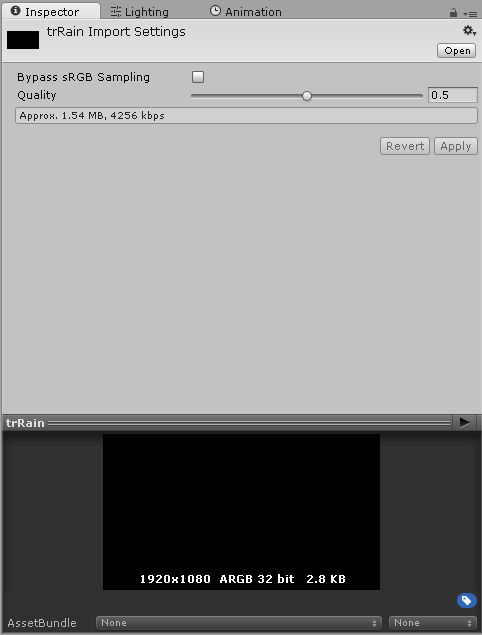
2015-08-10-02h15-30.png (11.3 kB)
Comment
Add comment · Show 13
10 |3000 characters needed characters left characters exceeded
▼
  • Viewable by all users
  • Viewable by moderators
  • Viewable by moderators and the original poster
  • Advanced visibility
Viewable by all users
avatar image Vice_Versa · Aug 13, 2015 at 06:28 PM 0
Share

Im having the exact same problem. By any chance did you just upgrade to windows 10?

avatar image gabenator123 · Aug 13, 2015 at 06:38 PM 0
Share

yes! Exactly!

avatar image Vice_Versa · Aug 13, 2015 at 07:51 PM 0
Share

I know that oculus rift doesnt work on it at all (which is really fucking stupid if you ask me considering how much they bragged about it at E3). If you can, try this on a different computer with a different OS (i will try to do the same). If it works, then this is yet another problem with their new OS.

avatar image gabenator123 · Aug 14, 2015 at 04:03 AM 0
Share

.mov seems to work, but nothing else

avatar image thornekey · Aug 14, 2015 at 05:10 AM 0
Share

Video files are imported via Apple QuickTime. Supported file types are what your QuickTime installation can play (usually .mov, .mpg, .mpeg, .mp4, .avi, .asf).

Show more comments

4 Replies

· Add your reply
  • Sort: 
avatar image
1

Answer by Larva-UDESC · Jan 19, 2016 at 09:24 PM

I had the same problem and, in my case, it was not an encoding problem as I thought in first place. I was using Unity 5.3.1f1 in Windows 10, and had the latest version of QuickTime (7.7.6). All of my movies were been displayed as black screens in the inspector and project folder (inside Unity) although them worked in external programs, including QuickTime. Actually, even in Unity, when I pressed play in the inspector painel the movie worked, but its thumbnail stills a black screen! Maybe its a bug or something like that in Unity (in my old system, one of the first versions of Unity 5 + Windows 7 the movie thumbnails were showed normally)

Inside the game those movies were also been displayed as black boxes, but when the script activated the Play() method, it worked. Thus, for solving this problem I realize you need to play the movie first in order to start it and then stop it (if you need to) for showing something on the screen.

If one loads the movie right in the beginning of the game, he/she can use the following code:

 public MovieTexture movie;
 
 void Start() {
      movie.Play();
 }
 
 void OnGUI() {           
      if( movie.isPlaying )
           movie.Stop();
      GUI.DrawTexture( new Rect(0,0,100,100), movie );
 }

Note that, for some reason, if you play your video in the inspector, the movie will work without the "movie.Play()" inside Unity. However, if you build your project, all you will see is a black rect.

Hope this helps somebody

Comment
Add comment · Share
10 |3000 characters needed characters left characters exceeded
▼
  • Viewable by all users
  • Viewable by moderators
  • Viewable by moderators and the original poster
  • Advanced visibility
Viewable by all users
avatar image
0

Answer by catberg · May 30, 2016 at 05:30 AM

i had the same problem but it was a video format issue, y reexported mi video as a quicktime video whit the h264 codec and the problem was solved. hope this can help u.

Comment
Add comment · Share
10 |3000 characters needed characters left characters exceeded
▼
  • Viewable by all users
  • Viewable by moderators
  • Viewable by moderators and the original poster
  • Advanced visibility
Viewable by all users
avatar image
0

Answer by tribemix · Oct 26, 2016 at 12:23 PM

For me, I fixed this by exporting the video and audio separately. The video then worked fine, although it still looked black in the thumbnail. I had to play the video in the texture editor or in the game engine to see the video appear as anything other than black.

Comment
Add comment · Share
10 |3000 characters needed characters left characters exceeded
▼
  • Viewable by all users
  • Viewable by moderators
  • Viewable by moderators and the original poster
  • Advanced visibility
Viewable by all users
avatar image
0

Answer by Beeblebrox · Apr 07, 2017 at 11:12 AM

Get VLC Media Player and use it to convert your movie file to the Theora + Vorbis (OGG) format. Unity deals with these natively. I think the cause of this issue is Quicktime improperly converting whatever file format that is being imported.

Comment
Add comment · Share
10 |3000 characters needed characters left characters exceeded
▼
  • Viewable by all users
  • Viewable by moderators
  • Viewable by moderators and the original poster
  • Advanced visibility
Viewable by all users

Your answer

Hint: You can notify a user about this post by typing @username

Up to 2 attachments (including images) can be used with a maximum of 524.3 kB each and 1.0 MB total.

Follow this Question

Answers Answers and Comments

9 People are following this question.

avatar image avatar image avatar image avatar image avatar image avatar image avatar image avatar image avatar image

Related Questions

Movie texture is not playing correctly 0 Answers

What to use instead of movie texture in Unity 5 webGL? Is there any workaround? 1 Answer

Small Sound File Import - Results in 40+/mb File Size! 1 Answer

Unity2D vector sprite sheet is blurry compared to single image with the same resolution. 1 Answer

Unity import assets crash 0 Answers


Enterprise
Social Q&A

Social
Subscribe on YouTube social-youtube Follow on LinkedIn social-linkedin Follow on Twitter social-twitter Follow on Facebook social-facebook Follow on Instagram social-instagram

Footer

  • Purchase
    • Products
    • Subscription
    • Asset Store
    • Unity Gear
    • Resellers
  • Education
    • Students
    • Educators
    • Certification
    • Learn
    • Center of Excellence
  • Download
    • Unity
    • Beta Program
  • Unity Labs
    • Labs
    • Publications
  • Resources
    • Learn platform
    • Community
    • Documentation
    • Unity QA
    • FAQ
    • Services Status
    • Connect
  • About Unity
    • About Us
    • Blog
    • Events
    • Careers
    • Contact
    • Press
    • Partners
    • Affiliates
    • Security
Copyright © 2020 Unity Technologies
  • Legal
  • Privacy Policy
  • Cookies
  • Do Not Sell My Personal Information
  • Cookies Settings
"Unity", Unity logos, and other Unity trademarks are trademarks or registered trademarks of Unity Technologies or its affiliates in the U.S. and elsewhere (more info here). Other names or brands are trademarks of their respective owners.
  • Anonymous
  • Sign in
  • Create
  • Ask a question
  • Spaces
  • Default
  • Help Room
  • META
  • Moderators
  • Explore
  • Topics
  • Questions
  • Users
  • Badges
