
Wayback Machinekoobas.hobune.stream
May JUN Jul
Previous capture 12 Next capture
2021 2022 2023
1 capture
12 Jun 22 - 12 Jun 22
sparklines
Close Help
  • Products
  • Solutions
  • Made with Unity
  • Learning
  • Support & Services
  • Community
  • Asset Store
  • Get Unity

UNITY ACCOUNT

You need a Unity Account to shop in the Online and Asset Stores, participate in the Unity Community and manage your license portfolio. Login Create account
  • Blog
  • Forums
  • Answers
  • Evangelists
  • User Groups
  • Beta Program
  • Advisory Panel

Navigation

  • Home
  • Products
  • Solutions
  • Made with Unity
  • Learning
  • Support & Services
  • Community
    • Blog
    • Forums
    • Answers
    • Evangelists
    • User Groups
    • Beta Program
    • Advisory Panel

Unity account

You need a Unity Account to shop in the Online and Asset Stores, participate in the Unity Community and manage your license portfolio. Login Create account

Language

  • Chinese
  • Spanish
  • Japanese
  • Korean
  • Portuguese
  • Ask a question
  • Spaces
    • Default
    • Help Room
    • META
    • Moderators
    • Topics
    • Questions
    • Users
    • Badges
  • Home /
avatar image
0
Question by Tenry92 · Dec 28, 2018 at 10:36 AM · bugscenescalegridview

Scene is suddenly super small,Scene is suddenly super small on reload

I'm not sure if this is some bug or some setting. I've created my first scene and placed some objects. Later, I created a second scene, created a canvas and text for a menu.

The next day I open my project in unity and open my initial scene, everything is super tiny (like maybe 1/100th of the usual size) as if the world has been scaled down (as the grid now is super large related to the world). However, the object coordinates are all normal - objects have an X/Z unit of 1 or 5 for example, but they don't exceed even the first rectangle of the grid. Also zooming in with the camera shows intense near clipping, so the world must be scaled down somehow.

However, all my objects - even my created root "empty" object all have a scale of 1, they are unscaled :/

Trying to scale my root object up (which should not be the solution) gives me other headaches, such as my player moving really slowly.

Even creating a new cube - size 1³ - in any of the two scenes is just super small.

Does anybody have an idea what is causing this and how to fix it?

Comment
Add comment · Show 1
10 |3000 characters needed characters left characters exceeded
▼
  • Viewable by all users
  • Viewable by moderators
  • Viewable by moderators and the original poster
  • Advanced visibility
Viewable by all users
avatar image Tenry92 · Dec 28, 2018 at 10:41 AM 0
Share

A new cube with a size of 1³ in my new scene:
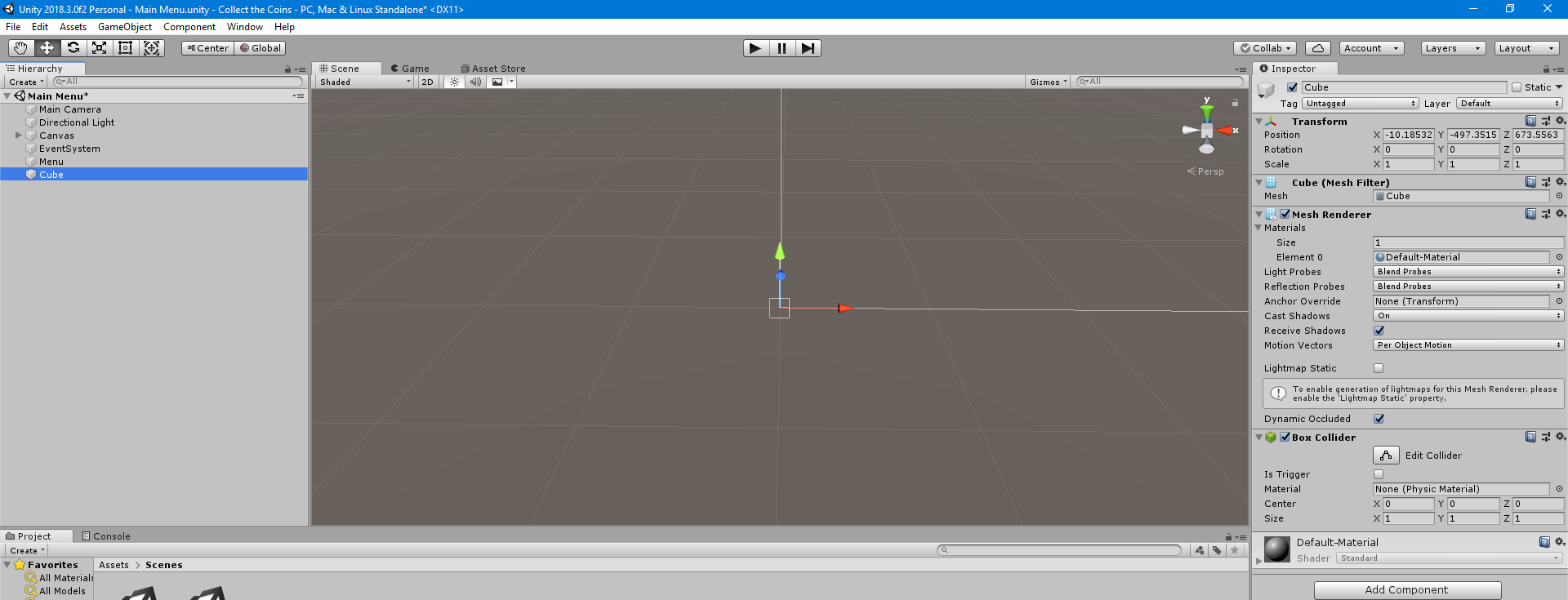
Screenshot 1

It's to tiny to be even seen. I have to zoom in so far that I don't even see the grid anymore:
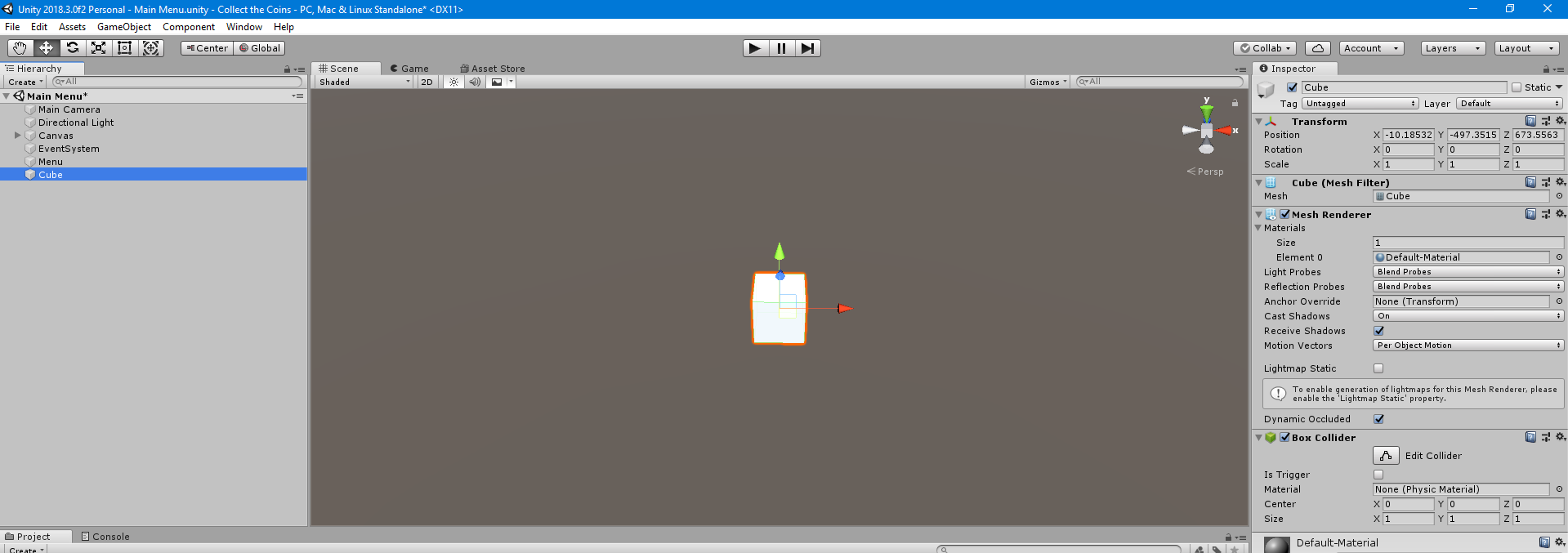
Screenshot 2

screenshot1.png (126.2 kB)
screenshot2.png (102.5 kB)

1 Reply

· Add your reply
  • Sort: 
avatar image
0
Best Answer

Answer by Tenry92 · Dec 28, 2018 at 10:53 AM

It seems the grid is initialized on project load depending on how far the active view is away. My second scene as a quite large canvas, why I am moving my view very far away. On the next project load, the grid and view is initialized at a much larger scale and is kept active for any scene.

In order to update/fix the grid/scaling, select the object of interest (such as my tiny root object or any actual object within there) and press F to focus that object. That reinitializes the grid and sizes and everything's fine again ^-^

Comment
Add comment · Share
10 |3000 characters needed characters left characters exceeded
▼
  • Viewable by all users
  • Viewable by moderators
  • Viewable by moderators and the original poster
  • Advanced visibility
Viewable by all users

Your answer

Hint: You can notify a user about this post by typing @username

Up to 2 attachments (including images) can be used with a maximum of 524.3 kB each and 1.0 MB total.

Follow this Question

Answers Answers and Comments

122 People are following this question.

avatar image avatar image avatar image avatar image avatar image avatar image avatar image avatar image avatar image avatar image avatar image avatar image avatar image avatar image avatar image avatar image avatar image avatar image avatar image avatar image avatar image avatar image avatar image avatar image avatar image avatar image avatar image avatar image avatar image avatar image avatar image avatar image avatar image avatar image avatar image avatar image avatar image avatar image avatar image avatar image avatar image avatar image avatar image avatar image avatar image avatar image avatar image avatar image avatar image avatar image avatar image avatar image avatar image avatar image avatar image avatar image avatar image avatar image avatar image avatar image avatar image avatar image avatar image avatar image avatar image avatar image avatar image avatar image avatar image avatar image avatar image avatar image avatar image avatar image avatar image avatar image avatar image avatar image avatar image avatar image avatar image avatar image avatar image avatar image avatar image avatar image avatar image avatar image avatar image avatar image avatar image avatar image avatar image avatar image avatar image avatar image avatar image avatar image avatar image avatar image avatar image avatar image avatar image avatar image avatar image avatar image avatar image avatar image avatar image avatar image avatar image avatar image avatar image avatar image avatar image avatar image avatar image avatar image avatar image avatar image avatar image avatar image

Related Questions

Why is the grid missing from scene view in Unity 4.0? 2 Answers

default setting scene area 1 Answer

Why cant I open my games properly? 0 Answers

Max size of scene map 1 Answer

Game view scale on compilation/play 5 Answers


Enterprise
Social Q&A

Social
Subscribe on YouTube social-youtube Follow on LinkedIn social-linkedin Follow on Twitter social-twitter Follow on Facebook social-facebook Follow on Instagram social-instagram

Footer

  • Purchase
    • Products
    • Subscription
    • Asset Store
    • Unity Gear
    • Resellers
  • Education
    • Students
    • Educators
    • Certification
    • Learn
    • Center of Excellence
  • Download
    • Unity
    • Beta Program
  • Unity Labs
    • Labs
    • Publications
  • Resources
    • Learn platform
    • Community
    • Documentation
    • Unity QA
    • FAQ
    • Services Status
    • Connect
  • About Unity
    • About Us
    • Blog
    • Events
    • Careers
    • Contact
    • Press
    • Partners
    • Affiliates
    • Security
Copyright © 2020 Unity Technologies
  • Legal
  • Privacy Policy
  • Cookies
  • Do Not Sell My Personal Information
  • Cookies Settings
"Unity", Unity logos, and other Unity trademarks are trademarks or registered trademarks of Unity Technologies or its affiliates in the U.S. and elsewhere (more info here). Other names or brands are trademarks of their respective owners.
  • Anonymous
  • Sign in
  • Create
  • Ask a question
  • Spaces
  • Default
  • Help Room
  • META
  • Moderators
  • Explore
  • Topics
  • Questions
  • Users
  • Badges