
Wayback Machinekoobas.hobune.stream
May JUN Jul
Previous capture 13 Next capture
2021 2022 2023
1 capture
13 Jun 22 - 13 Jun 22
sparklines
Close Help
  • Products
  • Solutions
  • Made with Unity
  • Learning
  • Support & Services
  • Community
  • Asset Store
  • Get Unity

UNITY ACCOUNT

You need a Unity Account to shop in the Online and Asset Stores, participate in the Unity Community and manage your license portfolio. Login Create account
  • Blog
  • Forums
  • Answers
  • Evangelists
  • User Groups
  • Beta Program
  • Advisory Panel

Navigation

  • Home
  • Products
  • Solutions
  • Made with Unity
  • Learning
  • Support & Services
  • Community
    • Blog
    • Forums
    • Answers
    • Evangelists
    • User Groups
    • Beta Program
    • Advisory Panel

Unity account

You need a Unity Account to shop in the Online and Asset Stores, participate in the Unity Community and manage your license portfolio. Login Create account

Language

  • Chinese
  • Spanish
  • Japanese
  • Korean
  • Portuguese
  • Ask a question
  • Spaces
    • Default
    • Help Room
    • META
    • Moderators
    • Topics
    • Questions
    • Users
    • Badges
  • Home /
avatar image
1
Question by Tterraj42 · Jan 27, 2014 at 11:16 PM · 2d-physicsjoint

Distance Joint 2D not working as described?

From the documentation here:

http://docs.unity3d.com/Documentation/Components/class-DistanceJoint2D.html

"Note that unlike the Spring Joint 2D, the Distance Joint is rigid and does not allow the distance between the objects to vary."

However, in practice, it acts more like a string or rope, where the distance specified is a maximum, not an exact.

To replicate:

Add two Game Objects to the scene.

Give them each a Rigidbody 2D.

Set Gravity Scale to 0 on both.

Give one (or both) of them a Distance Join 2D with the other object as the target.

Run the scene and move around one of the objects (either in the inspector or through a script)

So either the documentation was wrong, this is a bug, or I'm missing something obvious.

Thoughts?

Comment
Add comment · Show 1
10 |3000 characters needed characters left characters exceeded
▼
  • Viewable by all users
  • Viewable by moderators
  • Viewable by moderators and the original poster
  • Advanced visibility
Viewable by all users
avatar image rsodre · May 20, 2015 at 03:29 AM 0
Share

Reading carefully we can see that the joint only avoids the bodies to come closer than the distance. The joint should have another option to never let the objects go beyond that distance. I'm finding this impossible to do without scripting. I opened a feature request, please vote: http://feedback.unity3d.com/suggestions/distancejoint2d-should-have-an-option-to-keep-max-distance

4 Replies

· Add your reply
  • Sort: 
avatar image
1
Best Answer

Answer by CinnoMan · Feb 17, 2014 at 11:12 AM

I've run into the same discrepancy between the description and actual behaviour of DistanceJoint2D. It's behaving like what I'd expect from the slider joint.

My current workaround: use SpringJoint2D, set Frequency to 0. this keeps the joint objects at a fixed distance without any elasticity of the link.

Comment
Add comment · Show 2 · Share
10 |3000 characters needed characters left characters exceeded
▼
  • Viewable by all users
  • Viewable by moderators
  • Viewable by moderators and the original poster
  • Advanced visibility
Viewable by all users
avatar image Tterraj42 · Feb 17, 2014 at 01:17 PM 0
Share

Nice, works like I would want it too.

I'll mark this answer as correct, though I would like to see the documentation updated.

Thanks.

PS: Can anyone see a possible down side or side effect of this work around? I can' think of any.

avatar image CinnoMan · Feb 17, 2014 at 01:34 PM 0
Share

just guessing, but since it means using an unnecessarily complex solution it might impact performance a little.

avatar image
1

Answer by Jellezilla · Jan 28, 2014 at 01:37 AM

Yes, I think its the description you understand differently. with good reason imo.

look at the other one: "The Spring Joint 2D component allows two Sprite objects controlled by rigidbody physics to be attached together as if by a spring. The spring will apply a force along its axis between the two objects, attempting to keep them a certain distance apart."

http://docs.unity3d.com/Documentation/Components/class-SpringJoint2D.html

Comment
Add comment · Show 1 · Share
10 |3000 characters needed characters left characters exceeded
▼
  • Viewable by all users
  • Viewable by moderators
  • Viewable by moderators and the original poster
  • Advanced visibility
Viewable by all users
avatar image Tterraj42 · Jan 28, 2014 at 04:42 AM 0
Share

The keyword there is "attempting". It allows some flex.

Distance Joint 2D is, as I understanding it, a Spring Joint 2D without that flex. But it's not. So is the documentation wrong, or the implementation?

avatar image
0

Answer by Warped · Oct 16, 2017 at 01:54 PM

Its still not working! If you trying to move main parent object distance become increase

Comment
Add comment · Share
10 |3000 characters needed characters left characters exceeded
▼
  • Viewable by all users
  • Viewable by moderators
  • Viewable by moderators and the original poster
  • Advanced visibility
Viewable by all users
avatar image
0

Answer by shivam301296 · Feb 12, 2018 at 12:35 PM

In new version of Unity they added option alt textof Auto Configure Distance. that is the reason Just Disable Auto Configure Distance in Spring Joint 2D component and its DONEalt text
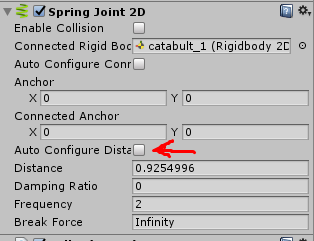
,Just Disable Auto Configure Distance in Spring joint 2D and its DONE

alt text


spring.png (14.0 kB)
Comment
Add comment · Share
10 |3000 characters needed characters left characters exceeded
▼
  • Viewable by all users
  • Viewable by moderators
  • Viewable by moderators and the original poster
  • Advanced visibility
Viewable by all users

Your answer

Hint: You can notify a user about this post by typing @username

Up to 2 attachments (including images) can be used with a maximum of 524.3 kB each and 1.0 MB total.

Follow this Question

Answers Answers and Comments

22 People are following this question.

avatar image avatar image avatar image avatar image avatar image avatar image avatar image avatar image avatar image avatar image avatar image avatar image avatar image avatar image avatar image avatar image avatar image avatar image avatar image avatar image avatar image avatar image

Related Questions

programmatically added SliderJoint2D not respected 0 Answers

2D Grappling Hook problems 0 Answers

HingeJoint2D.GetReactionForce not working 1 Answer

keeping constant "Distance Joint 2d" 2 Answers

Raycast 2D with origin inside the collider 1 Answer


Enterprise
Social Q&A

Social
Subscribe on YouTube social-youtube Follow on LinkedIn social-linkedin Follow on Twitter social-twitter Follow on Facebook social-facebook Follow on Instagram social-instagram

Footer

  • Purchase
    • Products
    • Subscription
    • Asset Store
    • Unity Gear
    • Resellers
  • Education
    • Students
    • Educators
    • Certification
    • Learn
    • Center of Excellence
  • Download
    • Unity
    • Beta Program
  • Unity Labs
    • Labs
    • Publications
  • Resources
    • Learn platform
    • Community
    • Documentation
    • Unity QA
    • FAQ
    • Services Status
    • Connect
  • About Unity
    • About Us
    • Blog
    • Events
    • Careers
    • Contact
    • Press
    • Partners
    • Affiliates
    • Security
Copyright © 2020 Unity Technologies
  • Legal
  • Privacy Policy
  • Cookies
  • Do Not Sell My Personal Information
  • Cookies Settings
"Unity", Unity logos, and other Unity trademarks are trademarks or registered trademarks of Unity Technologies or its affiliates in the U.S. and elsewhere (more info here). Other names or brands are trademarks of their respective owners.
  • Anonymous
  • Sign in
  • Create
  • Ask a question
  • Spaces
  • Default
  • Help Room
  • META
  • Moderators
  • Explore
  • Topics
  • Questions
  • Users
  • Badges
