 koobas.hobune.stream


Unwanted lines - maybe shadows?
When I play my game on an iOS device, there is an undesirable line showing. It looks like the line begins on the left side of the player (the sphere) and runs vertically down from the player. The line follows the player around the scene as I play the game. My first thought was that it's a shadow... but I have turned off shadows on my directional light and in the Project Quality settings. Interestingly, the line does not show up in the Unity Editor, only when playing the app on the device. Any ideas?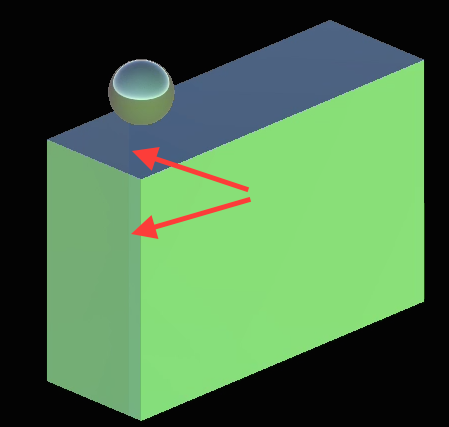
EDIT: So it looks like there is also a light shadow being cast from the camera (I think - it's casting down onto the floor below the sphere player when playing...) ... which also follows the player around the scene. Any ideas would be much appreciated!

I made a short slow-mo video of my issue - https://youtu.be/dBxBVcgTYSg
There are 2 shadows that appear - #1 is very large and obvious in the video, it appears to be a shadow cast from some large object (the camera or something else? I'm not sure... that's the only thing I'm aware of that is in that position) behind the player sphere. #2 is a smaller vertical line (visible in the image posted above with the red arrows) that goes up and down from the player sphere and follows the player sphere. I've disabled one of the two directional lights - the remaining directional light is set at rotations x=0 y=300 z=0 (the camera is also rotated on the y-axis at 315*). I've turned shadows off in the Quality Settings and in the Light component in the editor. The issue does NOT occur in the Unity Editor window when I play... only on iOS devices.
I've tried so many things trying to figure this out... probably something stupid that I am missing... help?
-pete

To me it looks like the materials are metallic and smooth.
Are the metallicness or smoothness settings above 0 on your materials?
Yes, the materials are metallic and smooth... why this would cause the lines/shadows though?
After turning off both metallic and smoothness settings, the issue is completely gone.
Thank you Crafterguy3x3!

A bit late with an answer. But adjusting the bias of the light source will resolve this problem. ie. directional light that is acting as the sun.

to clarify, you can keep both smoothness and metallic in your materials while still fixing the "line" issue.


