
Wayback Machinekoobas.hobune.stream
May JUN Jul
Previous capture 13 Next capture
2021 2022 2023
1 capture
13 Jun 22 - 13 Jun 22
sparklines
Close Help
  • Products
  • Solutions
  • Made with Unity
  • Learning
  • Support & Services
  • Community
  • Asset Store
  • Get Unity

UNITY ACCOUNT

You need a Unity Account to shop in the Online and Asset Stores, participate in the Unity Community and manage your license portfolio. Login Create account
  • Blog
  • Forums
  • Answers
  • Evangelists
  • User Groups
  • Beta Program
  • Advisory Panel

Navigation

  • Home
  • Products
  • Solutions
  • Made with Unity
  • Learning
  • Support & Services
  • Community
    • Blog
    • Forums
    • Answers
    • Evangelists
    • User Groups
    • Beta Program
    • Advisory Panel

Unity account

You need a Unity Account to shop in the Online and Asset Stores, participate in the Unity Community and manage your license portfolio. Login Create account

Language

  • Chinese
  • Spanish
  • Japanese
  • Korean
  • Portuguese
  • Ask a question
  • Spaces
    • Default
    • Help Room
    • META
    • Moderators
    • Topics
    • Questions
    • Users
    • Badges
  • Home /
avatar image
2
Question by metroidsnes · Mar 18, 2015 at 05:20 PM · nullreferenceexceptionenabled

this == null

How can it happen that this keyword returns null?
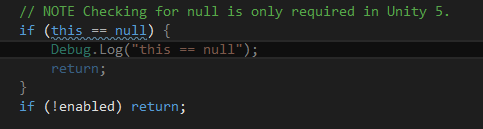
alt text

Even ReSharper tells that this condition is always false and yet, it return true in play mode and after exiting play mode.
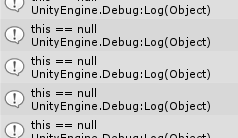
alt text

this is not null only after assembly reload. This problem only occurs in Unity 5. In Unity 4.6 it does not occur.

[EDIT] Solution in comments.

check-if-enabled.png (4.8 kB)
log-output.png (8.9 kB)
Comment
Add comment
10 |3000 characters needed characters left characters exceeded
▼
  • Viewable by all users
  • Viewable by moderators
  • Viewable by moderators and the original poster
  • Advanced visibility
Viewable by all users

1 Reply

· Add your reply
  • Sort: 
avatar image
3
Best Answer

Answer by CHPedersen · Mar 18, 2015 at 05:24 PM

It can happen in Unity because the equality operator is overloaded for scripts. Comparing to null does not check to see if the reference points to null, which would otherwise be the case in standard C#. Instead, it checks to see if the object is instantiated in the scene (technically, whether it exists in Unity's native C++ code backend).

ReSharper has no idea Unity is built this way. It assumes the equality operator works the same as for standard C#.

Comment
Add comment · Show 5 · Share
10 |3000 characters needed characters left characters exceeded
▼
  • Viewable by all users
  • Viewable by moderators
  • Viewable by moderators and the original poster
  • Advanced visibility
Viewable by all users
avatar image metroidsnes · Mar 18, 2015 at 05:51 PM 0
Share

Thanks, I didn't know about the overloaded operator. But still, how is is possible that refering to enabled property on $$anonymous$$onoBehaviour instantiated in the scene returns this error:

$$anonymous$$issingReferenceException: The object of type '$$anonymous$$yClass' has been destroyed but you are still trying to access it. Your script should either check if it is null or you should not destroy the object.

avatar image CHPedersen · Mar 18, 2015 at 05:55 PM 0
Share

For the same reason the equality operator is able to return true when compared to null. It's because all objects that exist in the scene, including GameObjects and all components, have both a managed version (a version in C#) and an unmanaged, native code version that exists inside the engine. When you get a $$anonymous$$issingReferenceException, it is because you are attempting to access an object that still exists in managed memory (because you retained a reference to it in C#, so the garbage collector hasn't de-allocated it yet), but which was de-allocated in the unmanaged part of the engine.

This typically occurs when you call Object.Destroy on something to destroy it in unmanaged memory, and then try to access the object's properties afterwards.

avatar image metroidsnes · Mar 18, 2015 at 06:24 PM 0
Share

Although I still don't know what causes this problem in my script, at least I understand what may be causing it. Thanks!

avatar image metroidsnes · Mar 18, 2015 at 07:13 PM 2
Share

Problem solved, my script was subscribed to an event declared in ScriptableObject asset file. After entering play mode, the script was rebuild but the asset file still hold a reference to previous script instance. What I had to do was to unsubscribe from event in OnDisable().

avatar image CHPedersen · Mar 18, 2015 at 08:01 PM 2
Share

Cool, that sounds like it might've been a tough one to crack. Glad you got it working. :)

Your answer

Hint: You can notify a user about this post by typing @username

Up to 2 attachments (including images) can be used with a maximum of 524.3 kB each and 1.0 MB total.

Follow this Question

Answers Answers and Comments

4 People are following this question.

avatar image avatar image avatar image avatar image

Related Questions

if (animation ["idle"].enabled == true){ gives a NullReferenceExeption? 2 Answers

Enabling/Disabling a slider from script 0 Answers

NullReferenceException: Object reference not set to an instance of an object 1 Answer

NullReference with trigger C# ? 1 Answer

Null Reference Excepting :Object reference not set to an instance of object while changing text of 3D text 2 Answers


Enterprise
Social Q&A

Social
Subscribe on YouTube social-youtube Follow on LinkedIn social-linkedin Follow on Twitter social-twitter Follow on Facebook social-facebook Follow on Instagram social-instagram

Footer

  • Purchase
    • Products
    • Subscription
    • Asset Store
    • Unity Gear
    • Resellers
  • Education
    • Students
    • Educators
    • Certification
    • Learn
    • Center of Excellence
  • Download
    • Unity
    • Beta Program
  • Unity Labs
    • Labs
    • Publications
  • Resources
    • Learn platform
    • Community
    • Documentation
    • Unity QA
    • FAQ
    • Services Status
    • Connect
  • About Unity
    • About Us
    • Blog
    • Events
    • Careers
    • Contact
    • Press
    • Partners
    • Affiliates
    • Security
Copyright © 2020 Unity Technologies
  • Legal
  • Privacy Policy
  • Cookies
  • Do Not Sell My Personal Information
  • Cookies Settings
"Unity", Unity logos, and other Unity trademarks are trademarks or registered trademarks of Unity Technologies or its affiliates in the U.S. and elsewhere (more info here). Other names or brands are trademarks of their respective owners.
  • Anonymous
  • Sign in
  • Create
  • Ask a question
  • Spaces
  • Default
  • Help Room
  • META
  • Moderators
  • Explore
  • Topics
  • Questions
  • Users
  • Badges