 koobas.hobune.stream


Object pooling - SetActive not working
I have this pool manager script inspired from the unity tutorial :
 using UnityEngine;
 using System.Collections;
 using System.Collections.Generic;

 public class PoolManagerScript : MonoBehaviour {

     public static PoolManagerScript instance;
     public bool willGrow;
     public Transform carsParent;
     public Transform scenesParent;
     public List<GameObject> cars;
     private List<GameObject> carsWithProbabilities;
     public List<GameObject> scenes;
     // Use this for initialization

     void Awake(){
         instance = this;
     }

     void Start () {
         //generate private list of cars based on their spawn probabilities and add cars to the scene
         carsWithProbabilities = new List<GameObject>();
         foreach(GameObject obj in cars){
             for(int i =1 ; i<= obj.GetComponent<SpawnedCarScript>().probability ; i++){
                 GameObject go = (GameObject)Instantiate(obj);
                 carsWithProbabilities.Add(go);
                 go.transform.parent = carsParent;
                 go.SetActive(false);
             }

         }
         //add scenes to the scene
         foreach(GameObject obj in scenes){
             GameObject go = (GameObject)Instantiate(obj);
             go.transform.parent = scenesParent;
             go.SetActive(false);
         }
     }


     public GameObject GetPooledCar(){
         int i = UnityEngine.Random.Range(0,cars.Count);
         if(!carsWithProbabilities[i].activeInHierarchy){
             return carsWithProbabilities[i];
         }
         if(willGrow){
             print ("growing cars");
             GameObject go = (GameObject)Instantiate(carsWithProbabilities[i]);
             go.transform.parent = carsParent;
             carsWithProbabilities.Add(go);
             return go;
         }
         return null;
     }
     public GameObject GetPooledScene(){
         int i = UnityEngine.Random.Range(0,scenes.Count);
         if(!scenes[i].activeInHierarchy){
             return scenes[i];
         }
         if(willGrow){
             print ("growing scenes");
             GameObject go = (GameObject)Instantiate(scenes[i]);
             go.transform.parent = scenesParent;
             scenes.Add(go);
             return go;
         }
         return null;
     }


 }
I call these functions from my generator script - THIS WORKS:
 GameObject obstacle = PoolManagerScript.instance.GetPooledCar();
 obstacle.transform.position = new Vector3(0,0,0);
 obstacle.transform.eulerAngles = new Vector3(0,0,0);
 obstacle.SetActive(true);
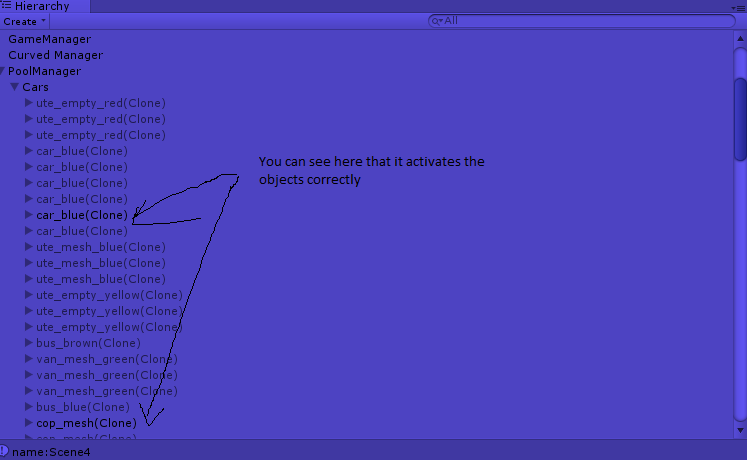
AND THIS DOESNT :
   GameObject obj = PoolManagerScript.instance.GetPooledScene();

     obj.transform.position = new Vector3(0,0,0);

     obj.transform.rotation = new Vector3(0,0,0);

     obj.SetActive(true);
     print ("name:" + obj.name);
Objects are not activating and the list is not growing . Prints the correct names so the function is not returning null. 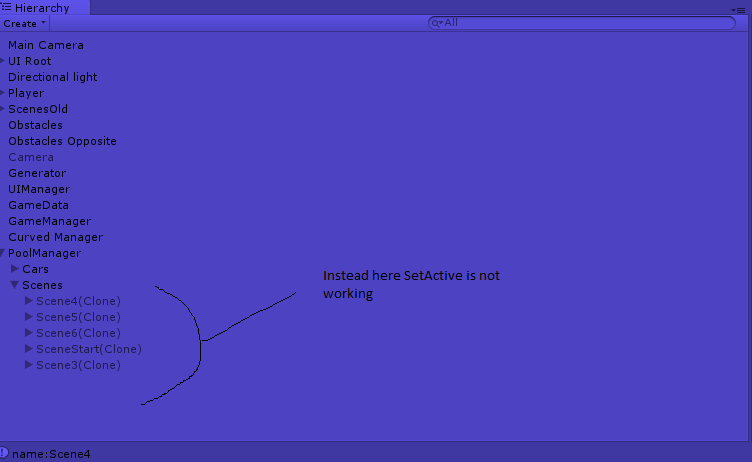
I have tried different approaches to activate the object but none worked . Any ideas?

Consider generalizing your Pool$$anonymous$$anager so your pools/prefabs don't care "what kind of object" they contain/are. Then you only need to write pool management code once and reuse it for any pooled object, ins$$anonymous$$d of addressing e.g. cars/scenes differently.
Please address the following:
"Objects are not activating and the list is not growing." What list isn't growing? What are the clones I'm seeing in the second screenshot, if not the instances you're creating?
Pooling can be a bit confusing: $$anonymous$$ake sure you account for the possibility that the object has changed since it was created/recycled. Pooling code should include "convenience" code to reset object properties (like active state, parent, any properties you've changed which might affect recycling). It's also atypical for a pool to hold its own active creations as children.

Is getPooledScene returning a parent object ("Scenes" in the 2nd picture,) with inactive children?
SetActive isn't recursive. Not WRT activeSelf. The effects are, like directory permissions, or Wonder Woman's invisible plane.

I also have this issue.
 go = GetDisabledPoolObject(myPrefab);
 go.SetActive(true);
 Debug.Log(go.activeInHierarchy); // prints false
In fact, I can't figure out what SetActive actually does...




