
Wayback Machinekoobas.hobune.stream
May JUN Jul
Previous capture 12 Next capture
2021 2022 2023
1 capture
12 Jun 22 - 12 Jun 22
sparklines
Close Help
  • Products
  • Solutions
  • Made with Unity
  • Learning
  • Support & Services
  • Community
  • Asset Store
  • Get Unity

UNITY ACCOUNT

You need a Unity Account to shop in the Online and Asset Stores, participate in the Unity Community and manage your license portfolio. Login Create account
  • Blog
  • Forums
  • Answers
  • Evangelists
  • User Groups
  • Beta Program
  • Advisory Panel

Navigation

  • Home
  • Products
  • Solutions
  • Made with Unity
  • Learning
  • Support & Services
  • Community
    • Blog
    • Forums
    • Answers
    • Evangelists
    • User Groups
    • Beta Program
    • Advisory Panel

Unity account

You need a Unity Account to shop in the Online and Asset Stores, participate in the Unity Community and manage your license portfolio. Login Create account

Language

  • Chinese
  • Spanish
  • Japanese
  • Korean
  • Portuguese
  • Ask a question
  • Spaces
    • Default
    • Help Room
    • META
    • Moderators
    • Topics
    • Questions
    • Users
    • Badges
  • Home /
avatar image
0
Question by bartbussel · Dec 22, 2017 at 07:49 AM · unity 5lists

Remove the size box

I am working on a game and I have a database with alot of information. I want to remove de size box where you can set the size of the list because it is all added with script.

I looked all over the internet and I cant find any information about it.

Thank you in advance

Comment
Add comment · Show 1
10 |3000 characters needed characters left characters exceeded
▼
  • Viewable by all users
  • Viewable by moderators
  • Viewable by moderators and the original poster
  • Advanced visibility
Viewable by all users
avatar image Nikhil12 · Dec 22, 2017 at 07:55 AM 0
Share

try " [HideInInspector]public listname"

2 Replies

· Add your reply
  • Sort: 
avatar image
1

Answer by LeEHil · Apr 26, 2021 at 06:15 AM

I know this is an old post, but still, there is not really a satisfying answer to me. So first of all, if I understood your question right there are several ways to hide/disable the "size" field. Just in case anyone else will need this in the future:


Solution 1:

         private void DisplayArray(SerializedProperty array, string caption=null)
         {
             EditorGUILayout.LabelField((caption == null) ? array.name : caption);
             int size = array.arraySize;
             array.Next(true);       //generic field (list)
             array.Next(true);       //arrays size field
             {
                 GUI.enabled = false;
                 EditorGUILayout.PropertyField(array);
             }
             for (int i = 0; i < size; i++)
             {
                 array.Next(false);       //first array element            
                 EditorGUILayout.PropertyField(array);
             }
         }


Solution 2:

         private void DisplayArray(SerializedProperty array, string caption=null)
         {
             EditorGUILayout.LabelField((caption == null) ? array.name : caption);
             for (int i = 0; i < array.arraySize; i++)
             {
                 EditorGUILayout.PropertyField(array.GetArrayElementAtIndex(i));
             }
             //other methods:
             //array.InsertArrayElementAtIndex;
             //array.DeleteArrayElementAtIndex;
             //array.MoveArrayElement;
         }
 
     }


In the inspector this will look like this:
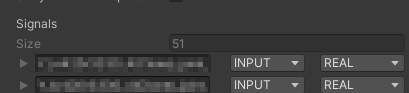
alt text
alt text


Now all you'd have to do is:

     [CustomEditor(typeof(blablabla))]
     public class blablablaEdior : Editor
     {
 
         public override void OnInspectorGUI()
         {
 
             serializedObject.Update();
 
             SerializedProperty listProp = serializedObject.FindProperty("list");    
             DisplayArray(listProp);            
 
             serializedObject.ApplyModifiedProperties();
         }
    }


@JVLVince : solved


2021-04-26-07-59-27-window.png (4.3 kB)
2021-04-26-07-50-03-window.png (5.1 kB)
Comment
Add comment · Show 1 · Share
10 |3000 characters needed characters left characters exceeded
▼
  • Viewable by all users
  • Viewable by moderators
  • Viewable by moderators and the original poster
  • Advanced visibility
Viewable by all users
avatar image LeEHil · Apr 26, 2021 at 07:09 AM 0
Share

You could even add your own context menu:

         private void DisplayArray(SerializedProperty array, string caption=null)
         {
             EditorGUILayout.LabelField((caption == null) ? array.name : caption);
             for (int i = 0; i < array.arraySize; i++)
             {
                 EditorGUILayout.PropertyField(array.GetArrayElementAtIndex(i));
 
                 //check the current editors EventSystem if there is a right click on this property and display a context menu
                 Event e = Event.current;
                 Rect position = GUILayoutUtility.GetLastRect();
                 if (e.type == EventType.MouseDown && e.button == 1 && position.Contains(e.mousePosition))
                 {
                     GenericMenu context = new GenericMenu();
                     context.AddItem(new GUIContent("Delete"), false, Delete, array.GetArrayElementAtIndex(i));
                     context.AddItem(new GUIContent("Add"), false, Add, array.GetArrayElementAtIndex(i));
                     context.ShowAsContext();
                 }
 
             }
             //other methods:
             //array.InsertArrayElementAtIndex;
             //array.DeleteArrayElementAtIndex;
             //array.MoveArrayElement;
         }
 
 
         void Add(object obj)
         {
 
         }
 
         void Delete(object obj)
         {
 
         }
avatar image
0

Answer by JVLVince · Dec 22, 2017 at 08:11 AM

I think you are talking about the readonly field, you want to serialize your data but don't want it editable. This is my approach. (I get this somewhere in this community but forgot where is it)Create a attribute class like this:

     using UnityEngine;
     
     public class ReadOnlyAttribute : PropertyAttribute{ }

Then create an editor class to draw the attribute:

 using UnityEditor;
 using UnityEngine;
 
 [CustomPropertyDrawer(typeof(ReadOnlyAttribute))]
 public class ReadOnlyAttributeDrawer : PropertyDrawer{
     public override float GetPropertyHeight(SerializedProperty property,
         GUIContent label)
     {
         return EditorGUI.GetPropertyHeight(property, label, true);
     }
  
     public override void OnGUI(Rect position,
         SerializedProperty property,
         GUIContent label)
     {
         GUI.enabled = false;
         EditorGUI.PropertyField(position, property, label, true);
         GUI.enabled = true;
     }
 }

Finally just add this attribute to which field you want to read only.

 [ReadOnly]public List<YourType> m_lists;

Edit1: This Solution just make the list's element readonly, the size still editable (I was wrong) I checking solution for this question.

Edit2: This answer can not solve your question, since someone has commented here so I will keep this answer here. And I will add my opinion:

  • In case the appearance of this list inside editor not important, I think you can try the solution as @Nikhil12 provided in comment - completely disable it appearance in editor: use [HideInInspector] attribute.

  • In case this list appearance is important, I think you should write the custom editor yourself. You can take a look here.


And if some one can solve this problem I also want to hearing it. Cheers!!!

Comment
Add comment · Show 2 · Share
10 |3000 characters needed characters left characters exceeded
▼
  • Viewable by all users
  • Viewable by moderators
  • Viewable by moderators and the original poster
  • Advanced visibility
Viewable by all users
avatar image Hellium · Dec 22, 2017 at 08:44 AM 0
Share

I use this attribute, but the input field with the size is still editable. (Only the elements of the list are read-only)

avatar image JVLVince Hellium · Dec 22, 2017 at 08:48 AM 0
Share

hmm I will check this. $$anonymous$$aybe I was missed something. Tks for let me know :)

Your answer

Hint: You can notify a user about this post by typing @username

Up to 2 attachments (including images) can be used with a maximum of 524.3 kB each and 1.0 MB total.

Follow this Question

Answers Answers and Comments

147 People are following this question.

avatar image avatar image avatar image avatar image avatar image avatar image avatar image avatar image avatar image avatar image avatar image avatar image avatar image avatar image avatar image avatar image avatar image avatar image avatar image avatar image avatar image avatar image avatar image avatar image avatar image avatar image avatar image avatar image avatar image avatar image avatar image avatar image avatar image avatar image avatar image avatar image avatar image avatar image avatar image avatar image avatar image avatar image avatar image avatar image avatar image avatar image avatar image avatar image avatar image avatar image avatar image avatar image avatar image avatar image avatar image avatar image avatar image avatar image avatar image avatar image avatar image avatar image avatar image avatar image avatar image avatar image avatar image avatar image avatar image avatar image avatar image avatar image avatar image avatar image avatar image avatar image avatar image avatar image avatar image avatar image avatar image avatar image avatar image avatar image avatar image avatar image avatar image avatar image avatar image avatar image avatar image avatar image avatar image avatar image avatar image avatar image avatar image avatar image avatar image avatar image avatar image avatar image avatar image avatar image avatar image avatar image avatar image avatar image avatar image avatar image avatar image avatar image avatar image avatar image avatar image avatar image avatar image avatar image avatar image avatar image avatar image avatar image avatar image avatar image avatar image avatar image avatar image avatar image avatar image avatar image avatar image avatar image avatar image avatar image avatar image avatar image avatar image avatar image avatar image avatar image avatar image avatar image avatar image avatar image avatar image avatar image avatar image

Related Questions

NullReferenceExeption 1 Answer

How do i convert this code snippet to a list? 1 Answer

Reading all data in the list with duplicate data inside 1 Answer

Correct way to have individual lists on different objects with same script 0 Answers

Why is my list not filling 1 Answer


Enterprise
Social Q&A

Social
Subscribe on YouTube social-youtube Follow on LinkedIn social-linkedin Follow on Twitter social-twitter Follow on Facebook social-facebook Follow on Instagram social-instagram

Footer

  • Purchase
    • Products
    • Subscription
    • Asset Store
    • Unity Gear
    • Resellers
  • Education
    • Students
    • Educators
    • Certification
    • Learn
    • Center of Excellence
  • Download
    • Unity
    • Beta Program
  • Unity Labs
    • Labs
    • Publications
  • Resources
    • Learn platform
    • Community
    • Documentation
    • Unity QA
    • FAQ
    • Services Status
    • Connect
  • About Unity
    • About Us
    • Blog
    • Events
    • Careers
    • Contact
    • Press
    • Partners
    • Affiliates
    • Security
Copyright © 2020 Unity Technologies
  • Legal
  • Privacy Policy
  • Cookies
  • Do Not Sell My Personal Information
  • Cookies Settings
"Unity", Unity logos, and other Unity trademarks are trademarks or registered trademarks of Unity Technologies or its affiliates in the U.S. and elsewhere (more info here). Other names or brands are trademarks of their respective owners.
  • Anonymous
  • Sign in
  • Create
  • Ask a question
  • Spaces
  • Default
  • Help Room
  • META
  • Moderators
  • Explore
  • Topics
  • Questions
  • Users
  • Badges

