
Wayback Machinekoobas.hobune.stream
May JUN Jul
Previous capture 13 Next capture
2021 2022 2023
1 capture
13 Jun 22 - 13 Jun 22
sparklines
Close Help
  • Products
  • Solutions
  • Made with Unity
  • Learning
  • Support & Services
  • Community
  • Asset Store
  • Get Unity

UNITY ACCOUNT

You need a Unity Account to shop in the Online and Asset Stores, participate in the Unity Community and manage your license portfolio. Login Create account
  • Blog
  • Forums
  • Answers
  • Evangelists
  • User Groups
  • Beta Program
  • Advisory Panel

Navigation

  • Home
  • Products
  • Solutions
  • Made with Unity
  • Learning
  • Support & Services
  • Community
    • Blog
    • Forums
    • Answers
    • Evangelists
    • User Groups
    • Beta Program
    • Advisory Panel

Unity account

You need a Unity Account to shop in the Online and Asset Stores, participate in the Unity Community and manage your license portfolio. Login Create account

Language

  • Chinese
  • Spanish
  • Japanese
  • Korean
  • Portuguese
  • Ask a question
  • Spaces
    • Default
    • Help Room
    • META
    • Moderators
    • Topics
    • Questions
    • Users
    • Badges
  • Home /
avatar image
0
Question by Visual Programmer · Oct 01, 2013 at 12:09 AM · javascriptrigidbodybox collidercollision event

Rigidbody -- Box Collider Collision Detection

I am currently working on a fighting game as a large school project and I had my characters set up with character controllers with collision working properly. After I had it all working properly, I learned that Rigidbodies will work better for accurate collision detection. After implementing them however, my characters' damage animations do not play right away.

What are the necessary steps I need to take to fix this?

I have the rigidbodies set to isKinematic = true; Interpolate = none; Collision Detection: Continuous Dynamic.

To get the collisions from their hands/feet, I have box colliders attached to their hand/feet bones with isTrigger = true.

The code is getting called by OnTriggerEnter. I have not provided any because the code was working perfectly before started using rigidbodies for the colliders.
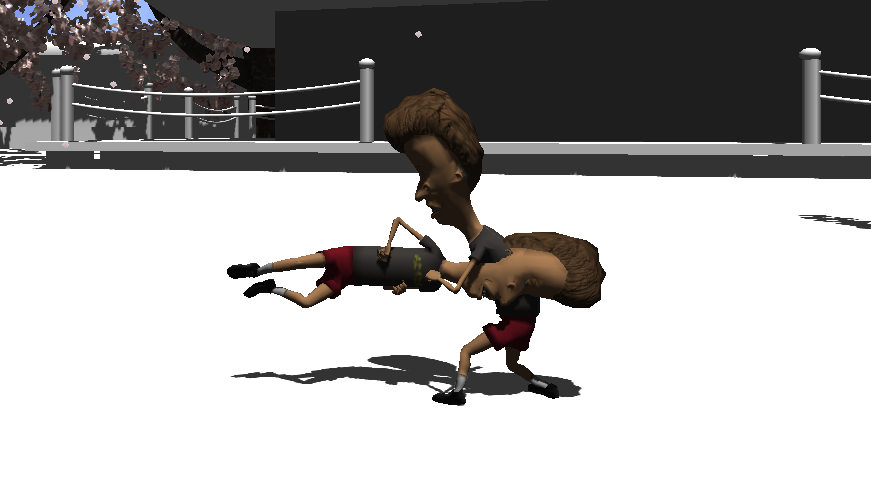
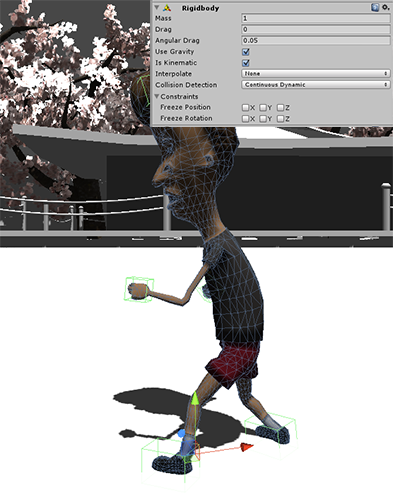
Collision Error Colliders

collisionerror.png (101.3 kB)
combined.png (142.5 kB)
Comment
Add comment · Show 4
10 |3000 characters needed characters left characters exceeded
▼
  • Viewable by all users
  • Viewable by moderators
  • Viewable by moderators and the original poster
  • Advanced visibility
Viewable by all users
avatar image zardini123 · Oct 07, 2013 at 10:11 PM 0
Share

I need more info if I can help. Can I maybe see the scripts for playing the animations and maybe the fighting controls script? Because most likely it might be a scripting error or something.

avatar image Visual Programmer · Oct 07, 2013 at 11:24 PM 0
Share

The scripts worked fine when I was using a character controller ins$$anonymous$$d of a rigidbody. Therefore, somewhere there is a problem with the rigidbody.

avatar image zardini123 · Oct 08, 2013 at 12:49 AM 0
Share

So u switched out a character controller for a rigid body? hmm, I have to say not the best idea. Character Controllers are so much easier to handle. I recommend that for the parent for the fighter has the rigid body, but does not have the character model, then you make a child which has the character model and the animations. That might work. Remember, the body collider should also be a separate child.

avatar image Visual Programmer · Oct 08, 2013 at 01:09 AM 0
Share

I had to switch it out because the character controller does not follow animations and during some animations the character leaves the ground. With that, the collision gets thrown off because the collider is no longer around the model.

But the by-product is that registering collision with the rigidbody is not working properly (as shown in the image above).

So how would a rigidbody on an empty gameobject work with registering collision against the character that is set as a child ?

1 Reply

· Add your reply
  • Sort: 
avatar image
0

Answer by zardini123 · Oct 09, 2013 at 12:13 AM

Just fool around with the child parent thing. I could have some effect

Comment
Add comment · Share
10 |3000 characters needed characters left characters exceeded
▼
  • Viewable by all users
  • Viewable by moderators
  • Viewable by moderators and the original poster
  • Advanced visibility
Viewable by all users

Your answer

Hint: You can notify a user about this post by typing @username

Up to 2 attachments (including images) can be used with a maximum of 524.3 kB each and 1.0 MB total.

Follow this Question

Answers Answers and Comments

15 People are following this question.

avatar image avatar image avatar image avatar image avatar image avatar image avatar image avatar image avatar image avatar image avatar image avatar image avatar image avatar image avatar image

Related Questions

Can a object without a rigidbody be triggered by a trigger? 1 Answer

custom rigidbody movement problem 2 Answers

Rigidbody person 1 Answer

Rigidbody Collision detection 1 Answer

Object Collider problem, objects going through walls? 1 Answer


Enterprise
Social Q&A

Social
Subscribe on YouTube social-youtube Follow on LinkedIn social-linkedin Follow on Twitter social-twitter Follow on Facebook social-facebook Follow on Instagram social-instagram

Footer

  • Purchase
    • Products
    • Subscription
    • Asset Store
    • Unity Gear
    • Resellers
  • Education
    • Students
    • Educators
    • Certification
    • Learn
    • Center of Excellence
  • Download
    • Unity
    • Beta Program
  • Unity Labs
    • Labs
    • Publications
  • Resources
    • Learn platform
    • Community
    • Documentation
    • Unity QA
    • FAQ
    • Services Status
    • Connect
  • About Unity
    • About Us
    • Blog
    • Events
    • Careers
    • Contact
    • Press
    • Partners
    • Affiliates
    • Security
Copyright © 2020 Unity Technologies
  • Legal
  • Privacy Policy
  • Cookies
  • Do Not Sell My Personal Information
  • Cookies Settings
"Unity", Unity logos, and other Unity trademarks are trademarks or registered trademarks of Unity Technologies or its affiliates in the U.S. and elsewhere (more info here). Other names or brands are trademarks of their respective owners.
  • Anonymous
  • Sign in
  • Create
  • Ask a question
  • Spaces
  • Default
  • Help Room
  • META
  • Moderators
  • Explore
  • Topics
  • Questions
  • Users
  • Badges
