
Wayback Machinekoobas.hobune.stream
May JUN Jul
Previous capture 13 Next capture
2021 2022 2023
1 capture
13 Jun 22 - 13 Jun 22
sparklines
Close Help
  • Products
  • Solutions
  • Made with Unity
  • Learning
  • Support & Services
  • Community
  • Asset Store
  • Get Unity

UNITY ACCOUNT

You need a Unity Account to shop in the Online and Asset Stores, participate in the Unity Community and manage your license portfolio. Login Create account
  • Blog
  • Forums
  • Answers
  • Evangelists
  • User Groups
  • Beta Program
  • Advisory Panel

Navigation

  • Home
  • Products
  • Solutions
  • Made with Unity
  • Learning
  • Support & Services
  • Community
    • Blog
    • Forums
    • Answers
    • Evangelists
    • User Groups
    • Beta Program
    • Advisory Panel

Unity account

You need a Unity Account to shop in the Online and Asset Stores, participate in the Unity Community and manage your license portfolio. Login Create account

Language

  • Chinese
  • Spanish
  • Japanese
  • Korean
  • Portuguese
  • Ask a question
  • Spaces
    • Default
    • Help Room
    • META
    • Moderators
    • Topics
    • Questions
    • Users
    • Badges
  • Home /
avatar image
1
Question by bitbutter · Jan 28, 2014 at 10:20 PM · physicsbug-perhapswheelcollider

WheelCollider: veering/drifting bug?

I know there have been a bunch of questions related to this but I've not yet found a satisfactory answer. Apologies if you're sick of hearing about this!

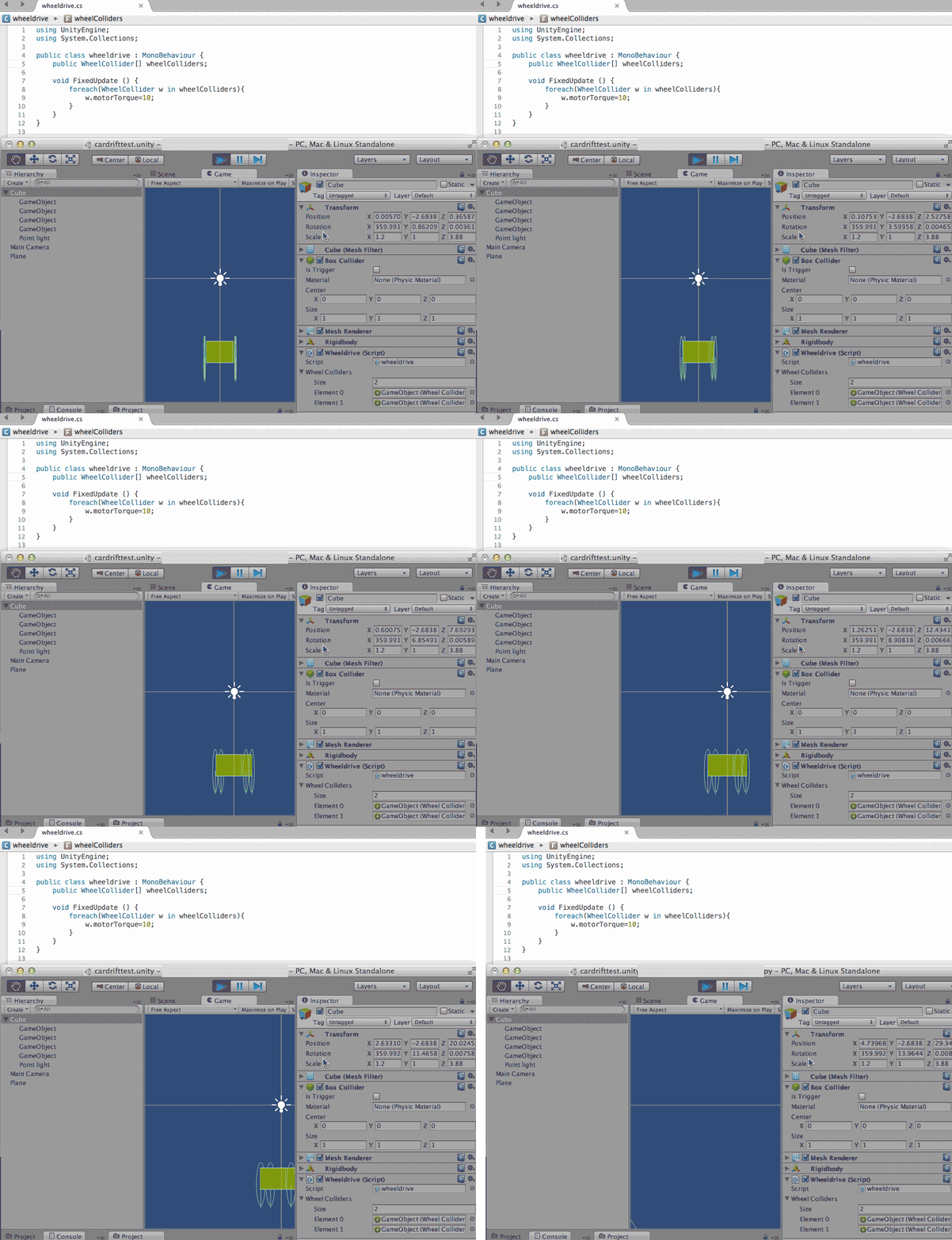
I've created a super simple 'car'. With four gameobjects with wheelcolliders positioned precisely symmetrically around the body (which has a rigid body attached). The car is placed on a simple plane. If i make the car 'go' by adding motortorque to the back wheels, the car will veer to one side quite dramatically as it travels.

Is this somehow expected behaviour or a bug? If it's expected, why is it happening?
alt text

Comment
Add comment
10 |3000 characters needed characters left characters exceeded
▼
  • Viewable by all users
  • Viewable by moderators
  • Viewable by moderators and the original poster
  • Advanced visibility
Viewable by all users

2 Replies

· Add your reply
  • Sort: 
avatar image
0
Best Answer

Answer by bitbutter · Jan 29, 2014 at 03:59 PM

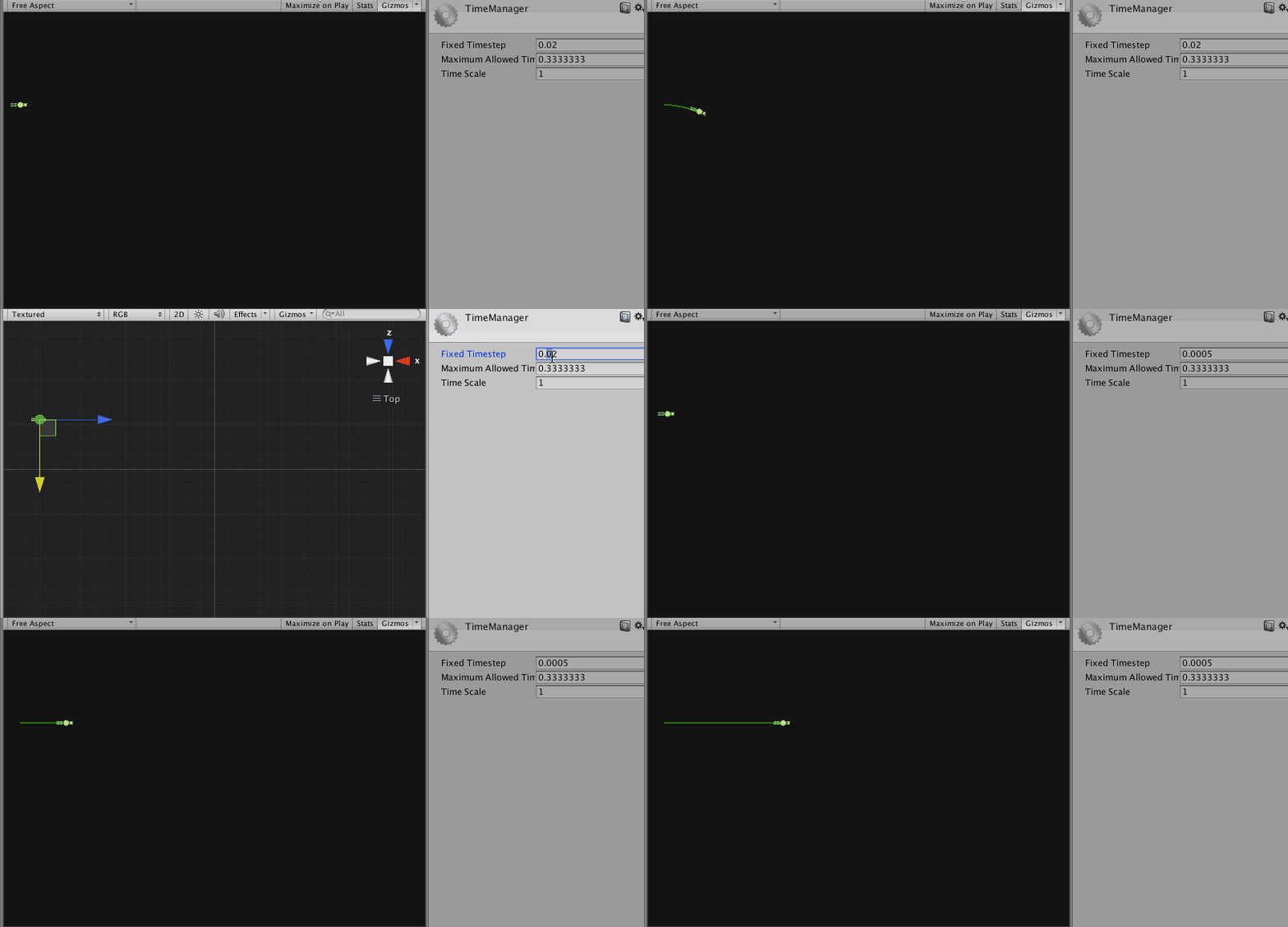
The reason for the drifting seems to be some kind of bug related to fixed timestep. The drifting can be removed by reducing the timestep, see animated gif below for a before and after.
alt text

Comment
Add comment · Show 1 · Share
10 |3000 characters needed characters left characters exceeded
▼
  • Viewable by all users
  • Viewable by moderators
  • Viewable by moderators and the original poster
  • Advanced visibility
Viewable by all users
avatar image cuongkimh4 · Feb 22, 2014 at 03:27 AM 0
Share

Sorry for inconvenience, if you change fixed timestep 0.02 to 0.000005, you make more update in per seconds. 0.02 -> 50 call updates, 0.000005 -> 200000 call updates. it's not good on mobile phone

avatar image
0

Answer by POLYGAMe · Feb 22, 2014 at 03:37 AM

Try adjusting the angular drag. With a bit of messing about you can get rid of the drift. Also, make sure all your wheels have the same mass and make sure wheels and car body masses are realistic amounts.

Comment
Add comment · Show 2 · Share
10 |3000 characters needed characters left characters exceeded
▼
  • Viewable by all users
  • Viewable by moderators
  • Viewable by moderators and the original poster
  • Advanced visibility
Viewable by all users
avatar image cuongkimh4 · Feb 24, 2014 at 04:46 AM 0
Share

i'm adjusting 4 wheel, they are same (mass, foward friction, sideway friction, radius), same position Y, and symmetric position X. Add same torque. But car still go to left side. It's can't go straight. Can you help me with example number in wheelcollider to make car go straight.

avatar image KazYamof cuongkimh4 · Nov 22, 2015 at 10:35 PM 0
Share

Hi there, I know this is an old question, but I have same problem here. Did you solved this issue? Change timeStep didn't work for me... Thanks

Your answer

Hint: You can notify a user about this post by typing @username

Up to 2 attachments (including images) can be used with a maximum of 524.3 kB each and 1.0 MB total.

Follow this Question

Answers Answers and Comments

21 People are following this question.

avatar image avatar image avatar image avatar image avatar image avatar image avatar image avatar image avatar image avatar image avatar image avatar image avatar image avatar image avatar image avatar image avatar image avatar image avatar image avatar image avatar image

Related Questions

Character Controller Pushes Car With Wheel Colliders? 0 Answers

Simulating wheels without a wheel collider? 1 Answer

Cloth disappears (occludes?) in scene view when zoomed in too far. Is there a fix? 2 Answers

Null attachedRigidbody of a WheelCollider 0 Answers

Make locomotive Pull Carriage 0 Answers


Enterprise
Social Q&A

Social
Subscribe on YouTube social-youtube Follow on LinkedIn social-linkedin Follow on Twitter social-twitter Follow on Facebook social-facebook Follow on Instagram social-instagram

Footer

  • Purchase
    • Products
    • Subscription
    • Asset Store
    • Unity Gear
    • Resellers
  • Education
    • Students
    • Educators
    • Certification
    • Learn
    • Center of Excellence
  • Download
    • Unity
    • Beta Program
  • Unity Labs
    • Labs
    • Publications
  • Resources
    • Learn platform
    • Community
    • Documentation
    • Unity QA
    • FAQ
    • Services Status
    • Connect
  • About Unity
    • About Us
    • Blog
    • Events
    • Careers
    • Contact
    • Press
    • Partners
    • Affiliates
    • Security
Copyright © 2020 Unity Technologies
  • Legal
  • Privacy Policy
  • Cookies
  • Do Not Sell My Personal Information
  • Cookies Settings
"Unity", Unity logos, and other Unity trademarks are trademarks or registered trademarks of Unity Technologies or its affiliates in the U.S. and elsewhere (more info here). Other names or brands are trademarks of their respective owners.
  • Anonymous
  • Sign in
  • Create
  • Ask a question
  • Spaces
  • Default
  • Help Room
  • META
  • Moderators
  • Explore
  • Topics
  • Questions
  • Users
  • Badges
