
Wayback Machinekoobas.hobune.stream
May JUN Jul
Previous capture 12 Next capture
2021 2022 2023
1 capture
12 Jun 22 - 12 Jun 22
sparklines
Close Help
  • Products
  • Solutions
  • Made with Unity
  • Learning
  • Support & Services
  • Community
  • Asset Store
  • Get Unity

UNITY ACCOUNT

You need a Unity Account to shop in the Online and Asset Stores, participate in the Unity Community and manage your license portfolio. Login Create account
  • Blog
  • Forums
  • Answers
  • Evangelists
  • User Groups
  • Beta Program
  • Advisory Panel

Navigation

  • Home
  • Products
  • Solutions
  • Made with Unity
  • Learning
  • Support & Services
  • Community
    • Blog
    • Forums
    • Answers
    • Evangelists
    • User Groups
    • Beta Program
    • Advisory Panel

Unity account

You need a Unity Account to shop in the Online and Asset Stores, participate in the Unity Community and manage your license portfolio. Login Create account

Language

  • Chinese
  • Spanish
  • Japanese
  • Korean
  • Portuguese
  • Ask a question
  • Spaces
    • Default
    • Help Room
    • META
    • Moderators
    • Topics
    • Questions
    • Users
    • Badges
  • Home /
avatar image
0
Question by belamessex · Mar 31, 2016 at 11:32 PM · renderinggraphicslinerenderer

jiggly beam like tf2 medi gun?

Hi, I've written a script that connects two rigidbody game objects to each other with a line renderer so that they have a "beam" connecting them even as their positions change. It works great, but I'd like to get more life out of the beam, kinda like the beam from the medi gun in team fortress 2: it's a bit rubbery and elastic, and almost follows your movement, but moves back into a straight line if there is no movement. I've looked into line Renderer advanced techniques, but I can't really find anything this specific. Anyone have ideas about how to do this?

Thanks! alt text
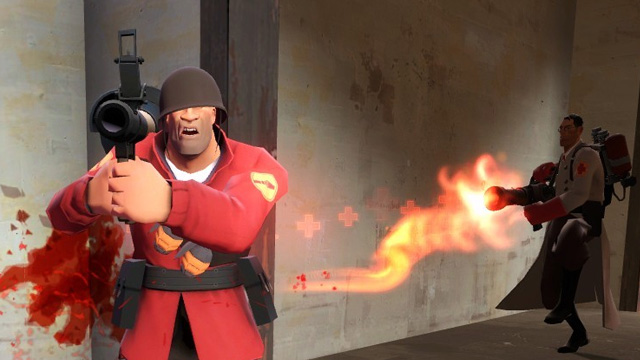
steamworkshop-webupload-previewfile-121997321-prev.jpg (72.9 kB)
Comment
Add comment
10 |3000 characters needed characters left characters exceeded
▼
  • Viewable by all users
  • Viewable by moderators
  • Viewable by moderators and the original poster
  • Advanced visibility
Viewable by all users

1 Reply

· Add your reply
  • Sort: 
avatar image
0

Answer by phxvyper · Apr 01, 2016 at 12:03 AM

I would suggest creating a sort of Bezier curve. Have the originating point and the target point, and two points in the middle that control the Bezier bend in the middle.


You'd have to do some research on the equations for bezier curves and also find a way to give life to them. I would suggest rotating them around the center point randomly but smoothly:

Have these points rotate around, say, the middle position between the originating point and the target point, just smoothly randomize their position, and connect all the points.


You could also go the Overwatch route and make the beam have a genuine bezier curve:
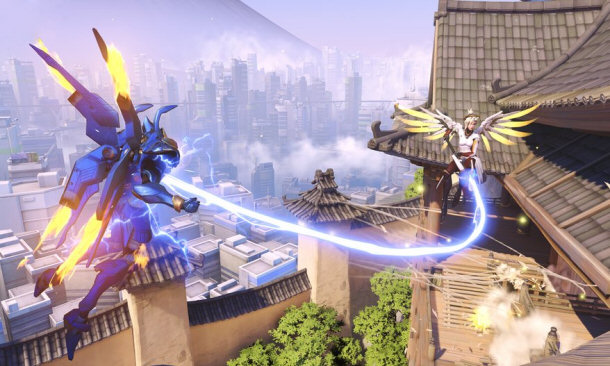
mercy's beam

Which is the same concept, except with only two points and two bezier points associated with the two points. Do some research on bezier curves and you might find the result you're looking for.


mercy-damage-boost.jpg (76.6 kB)
Comment
Add comment · Show 2 · Share
10 |3000 characters needed characters left characters exceeded
▼
  • Viewable by all users
  • Viewable by moderators
  • Viewable by moderators and the original poster
  • Advanced visibility
Viewable by all users
avatar image belamessex · Apr 01, 2016 at 12:48 AM 0
Share

Yes that beam is basically what i'm after. Thanks for the reply, I'll look into bezier curves. I'd also be into an animation that just follows the straight line, but I still have a lot to learn about the line renderer.

avatar image phxvyper belamessex · Apr 01, 2016 at 12:51 AM 0
Share

No problem. I'm glad i could help. Don't forget to upvote and bestanswer my answer if you think it qualifies as the answer to your question! :D

Also, as for creating that sort of animation, I'd figure that'd be a shader you could apply that creates that effect. $$anonymous$$y roommate made something similar with a shader, without having to animate anything in a 3d modeler or animator.

Your answer

Hint: You can notify a user about this post by typing @username

Up to 2 attachments (including images) can be used with a maximum of 524.3 kB each and 1.0 MB total.

Follow this Question

Answers Answers and Comments

45 People are following this question.

avatar image avatar image avatar image avatar image avatar image avatar image avatar image avatar image avatar image avatar image avatar image avatar image avatar image avatar image avatar image avatar image avatar image avatar image avatar image avatar image avatar image avatar image avatar image avatar image avatar image avatar image avatar image avatar image avatar image avatar image avatar image avatar image avatar image avatar image avatar image avatar image avatar image avatar image avatar image avatar image avatar image avatar image avatar image avatar image avatar image

Related Questions

Creating a Masking Object with Variable Pass Through 0 Answers

Why is this issue occurring with my models? 1 Answer

Object see-through when rendering mode is set to Fade 1 Answer

Cutting hole in water plane using stencil buffer.Help making it visible from both sides. 0 Answers

LineRenderer: how to draw line intersections? 1 Answer


Enterprise
Social Q&A

Social
Subscribe on YouTube social-youtube Follow on LinkedIn social-linkedin Follow on Twitter social-twitter Follow on Facebook social-facebook Follow on Instagram social-instagram

Footer

  • Purchase
    • Products
    • Subscription
    • Asset Store
    • Unity Gear
    • Resellers
  • Education
    • Students
    • Educators
    • Certification
    • Learn
    • Center of Excellence
  • Download
    • Unity
    • Beta Program
  • Unity Labs
    • Labs
    • Publications
  • Resources
    • Learn platform
    • Community
    • Documentation
    • Unity QA
    • FAQ
    • Services Status
    • Connect
  • About Unity
    • About Us
    • Blog
    • Events
    • Careers
    • Contact
    • Press
    • Partners
    • Affiliates
    • Security
Copyright © 2020 Unity Technologies
  • Legal
  • Privacy Policy
  • Cookies
  • Do Not Sell My Personal Information
  • Cookies Settings
"Unity", Unity logos, and other Unity trademarks are trademarks or registered trademarks of Unity Technologies or its affiliates in the U.S. and elsewhere (more info here). Other names or brands are trademarks of their respective owners.
  • Anonymous
  • Sign in
  • Create
  • Ask a question
  • Spaces
  • Default
  • Help Room
  • META
  • Moderators
  • Explore
  • Topics
  • Questions
  • Users
  • Badges
