
Wayback Machinekoobas.hobune.stream
May JUN Jul
Previous capture 12 Next capture
2021 2022 2023
1 capture
12 Jun 22 - 12 Jun 22
sparklines
Close Help
  • Products
  • Solutions
  • Made with Unity
  • Learning
  • Support & Services
  • Community
  • Asset Store
  • Get Unity

UNITY ACCOUNT

You need a Unity Account to shop in the Online and Asset Stores, participate in the Unity Community and manage your license portfolio. Login Create account
  • Blog
  • Forums
  • Answers
  • Evangelists
  • User Groups
  • Beta Program
  • Advisory Panel

Navigation

  • Home
  • Products
  • Solutions
  • Made with Unity
  • Learning
  • Support & Services
  • Community
    • Blog
    • Forums
    • Answers
    • Evangelists
    • User Groups
    • Beta Program
    • Advisory Panel

Unity account

You need a Unity Account to shop in the Online and Asset Stores, participate in the Unity Community and manage your license portfolio. Login Create account

Language

  • Chinese
  • Spanish
  • Japanese
  • Korean
  • Portuguese
  • Ask a question
  • Spaces
    • Default
    • Help Room
    • META
    • Moderators
    • Topics
    • Questions
    • Users
    • Badges
  • Home /
avatar image
0
Question by GhostlyDonut5 · Oct 24, 2017 at 06:03 AM · c#gameobjectlistfor-loopiterate

A couple of questions about my GameManager

Hello! I had a couple of questions about my GameManager.

Question 1: I have a list of GameObjects that consists of every GameObject in the current scene, then it iterates through a for loop to filter out every object that isn't tagged "Brick", like so:

 public static List<GameObject> find_bricks()
 {
     Scene curr_scene = SceneManager.GetActiveScene();
     List<GameObject> bricks = new List<GameObject>(curr_scene.GetRootGameObjects());
     int brick_count = bricks.Count;

     for (int j = 0; j < brick_count; j++)
     {
         if (bricks[j].tag != "Brick")
         {
             bricks.Remove(bricks[j]);
             brick_count = bricks.Count;
             j = 0;
         }
     }

     return bricks;
 }

The problem: In every scene, there is always one object that is not filtered. It remains in the list at bricks[0]. Here's a screenshot of the scene as well as the Debug.Log of the list in the console: alt text
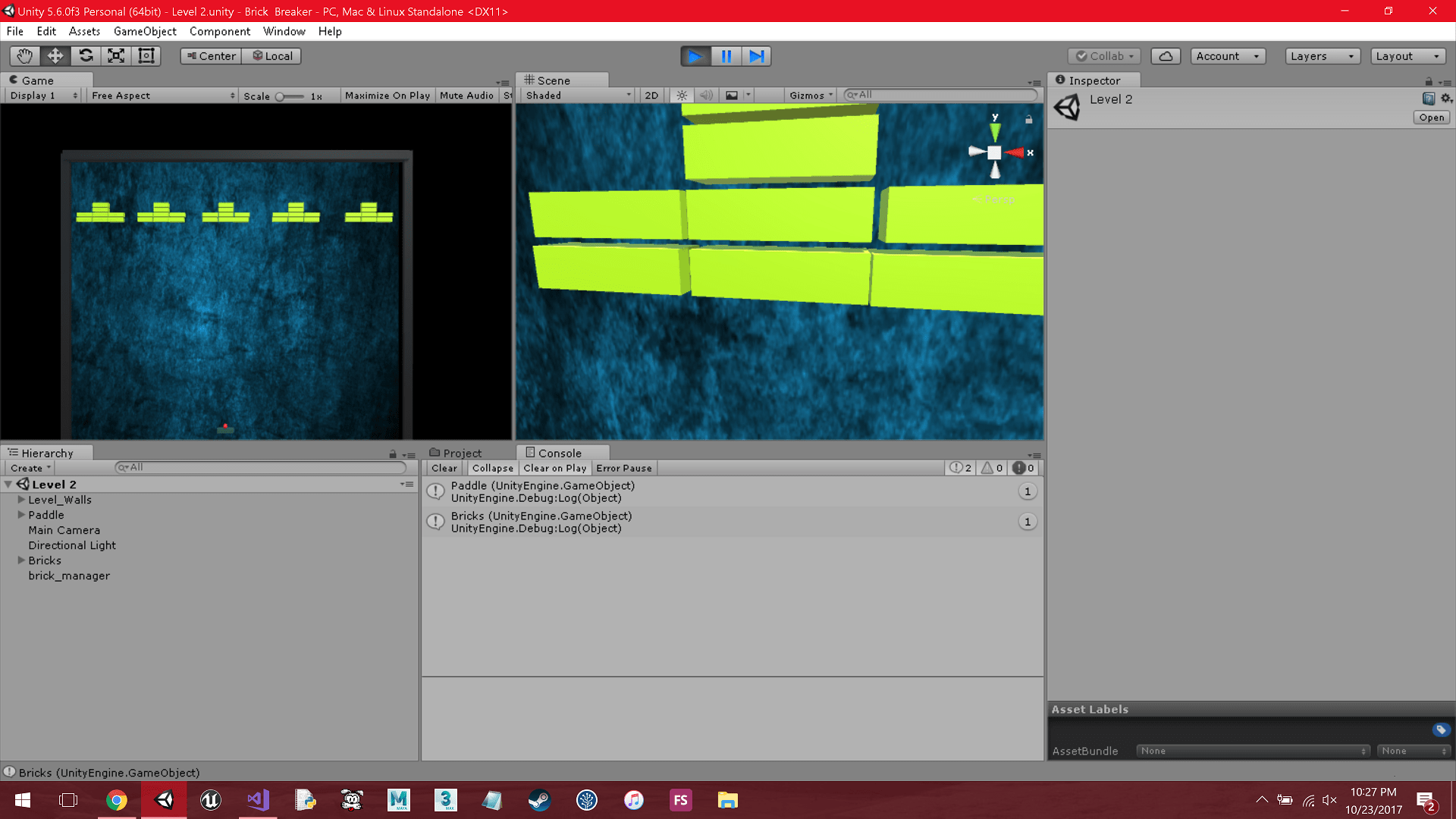
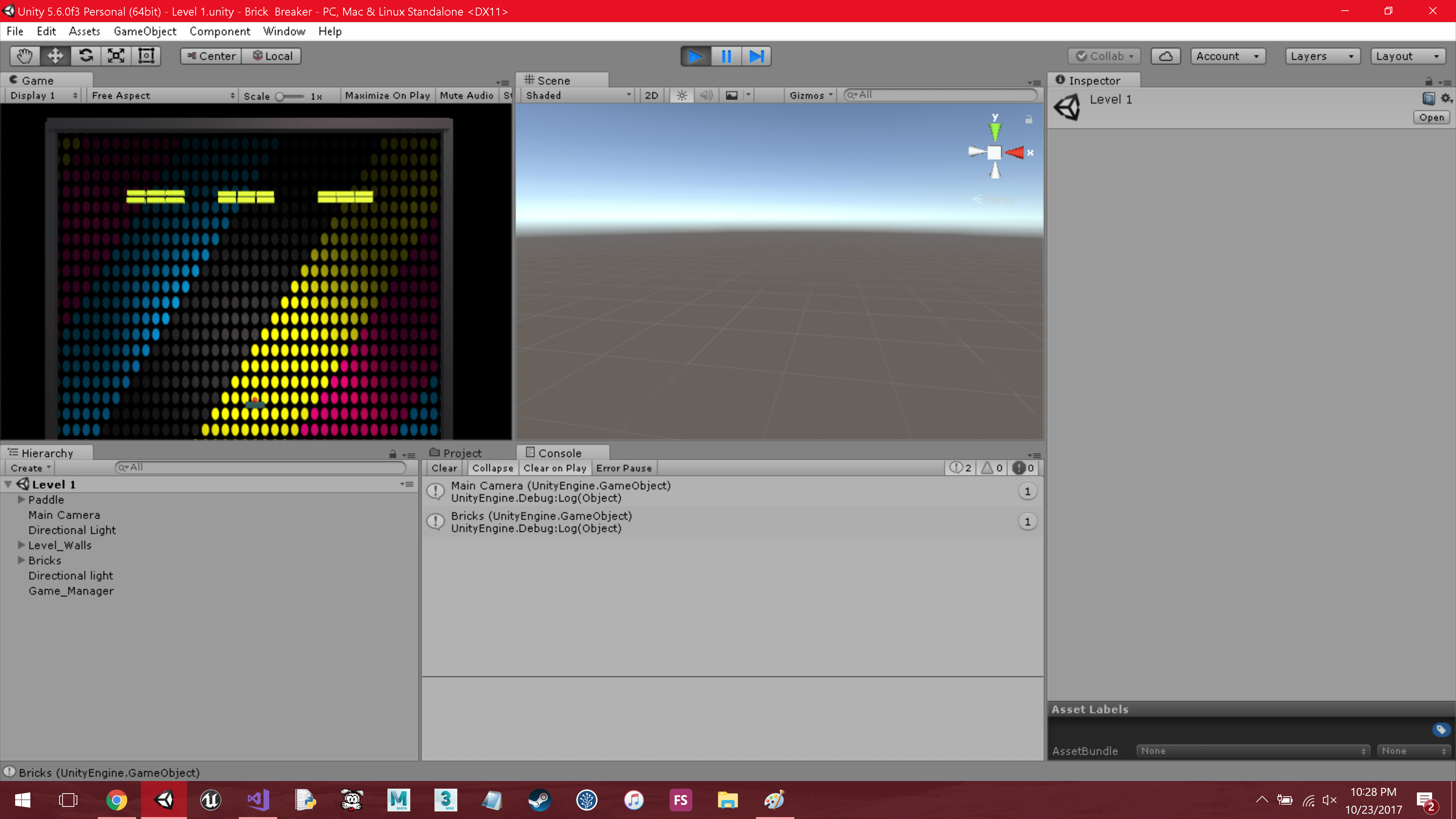
Here's another to show it's not just one object, but multiple: alt text
Question 2: So I've been coding in Unity for about 5+ years now and before I show the entire code I wanted to ask for some feedback or anyways to improve my code's efficiency/formatting etc. Among my circle of friends/connections I've always been the go to guy for programming questions, and have never had anyone better than me to mentor me or help me improve upon my skills (Most are artists which I am very far from). So that's basically what I'm asking of this community. I've come here many times, but have rarely ever posted anything on this forum (Mostly because any questions I've had have been answered). Thank you very much for your time, and I appreciate this community for all of the help it has given me throughout the years!

Entire Code:

Game_Man(C#):

 using UnityEngine;
 using System.Collections;
 using System.Collections.Generic;
 using UnityEngine.SceneManagement;
 
 public class Game_Man
 {
     public static void change_level()
     {
         Scene curr_scene = SceneManager.GetActiveScene();
         int sceneCount = UnityEngine.SceneManagement.SceneManager.sceneCountInBuildSettings;
         string[] scenes = new string[sceneCount];
         int curr_scene_num = 0;
 
         for (int i = 0; i < sceneCount; ++i)
         {
             scenes[i] = System.IO.Path.GetFileNameWithoutExtension(UnityEngine.SceneManagement.SceneUtility.GetScenePathByBuildIndex(i));
 
             if (curr_scene.name == scenes[i])
             {
                 curr_scene_num = i;
             }
         }
 
         curr_scene_num = curr_scene_num + 1;
         SceneManager.LoadScene(scenes[curr_scene_num]);
     }
 
     public static List<GameObject> find_bricks()
     {
         Scene curr_scene = SceneManager.GetActiveScene();
         List<GameObject> bricks = new List<GameObject>(curr_scene.GetRootGameObjects());
         int brick_count = bricks.Count;
 
         for (int j = 0; j < brick_count; j++)
         {
             if (bricks[j].tag != "Brick")
             {
                 bricks.Remove(bricks[j]);
                 brick_count = bricks.Count;
                 j = 0;
             }
         }
         Debug.Log(bricks[0]);
         Debug.Log(bricks[1]);
 
         return bricks;
     }
 
     public static IEnumerator check_bricks(List<GameObject> list)
     {
         while(true)
         {
             yield return null;
             if (list[1].GetComponentInChildren<Brick>() == null)
             {
                 change_level();
             }
         }
     }
 }


brick_man(C#):

 using UnityEngine;
 
 public class brick_man : MonoBehaviour 
 {
     private void Start()
     {
         StartCoroutine(Game_Man.check_bricks(Game_Man.find_bricks()));
     }
 }
brick1-min.png (289.8 kB)
brick2-min.png (524.1 kB)
Comment
Add comment
10 |3000 characters needed characters left characters exceeded
▼
  • Viewable by all users
  • Viewable by moderators
  • Viewable by moderators and the original poster
  • Advanced visibility
Viewable by all users

1 Reply

· Add your reply
  • Sort: 
avatar image
1
Best Answer

Answer by DaDonik · Oct 24, 2017 at 07:21 AM

Answer 1:

I am sure that your problem doesn't originate here. The for loop should work flawlessly. Two optimizations come to mind, though:

Edit: As pointed out by Bonfire-Boy, i have changed the code below to work correctly.

 for (int j = 0; j < brick_count; j++)
 {
     if (bricks[j].tag != "Brick")
     {
         bricks.Remove(bricks[j]);
         brick_count--;
         if (brick_count == 0) { break; }
         j--;
     }
 }


There is no need to query bricks.count if you know you just removed a single item. The bigger improvement is not restarting at 0. All you have to do is continue the loop on the current value of j, which can be done by j--.


Answer 2:

Your formatting looks fine to me. Your variable/function names make sense to me. Personally i wouldn't use underscores, as i prefer CamelCase. Hard to judge someones code from such a small amount of code, but i would assume you are doing fine in that department =)

Your check_bricks() function makes me uncomfortable. Without even checking if the list for null you are accessing element 1. Assuming the list does have at least two elements. I'm not a fan of coroutines at all, but i would write it like this:

 public static IEnumerator check_bricks(List<GameObject> list)
 {
     UnityEngine.Assertions.Assert.IsTrue(list != null, "list must not be null!");
     UnityEngine.Assertions.Assert.IsTrue(list.count > 0, 
                                          "list does not have enough elements!");

     while(true)
     {
         yield return null;
         if (list[1].GetComponentInChildren<Brick>() == null)
         {
             change_level();
         }
     }
 }   

Depending on the scenario i could also end up with:

 public static IEnumerator check_bricks(List<GameObject> list)
 {
     while(true)
     {
         yield return null;
         if ((list != null) && 
             (list.count > 0) && 
             (list[1].GetComponentInChildren<Brick>() == null))
         {
             change_level();
         }
     }
 }   

Which i would use if i need the coroutine to run despite of any errors, maybe because it does more than just check_bricks. You could also mix the two, so you get alerted by the assert and there is still 0% chance that the code will crash in a release build without the asserts.

Not sure why that coroutine uses bricks[1], but this looks pretty suspicious to me.

Comment
Add comment · Show 4 · Share
10 |3000 characters needed characters left characters exceeded
▼
  • Viewable by all users
  • Viewable by moderators
  • Viewable by moderators and the original poster
  • Advanced visibility
Viewable by all users
avatar image GhostlyDonut5 · Oct 24, 2017 at 08:29 AM 0
Share

Thanks for the feedback, and the help! The bricks[1] is there mostly because of the problem that I've run into for question 1 which forces me to check the first element which the bricks object has been consistently placed in every scene.

Also for some reason when I use j-- it gives me an array out of index error :(

Definitely missed the null check, thank you for pointing that out, need to make a habit out of that!

avatar image Bonfire-Boy · Oct 24, 2017 at 08:46 AM 1
Share

With regard to the first bit, your correction is not just an optimisation; the OP's code should not be expected to work flawlessly.

Setting the loop variable to zero doesn't work because it gets incremented immediately, when the loop is entered again (note that when the first object found is a brick, j is already zero - the fact that it's not being changed in this case should be a red flag). So when the first object is a brick, the second, which has become index 0 in the list, is skipped over.

So, while of course your version is better, the logic in the OP's could also be corrected by changing j=0 to j=-1.

avatar image GhostlyDonut5 Bonfire-Boy · Oct 24, 2017 at 09:08 AM 0
Share

Both the j-- and j -= 1 are giving me array out of range. The only thing that's not returning that error is j = 0. Also doesn't j =-1 just change j to negative one?

EDIT: Got it to work! Thanks a lot, now there is no need for the bricks[1] check! Thank you!

avatar image Bonfire-Boy GhostlyDonut5 · Oct 24, 2017 at 09:39 AM 0
Share

Yes, j=-1 changes it to -1. But then it goes back to the start of the loop and the j++ changes it to zero. But you'll get an exception if you empty the list. Try adding a check that the list isn't empty eg for (int j = 0; j < brick_count && brick_count > 0; j++) Also, try debugging it yourself by Debug.Logging the value of j at the start of (and within) the loop so you can see for what value(s) it's failing.

Your answer

Hint: You can notify a user about this post by typing @username

Up to 2 attachments (including images) can be used with a maximum of 524.3 kB each and 1.0 MB total.

Follow this Question

Answers Answers and Comments

419 People are following this question.

avatar image avatar image avatar image avatar image avatar image avatar image avatar image avatar image avatar image avatar image avatar image avatar image avatar image avatar image avatar image avatar image avatar image avatar image avatar image avatar image avatar image avatar image avatar image avatar image avatar image avatar image avatar image avatar image avatar image avatar image avatar image avatar image avatar image avatar image avatar image avatar image avatar image avatar image avatar image avatar image avatar image avatar image avatar image avatar image avatar image avatar image avatar image avatar image avatar image avatar image avatar image avatar image avatar image avatar image avatar image avatar image avatar image avatar image avatar image avatar image avatar image avatar image avatar image avatar image avatar image avatar image avatar image avatar image avatar image avatar image avatar image avatar image avatar image avatar image avatar image avatar image avatar image avatar image avatar image avatar image avatar image avatar image avatar image avatar image avatar image avatar image avatar image avatar image avatar image avatar image avatar image avatar image avatar image avatar image avatar image avatar image avatar image avatar image avatar image avatar image avatar image avatar image avatar image avatar image avatar image avatar image avatar image avatar image avatar image avatar image avatar image avatar image avatar image avatar image avatar image avatar image avatar image avatar image avatar image avatar image avatar image avatar image avatar image avatar image avatar image avatar image avatar image avatar image avatar image avatar image avatar image avatar image avatar image avatar image avatar image avatar image avatar image avatar image avatar image avatar image avatar image avatar image avatar image avatar image avatar image avatar image avatar image avatar image avatar image avatar image avatar image avatar image avatar image avatar image avatar image avatar image avatar image avatar image avatar image avatar image avatar image avatar image avatar image avatar image avatar image avatar image avatar image avatar image avatar image avatar image avatar image avatar image avatar image avatar image avatar image avatar image avatar image avatar image avatar image avatar image avatar image avatar image avatar image avatar image avatar image avatar image avatar image avatar image avatar image avatar image avatar image avatar image avatar image avatar image avatar image avatar image avatar image avatar image avatar image avatar image avatar image avatar image avatar image avatar image avatar image avatar image avatar image avatar image avatar image avatar image avatar image avatar image avatar image avatar image avatar image avatar image avatar image avatar image avatar image avatar image avatar image avatar image avatar image avatar image avatar image avatar image avatar image avatar image avatar image avatar image avatar image avatar image avatar image avatar image avatar image avatar image avatar image avatar image avatar image avatar image avatar image avatar image avatar image avatar image avatar image avatar image avatar image avatar image avatar image avatar image avatar image avatar image avatar image avatar image avatar image avatar image avatar image avatar image avatar image avatar image avatar image avatar image avatar image avatar image avatar image avatar image avatar image avatar image avatar image avatar image avatar image avatar image avatar image avatar image avatar image avatar image avatar image avatar image avatar image avatar image avatar image avatar image avatar image avatar image avatar image avatar image avatar image avatar image avatar image avatar image avatar image avatar image avatar image avatar image avatar image avatar image avatar image avatar image avatar image avatar image avatar image avatar image avatar image avatar image avatar image avatar image avatar image avatar image avatar image avatar image avatar image avatar image avatar image avatar image avatar image avatar image avatar image avatar image avatar image avatar image avatar image avatar image avatar image avatar image avatar image avatar image avatar image avatar image avatar image avatar image avatar image avatar image avatar image avatar image avatar image avatar image avatar image avatar image avatar image avatar image avatar image avatar image avatar image avatar image avatar image avatar image avatar image avatar image avatar image avatar image avatar image avatar image avatar image avatar image avatar image avatar image avatar image avatar image avatar image avatar image avatar image avatar image avatar image avatar image avatar image avatar image avatar image avatar image avatar image avatar image avatar image avatar image avatar image avatar image avatar image avatar image avatar image avatar image avatar image avatar image avatar image avatar image avatar image avatar image avatar image avatar image avatar image avatar image avatar image avatar image avatar image avatar image avatar image avatar image avatar image avatar image avatar image avatar image avatar image avatar image avatar image avatar image avatar image avatar image avatar image avatar image avatar image avatar image avatar image avatar image avatar image avatar image avatar image avatar image avatar image avatar image avatar image avatar image avatar image

Related Questions

For loop does not loop C# 2 Answers

Get first gameobject in a list and cycle through on keypress 1 Answer

A node in a childnode? 1 Answer

How to add elements from a List of another class to another List (C#) 1 Answer

Ordering a list of GameObjects 3 Answers


Enterprise
Social Q&A

Social
Subscribe on YouTube social-youtube Follow on LinkedIn social-linkedin Follow on Twitter social-twitter Follow on Facebook social-facebook Follow on Instagram social-instagram

Footer

  • Purchase
    • Products
    • Subscription
    • Asset Store
    • Unity Gear
    • Resellers
  • Education
    • Students
    • Educators
    • Certification
    • Learn
    • Center of Excellence
  • Download
    • Unity
    • Beta Program
  • Unity Labs
    • Labs
    • Publications
  • Resources
    • Learn platform
    • Community
    • Documentation
    • Unity QA
    • FAQ
    • Services Status
    • Connect
  • About Unity
    • About Us
    • Blog
    • Events
    • Careers
    • Contact
    • Press
    • Partners
    • Affiliates
    • Security
Copyright © 2020 Unity Technologies
  • Legal
  • Privacy Policy
  • Cookies
  • Do Not Sell My Personal Information
  • Cookies Settings
"Unity", Unity logos, and other Unity trademarks are trademarks or registered trademarks of Unity Technologies or its affiliates in the U.S. and elsewhere (more info here). Other names or brands are trademarks of their respective owners.
  • Anonymous
  • Sign in
  • Create
  • Ask a question
  • Spaces
  • Default
  • Help Room
  • META
  • Moderators
  • Explore
  • Topics
  • Questions
  • Users
  • Badges
