
Wayback Machinekoobas.hobune.stream
May JUN Jul
Previous capture 13 Next capture
2021 2022 2023
1 capture
13 Jun 22 - 13 Jun 22
sparklines
Close Help
  • Products
  • Solutions
  • Made with Unity
  • Learning
  • Support & Services
  • Community
  • Asset Store
  • Get Unity

UNITY ACCOUNT

You need a Unity Account to shop in the Online and Asset Stores, participate in the Unity Community and manage your license portfolio. Login Create account
  • Blog
  • Forums
  • Answers
  • Evangelists
  • User Groups
  • Beta Program
  • Advisory Panel

Navigation

  • Home
  • Products
  • Solutions
  • Made with Unity
  • Learning
  • Support & Services
  • Community
    • Blog
    • Forums
    • Answers
    • Evangelists
    • User Groups
    • Beta Program
    • Advisory Panel

Unity account

You need a Unity Account to shop in the Online and Asset Stores, participate in the Unity Community and manage your license portfolio. Login Create account

Language

  • Chinese
  • Spanish
  • Japanese
  • Korean
  • Portuguese
  • Ask a question
  • Spaces
    • Default
    • Help Room
    • META
    • Moderators
    • Topics
    • Questions
    • Users
    • Badges
  • Home /
avatar image
1
Question by whydoidoit · Jan 18, 2013 at 03:41 PM · cameraperformanceclear

Camera taking a long time to clear (but drawing is fast!)

I'm not sure what's happening, but my cameras seem to take a long time to clear.

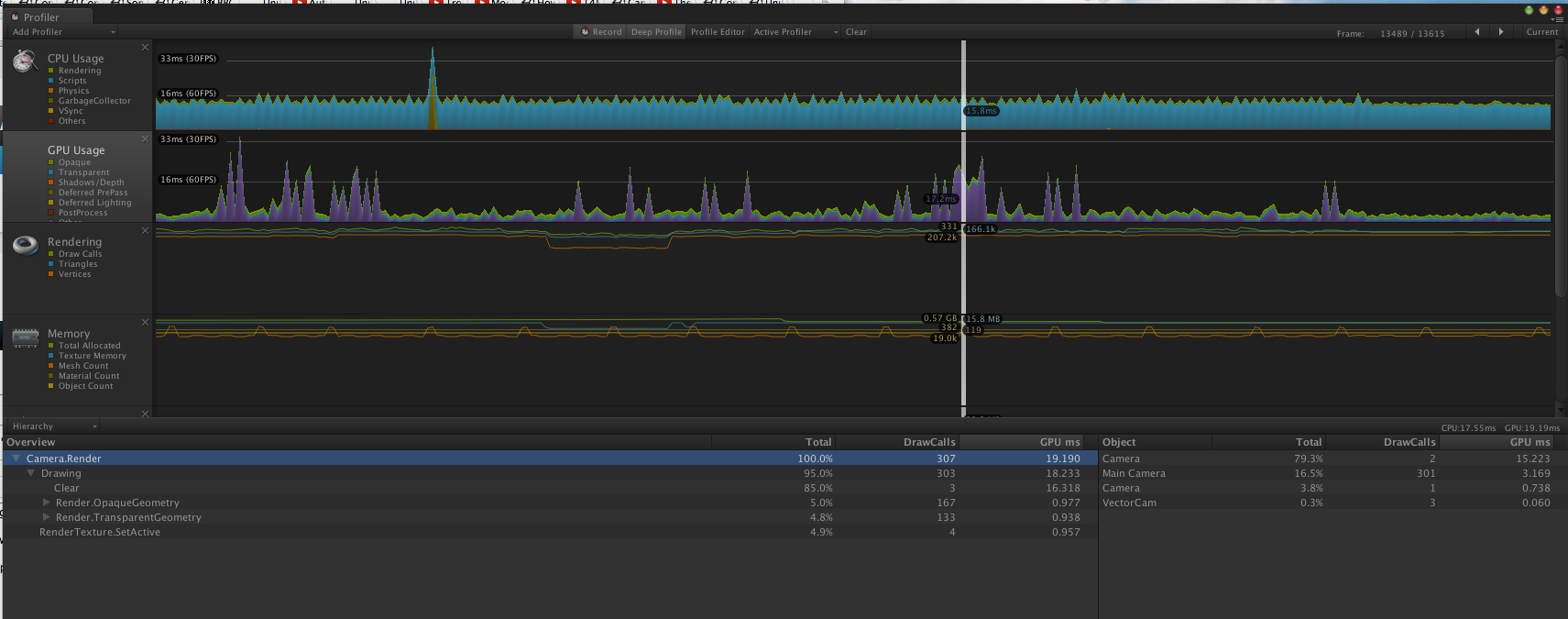
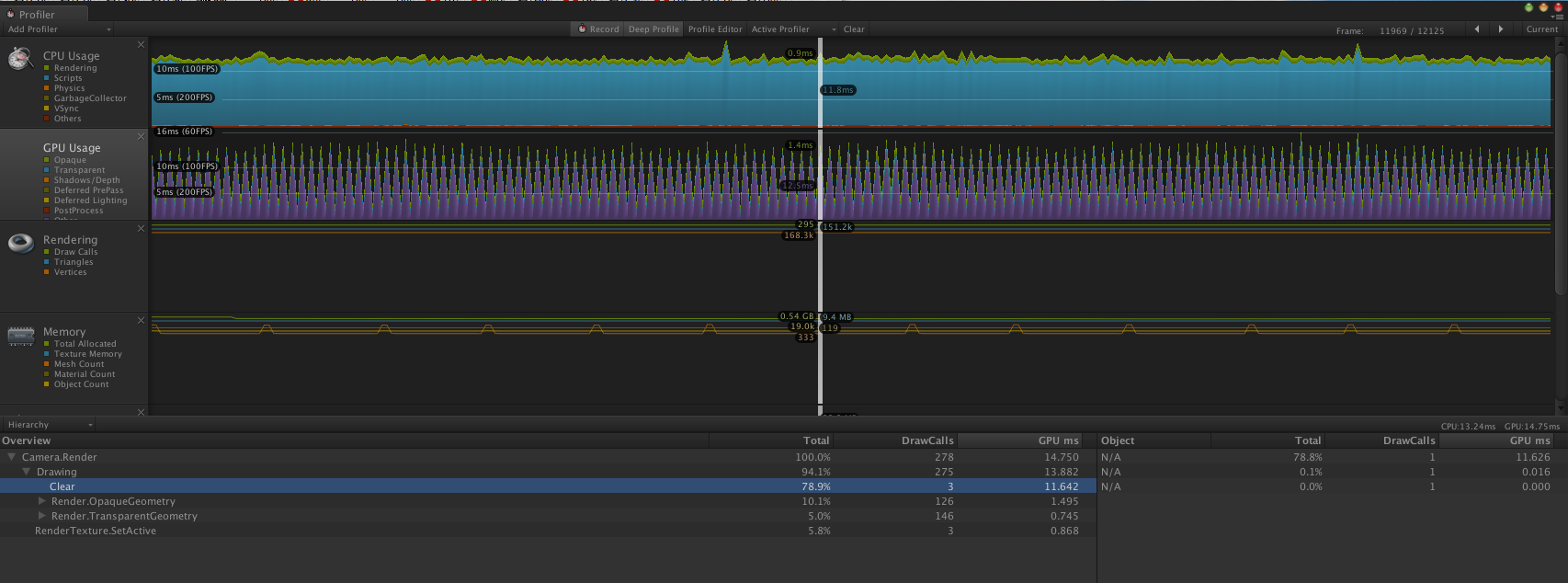
Normal rendering is fine when I don't move my main camera, but when I do then the Vectrosity camera and occasionally the NGUI cameras report that they are taking a very long time to clear in the profiler. If I set cameras to not clear then the problem just moves to a different one. Very occasionally it is the main camera itself that reports 15ms to clear.

Profiler pictures attached (in the second one I managed to get it to repeat without having to move the camera):
alt text

alt text

screen shot 2013-01-18 at 15.44.32.png (220.9 kB)
screen shot 2013-01-18 at 15.37.45.png (272.9 kB)
Comment
Add comment · Show 3
10 |3000 characters needed characters left characters exceeded
▼
  • Viewable by all users
  • Viewable by moderators
  • Viewable by moderators and the original poster
  • Advanced visibility
Viewable by all users
avatar image asafsitner · Jan 21, 2013 at 08:40 AM 0
Share

What is your hardware configuration?

I've ran into **some issues** with ATI cards in the past.

avatar image whydoidoit · Jan 21, 2013 at 08:44 AM 0
Share

That was running on a 27" i$$anonymous$$ac - will check on the specs when I get to the office.

avatar image whydoidoit · Jan 21, 2013 at 08:45 AM 0
Share

Per your point on the other thread - I wouldn't be at all surprised if its the profiler (which is totally random about the amount of memory you allocate too).

1 Reply

· Add your reply
  • Sort: 
avatar image
0

Answer by sparkzbarca · Jan 24, 2013 at 09:52 PM

per

http://docs.unity3d.com/Documentation/Manual/Profiler.html

the very last line

Please note that on the Mac, GPU profiling is only available under OSX 10.7 Lion and later versions.

your gpu line is spiking like crazy, are you sure you have a later OSX. Perhaps its not that your clear is taking forever, its that the profiler can't profile right.

Comment
Add comment · Show 10 · Share
10 |3000 characters needed characters left characters exceeded
▼
  • Viewable by all users
  • Viewable by moderators
  • Viewable by moderators and the original poster
  • Advanced visibility
Viewable by all users
avatar image whydoidoit · Jan 24, 2013 at 09:56 PM 0
Share

I am using $$anonymous$$ountain Lion 10.8.2 on a variety of $$anonymous$$acs and all are showing the same effect - I'm fairly convinced it isn't profiling properly - but how can I tell?

avatar image whydoidoit · Jan 24, 2013 at 09:57 PM 0
Share

BTW in the second picture I did manage to get it to spike, as I mentioned in the question, that's rare - it normally just happens if I scroll around the view - so something is causing the spike, in apparently, a clear function.

If I leave the panning of the view alone the frame rate is consistently the lower values.

avatar image sparkzbarca · Jan 24, 2013 at 10:06 PM 0
Share

based on the second view there are 4 cameras

camera $$anonymous$$ain Camera camera Vector Cam

you can tell because you have camera.render selected and those 4 object in the far right panel. those are the 4 cameras.

now my question for you is what is this top object

Camera

which only has 2 drawcalls which takes up 80% of everything.

This camera is clearly viewing, I don't know like something crazy.

I think its this camera. Why do you have a camera with only 2 draw calls.

It is like taking in the entire scene and not having any culling or something?

avatar image whydoidoit · Jan 24, 2013 at 10:11 PM 0
Share

It's an NGUI camera. (There are 2 NGUI cameras and 1 Vectrosity camera) + the scene camera. When there is no spike, those cameras take no time.

avatar image whydoidoit · Jan 24, 2013 at 10:17 PM 0
Share

And those cameras are not drawing anything different between spikes, they are continuously displaying the same output.

Show more comments

Your answer

Hint: You can notify a user about this post by typing @username

Up to 2 attachments (including images) can be used with a maximum of 524.3 kB each and 1.0 MB total.

Follow this Question

Answers Answers and Comments

11 People are following this question.

avatar image avatar image avatar image avatar image avatar image avatar image avatar image avatar image avatar image avatar image avatar image

Related Questions

Check if mouse is over GUI element using Rendertexture? 1 Answer

Fov affect performance in an unexpected way 0 Answers

what is renderer.camera drawing clear in profiler 0 Answers

How to avoid performance problems using HDR Cameras (in VR) 0 Answers

Using 2 cameras on a mobile game: performance hit? 1 Answer


Enterprise
Social Q&A

Social
Subscribe on YouTube social-youtube Follow on LinkedIn social-linkedin Follow on Twitter social-twitter Follow on Facebook social-facebook Follow on Instagram social-instagram

Footer

  • Purchase
    • Products
    • Subscription
    • Asset Store
    • Unity Gear
    • Resellers
  • Education
    • Students
    • Educators
    • Certification
    • Learn
    • Center of Excellence
  • Download
    • Unity
    • Beta Program
  • Unity Labs
    • Labs
    • Publications
  • Resources
    • Learn platform
    • Community
    • Documentation
    • Unity QA
    • FAQ
    • Services Status
    • Connect
  • About Unity
    • About Us
    • Blog
    • Events
    • Careers
    • Contact
    • Press
    • Partners
    • Affiliates
    • Security
Copyright © 2020 Unity Technologies
  • Legal
  • Privacy Policy
  • Cookies
  • Do Not Sell My Personal Information
  • Cookies Settings
"Unity", Unity logos, and other Unity trademarks are trademarks or registered trademarks of Unity Technologies or its affiliates in the U.S. and elsewhere (more info here). Other names or brands are trademarks of their respective owners.
  • Anonymous
  • Sign in
  • Create
  • Ask a question
  • Spaces
  • Default
  • Help Room
  • META
  • Moderators
  • Explore
  • Topics
  • Questions
  • Users
  • Badges
