 koobas.hobune.stream


OnTriggerStay2D changes bool to true and false at the same time.
Hello. I'm trying to make a 2D multiplayer game on Unity version 2018.3.0f2 Personal where the players have to clean a house before a time limit. This game will involve picking up and dropping items.
I'm using OnTriggerStay2D() and tags to detect whether an item is beneath the player. When the player is over an item, a bool called isInPickUpState should turn true to detect that the player is over an item and can potentially pick it up.
I want to do this because in a situation where the player is not over an item and the player has an item in their inventory, isInPickUpState will turn false and the player drops the item that is in their inventory.
However, when the player goes over an item, the bool turns to false and true at the same time (normally behavior is it only turns to true).
 using UnityEngine;

 public class PlayerAction : MonoBehaviour
 {
     bool isInPickUpState = false;

     Inventory inventory;

     private void Start()
     {
         inventory = GetComponent<Inventory>();
     }

     private void OnTriggerStay2D(Collider2D other)
     {
         //Swapping/Picking up objects. Might only work when the player is not using mop/broom
         if (other.gameObject.tag == "Item")
         {
             isInPickUpState = true;
             if (Input.GetKeyDown(KeyCode.X))
             {
                 inventory.PlaceInSlot(other.gameObject.GetComponent<Item>());
             }
         }
     }

     private void Update()
     {
         if (isInPickUpState == true)
         {
             if (Input.GetKeyDown(KeyCode.X))
             {
                 Debug.Log("Pickup Running");
             }
         }
         else if (isInPickUpState == false)
         {
             if (Input.GetKeyDown(KeyCode.X))
             {
                 Debug.Log("Normal Running");
             }
         }
     }
Here, I am checking for whether the bool is both true and false at the same time when I press X on top of an item. This is the output.
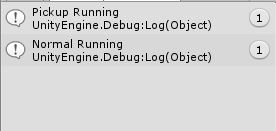
I am actually lost on this. I tested this behavior on Unity version 2018.2.11 and it worked fine. Is this a bug or intended behavior?

Hi! If you're getting both messages at the same time when pressing X, you probably have more than one script in the scene.
Try searching for "t:PlayerAction" in the Hierarchy.
As a sidenote, searching "t:[type]" (e.g t:Light, t:Collider2D) filters all the GameObjects that contain that component. Works in the project window too!

I have to be the most stupidest person in the world. I do have two of this script in the scene.
Thanks for the help. I would have been lost on the dumbest thing for a very long time.

Ha! Don't be so harsh on yourself, this probably happens to everyone. Good luck and keep making games!



