 koobas.hobune.stream


apk builded to Android device shows just a black screen
When I build and run my project , on my android devices (with android version 4.0.4)just a black screen is showed , not the created scene. I did this configuration : -Build setting for android ->Player settings -> Budle identifier (com.mycompany.appname) Minimun Api level (4.0.3) -Build and run
This configuration doesn't works for me , please help me. I am new in unity .

Did you put the scene you created into the Scenes to build list?

It doesn't have to be in the build list, it just has to be open in the editor.
Try reducing the required API level, i always build with the lowest and never had such problems.

I have solved this problem.. select all your sprites images in your project and set these following things Check override to android set Format to "RGB 32 bit" override ETC fallback to "32 bit"
the following screenshot will help you...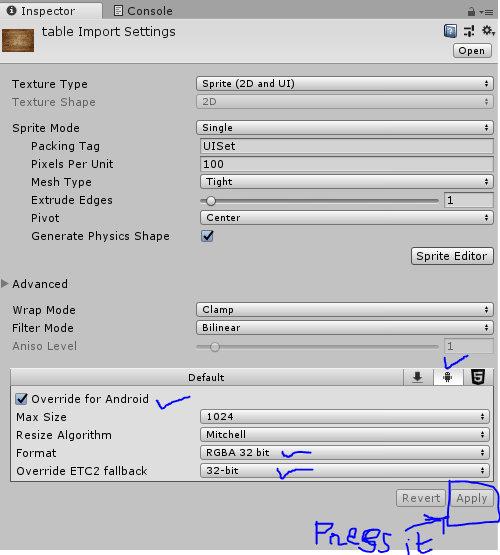

Hi andrea_sj, I've been facing the same problem. After exploring some option in player settings, I'm able to creat an (.apk) file which is functional in my android device.
First grab the file which is selected as the spalsh screen, in the inspector panel set the "Texture type" to "sprite (2D/uGUI)" and "Format" to "Truecolor". Second go to "Build Settings", make sure platform is switched to Android, change the "Texture Compression" into "ATC(Adreno)". Then press build or build and run whichever you prefer. It should creat the APK file without any issue.



