
Wayback Machinekoobas.hobune.stream
May JUN Jul
Previous capture 13 Next capture
2021 2022 2023
1 capture
13 Jun 22 - 13 Jun 22
sparklines
Close Help
  • Products
  • Solutions
  • Made with Unity
  • Learning
  • Support & Services
  • Community
  • Asset Store
  • Get Unity

UNITY ACCOUNT

You need a Unity Account to shop in the Online and Asset Stores, participate in the Unity Community and manage your license portfolio. Login Create account
  • Blog
  • Forums
  • Answers
  • Evangelists
  • User Groups
  • Beta Program
  • Advisory Panel

Navigation

  • Home
  • Products
  • Solutions
  • Made with Unity
  • Learning
  • Support & Services
  • Community
    • Blog
    • Forums
    • Answers
    • Evangelists
    • User Groups
    • Beta Program
    • Advisory Panel

Unity account

You need a Unity Account to shop in the Online and Asset Stores, participate in the Unity Community and manage your license portfolio. Login Create account

Language

  • Chinese
  • Spanish
  • Japanese
  • Korean
  • Portuguese
  • Ask a question
  • Spaces
    • Default
    • Help Room
    • META
    • Moderators
    • Topics
    • Questions
    • Users
    • Badges
  • Home /
avatar image
0
Question by crush83 · Nov 14, 2013 at 07:31 PM · shadersphereperspective

Sphere appears to elongate further away I get

My sphere elongates as I move around in my game, and I'm not sure why this is happening. My best guess is that it has something to do with either my camera view or the material/shader settings I have set on the sphere representing the planet in the picture below:
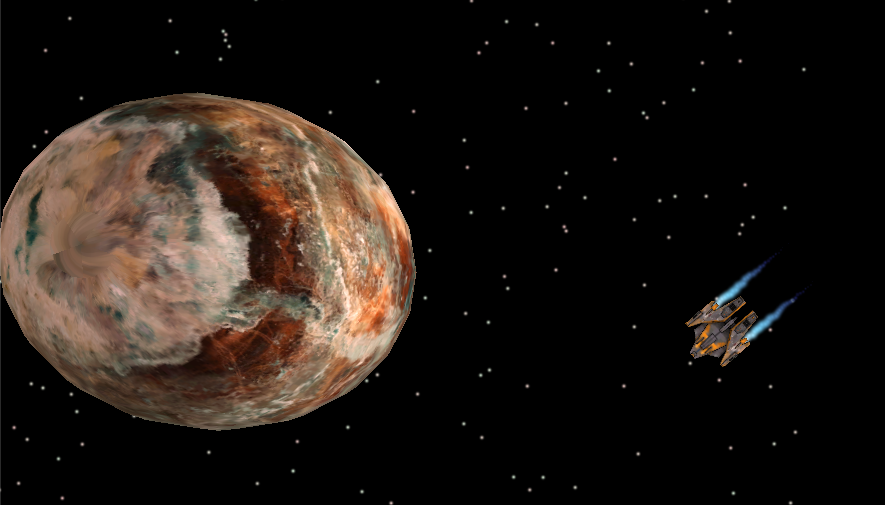
alt text

My planet has a PNG texture with the Diffuse shader applied to it. No special settings. It is a perfect sphere.

Here it is again as I get closer to the object. Notice how now it appears to be a perfect sphere.
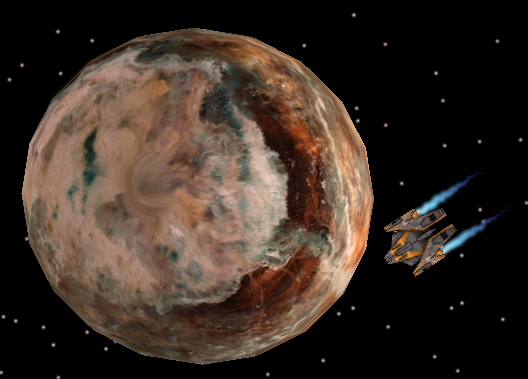
alt text

I have a perspective camera that follows my player object (the ship in the picture) around the screen. The perspective camera looks straight down on the ship. That is why I assume it has something to do with perspective. I plan on altering the camera angle at some point in the future to not be looking straight down, but for now, it looks straight down.

Question Revisited

So what I'm asking here is why is the planet seemingly elongated when I have moved far away from it. Is this the perspective camera? Should I be using an orthogonal view instead? Does it have to do with the shaders? Do I need to somehow map my texture to the sphere differently?

Note This is my first question on the site, so if I've left out crucial information, please ask for it and I will provide. Thanks.

capture.png (284.1 kB)
capture.png (352.1 kB)
Comment
Add comment · Show 1
10 |3000 characters needed characters left characters exceeded
▼
  • Viewable by all users
  • Viewable by moderators
  • Viewable by moderators and the original poster
  • Advanced visibility
Viewable by all users
avatar image Julian-Glenn · Nov 14, 2013 at 07:40 PM 0
Share

Just a query: Why is the second screen capture 3:4 and the first is more like 16:9? That could play a part if you camera is set-up correctly.

1 Reply

· Add your reply
  • Sort: 
avatar image
3
Best Answer

Answer by GameVortex · Nov 14, 2013 at 07:45 PM

Yes, that is an effect from the perspective of the camera. You could try lowering the field of view and place the camera further away, or you could as you suggested use an Orthogonal view instead (depending on your game this may not be ideal). But it has at least nothing to do with the shader or the texture mapping.

Comment
Add comment · Show 1 · Share
10 |3000 characters needed characters left characters exceeded
▼
  • Viewable by all users
  • Viewable by moderators
  • Viewable by moderators and the original poster
  • Advanced visibility
Viewable by all users
avatar image crush83 · Nov 14, 2013 at 07:51 PM 0
Share

Thanks for the insight! Now I can try to remedy this problem.

Your answer

Hint: You can notify a user about this post by typing @username

Up to 2 attachments (including images) can be used with a maximum of 524.3 kB each and 1.0 MB total.

Follow this Question

Answers Answers and Comments

18 People are following this question.

avatar image avatar image avatar image avatar image avatar image avatar image avatar image avatar image avatar image avatar image avatar image avatar image avatar image avatar image avatar image avatar image avatar image avatar image

Related Questions

Sphere and normal mapping problem with Shader Graph 0 Answers

Why does spec map turn object black? 0 Answers

Sphere turns oval at edge of viewport 1 Answer

Projecting a plane onto a sphere 2 Answers

Dynamic Skybox 0 Answers


Enterprise
Social Q&A

Social
Subscribe on YouTube social-youtube Follow on LinkedIn social-linkedin Follow on Twitter social-twitter Follow on Facebook social-facebook Follow on Instagram social-instagram

Footer

  • Purchase
    • Products
    • Subscription
    • Asset Store
    • Unity Gear
    • Resellers
  • Education
    • Students
    • Educators
    • Certification
    • Learn
    • Center of Excellence
  • Download
    • Unity
    • Beta Program
  • Unity Labs
    • Labs
    • Publications
  • Resources
    • Learn platform
    • Community
    • Documentation
    • Unity QA
    • FAQ
    • Services Status
    • Connect
  • About Unity
    • About Us
    • Blog
    • Events
    • Careers
    • Contact
    • Press
    • Partners
    • Affiliates
    • Security
Copyright © 2020 Unity Technologies
  • Legal
  • Privacy Policy
  • Cookies
  • Do Not Sell My Personal Information
  • Cookies Settings
"Unity", Unity logos, and other Unity trademarks are trademarks or registered trademarks of Unity Technologies or its affiliates in the U.S. and elsewhere (more info here). Other names or brands are trademarks of their respective owners.
  • Anonymous
  • Sign in
  • Create
  • Ask a question
  • Spaces
  • Default
  • Help Room
  • META
  • Moderators
  • Explore
  • Topics
  • Questions
  • Users
  • Badges