
Wayback Machinekoobas.hobune.stream
May JUN Jul
Previous capture 12 Next capture
2021 2022 2023
1 capture
12 Jun 22 - 12 Jun 22
sparklines
Close Help
  • Products
  • Solutions
  • Made with Unity
  • Learning
  • Support & Services
  • Community
  • Asset Store
  • Get Unity

UNITY ACCOUNT

You need a Unity Account to shop in the Online and Asset Stores, participate in the Unity Community and manage your license portfolio. Login Create account
  • Blog
  • Forums
  • Answers
  • Evangelists
  • User Groups
  • Beta Program
  • Advisory Panel

Navigation

  • Home
  • Products
  • Solutions
  • Made with Unity
  • Learning
  • Support & Services
  • Community
    • Blog
    • Forums
    • Answers
    • Evangelists
    • User Groups
    • Beta Program
    • Advisory Panel

Unity account

You need a Unity Account to shop in the Online and Asset Stores, participate in the Unity Community and manage your license portfolio. Login Create account

Language

  • Chinese
  • Spanish
  • Japanese
  • Korean
  • Portuguese
  • Ask a question
  • Spaces
    • Default
    • Help Room
    • META
    • Moderators
    • Topics
    • Questions
    • Users
    • Badges
  • Home /
avatar image
0
Question by agnebers · Jan 05, 2019 at 02:12 PM · 2dcolliderphysics2d

Ball bounces in the wrong direction
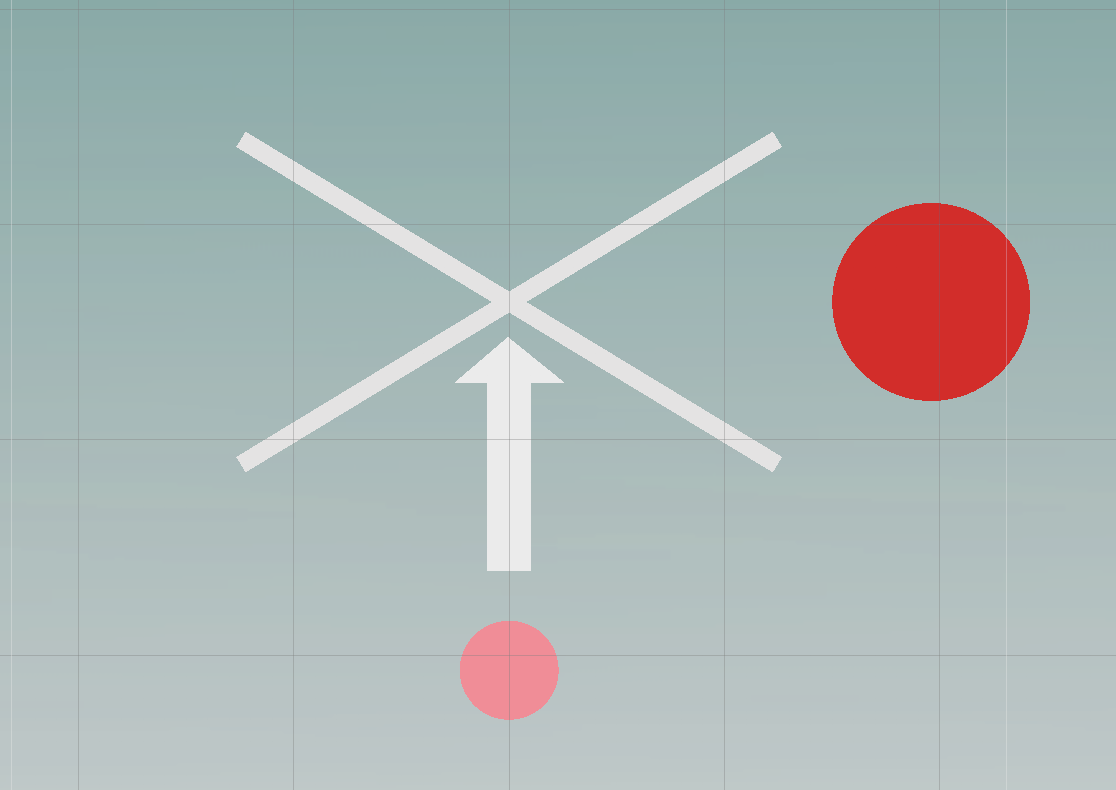
alt textI have written a script that is is applying a force to a ball and then makes the ball bounce off the objects it collides with. It works very well except in the situation in the attached photo where the ball is applied a force to make it go straight up, but it seems to only detect collision with one of the lines in the cross (detects one of them, then the other right after in the next frame or so, resulting in the first collision being "ignored"), resulting in the ball bouncing down to the far right instead of straight downwards. Any ideas how to fix this?

     private void Start()
 {
     rb = GetComponent<Rigidbody2D>();
     rb.velocity = initialVelocity;
     s=false;
     force = new Vector2(0f,1f);
 }

 private void Update()
 {
     lastFrameVelocity = rb.velocity;
     if (s)
         rb.AddForce(force);

 }

 private void OnCollisionEnter2D(Collision2D collision)
 {
     Bounce(collision.contacts[0].normal);
     s = false;    
 }

 private void Bounce(Vector3 collisionNormal)
 {
     var speed = lastFrameVelocity.magnitude;
     var direction = Vector2.Reflect(lastFrameVelocity.normalized, collisionNormal);
     rb.velocity = direction * Mathf.Max(speed, minVelocity);
     
 }

 private void Fire()
 {
     s = true;
 }

 private void OnMouseDown()
 {
     Fire();
 }

}

screen-shot-2019-01-05-at-145746.png (67.9 kB)
Comment
Add comment
10 |3000 characters needed characters left characters exceeded
▼
  • Viewable by all users
  • Viewable by moderators
  • Viewable by moderators and the original poster
  • Advanced visibility
Viewable by all users

1 Reply

· Add your reply
  • Sort: 
avatar image
1

Answer by Ady_M · Jan 05, 2019 at 04:07 PM

First of all, move AddForce and the lastFrameVelocity assignment to FixedUpdate. The regular Update event is not suited for physics manipulation.


Secondly, if you need that much control over the physics then maybe you should consider enabling isKinematic on the Rigidbody and doing the collision detection yourself using Raycast.


Thirdly, and I'm sorry if this sounds pessimistic, but you should not rely on the physics engine that much. It cannot simulate the real world precisely. All it can do (due to performance) is approximate. So, if there is a great chance that the ball will hit the corner perfectly as shown in the image then I would advise you to check for this condition specifically. You could, for instance, check if the velocity.x is zero (assuming that's left/right) and the same with velocity.z, if there's a chance the ball might hit the corner horizontally, and check if the ball is lined up perfectly (or close enough) with the intersection.

Comment
Add comment · Share
10 |3000 characters needed characters left characters exceeded
▼
  • Viewable by all users
  • Viewable by moderators
  • Viewable by moderators and the original poster
  • Advanced visibility
Viewable by all users

Your answer

Hint: You can notify a user about this post by typing @username

Up to 2 attachments (including images) can be used with a maximum of 524.3 kB each and 1.0 MB total.

Follow this Question

Answers Answers and Comments

216 People are following this question.

avatar image avatar image avatar image avatar image avatar image avatar image avatar image avatar image avatar image avatar image avatar image avatar image avatar image avatar image avatar image avatar image avatar image avatar image avatar image avatar image avatar image avatar image avatar image avatar image avatar image avatar image avatar image avatar image avatar image avatar image avatar image avatar image avatar image avatar image avatar image avatar image avatar image avatar image avatar image avatar image avatar image avatar image avatar image avatar image avatar image avatar image avatar image avatar image avatar image avatar image avatar image avatar image avatar image avatar image avatar image avatar image avatar image avatar image avatar image avatar image avatar image avatar image avatar image avatar image avatar image avatar image avatar image avatar image avatar image avatar image avatar image avatar image avatar image avatar image avatar image avatar image avatar image avatar image avatar image avatar image avatar image avatar image avatar image avatar image avatar image avatar image avatar image avatar image avatar image avatar image avatar image avatar image avatar image avatar image avatar image avatar image avatar image avatar image avatar image avatar image avatar image avatar image avatar image avatar image avatar image avatar image avatar image avatar image avatar image avatar image avatar image avatar image avatar image avatar image avatar image avatar image avatar image avatar image avatar image avatar image avatar image avatar image avatar image avatar image avatar image avatar image avatar image avatar image avatar image avatar image avatar image avatar image avatar image avatar image avatar image avatar image avatar image avatar image avatar image avatar image avatar image avatar image avatar image avatar image avatar image avatar image avatar image avatar image avatar image avatar image avatar image avatar image avatar image avatar image avatar image avatar image avatar image avatar image avatar image avatar image avatar image avatar image avatar image avatar image avatar image avatar image avatar image avatar image avatar image avatar image avatar image avatar image avatar image avatar image avatar image avatar image avatar image avatar image avatar image avatar image avatar image avatar image avatar image avatar image avatar image avatar image avatar image avatar image avatar image avatar image avatar image avatar image avatar image avatar image avatar image avatar image avatar image avatar image avatar image avatar image avatar image avatar image avatar image avatar image avatar image avatar image avatar image avatar image avatar image avatar image avatar image avatar image avatar image avatar image avatar image avatar image

Related Questions

How to check for collision between a moving kinematic object and an empty object? 3 Answers

How can I see my physics2d joints? 0 Answers

Colliders in a wall jut out 0 Answers

How can a character not move out of box collider's bounds? 1 Answer

Top Down 2d (PC): Gameobjects' Colliders intermeshing 1 Answer


Enterprise
Social Q&A

Social
Subscribe on YouTube social-youtube Follow on LinkedIn social-linkedin Follow on Twitter social-twitter Follow on Facebook social-facebook Follow on Instagram social-instagram

Footer

  • Purchase
    • Products
    • Subscription
    • Asset Store
    • Unity Gear
    • Resellers
  • Education
    • Students
    • Educators
    • Certification
    • Learn
    • Center of Excellence
  • Download
    • Unity
    • Beta Program
  • Unity Labs
    • Labs
    • Publications
  • Resources
    • Learn platform
    • Community
    • Documentation
    • Unity QA
    • FAQ
    • Services Status
    • Connect
  • About Unity
    • About Us
    • Blog
    • Events
    • Careers
    • Contact
    • Press
    • Partners
    • Affiliates
    • Security
Copyright © 2020 Unity Technologies
  • Legal
  • Privacy Policy
  • Cookies
  • Do Not Sell My Personal Information
  • Cookies Settings
"Unity", Unity logos, and other Unity trademarks are trademarks or registered trademarks of Unity Technologies or its affiliates in the U.S. and elsewhere (more info here). Other names or brands are trademarks of their respective owners.
  • Anonymous
  • Sign in
  • Create
  • Ask a question
  • Spaces
  • Default
  • Help Room
  • META
  • Moderators
  • Explore
  • Topics
  • Questions
  • Users
  • Badges