
Wayback Machinekoobas.hobune.stream
May JUN Jul
Previous capture 13 Next capture
2021 2022 2023
1 capture
13 Jun 22 - 13 Jun 22
sparklines
Close Help
  • Products
  • Solutions
  • Made with Unity
  • Learning
  • Support & Services
  • Community
  • Asset Store
  • Get Unity

UNITY ACCOUNT

You need a Unity Account to shop in the Online and Asset Stores, participate in the Unity Community and manage your license portfolio. Login Create account
  • Blog
  • Forums
  • Answers
  • Evangelists
  • User Groups
  • Beta Program
  • Advisory Panel

Navigation

  • Home
  • Products
  • Solutions
  • Made with Unity
  • Learning
  • Support & Services
  • Community
    • Blog
    • Forums
    • Answers
    • Evangelists
    • User Groups
    • Beta Program
    • Advisory Panel

Unity account

You need a Unity Account to shop in the Online and Asset Stores, participate in the Unity Community and manage your license portfolio. Login Create account

Language

  • Chinese
  • Spanish
  • Japanese
  • Korean
  • Portuguese
  • Ask a question
  • Spaces
    • Default
    • Help Room
    • META
    • Moderators
    • Topics
    • Questions
    • Users
    • Badges
  • Home /
avatar image
0
Question by TaliDen · Jan 18, 2014 at 11:38 PM · ios2d-physics

2D iOS Shooter - Bullet prefab not destroyed on collision

Hello all,

I'm working on a top down shooter iOS 2D game and I'm having some problems with destroying the bullets the spaceship shoots. This is what I have done so far:

  1. Created a top bumper. It's a sprite with a Box Collider 2D attached. It is also on its own shorting layer behind the foreground and in-front of the background (Z position is 0, the shame as spaceship).

  2. Made the bullet, which is a prefab, a Rigid Body 2D component (with 0 Gravity Scale) and also applied a Box Collider 2D (I also tested without the Box Collider 2D and only with the Rigid Body 2D but in this case the bullet does not collide on the top bumper at all).

  3. On the bullet prefab I attached the following script:

function OnCollisionEnter(col : Collision){

  if(col.gameObject.tag == "Top"){
     Destroy(gameObject);
     
   }

}

*Note that I have assigned the top bumper a "Top" tag.

So what I ended up with is a bullet that when it reaches the top bumper, it collides to it and stays there or moves weirdly along the bumper, but it is not destroyed. See image:
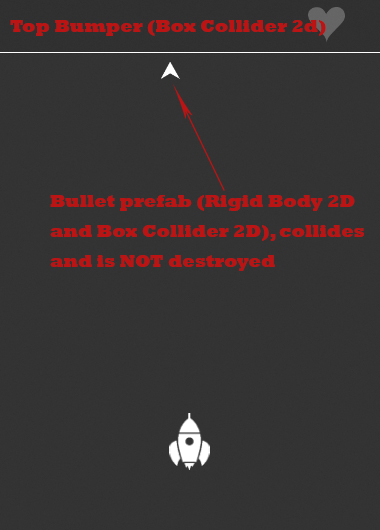
alt text

I believe it may have something to do with the 2D components and the colliders I use, as this is my first 2D game and I'm not accustomed to this workflow.

Please help out if you are experienced with 2D, cause I don't seem to be able to find a solution about this.

Thank you so much!

bullet_problem.jpg (115.6 kB)
Comment
Add comment
10 |3000 characters needed characters left characters exceeded
▼
  • Viewable by all users
  • Viewable by moderators
  • Viewable by moderators and the original poster
  • Advanced visibility
Viewable by all users

1 Reply

· Add your reply
  • Sort: 
avatar image
0

Answer by robertbu · Jan 18, 2014 at 11:40 PM

For 2D components, you want to use OnCollisionEnter2D() rather than the 3D version (OnCollisionEnter()).

Comment
Add comment · Show 7 · Share
10 |3000 characters needed characters left characters exceeded
▼
  • Viewable by all users
  • Viewable by moderators
  • Viewable by moderators and the original poster
  • Advanced visibility
Viewable by all users
avatar image TaliDen · Jan 18, 2014 at 11:45 PM 0
Share

Thanks for the suggestion, you're right about the function being a 2D, however it still does the same thing. Collides and is not removed :(

avatar image robertbu · Jan 18, 2014 at 11:48 PM 0
Share

Did you change the parameter to a Collision2D as well?

avatar image TaliDen · Jan 18, 2014 at 11:49 PM 0
Share

Yes did that! :)

avatar image robertbu · Jan 18, 2014 at 11:52 PM 0
Share

So is it still not working?

avatar image TaliDen · Jan 18, 2014 at 11:53 PM 0
Share

Yes it's still behaving the same way

Show more comments

Your answer

Hint: You can notify a user about this post by typing @username

Up to 2 attachments (including images) can be used with a maximum of 524.3 kB each and 1.0 MB total.

Follow this Question

Answers Answers and Comments

18 People are following this question.

avatar image avatar image avatar image avatar image avatar image avatar image avatar image avatar image avatar image avatar image avatar image avatar image avatar image avatar image avatar image avatar image avatar image avatar image

Related Questions

Crash in PhysicsScene2D::UpdateJoints(float) 0 Answers

The name 'Joystick' does not denote a valid type ('not found') 2 Answers

Player Jump 2D with little parabolic effect. 3 Answers

IL2CPP - RPC doesn't work 1 Answer

Dynamically disabling Dynamic Batching on iPhone 2 Answers


Enterprise
Social Q&A

Social
Subscribe on YouTube social-youtube Follow on LinkedIn social-linkedin Follow on Twitter social-twitter Follow on Facebook social-facebook Follow on Instagram social-instagram

Footer

  • Purchase
    • Products
    • Subscription
    • Asset Store
    • Unity Gear
    • Resellers
  • Education
    • Students
    • Educators
    • Certification
    • Learn
    • Center of Excellence
  • Download
    • Unity
    • Beta Program
  • Unity Labs
    • Labs
    • Publications
  • Resources
    • Learn platform
    • Community
    • Documentation
    • Unity QA
    • FAQ
    • Services Status
    • Connect
  • About Unity
    • About Us
    • Blog
    • Events
    • Careers
    • Contact
    • Press
    • Partners
    • Affiliates
    • Security
Copyright © 2020 Unity Technologies
  • Legal
  • Privacy Policy
  • Cookies
  • Do Not Sell My Personal Information
  • Cookies Settings
"Unity", Unity logos, and other Unity trademarks are trademarks or registered trademarks of Unity Technologies or its affiliates in the U.S. and elsewhere (more info here). Other names or brands are trademarks of their respective owners.
  • Anonymous
  • Sign in
  • Create
  • Ask a question
  • Spaces
  • Default
  • Help Room
  • META
  • Moderators
  • Explore
  • Topics
  • Questions
  • Users
  • Badges
