
Wayback Machinekoobas.hobune.stream
May JUN Jul
Previous capture 13 Next capture
2021 2022 2023
1 capture
13 Jun 22 - 13 Jun 22
sparklines
Close Help
  • Products
  • Solutions
  • Made with Unity
  • Learning
  • Support & Services
  • Community
  • Asset Store
  • Get Unity

UNITY ACCOUNT

You need a Unity Account to shop in the Online and Asset Stores, participate in the Unity Community and manage your license portfolio. Login Create account
  • Blog
  • Forums
  • Answers
  • Evangelists
  • User Groups
  • Beta Program
  • Advisory Panel

Navigation

  • Home
  • Products
  • Solutions
  • Made with Unity
  • Learning
  • Support & Services
  • Community
    • Blog
    • Forums
    • Answers
    • Evangelists
    • User Groups
    • Beta Program
    • Advisory Panel

Unity account

You need a Unity Account to shop in the Online and Asset Stores, participate in the Unity Community and manage your license portfolio. Login Create account

Language

  • Chinese
  • Spanish
  • Japanese
  • Korean
  • Portuguese
  • Ask a question
  • Spaces
    • Default
    • Help Room
    • META
    • Moderators
    • Topics
    • Questions
    • Users
    • Badges
  • Home /
avatar image
1
Question by asfdasc · Dec 16, 2013 at 09:13 PM · collisionontriggerstay

OnTriggerStay doesnt work unless moving?

I asked this question previously, but i guess i didnt word it properly so people didnt really understand what i am trying to ask. I have an enemy which has a sword. He is programmed to approach to player and play and animaton which swings the sword at the player and it collides with it. For some reason when he approaches the player and swings once, the collider detects the collision and i have it print out the collided object's tag which is always the player, but when he swings again and the player still hasnt moved, it doesnt detect a collision. Some other strange things is that if the player constantly moves into a wall or into the enemy, it works properly, as if the collision is only detected when the player is moving. Heres a picture of the enemies components and settings alt text
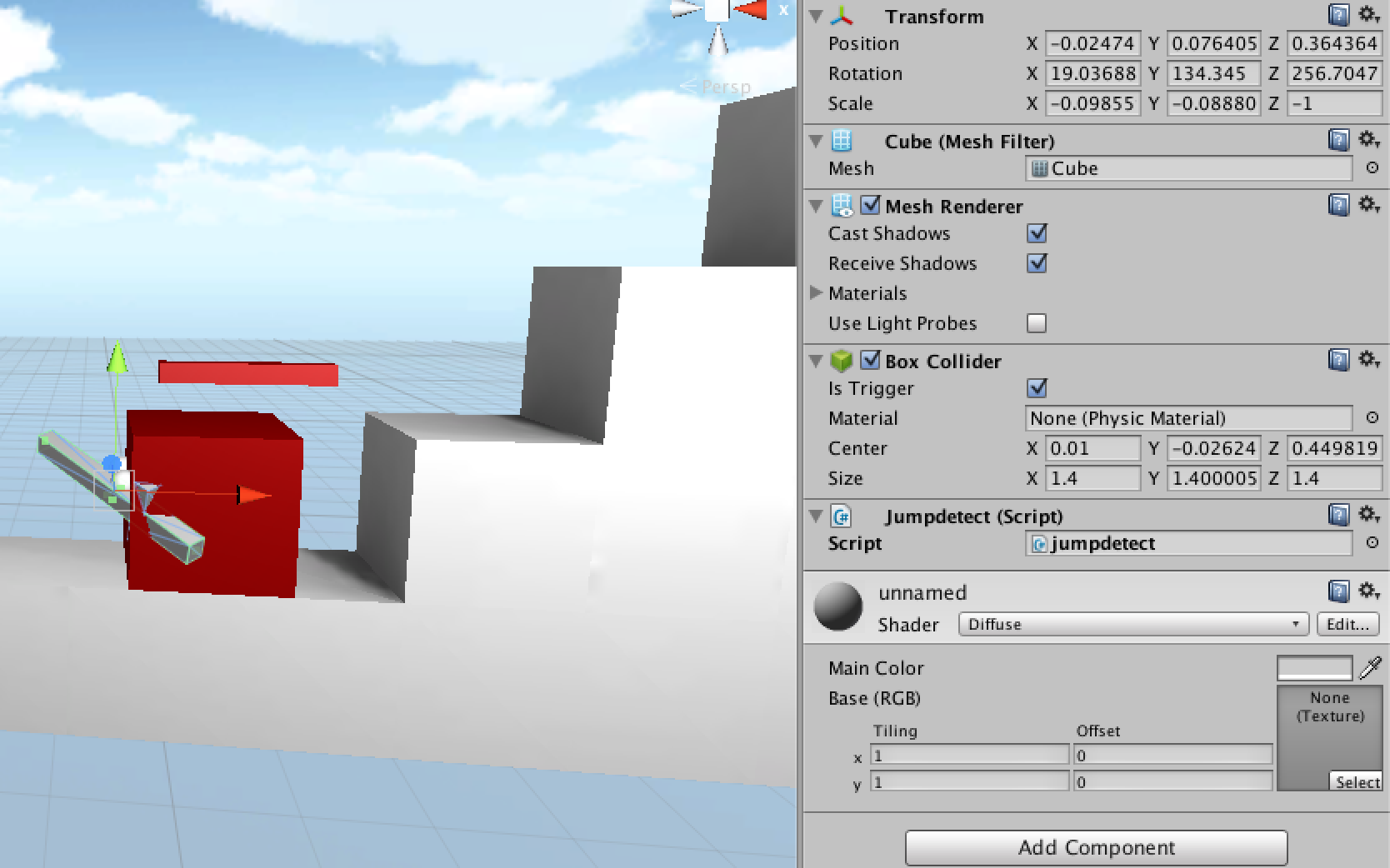
As you can see the collider looks like the size and shape it should be and the box collider is set to Trigger. here is my code for the script jumpdetect

 public class jumpdetect : MonoBehaviour {
     void OnTriggerStay(Collider c){
         Debug.Log(c.tag);
     }
 }

So just to repeat myself.... when the enemy approaches and swings the sword (Which obviously collided with the player every time) it prints out about 25 lines of "Player" like it should... but next time around if i havent moved from the last time he hit me then it doestn print anything out. Ive been stuck on this issue for about 2 days now and im totally baffled by what the issue is. Thanks in advance for the help.

screen shot 2013-12-16 at 4.07.01 pm.png (252.6 kB)
Comment
Add comment · Show 2
10 |3000 characters needed characters left characters exceeded
▼
  • Viewable by all users
  • Viewable by moderators
  • Viewable by moderators and the original poster
  • Advanced visibility
Viewable by all users
avatar image TimBorquez · Dec 16, 2013 at 09:27 PM 0
Share

using a character controller?

avatar image BMayne · Jan 04, 2015 at 01:09 AM 0
Share

Collider are weird and don't like when they enter something else.

Think of it this way.

If you broke into someones house you would not call the police(function). If someone broke into your house you would call the police(function).

If your target is not moving it will not be called. I would suggest just using a raycast.

1 Reply

· Add your reply
  • Sort: 
avatar image
1
Best Answer

Answer by TimBorquez · Dec 16, 2013 at 09:34 PM

if you're using the character controller the collision functions don't seem to work all the time unless you're moving

you should be able to either:

-detect it from the character controller with this

-put a rigidbody on the sword because it's moving

-cheat and "move" the player constantly:

 //put this code on the character controller
 
 function Update () {
 //add nothing to position yo
 transform.position += Vector3.zero;
 }


Comment
Add comment · Show 2 · Share
10 |3000 characters needed characters left characters exceeded
▼
  • Viewable by all users
  • Viewable by moderators
  • Viewable by moderators and the original poster
  • Advanced visibility
Viewable by all users
avatar image asfdasc · Dec 16, 2013 at 10:10 PM 0
Share

Im not using the character controller but i added a rigidbody to the sword and it works perfectly now! Thanks!

avatar image murkantilism · Jul 06, 2014 at 09:29 PM 1
Share

To clarify a wee bit, transform.position += Vector3.zero probably won't do the trick. Functions like OnControllerColliderHit() depend on calls to Simple$$anonymous$$ove() or $$anonymous$$ove().

controller.Simple$$anonymous$$ove(Vector3.zero); is the right "cheat" you're looking for.

Your answer

Hint: You can notify a user about this post by typing @username

Up to 2 attachments (including images) can be used with a maximum of 524.3 kB each and 1.0 MB total.

Follow this Question

Answers Answers and Comments

20 People are following this question.

avatar image avatar image avatar image avatar image avatar image avatar image avatar image avatar image avatar image avatar image avatar image avatar image avatar image avatar image avatar image avatar image avatar image avatar image avatar image avatar image

Related Questions

Having problems with GetButtonDown missing button presses 1 Answer

Detect 2 colliders by trigger 1 Answer

Can someone clarifies OnTriggerEnter, OnTriggerExit and OnTriggerStay for me? (I have image included already) 0 Answers

Problem with OnTriggerStay2D function 2 Answers

OnTriggerStay to detect objects inside of another 2 Answers


Enterprise
Social Q&A

Social
Subscribe on YouTube social-youtube Follow on LinkedIn social-linkedin Follow on Twitter social-twitter Follow on Facebook social-facebook Follow on Instagram social-instagram

Footer

  • Purchase
    • Products
    • Subscription
    • Asset Store
    • Unity Gear
    • Resellers
  • Education
    • Students
    • Educators
    • Certification
    • Learn
    • Center of Excellence
  • Download
    • Unity
    • Beta Program
  • Unity Labs
    • Labs
    • Publications
  • Resources
    • Learn platform
    • Community
    • Documentation
    • Unity QA
    • FAQ
    • Services Status
    • Connect
  • About Unity
    • About Us
    • Blog
    • Events
    • Careers
    • Contact
    • Press
    • Partners
    • Affiliates
    • Security
Copyright © 2020 Unity Technologies
  • Legal
  • Privacy Policy
  • Cookies
  • Do Not Sell My Personal Information
  • Cookies Settings
"Unity", Unity logos, and other Unity trademarks are trademarks or registered trademarks of Unity Technologies or its affiliates in the U.S. and elsewhere (more info here). Other names or brands are trademarks of their respective owners.
  • Anonymous
  • Sign in
  • Create
  • Ask a question
  • Spaces
  • Default
  • Help Room
  • META
  • Moderators
  • Explore
  • Topics
  • Questions
  • Users
  • Badges
