Wayback Machinekoobas.hobune.stream
May JUN Jul
Previous capture 13 Next capture
2021 2022 2023
1 capture
13 Jun 22 - 13 Jun 22
sparklines
Close Help
  • Products
  • Solutions
  • Made with Unity
  • Learning
  • Support & Services
  • Community
  • Asset Store
  • Get Unity

UNITY ACCOUNT

You need a Unity Account to shop in the Online and Asset Stores, participate in the Unity Community and manage your license portfolio. Login Create account
  • Blog
  • Forums
  • Answers
  • Evangelists
  • User Groups
  • Beta Program
  • Advisory Panel

Navigation

  • Home
  • Products
  • Solutions
  • Made with Unity
  • Learning
  • Support & Services
  • Community
    • Blog
    • Forums
    • Answers
    • Evangelists
    • User Groups
    • Beta Program
    • Advisory Panel

Unity account

You need a Unity Account to shop in the Online and Asset Stores, participate in the Unity Community and manage your license portfolio. Login Create account

Language

  • Chinese
  • Spanish
  • Japanese
  • Korean
  • Portuguese
  • Ask a question
  • Spaces
    • Default
    • Help Room
    • META
    • Moderators
    • Topics
    • Questions
    • Users
    • Badges
  • Home /
avatar image
1
Question by Lillian1810 · Jan 28, 2015 at 02:13 PM · animationanimatorpositionroot motionsinking

Character keeps sinking into ground even though root motion is disabled

Hi!

I am quite new to Unity and I am having a (probably pretty simple) issue but I can't seem to figure it out.

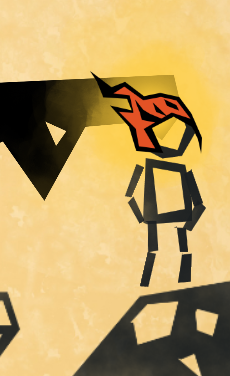
I have a simple scene with a character that can walk, but with every step it sinks a tiny bit into the ground. It's barely noticeable at first, but after walking back and forth for a while it gets clearer.

Visual. Before vs after running around.
alt text alt text

I have unchecked "Apply Root Motion" in the Animator Component, and also tried baking the Y position into pose in the animation import settings, but neither of these solutions seem to work. Also, the character does not have a rigid body or physics whatsoever yet.

It must have something to do with the animations as the issue doesn't occur when the animator is disabled.

Does anyone have any suggestions on how to fix this?

Thanks in advance! Lillian1810

EDIT: For some reason it now randomly switches between sinking down and floating up, so something really random must be going on....

screen-shot-2015-01-27-at-224920.png (113.5 kB)
screen-shot-2015-01-27-at-224816.png (69.7 kB)
Comment
Add comment · Show 2
10 |3000 characters needed characters left characters exceeded
▼
  • Viewable by all users
  • Viewable by moderators
  • Viewable by moderators and the original poster
  • Advanced visibility
Viewable by all users
avatar image Rosie-Posie · Jan 29, 2015 at 03:51 PM 0
Share

Are you only using one animation (your run) or are you blending between several? make sure all of them have been baked properly. But the fact that it keeps sinking even after you've ticked off the apply root motion is weird...

avatar image Lillian1810 · Feb 01, 2015 at 09:14 PM 0
Share

Hi! Thanks for your reply! I have two animations, one for Idle and one for Run, and both are baked into pose.

I've even tried locking the Y axis in C# completely, which actually works in this particular situation, but is obviously not a very good fix :)

2 Replies

· Add your reply
  • Sort: 
avatar image
0

Answer by s7887177 · Aug 04, 2020 at 12:42 AM

Hi. Did you found the answer yet? I have the same problem here.... Appreciate if anyone got the answer.

Comment
Add comment · Share
10 |3000 characters needed characters left characters exceeded
▼
  • Viewable by all users
  • Viewable by moderators
  • Viewable by moderators and the original poster
  • Advanced visibility
Viewable by all users
avatar image
0

Answer by Schlissel · Nov 27, 2020 at 09:43 AM

Select the Prefab of the animation that causes the legs to sink. Inspector > Animation > Root Transform Position (Y) > Bake Into Pose > V > Apply.

Comment
Add comment · Share
10 |3000 characters needed characters left characters exceeded
▼
  • Viewable by all users
  • Viewable by moderators
  • Viewable by moderators and the original poster
  • Advanced visibility
Viewable by all users

Your answer

Hint: You can notify a user about this post by typing @username

Up to 2 attachments (including images) can be used with a maximum of 524.3 kB each and 1.0 MB total.

Follow this Question

Answers Answers and Comments

5 People are following this question.

avatar image avatar image avatar image avatar image avatar image

Related Questions

How to make animation and change position at the same time ? ( Example , like MapleStory /Terraria Slime hoping from one place to another ) 0 Answers

Only animate rotation not position 1 Answer

Scriptable root motion? 1 Answer

Trouble using root motion. 0 Answers

humanoid animation trigger root motions also on child on 2020 0 Answers


Enterprise
Social Q&A

Social
Subscribe on YouTube social-youtube Follow on LinkedIn social-linkedin Follow on Twitter social-twitter Follow on Facebook social-facebook Follow on Instagram social-instagram

Footer

  • Purchase
    • Products
    • Subscription
    • Asset Store
    • Unity Gear
    • Resellers
  • Education
    • Students
    • Educators
    • Certification
    • Learn
    • Center of Excellence
  • Download
    • Unity
    • Beta Program
  • Unity Labs
    • Labs
    • Publications
  • Resources
    • Learn platform
    • Community
    • Documentation
    • Unity QA
    • FAQ
    • Services Status
    • Connect
  • About Unity
    • About Us
    • Blog
    • Events
    • Careers
    • Contact
    • Press
    • Partners
    • Affiliates
    • Security
Copyright © 2020 Unity Technologies
  • Legal
  • Privacy Policy
  • Cookies
  • Do Not Sell My Personal Information
  • Cookies Settings
"Unity", Unity logos, and other Unity trademarks are trademarks or registered trademarks of Unity Technologies or its affiliates in the U.S. and elsewhere (more info here). Other names or brands are trademarks of their respective owners.
  • Anonymous
  • Sign in
  • Create
  • Ask a question
  • Spaces
  • Default
  • Help Room
  • META
  • Moderators
  • Explore
  • Topics
  • Questions
  • Users
  • Badges