
Wayback Machinekoobas.hobune.stream
May JUN Jul
Previous capture 13 Next capture
2021 2022 2023
1 capture
13 Jun 22 - 13 Jun 22
sparklines
Close Help
  • Products
  • Solutions
  • Made with Unity
  • Learning
  • Support & Services
  • Community
  • Asset Store
  • Get Unity

UNITY ACCOUNT

You need a Unity Account to shop in the Online and Asset Stores, participate in the Unity Community and manage your license portfolio. Login Create account
  • Blog
  • Forums
  • Answers
  • Evangelists
  • User Groups
  • Beta Program
  • Advisory Panel

Navigation

  • Home
  • Products
  • Solutions
  • Made with Unity
  • Learning
  • Support & Services
  • Community
    • Blog
    • Forums
    • Answers
    • Evangelists
    • User Groups
    • Beta Program
    • Advisory Panel

Unity account

You need a Unity Account to shop in the Online and Asset Stores, participate in the Unity Community and manage your license portfolio. Login Create account

Language

  • Chinese
  • Spanish
  • Japanese
  • Korean
  • Portuguese
  • Ask a question
  • Spaces
    • Default
    • Help Room
    • META
    • Moderators
    • Topics
    • Questions
    • Users
    • Badges
  • Home /
avatar image
1
Question by ZouBi27 · Sep 08, 2013 at 02:36 PM · collisionrigidbody

Chain Reaction: Rigidbody that pushes rigidbody that pushes other rigidbody

Hello everybody,

I'm trying to make a "medal game" in Unity. You can see on this video what I'm calling a "medal game": youtube. You can find a description on Wikipedia here in "Pusher game type" section. The aim is to add coins/medals to push others to you. Here is a picture:
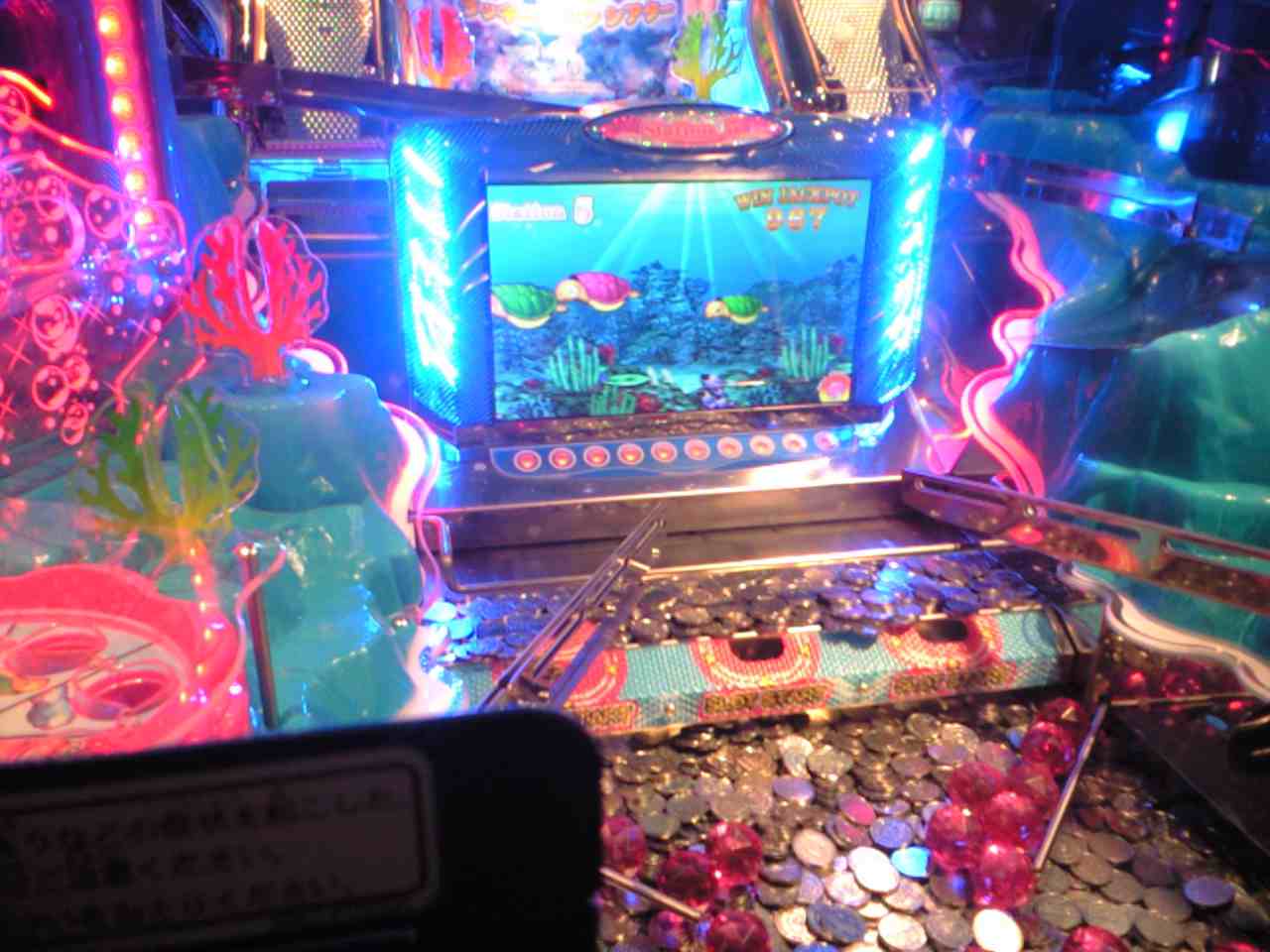
alt text

So I have medals that have rigid body, and a block, that also has a rigidbody, that pushes medals. This block moves forward and backward with the MovePosition method of the rigidbody.

Problem is that this block correctly pushes medals that are on its way, but these medals don't push other medals that could be also on their way. Medals just merge each other.

Screenshots:

I add medals on the game
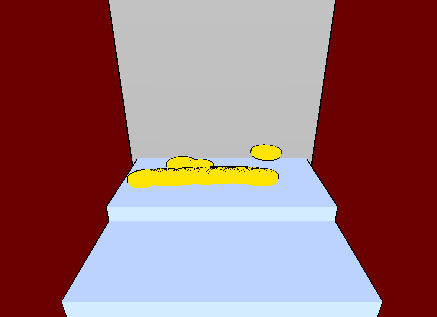
alt text

Medals are pushed and merge with other medals without pushing them. Nothing moves. No chain reactions.
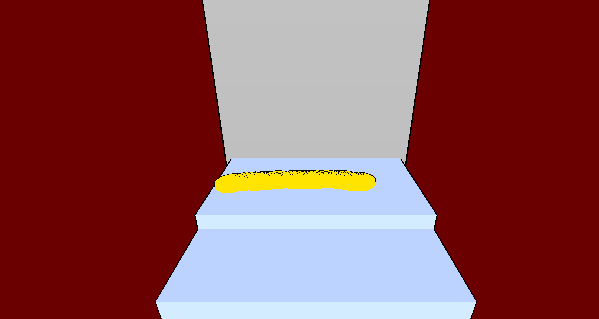
alt text

My solution

I found one trick. For now, I add a script on medals. When a medal enters in collision with an other medal ("OnCollisionEnter"), I add a Fixed Joint component and link these two medals. I remove the component in "OnCollisionExit" method. Now it works.

I don't know if it is the best way or I missed something with Unity. Someone has any idea?

2.png (4.2 kB)
1.png (4.3 kB)
Comment
Add comment · Show 4
10 |3000 characters needed characters left characters exceeded
▼
  • Viewable by all users
  • Viewable by moderators
  • Viewable by moderators and the original poster
  • Advanced visibility
Viewable by all users
avatar image Bayreuth · Sep 08, 2013 at 03:23 PM 0
Share

i think u can use IsTrigger in the boxcollider this disables the collision

avatar image ZouBi27 · Sep 09, 2013 at 01:47 AM 0
Share

I don't want to disable the collision. On the contrary I want the collision to work. If I use IsTrigger, medals would fall through the platform. You probably didn't understand well my problem.

avatar image rednax20 · Sep 09, 2013 at 01:51 AM 0
Share

not all of us can use you tube, you know. Its blocked on my home computer, and i have no idea what your talking about.

avatar image ZouBi27 · Sep 09, 2013 at 02:35 AM 0
Share

You can find a description on Wikipedia here in "Pusher game type" section. Hope your home computer also doesn't block Wikipedia... The aim is to add coins/medals to push others to you.

Here is a picture:

alt text

1 Reply

· Add your reply
  • Sort: 
avatar image
0
Best Answer

Answer by ZouBi27 · Sep 12, 2013 at 12:54 AM

Finally, a friend helped me to find the solution. It may seem stupid but the problem was the scaling. Indeed, the medals/coins was too small so collision didn't work. By increasing the scale, everything is perfect. I don't know why but now it's good !

Comment
Add comment · Show 4 · Share
10 |3000 characters needed characters left characters exceeded
▼
  • Viewable by all users
  • Viewable by moderators
  • Viewable by moderators and the original poster
  • Advanced visibility
Viewable by all users
avatar image Fattie · Mar 13, 2014 at 09:30 AM 0
Share

Zou, there are actually may extensive questions about this on this site, have a good search! (always add "fattie" to your serach to get worthwhile results ;-) )

avatar image Fattie · Mar 13, 2014 at 09:35 AM 0
Share

BTW "coindozer" is the usual term for these sorts of games, I guess. (There are 100s of them on the app store.)

http://answers.unity3d.com/questions/318841/what-approach-would-you-recommend-for-a-coindozer.html

it's actually a surprisingly difficult challenge to do well with a conventional physics engine.

Note: "SPHERE" colliders are by far the fastest. simply use SPHERE Colliders (and possibly lock off rotation other than around Z, so they don't tumble unrealistically), it's one of the few situations where you need to worry about performance.

You'll have to correctly use physics layers and other stuff.

Don't forget that normally you "can't really" use that many colliders in a scene! You're killing the PhysX.

avatar image ZouBi27 · Mar 13, 2014 at 09:47 AM 0
Share

Thank you for your reply. In Japan, we call it "medal game" and i've never heard before the word "coindozer". That's why I couldn't find any relative case when I was looking for it.

I was using SphereCollider, but I found that if you are using colliders with a small scale (ex: 0.001), Rigidbody and Physic Engine don't work well anymore. By increasing the scale of my colliders, Everything started to work fine.

avatar image Fattie · Mar 13, 2014 at 10:08 AM 0
Share

You're in Japan ?! Ah fantastic. Tokyo? We only watch NH$$anonymous$$ :) "medal game" thanks for telling me that - good information. That is ABSOLUTELY CORRECT, PhysX fails when scale is small. $$anonymous$$oreover: Essentially, you should really only use, I'd say, a scale of one everywhere. (In general terms.) It's a real gotchya. Your model makers should make everything with real meters and then use real kilograms.

Your answer

Hint: You can notify a user about this post by typing @username

Up to 2 attachments (including images) can be used with a maximum of 524.3 kB each and 1.0 MB total.

Follow this Question

Answers Answers and Comments

17 People are following this question.

avatar image avatar image avatar image avatar image avatar image avatar image avatar image avatar image avatar image avatar image avatar image avatar image avatar image avatar image avatar image avatar image avatar image

Related Questions

rigidbody collision and forces 0 Answers

Why is this rigidbody not activating the trigger? 0 Answers

Turning an object into a RigidBody and applying a force on it... 2 Answers

Collision problems 0 Answers

Advice for Intersecting Colliders 0 Answers


Enterprise
Social Q&A

Social
Subscribe on YouTube social-youtube Follow on LinkedIn social-linkedin Follow on Twitter social-twitter Follow on Facebook social-facebook Follow on Instagram social-instagram

Footer

  • Purchase
    • Products
    • Subscription
    • Asset Store
    • Unity Gear
    • Resellers
  • Education
    • Students
    • Educators
    • Certification
    • Learn
    • Center of Excellence
  • Download
    • Unity
    • Beta Program
  • Unity Labs
    • Labs
    • Publications
  • Resources
    • Learn platform
    • Community
    • Documentation
    • Unity QA
    • FAQ
    • Services Status
    • Connect
  • About Unity
    • About Us
    • Blog
    • Events
    • Careers
    • Contact
    • Press
    • Partners
    • Affiliates
    • Security
Copyright © 2020 Unity Technologies
  • Legal
  • Privacy Policy
  • Cookies
  • Do Not Sell My Personal Information
  • Cookies Settings
"Unity", Unity logos, and other Unity trademarks are trademarks or registered trademarks of Unity Technologies or its affiliates in the U.S. and elsewhere (more info here). Other names or brands are trademarks of their respective owners.
  • Anonymous
  • Sign in
  • Create
  • Ask a question
  • Spaces
  • Default
  • Help Room
  • META
  • Moderators
  • Explore
  • Topics
  • Questions
  • Users
  • Badges
