
Wayback Machinekoobas.hobune.stream
May JUN Jul
Previous capture 13 Next capture
2021 2022 2023
1 capture
13 Jun 22 - 13 Jun 22
sparklines
Close Help
  • Products
  • Solutions
  • Made with Unity
  • Learning
  • Support & Services
  • Community
  • Asset Store
  • Get Unity

UNITY ACCOUNT

You need a Unity Account to shop in the Online and Asset Stores, participate in the Unity Community and manage your license portfolio. Login Create account
  • Blog
  • Forums
  • Answers
  • Evangelists
  • User Groups
  • Beta Program
  • Advisory Panel

Navigation

  • Home
  • Products
  • Solutions
  • Made with Unity
  • Learning
  • Support & Services
  • Community
    • Blog
    • Forums
    • Answers
    • Evangelists
    • User Groups
    • Beta Program
    • Advisory Panel

Unity account

You need a Unity Account to shop in the Online and Asset Stores, participate in the Unity Community and manage your license portfolio. Login Create account

Language

  • Chinese
  • Spanish
  • Japanese
  • Korean
  • Portuguese
  • Ask a question
  • Spaces
    • Default
    • Help Room
    • META
    • Moderators
    • Topics
    • Questions
    • Users
    • Badges
  • Home /
avatar image
0
Question by Orggrim · Nov 30, 2012 at 04:18 AM · animationplatformmovingresetdeath

Reset Animation on Death of Player

I have a part of my level where the player travels across a platform, avoiding obstacles and moving objects in order to reach the end. Should the player say get knocked off and fall to his death, I would want the platform that he was riding to reset to its original position and wait till the player jumps back on for another attempt.

Here is a picture demonstrating what I want to have! alt text
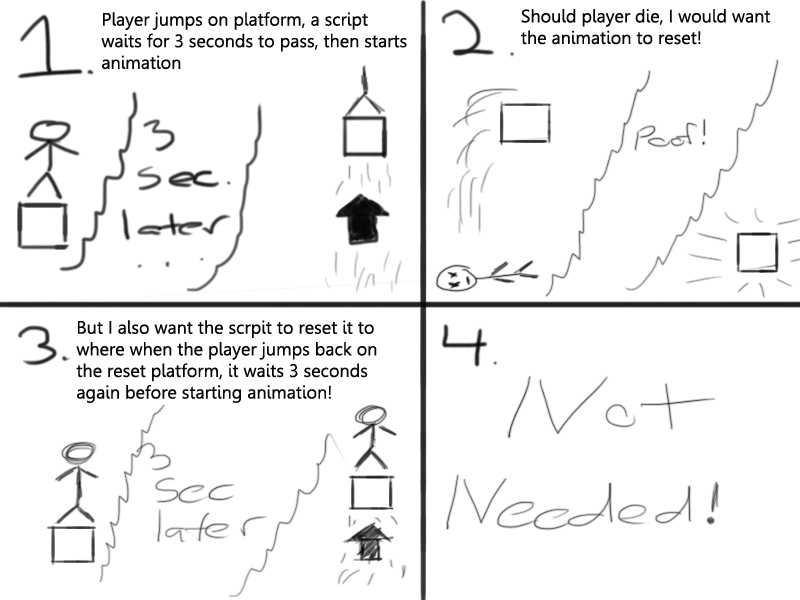
Here is the code I have so far. I have it to where it waits 3 seconds after the player jumps on to start, but I dont know how to get it to reset the animation and wait 3 seconds after the player jumps on!


 var anim : String; 
 var animatingObject : GameObject; 
 
 function OnTriggerEnter(other : Collider)
     { 
         if (other.tag == "Player")
         { 
             yield WaitForSeconds(3.0);
             animatingObject.animation.Play();
             
         } 
     }


Any help or guidance would be very greatly appreciated!

Let me know if you need any additional info needed to help!

example.jpg (140.7 kB)
Comment
Add comment
10 |3000 characters needed characters left characters exceeded
▼
  • Viewable by all users
  • Viewable by moderators
  • Viewable by moderators and the original poster
  • Advanced visibility
Viewable by all users

4 Replies

· Add your reply
  • Sort: 
avatar image
1

Answer by Maulik2208 · Nov 30, 2012 at 06:23 AM

First of all at the start take the cube position in temporary variables and, when needed reset the position of cube, by using cube.transform.position = new vector3(xtemp,ytemp,ztemp);....and then use Animation.Rewind.....it will rewind the animation, for syntex and other stuff kindly go to help----->scriptreference------>to animation.rewind....... if you found this useful then please mark as right answer so others can Find the working solution easily.....Enjoy.....Hope it will work best for You....

Comment
Add comment · Show 7 · Share
10 |3000 characters needed characters left characters exceeded
▼
  • Viewable by all users
  • Viewable by moderators
  • Viewable by moderators and the original poster
  • Advanced visibility
Viewable by all users
avatar image Maulik2208 · Nov 30, 2012 at 06:24 AM 0
Share

Sorry for the bad english but i think you can understand what i was saying....

avatar image Orggrim · Nov 30, 2012 at 06:59 AM 0
Share

yeah I got the general jist. Your link did not work btw

avatar image Maulik2208 · Nov 30, 2012 at 07:13 AM 0
Share

Sorry for the link it was a mistake in hurry.....So,please Go to help in unity From there Go To scriptreferences and search animation.rewind and you will get your stuff.....

avatar image Orggrim · Nov 30, 2012 at 07:35 AM 0
Share

Alright well I messed around with it, but keep getting error "$$anonymous$$issing$$anonymous$$ethodException: $$anonymous$$ethod not found: 'UnityEngine.Animation.rewind'. Boo.Lang.Runtime.DynamicDispatching.$$anonymous$$ethodDispatcherFactory.ProduceExtensionDispatcher ()"

Here is the script I have so far

var wooden_Pillar_23 : GameObject; var woodenPillar23_anim : Animation; function Rewind (woodenPillar23_anim : animation) : void { } function OnTriggerEnter(other:Collider) { if (other.tag == "Player") { wooden_Pillar_23.transform.position = new Vector3(825.97,104.6422,1210.79); animation.rewind(woodenPillar23_anim); } } --------------------------------------------------------------- wooden_Pillar_23 is the object that I want moved back woodenPillar23_anim is the object`s animation

let me know if you need more info!

avatar image Orggrim · Nov 30, 2012 at 08:51 AM 0
Share

Hey I figured it out, combination of my original script plus your .Transform Position, I ended up using animation.stop

Thanks alot for your help!

Show more comments
avatar image
0

Answer by Maulik2208 · Nov 30, 2012 at 07:16 AM

if Found useful don't forget to mark

Comment
Add comment · Share
10 |3000 characters needed characters left characters exceeded
▼
  • Viewable by all users
  • Viewable by moderators
  • Viewable by moderators and the original poster
  • Advanced visibility
Viewable by all users
avatar image
0

Answer by Maulik2208 · Nov 30, 2012 at 10:13 AM

 Public Gameobject  wooden_Pillar_23;//define this in inspector
 Public Animation  woodenPillar23_anim;//
 void OnTriggerEnter(other:Collider)
 {
     if (other.tag == "Player")
     {
     wooden_Pillar_23.transform.position = new Vector3(825.97,104.6422,1210.79);    
                    animation.Rewind("woodenPillar23_anim");;
     }
 }
Comment
Add comment · Show 1 · Share
10 |3000 characters needed characters left characters exceeded
▼
  • Viewable by all users
  • Viewable by moderators
  • Viewable by moderators and the original poster
  • Advanced visibility
Viewable by all users
avatar image Maulik2208 · Nov 30, 2012 at 10:13 AM 0
Share

C# code for your need......

avatar image
0

Answer by Maulik2208 · Nov 30, 2012 at 10:18 AM

link text

Comment
Add comment · Share
10 |3000 characters needed characters left characters exceeded
▼
  • Viewable by all users
  • Viewable by moderators
  • Viewable by moderators and the original poster
  • Advanced visibility
Viewable by all users

Your answer

Hint: You can notify a user about this post by typing @username

Up to 2 attachments (including images) can be used with a maximum of 524.3 kB each and 1.0 MB total.

Follow this Question

Answers Answers and Comments

12 People are following this question.

avatar image avatar image avatar image avatar image avatar image avatar image avatar image avatar image avatar image avatar image avatar image avatar image

Related Questions

timer that can be reset 1 Answer

Animation problems 1 Answer

Can I make animations snap to a frame? 1 Answer

How can I animate a death sequence for the FPS controller? 1 Answer

How can i make the cat climb a fence? 0 Answers


Enterprise
Social Q&A

Social
Subscribe on YouTube social-youtube Follow on LinkedIn social-linkedin Follow on Twitter social-twitter Follow on Facebook social-facebook Follow on Instagram social-instagram

Footer

  • Purchase
    • Products
    • Subscription
    • Asset Store
    • Unity Gear
    • Resellers
  • Education
    • Students
    • Educators
    • Certification
    • Learn
    • Center of Excellence
  • Download
    • Unity
    • Beta Program
  • Unity Labs
    • Labs
    • Publications
  • Resources
    • Learn platform
    • Community
    • Documentation
    • Unity QA
    • FAQ
    • Services Status
    • Connect
  • About Unity
    • About Us
    • Blog
    • Events
    • Careers
    • Contact
    • Press
    • Partners
    • Affiliates
    • Security
Copyright © 2020 Unity Technologies
  • Legal
  • Privacy Policy
  • Cookies
  • Do Not Sell My Personal Information
  • Cookies Settings
"Unity", Unity logos, and other Unity trademarks are trademarks or registered trademarks of Unity Technologies or its affiliates in the U.S. and elsewhere (more info here). Other names or brands are trademarks of their respective owners.
  • Anonymous
  • Sign in
  • Create
  • Ask a question
  • Spaces
  • Default
  • Help Room
  • META
  • Moderators
  • Explore
  • Topics
  • Questions
  • Users
  • Badges
