 koobas.hobune.stream


Applying force at contact.point
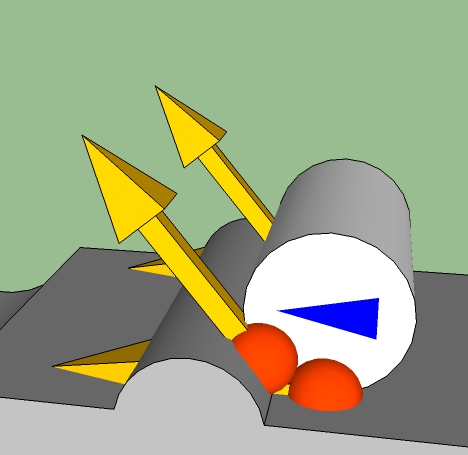
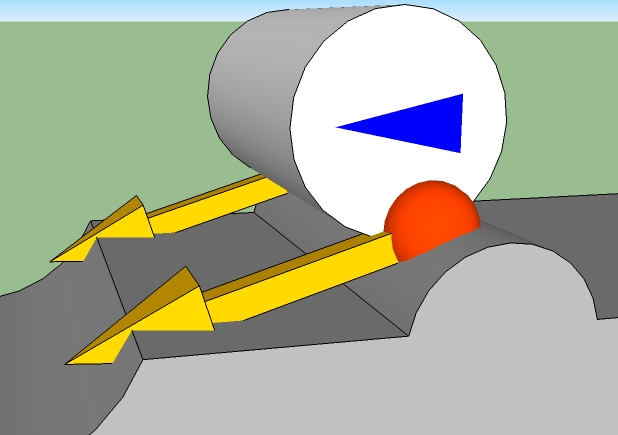
Hello everyone. I am trying to apply relative force to a rigidbody (cylinder) at its contact point with the ground. The direction of the force applied has to change according to the surface which the cylinder is touching. The pictures show how the direction of the force, applied from rigidbody's contact point(s), should change. Orange sphere is a contact point, yellow arrow - force that should by applied to the cylinder by the script, blue triangle on a cylinder just shows that it is not rotating when clearing the obstacle.
Current working code:
 function OnCollisionStay (collision : Collision) {

     for (var contact : ContactPoint in collision.contacts) {

         contacts = collision.contacts.Length;

         if(Input.GetKey(KeyCode.W)){

         var dir : Vector3;
         dir = (transform.position - contact.point);
         rigidbody.rigidbody.AddForceAtPosition(Vector3.Cross(transform.right, dir).normalized * (Power / collision.contacts.Length) * Time.deltaTime, contact.point);

         }

     }

 }
In this code, made using the suggestion of Habitablaba, I have created a vector (dir) from the center of the cylinder towards the contact point, crossed it with transform.right to create a direction offset and normalized it. Variable "Power" is a float, it is divided by the number of contacts so that the total force does not increase when the rigidbody has more than one contact with the surface.


The comments below are getting out of hand, so here is what I suggest.
Update your question with the following:
- Better explanation of what is going on in that picture. (are you just trying to provide 'friction' or 'drag'?) - Code which shows where the contact point is being deter$$anonymous$$ed. - The code from the comments below showing what it is you've tried and a description of how the object behaves when you do that.
I think there is a lot of misunderstanding going on here. Both from you in relation to vectors and from the rest of us in relation to what it is your asking.
Once we get a better understanding of the question, we may be able to provide a better answer.
This question is so much improved from the last time I looked at it, so good job there :)
I think the vector you are looking for is:
Take the vector that is from the collider's center to the contact point.
Cross that vector with the object's transform.right.
Normalize this vector, then multiply by your desired power.

That worked! Code:
 var dir : Vector3;
 dir = (transform.position - contact.point);
 rigidbody.AddForce(Vector3.Cross(transform.right, dir).normalized * 100 * (Power / collision.contacts.Length) * spindr * Time.deltaTime);
The behavior is definitely correct, but just in case, is there a way to check? Something like Debug.DrawForce... Also you should make this comment in to an answer.

Take the collision point and add force forward regarding from center in 90 degree angle.

All of my codes are .js (java script) files, its not really java, but people call it that way for short.

No they don't, they call it JavaScript or UnityScript. Java is a completely separate language. Confusing the two terms pretty much shows everybody you have no idea what you are talking about.
The method you are after is AddForceAtPostion. Friction will also do a similar thing, you can set this on the physics material.
I think that you do not understand vectors, or vector math.
What do you expect forceDir to be, when you get the direction from the position of the object to the contact point?
Do you understand what a 'contact normal' is?
Do you understand the concept of 'tangent'?
What do you expect adding 90 to the z will do?

Still figuring out what you even want.
If you are after the direction of the vector shown in the pic then you need to take the cross product of the contact point minus the centre point and the vector going into the page. I'd suggest normalising the result. This assumes you are working in 2D

or you have the normal of the hit (x,y) and you get the new vector ( -hit.normal.y, hit.normal.x). :)
That's what I just said :)
So assu$$anonymous$$g you are working in normal unity 2D environment the cross product does simplify as described by @fafase.
I am working in 3D, I have mentioned that this picture is a side view. I will put this in a different way - this code should apply force to the rigidbody in a similar way as force is applied to a tire, except this rigidbody does not rotate, it just slides along the surface. Hope everyone gets it, I do not have any more ideas how to explain my needs anymore. 
The "Fx" is what I need.
In which case you do want the cross product between the contact normal and the axel.
It would certainly help to know why you want this force. On a simplified model the forces on the tyre are:
A force downwards through the centre via gravity
A force upwards through the centre via gravity
A torque force applied through the shaft
A 'rolling friction force' applied at the contact point between the road and the tyre. This can also be considered as a torque applied in the opposite direction to velocity
All of these forces will be automatically calculated and applied by the physics engine if configured properly. Pay particular attention to friction.
So again my question is - What is your use case? Don't just tell me what force you want with a picture. Tell me why you want it and what game effect you are trying to achieve.
I have posted some pictures that show forces in 3D space, maybe these will help you understand my better...




