
Wayback Machinekoobas.hobune.stream
May JUN Jul
Previous capture 13 Next capture
2021 2022 2023
1 capture
13 Jun 22 - 13 Jun 22
sparklines
Close Help
  • Products
  • Solutions
  • Made with Unity
  • Learning
  • Support & Services
  • Community
  • Asset Store
  • Get Unity

UNITY ACCOUNT

You need a Unity Account to shop in the Online and Asset Stores, participate in the Unity Community and manage your license portfolio. Login Create account
  • Blog
  • Forums
  • Answers
  • Evangelists
  • User Groups
  • Beta Program
  • Advisory Panel

Navigation

  • Home
  • Products
  • Solutions
  • Made with Unity
  • Learning
  • Support & Services
  • Community
    • Blog
    • Forums
    • Answers
    • Evangelists
    • User Groups
    • Beta Program
    • Advisory Panel

Unity account

You need a Unity Account to shop in the Online and Asset Stores, participate in the Unity Community and manage your license portfolio. Login Create account

Language

  • Chinese
  • Spanish
  • Japanese
  • Korean
  • Portuguese
  • Ask a question
  • Spaces
    • Default
    • Help Room
    • META
    • Moderators
    • Topics
    • Questions
    • Users
    • Badges
  • Home /
This question was closed Dec 27, 2016 at 07:40 PM by wesleywh for the following reason:

The question is answered, right answer was accepted

avatar image
0
Question by wesleywh · Oct 22, 2014 at 07:20 PM · network.instantiate

Network.Instantiate crashes my game

So I am not sure what I did but I had this working at one point now it doesn't.

To give an overview of what is going on when a player clicks the join the game it will spawn a prefab owned by that connected user. Here is the code that is called when clicking to join the game:

 if(networkView.isMine){
                 if(PersistantObject.readyplayers == PersistantObject.connectedplayers ){
                     if(GUI.Button(new Rect(230,200, 150, 50), "Join Game")){
                         if(do_once){
                             inLobby = false;
                             networkView.RPC("IncJoinedPlayers", RPCMode.AllBuffered);
                             SpawnPlayer();
                             do_once = false;
                         }//end do_once
                     }//end button
                 }//end readyplayers = connected player
             }//end networkview.ismine

Now here is the code for the "SpawnPlayer()" function that is called:

 private void SpawnPlayer()
     {
         if(networkView.isMine){
             inLobby = false;
             if (PersistantObject.ImAGhost) {
                 Network.Instantiate(prefab_ghost, GhostLocation.transform.position, Quaternion.identity, 0);
             }else{
                 if(chr_number == 1){
                     Network.Instantiate(playerPrefab_ethan, spawnLocation.position, Quaternion.identity, 0);
                 }else if(chr_number == 2){
                     Network.Instantiate(playerPrefab_robot, spawnLocation.position, Quaternion.identity, 0);
                 }else if(chr_number == 3){
                     Network.Instantiate(playerPrefab_goblin, spawnLocation.position, Quaternion.identity, 0);
                 }
             //chr_number = 0;
             networkView.RPC ("IncListCount", RPCMode.AllBuffered);
             }
         }
     }

The "chr_number" is the chosen character in prior menu screens. So it works if I test it by myself but if I test a server and client then it crashes unity and freezes the other that I am testing as soon as I click "Join Game" button.

Any help on this would be amazing. I found some similar issues with network.instantiate on other forums but nothing that can fully answer my question.

Here is a picture of the button that is pressed, its an OnGUI() call: alt text
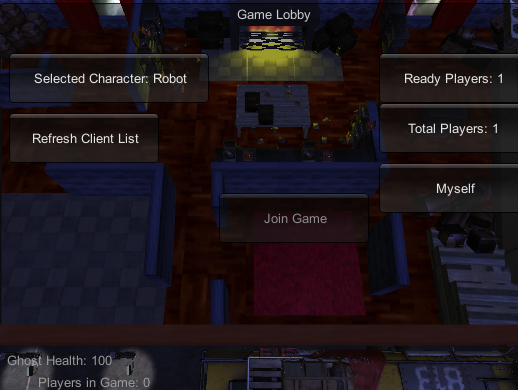
gui_buttons.png (250.1 kB)
Comment
Add comment
10 |3000 characters needed characters left characters exceeded
▼
  • Viewable by all users
  • Viewable by moderators
  • Viewable by moderators and the original poster
  • Advanced visibility
Viewable by all users

1 Reply

  • Sort: 
avatar image
0
Best Answer

Answer by wesleywh · Oct 22, 2014 at 11:42 PM

Well I may have just solved my problem! I feel dumb for not checking this before but hopefully this will help someone else out that is having the same problem that I was. The first thing that I did was I turned off my firewall. Now this is good for testing just make sure not to leave it off ;). Then I changed one line of code that was listed above. In OnGUI() script, not the SpawnPlayer() script, I removed the line if(Network.isMine). After doing those two things everything started working again. Summery: Turn off your firewall Check to make sure you're using Network.isMine in the correct location

Comment
Add comment · Share
10 |3000 characters needed characters left characters exceeded
▼
  • Viewable by all users
  • Viewable by moderators
  • Viewable by moderators and the original poster
  • Advanced visibility
Viewable by all users

Follow this Question

Answers Answers and Comments

2 People are following this question.

avatar image avatar image

Related Questions

Network.Instantiate a Non-prefab 1 Answer

Weird network spawning bug. 1 Answer

Network rigidbody synchronize 0 Answers

SpawnWithCLientAuthority Issues... 0 Answers

how i can apply changes objects on Network.Instantiate? 1 Answer


Enterprise
Social Q&A

Social
Subscribe on YouTube social-youtube Follow on LinkedIn social-linkedin Follow on Twitter social-twitter Follow on Facebook social-facebook Follow on Instagram social-instagram

Footer

  • Purchase
    • Products
    • Subscription
    • Asset Store
    • Unity Gear
    • Resellers
  • Education
    • Students
    • Educators
    • Certification
    • Learn
    • Center of Excellence
  • Download
    • Unity
    • Beta Program
  • Unity Labs
    • Labs
    • Publications
  • Resources
    • Learn platform
    • Community
    • Documentation
    • Unity QA
    • FAQ
    • Services Status
    • Connect
  • About Unity
    • About Us
    • Blog
    • Events
    • Careers
    • Contact
    • Press
    • Partners
    • Affiliates
    • Security
Copyright © 2020 Unity Technologies
  • Legal
  • Privacy Policy
  • Cookies
  • Do Not Sell My Personal Information
  • Cookies Settings
"Unity", Unity logos, and other Unity trademarks are trademarks or registered trademarks of Unity Technologies or its affiliates in the U.S. and elsewhere (more info here). Other names or brands are trademarks of their respective owners.
  • Anonymous
  • Sign in
  • Create
  • Ask a question
  • Spaces
  • Default
  • Help Room
  • META
  • Moderators
  • Explore
  • Topics
  • Questions
  • Users
  • Badges