 koobas.hobune.stream


Can't figure out my collision mistake, please help!
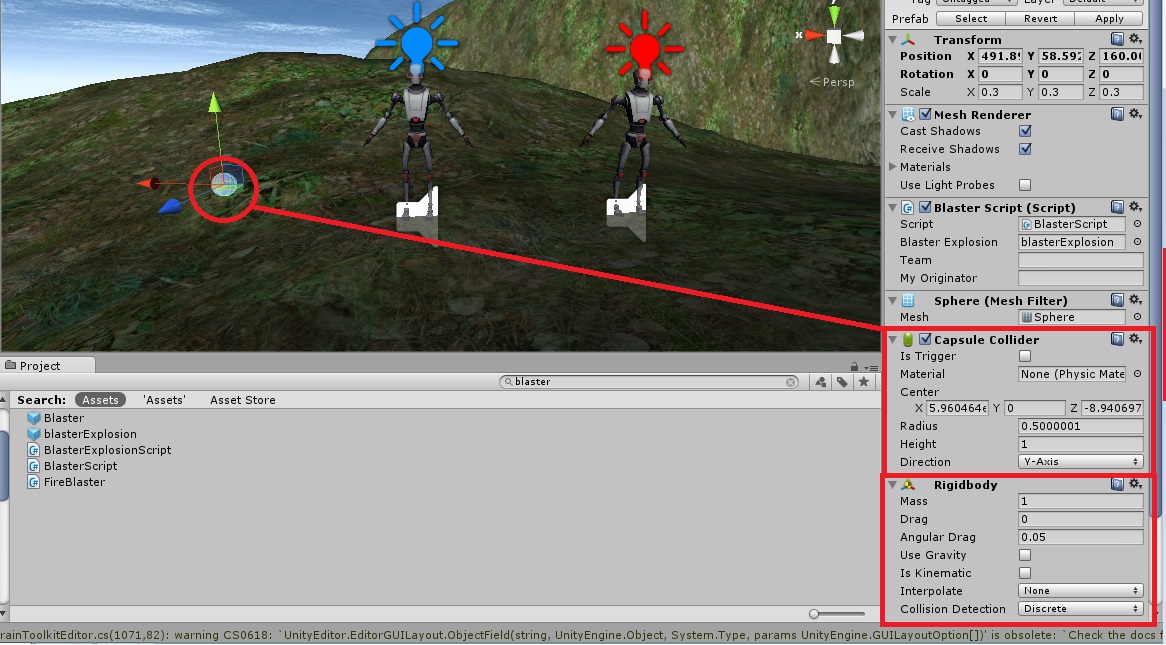 Hi Unity,
I've been working on this issue for about 3 days to no avail.
Issue:
I am trying to get a projectile's capsule collider (with a rigidbody attached, no isTrigger) to collide with a player's capsule collider (capsule collider with isTrigger).
I checked the collision matrix, but nothing seems to be happening? I'll attach the relevant code below to see if it's perhaps something wrong with the way it's written.
Thanks for the help!
C#
 if(hit.transform.tag == "BlueTeamTrigger" ||
                hit.transform.tag == "RedTeamTrigger")
             {

                 expended = true;

                 //Instantiate an explosion effect.

                 Instantiate(blasterExplosion, hit.point, Quaternion.identity);
The colliders attached to the players are children of the players, and are marked with RedTeamTrigger or BlueTeamTrigger Respective to what team they're on.

What the hell is the "collision matrix"? Have you tried debugging the problem?

Here's a link to the collision action matrix in case you were wondering. http://answers.unity3d.com/questions/148923/collisions-do-they-need-two-rigidbodies.html
Right, it's a documentation thing. Not an actual part of the API. Have you tried debugging the problem?
Well I'm not exactly sure what you mean by debugging, but I put debug.log("hit the collider"); etc. after each function, and the only way I could get anything to appear was when I set the rigid body to kinematic. However this also renders my player uncontrollable, as he/it is controlled by applied force.
Thanks for the responses!

I suggest you read this post.
http://answers.unity3d.com/questions/454479/toggling-is-trigger-on-box-collider-causes-it-to-n.html
"Hello. Is Trigger in unity disables the function of the collider and turns it into a passable trigger."
Let me know if this helped you.
I'm afraid this didn't do it for me. I've tried loads of combinations according to the collision action matrix and none of them seem to be working for me. It feels like I'm missing something obvious, as the projectile seems to just pass through the player no matter what I set them to. I've tried both rigidbodies, both triggers, both non-trigger (static) and no luck.

In the code you provided you don't call the OnCollisionEnter() function. I suppose you have it somewhere in your code? Just making sure.
I didn't think I needed a OnCollisionEnter function if I was using hit.transform.tag? Here's the full script ($$anonymous$$us the variable declarations) for reference, it's actually part of a tutorial series that I've followed to a T, but the collider issue seems to persist:
 using UnityEngine;
 using System.Collections;


     // Use this for initialization
     void Start ()
     {
         myTransform = transform;

         //As soon as the projectile is created start a countdown
         //to destroy it.

         StartCoroutine(Destroy$$anonymous$$yselfAfterSomeTime());
     }

     // Update is called once per frame
     void Update ()
     {
         //Translate the projectile in the up direction (the pointed
         //end of the projectile).

         myTransform.Translate(Vector3.up * projectileSpeed * Time.deltaTime);


         //If the ray hits something then execute this code.

         if(Physics.Raycast(myTransform.position,myTransform.up, out hit, range) &&
            expended == false)
         {
             //If the collider has the tag of Floor then..

             if(hit.transform.tag == "Floor")
             {
                 expended = true;


                 //Instantiate an explosion effect.

                 Instantiate(blasterExplosion, hit.point, Quaternion.identity);


                 //$$anonymous$$ake the projectile become invisible.

                 myTransform.renderer.enabled = false;


             }


             if(hit.transform.tag == "BlueTeamTrigger" ||
                hit.transform.tag == "RedTeamTrigger")
             {

                 expended = true;

                 //Instantiate an explosion effect.

                 Instantiate(blasterExplosion, hit.point, Quaternion.identity);


                 //$$anonymous$$ake the projectile become invisible.

                 myTransform.renderer.enabled = false;


                 //Access the HealthAndDamage script of the enemy player
                 //and inform them that they have been attacked and by whom.

                 if(hit.transform.tag == "BlueTeamTrigger" && $$anonymous$$m == "red")
                 {
                     HealthAndDamage HDscript = hit.transform.GetComponent<HealthAndDamage>();

                     HDscript.iWasJustAttacked = true;

                     HDscript.myAttacker = myOriginator;

                     HDscript.hitByBlaster = true;
                 }

                 if(hit.transform.tag == "RedTeamTrigger" && $$anonymous$$m == "blue")
                 {
                     HealthAndDamage HDscript = hit.transform.GetComponent<HealthAndDamage>();

                     HDscript.iWasJustAttacked = true;

                     HDscript.myAttacker = myOriginator;

                     HDscript.hitByBlaster = true;
                 }
             }

         }
     }


     IEnumerator Destroy$$anonymous$$yselfAfterSomeTime()
     {
         //Wait for the timer to count up to the expireTime
         //and then destroy the projectile.

         yield return new WaitForSeconds(expireTime);

         Destroy(myTransform.gameObject);
     }
 }




